

Buy anything from 5,000+ international stores. One checkout price. No surprise fees. Join 2M+ shoppers on Desertcart.
Desertcart purchases this item on your behalf and handles shipping, customs, and support to Brazil.
🎛️ Elevate your mix game—where tactile meets tech in perfect harmony!
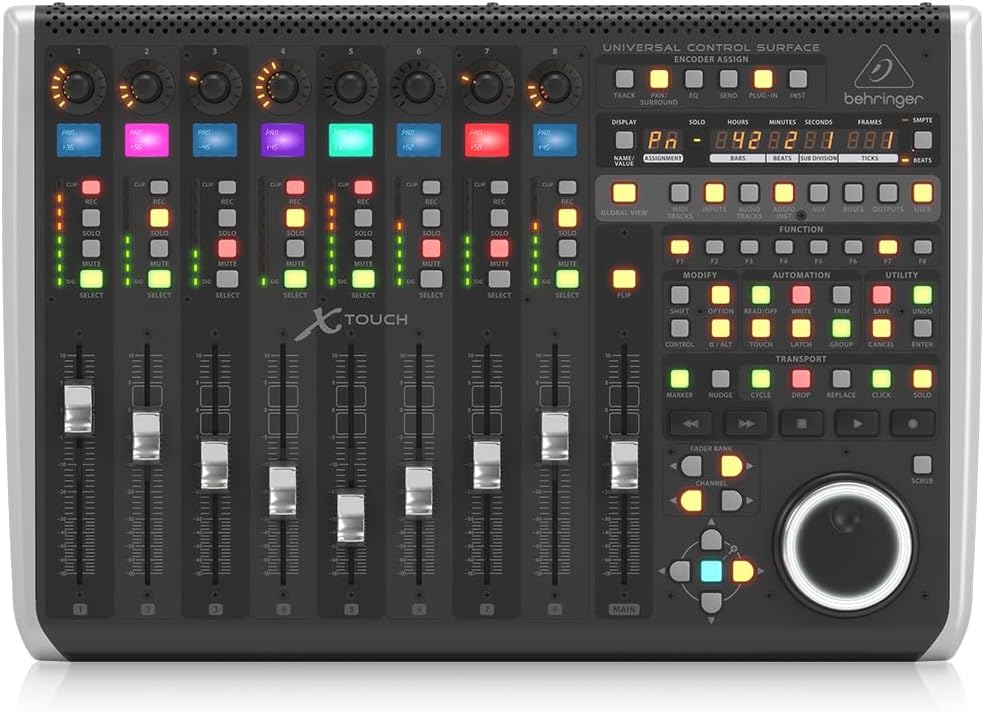
The Behringer X-TOUCH is a professional-grade control surface featuring 9 motorized 100mm faders, 8 dynamic LCD scribble strips, and a comprehensive set of illuminated buttons and rotary encoders. Designed for universal DAW compatibility via HUI and Mackie Control protocols, it offers flexible USB, MIDI, and Ethernet connectivity, making it ideal for both home studios and live performance environments. Its compact footprint and intuitive interface deliver precise, hands-on control that transforms digital mixing into a tactile, immersive experience.


| ASIN | B018W0VWXI |
| Best Sellers Rank | 2,475 in Musical Instruments & DJ ( See Top 100 in Musical Instruments & DJ ) 22 in MIDI Controller |
| Brand Name | Behringer |
| Colour | Black |
| Compatible Devices | Computer, Tablet |
| Connectivity Technology | USB |
| Connector Type | USB |
| Control Method | Touch |
| Control Type | Motor Faders, LCD Scribble Strips, and Rotary Encoders |
| Country of Origin | China |
| Customer Reviews | 4.5 4.5 out of 5 stars (1,387) |
| Global Trade Identification Number | 04033653130646 |
| Hardware Interface | USB |
| Hardware Platform | PC/Mac |
| Human Interface Input | Touchscreen |
| Included Components | USB Cable, Power Adapter, User Manual, LCD Scribble Strips, Motorized Faders, Rotary Controls with LED-collars, Ethernet Cable (for RTP MIDI and future BEHRINGER X32 remote control) |
| Instrument | digital audio workstation |
| Instrument Key | Any |
| Item Dimensions D x W x H | 38.1D x 56W x 16.8H centimetres |
| Item Type Name | Desktop Controllers |
| Item Weight | 4.27 Kilograms |
| Keyboard Description | Ergonomic |
| Manufacturer | Behringer |
| Manufacturer Part Number | X-TOUCH |
| Material Type | Metal Plastic |
| Mixer Channel Quantity | 9 |
| Model Name | Behringer X-TOUCH |
| Model Number | X-TOUCH |
| Noise Control | None |
| Number of Keys | 9 |
| Outer Material | Plastic or Metal |
| Platform | iOS |
| Product Style | Modern |
| Product Warranty | Community. Musictribe. Com. |
| Size | 38.1 cm x 56 cm x 16.8 cm |
| Special Features | Studio Recording, Mute Controls |
| Supported Software | Pro Tools, Logic Pro |
| UPC | 748252139443 |
S**Y
X-Touch & Logic Pro X. Works brilliantly.
I have to admit I was very wary of this initially. I've always thought Behringer audio gear was a bit cheap and toylike - I'm used to professional equipment that's built like a tank. Now I work for myself I can't justify the prices that Avid/Pro Tools want for a control surface. So after a lot of research (a big thanks to the Gearslutz website) I changed to Logic Pro X DAW and bought this control surface. And I'm staggered by what £ 450 buys you. This thing works so smoothly with Logic Pro. And it's more solid than it looks in the pictures. At the price I can live with the niggles some people mention like... 1) You can't see the backlit LCD scribble strips when the desk is flat - an easy solution is to tilt it 2) The faders are a little bit noisy/juddery. At the level I monitor at I don't hear them and they track accurately, which is the big concern. Just some of the things I love.. 1) Solidly built and a small footprint. Just right for a small studio. 2) When you touch a fader, Logic jumps to that channel. 3) Works reliably all day without locking up. 4) When nudging a piece of audio, each encoder has a different step value. So handy for moving cues around quickly. 5) Although Behringer don't publish a user's manual, there's a series of brilliant tutorials on Youtube. 6) Intuitive - you get up and running very quickly. Edit: Just bought a footswitch and am finding it very useful . For the sockets at the rear of the surface, Footswitch 1 operates the transport start/stop. Footswitch 2 toggles the record punch in and out - great for working on your own. Both pedals need to be a momentary footswitch with NO (Normally open contacts) terminated in 1/4" mono jack.
J**S
Fantastic control surface.
Just like a proper hands on mixing desk. This contol surface feels very responsive with a sturdy metal design and coloured strips which is a bonus. Will buy the extender too. Seamlessdly integrates with my Daw. Proper controls which feels productive rather than scratching around the screen with the mouse. Proper faders for a professional touch. Great delivery too.
G**E
Nice to have but not essential
I assume someone somewhere knows how to use this to control every aspect of their DAW, but I've yet to figure out the basics and I've been persevering for some months now. On the surface of it, it's fairly straightforward. But once you start doing anything more complicated than simple fader moves and panning, behaviour is unpredictable and buggy. I have a Mac Mini M1 with the latest version of Logic and I've yet to work out how to get it to behave with any predictably. Some times the Plug in shortcut opens the plug in assigned to the currently selected fader, and sometimes it doesn't. Sometimes it works as expected, sometimes it crashes for no fathomable reason. Sometimes it let's you adjust the parameters of the currently in focus plug in window, sometimes it doesn't. Terrible documentation. Terrible support. No support for colour assignable scribble strips. The Expression controller appears to have SysEx disabled but documentation makes no mention of how to enable it. Apart from that, fader automation works brilliantly and the ability to quickly mix drums and control sends is genuinely something I couldn't go back to doing with just a mouse. But for the money it should be more intuitive to use and configure and the lack of proper easy to follow set up documentation is shocking for such a well established brand. Build quality is excellent. Fader caps feel a little plasticy. Jog shuttle wheel is a great time saver. 6 out of 10.
S**E
It's fun to play with knobs.
I purchased this to do use with Reaper, as someone who had spent decades away from a mixing desk. This gave back a better sense of control and tactile feeling. Compact as it sounds. Straight forward to connect. There's an editor you can download from the Behringer website. I will suggest that if you're intending to use this with Reaper, that you consider looking into ReaLearn. It can take a bit of time to setup, but is the best way to go. You can tweak the encoders/knobs and buttons as well as fader to act however you want, better than the editor software. Worth every £1 for improving your workflow.
C**M
Perfect for a home studio with space limitations.
The benefit of home studios these days is that you can near enough have everything you need on a PC. The downside is that it loses that hands-on tactile feel that a professional studio offers. If like me, you’re a bit old school and like to physically push buttons but are also limited with space, this lovely little midi controller is perfect. Using USB it plugs straight into your PC and the buttons and knobs are fully assignable to actions within your DAW. The price point is spot on and it’s super easy to set up. Definitely gives you a semi-pro fee in your home studio.
T**S
I use this with SpadNext software to program it to work with MSFS 2020. It works perfectly, but does require you to program it, which is the tricky part and can take some time (good tutorials in YT). I now have 2 of these as part of my 787 setup.
K**N
Can't complain about this controller. works good just as expected.
W**.
Für den Preis ein super Teil
J**S
Toestel doet wat het moet doen en daar ben ik heel tevreden over! Echter de manier dat het verpakt was, vond ik niet zo professioneel. Het toestel zat gewoon in zijn eigen doos, niet eens beveiligd met een plakband of zo. Iedereen kon de doos openen en er weet ik wat uithalen. Gelukkig is dit niet gebeurd, maar toch vond ik het vernoemen even waard!
S**L
Pour un budget relativement correct, j'ai enfin une surface de contrôle digne de ce nom pour piloter Logic Pro X. La prise en main est rapide sur les fonctions basiques, mais le mode d'emploi très succinct vous oblige à chercher ailleurs. Fort heureusement, Behringer a publié de nombreuses vidéos sur Youtube pour présenter les fonctionnalités en détails et elles sont très claires (en anglais mais sous-titrées). C'est un fait, cette X-Touch fait très bien le boulot au point que je ne touche presque plus la souris pour des tâches courantes dans LCPX. Un petite amélioration toute de même : des faders moins bruyants la rendrait parfaite. Quelques instabilité quand vous testez toutes les fonctionnalité, mais globalement, je suis ultra satisfait de mon acquisition et je regrette seulement de ne pas l'avoir acheter plus tôt.
Trustpilot
1 week ago
5 days ago