📸 Capture the moment, not the stretch—remote control your shots like a pro!
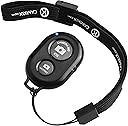
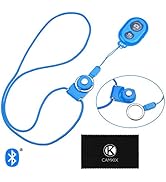
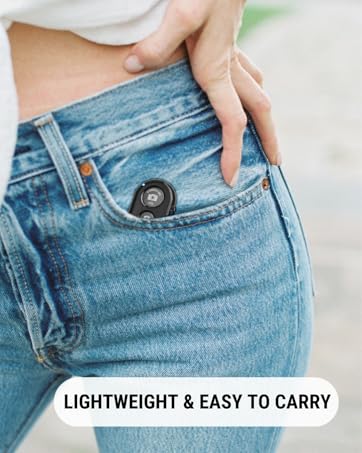
The CamKix Wireless Bluetooth Camera Shutter Remote Control is a sleek, lightweight device designed for smartphone photographers who demand convenience and versatility. Compatible with a wide range of iOS and Android devices, it offers a reliable Bluetooth connection up to 30 feet, enabling hands-free photo capture. Its compact size and included wrist strap make it effortlessly portable, while the multi-function button adds unexpected utility beyond photography. With strong battery life and durable construction, it’s a must-have accessory for elevating your mobile photography and social media game.


| ASIN | B00PJSIIES |
| Batteries | 1 Lithium Metal batteries required. |
| Best Sellers Rank | 2,167 in Electronics & Photo ( See Top 100 in Electronics & Photo ) 152 in Remote Controls (Electronics & Photo) |
| Colour | Black |
| Connectivity technologies | Bluetooth |
| Customer Reviews | 4.5 4.5 out of 5 stars (20,055) |
| Date First Available | 27 Nov. 2014 |
| Item Weight | 18.1 g |
| Item model number | D0027-SRC-BLA |
| Other display features | CE |
| Product Dimensions | 12.5 x 1.1 x 8.7 cm; 18.14 g |
| Special features | Universal |
N**D
A Game-Changer for Selfie Enthusiasts!
I recently purchased the CamKix Wireless Bluetooth Camera Shutter Remote Control, and it has completely transformed my photography experience! This nifty little gadget is a must-have for anyone who loves taking photos or selfies with their smartphones. The setup was a breeze; it seamlessly connected to both my iOS and Android devices via Bluetooth. The compatibility is fantastic, and I love that it works across different platforms. The range is impressive, allowing me to capture moments from a distance without any hassle. The included wrist strap adds a convenient and secure way to carry the remote, ensuring I never miss a shot. The build quality is sturdy, and the buttons are responsive, providing a tactile and satisfying feel. What sets this remote apart is its versatility. Whether I'm capturing group photos, exploring creative angles, or simply avoiding awkward arm extensions, the CamKix remote has become an essential tool in my photography kit. The battery life is impressive, lasting through multiple sessions without needing a recharge. It's a small investment that yields significant returns in terms of convenience and photo quality. In conclusion, the CamKix Wireless Bluetooth Camera Shutter Remote Control exceeded my expectations. It's a game-changer for anyone looking to up their selfie and photography game. I highly recommend it to fellow smartphone photographers—it's a five-star addition to your camera accessories!
S**.
Great value for money, works perfectly.
I use it as a clicker for my kindle app on my ipad to turn pages and it works fantastic. The button can be programmed to do a multitude of things but still works as a photo caption tool for my phone as well! Slightly on the cheaper quality but I haven't had any issues with the durability or functionality so I woyld say it is great value for money!
P**N
Remote works - just not with what I wanted it to!
I am still torn about this little gadget. On the face of it, it sounds briliant! I own a Samsung Galaxy Zoom as I do enjoy my photography a lot and having a handsfree shutter release for it I thought was a brilliant idea. Well, it turns out that once I turned it on and paired it to my phone it didn't work.... the two buttons worked as the volume buttons instead!! The instruction in the booklet advise that if the remote does not work with your phone - Android in my case - I should download an app called 360 cam or something like that.... now I am suspicious about downloading too many apps on my phone so I looked it up. I wasn't able to find anything except for a 360 cam filters - again I don't remember the exact name. By this point I was quite annoyed. Ended up looking up camera apps and downloaded an open source one after trying multiple ones and none working properly with the remote. So now I have my Samsung camera app which I love and use all the time and my new open source one to just use with the remote - which also has the added annoyance of have a very LOUD shutter sound that cannot be disabled..... (but obviously this is something to do with the app, not the remote). All in all - the remote works and I still find it very convenient. And for the price maybe the hassle is worth it but not what I was expecting to have to go through since the spiel says that it works for both Android and iOS.
L**N
Very useful
Very useful to use, good quality, small in size so you can take a selfie and not notice the shutter on hand
O**R
Its great as a page turner too!
This was recommended to me as an alternative to a page turner. Ive wanted a Kindle for ages but have a great iPad with the Kindle app. This clicker when set up via the Accessibility settings in teh ipad works amazingly on the Kindle app to accurately turn the pages on a book. Way cheaper than buying a new Kindle and i can tuck myself up and just read away without having to take my hands out the blankets and turn a page every few seconds. It also works great on my iphone as a camera shutter for remote photo taking. Highly portable with a wrist strap, battery included. Very versatile. Well worth the few quid i paid for it and im so pleased. Highly recommended gadget!!!
B**R
Difficult to link
Difficult to link to your phone.
R**0
Good remote shutter
I bought this as a gift for my uncle. He made a jig to attach his iPhone 6 to a telescope for amateur astrophotography. He found that even gently touching the screen is enough to knock the telescope/iPhone out of focus and produce a bad picture. Hence the remote shutter! Setting this up as a bluetooth device for Apple iPhone was very simple, just like any other bluetooth device. After a successful connection, it's as simple as opening up the camera app, tapping the screen to focus at the right spot, and then hitting the big "CAMERA 360 IOS" button. Takes a picture perfectly well. If you wanted, you could set your iPhone up for a 5 second delay and this remote will trigger the 5 second delay before taking a picture. This device is also compatible with Android phones, just note that there's a smaller "ANDROID" button on the remote to trigger the shutter. I can confirm this worked fine with my Samsung Galaxy S8. There is also an ON/OFF button on the side to save the battery (included). All in all, an affordable remote shutter which worked as expected!
M**S
Good
Works very well
J**S
Un control remoto estupendo para el móvil. La configuración del mismo es sencilla, ya que únicamente hay que sincronizarlo por Bluetooth con el móvil y el resto es completamente automático. En mi caso lo he probado con mi iPhone y desde entonces, los Selfies se han vuelto una tarea mucho más sencilla y, sobretodo, el resultado de la foto siempre es mucho mejor. No sólo porque puedes dejar el móvil a una distancia y hacer la foto, sino porque cuando simplemente coges el móvil con la mano, ya no tienes que estar buscando el botón en el móvil con la mano, lo que hace que las fotos salgan mucho mejor. Una gran compra que se ha vuelto imprescindible desde que lo compré.
S**A
Easy to use and works really well.
A**ー
iPhoneで使用。 一旦Bluetooth設定したら接続が途切れることなく使えます。 自撮り棒付属のはいちいち切れてしまい、 その都度接続させなくてはならなかったのでストレスでした。 こちらを標準にしました。 サイズ感もこのくらいが使いやすいです。 登山で使用してますが小さすぎると落すと見つけにくいので。 ストラップの長さも絶妙で右手首に付けると、 そのまま外さず使用できます。 別に自撮り棒本体に付いてなくても使用感は問題なしです。
F**T
-- LA CONFEZIONE -- Il telecomando arriva in un'ottima confezione, un sacchetto di plastica resistente, a chiusura ermetica, che contiene: - Il telecomando; - le istruzioni (solo in inglese, ma il funzionamento è così immediato da non richiedere neanche la lettura del pieghevole); - un cartoncino con un codice QR per partecipare al vip program dell'azienda. Staccando la parte centrale del cartoncino, inoltre, si ottiene una cornice per inquadrare soggetti e scattare foto in stile polaroid. Un'idea carina quanto scarsamente utilizzabile (anche perchè la cornice presenta scritte su 2 dei 4 lati); - un comodo laccetto da polso a cui agganciare il dispositivo -- FUNZIONAMENTO -- Il telecomando si alimenta con una pila a bottone (inclusa e già installata nel dispositivo). Per procedere all'utilizzo occorre: 1) accendere il telecomando dall'apposito tasto ON/OFF. Un led blu si accenderà per confermare l'accensione e iniziare il pairing con il telefono; 2) Dopo aver attivato il bluetooth sul dispositivo da accoppiare, il telecomando dovrebbe apparire nella lista dei dispositivi disponibili ("AB Shutter"); 3) Si può quindi lanciare l'applicazione della fotocamera, sia essa quella nativa del telefono o un'altra (nelle istruzioni viene consigliata "Camera 360", che probabilmente rende disponibili altre funzioni, ma mi sono accontentato dell'app standard del mio smartphone.) 4) Si preme il pulsante dedicato (Android o iOS in base al telefono) e si scatta. -- COMPATIBILITA'-- Le istruzioni dichiarano compatibilità con dispositivi android a partire dalla versione 4.2.2, e con iOS in versione almeno 6.0. Ho provato il telecomando su entrambe le piattaforme ed è risultato perfettamente compatibile sia con iOS10 che Android 8.0. Sul retro delle istruzioni si fa comunque riferimento a un'ampia gamma di dispositivi, dall' iPhone 5 fino all' iPod Touch di 4a generazione o alcuni terminali Xiaomi, Sony e HTC. Ma immagino che l'unico requisito sia la versione del sistema operativo. Per questo motivo, il telecomando NON dovrebbe essere compatibile con le Action Camera, Smartwatch, o altre fotocamere che non siano basati su uno di questi due sistemi operativi. -- CONSIDERAZIONI FINALI -- E' un'ottimo telecomando, riconosciuto immediatamente da diversi dispositivi. E' inoltre molto piccolo e comodo da portare in giro, e lo scatto avviene in maniera istantanea senza particolari lag dalla pressione del tasto. Questi sono invece alcuni difetti e dubbi, che sono assolutamente soggettivi : - Il telecomando sembra non supportare lo scatto continuo: tenendo premuto il pulsante, lo smartphone non scatta foto in sequenza. Occorre quindi cliccare ogni volta. - un pulsante è molto più grande dell'altro, e dato che ognuno di essi corrisponde a un sistema operativo, scattare con quello più piccolo può non essere il massimo in termini di ergonomia; - alcune volte i pulsanti funzionano entrambi sullo stesso dispositivo. Su android, ad esempio, si può scattare con l'app fotocamera di default anche cliccando il pulsante "iOS". La scritta "Camera 360" lascia forse intuire che usando l'app dedicata le funzioni cambiano. - la compatibilità sarà garantita anche in seguito a futuri aggiornamenti dello smartphone? - l'alimentazione a pile è ovviamente la cosa che meno mi è piaciuta. Certo, il dispositivo si può spegnere completamente e richiede un'energia quasi insignificante durante l'utilizzo, ma una piccola batteria interna con ricarica usb lo avrebbe reso davvero perfetto. Tuttavia, alla luce della qualità e dell'immediatezza di funzionamento, e soprattutto considerato il prezzo bassissimo, mi sento tranquillamente di dare a questo telecomando il punteggio massimo. Davvero ottimo.
R**U
Easy to connect
Trustpilot
2 months ago
2 months ago