📸 Scan Smarter, Preserve Forever!
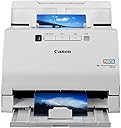
The Canon imageFORMULA RS40 is a high-speed, double-sided photo and document scanner designed for home and office use. It scans up to 40 photos per batch with advanced image correction features like Auto Photo Fix and Red Eye Correction. Powered via USB, it offers reliable feeding with ultrasonic double-feed detection and comes bundled with Canon CaptureOnTouch software for easy scanning, editing, and document management across Windows, Mac, and Linux platforms.


| ASIN | B0B4HJYBC5 |
| Are Batteries Included | No |
| Best Sellers Rank | 770 in Computers & Accessories ( See Top 100 in Computers & Accessories ) 1 in Document Scanners |
| Brand | Canon |
| Colour | white |
| Customer Reviews | 4.3 4.3 out of 5 stars (8,994) |
| Date First Available | 19 Jun. 2022 |
| Guaranteed software updates until | unknown |
| Hardware Platform | Laptop, PC |
| Item Weight | 3 kg |
| Item model number | RS40 |
| Lithium Battery Energy Content | 2.6 Watt Hours |
| Lithium Battery Packaging | Batteries contained in equipment |
| Lithium Battery Weight | 11 Kilograms |
| Manufacturer | Canon |
| Operating System | Linux, Mac, Windows |
| Product Dimensions | 60 x 29.1 x 38.2 cm; 3 kg |
| Series | RS40 |
| Standing screen display size | 3 Inches |
| Wattage | 19 watts |
A**B
Great for scanning photos
I bought this exclusively for scanning in old photos and for £65, I am very happy with it. It took me about 2 hours to scan 250 photos. I scanned two at a time at 600 dpi and the quality is fine for me. The software for this scanner will automatically separate and crop the photos, so by scanning two at a time, as long as you leave a gap between them, the scanner will create two separate images on your computer and they will be perfectly cropped and aligned - so you don't need to keep them straight when putting them into the scanner. It takes about 30 seconds for the scanner to scan 2 photos at 600 dpi. Once you play around with it to make sure you know what you're doing and that you're happy with the quality, it doesn't take long to work through the photos and scan them all in. The software (which can be downloaded) is pretty straightforward and easy to use. If you are on macOS, you don't even need any drivers (not sure about Windows but they are all on the Canon website anyway). The only thing I will say is that this scanner has a lock switch on the bottom - I've no idea what this is for (maybe to stop your kids from scanning stuff?) but it is important to put it to the unlocked position or the scanner won't work. And if you unlock it whilst it's already plugged into the computer, you will need to disconnect and reconnect it to the computer (i.e. unplug / plug in the USB cable) after you put the switch to unlock, otherwise your computer might not detect it. This scanner also does not need any power source / plug socket, which is handy. It gets power from your computer (the USB cable is supplied). Overall I am very happy with this scanner - it did exactly what I wanted it to do and it was pretty cheap.
T**N
A worthy successor to the departed Canon 220
The Canon LIDE 400 is my third of these type of scanner I have had over time starting with the Lide 110. Previous Lide models all worked reasonably well except from panel scanner buttons which stopped many years ago on MacOS, a software issue probably. My Lide 220 didn't survive the upgrade from from Ventura 13.6 to Sonoma 14.0 via should add though the same would have happened going to Windows 11and it's about 10 years in the market. I tried the usual things but it didn't really seem to budge so decided not to sweat the problem and just get a more up to date Canon. First, Amazon supplied wickedly fast arriving 7:43 AM less than 12 hours after ordering. The Lide 400 is the top of the range of Lide scanners, the 300 is about £20 cheaper but loses some document scanning options exchanging USB C for a micro B on the back of the cheaper model. I mf you are going portable I'd go for the 400 because those micro B are super delicate and only go in one way. I mainly use it for document scanning though quoted resolution and apparent facilities make it good for photography too I bet. For document scanning the Lide 400 claims about 8 seconds scanning time whereas my old Lide 210 10 seconds, the difference isn't readily apparent in practice so the cheaper Lide 300 would have done just as well for that document scanning. I am a Mac user so that is what I will concentrate on, there are loads of people out there who have reports with Windows. Box contents: - Scanner - USB A to C cable - Scanner stand - CD (see below) - Documentation Only thing to do is remove the tapes, other packaging and unlock the scanner head (bottom towards the front). Then hook up the cable and make Mac OS aware via Printers and scanners of the new unit detected via AirPrint although it's a scanner and no Wi-Fi involved. Effectively this means support is built into Mac OS itself so there is no driver from Canon. To save this being too long some bullet points: Good * Scanner is very nearly plug and play affair with Mac with respect to driver install. You just have to add the scanner from within the Settings app, it is an AirPrint device even thought it is not a printer. * IJ Scan utility is dark mode - hooray! * Very clear fast document scans at 300 DPI should be good for higher resolution photography work. * Scanner front panel buttons which actually do work, previous models buttons stopped working (some kind of software issue). Not so Good * The CD only contains a Windows installer, for Mac you will have reach Canon's driver pay to download any relevant companion software. * There seemed to be some teething issues with detection of the scanner, I managed to resolve by juggling connections of my 16 port USB hub to fix. * IJ Scan utility is very much more complicated than it was, not good for keyboard users. I accept though that this is a very niche thing. Most others want more buttons and functionality which it does provide.§ * You cannot tweak the precise behaviour of the physical buttons on the scanner.
J**S
Good budget scanner
For a budget scanner, quality is very good. Little noisy on some speeds but nothing obtrusive. Software was fiddly to get set up, but works fine once it's sorted and is user-friendly.
M**D
Easy Peasy’ LiDE’ Squeeze
The Canon LiDE 400 is a brilliant colour flatbed scanner. Setup with my MacBook Pro was effortless, plugging in and working instantly with no drivers needed. Scans are impressively fast, even at high DPI, delivering sharp results. Reliable, sleek, and highly recommended. Perfect for home, office, and creative projects alike.
D**E
Very good quality for the price
Amazing bit of kit that gives a very good result. Many options and settings that make this a great purchase for the money. The build is sturdy and professional to feel, and fits in well to an office setup. I have not used the software as this is mainly for windows - I use Linux and this scanner was plug and play with no issues at all.
G**5
Good for artwork
Purchased this scanner to scan my artwork. Watercolours and lino print. Really pleased with the quality of the scan for this purpose. I had greetings cards professionally printed from the scans and they look great.
D**R
I just received this today and have put it through its paces. The first scan was a 5x8 photo with a resulting jpeg nearly identical to the original. Easily handles documents and books. Scans to pdf format as well. A really good value for the money. The fact that it’s small, portable, and USB powered is a huge plus.
L**E
Recibí el escáner hace unos días. Es fácil bajar los controladores. Apenas lo estoy empezando a probar, editaré esta opinión cuando haya terminado con eso. Sólo les quiero advertir que el aparato no tiene botón de encendido/apagado, lo cual a mi me resulta muy incómodo porque se enciende cuando lo conectas a la PC por USB y lo tienes que estar conectando y desconectando cada vez que lo usas. Tardé un buen rato en poder escanear un documento por 1a. vez porque te pide mover una palanca para desbloquear el aparato y nomás no la encuentras: LA PALANCA PARA DESBLOQUEARLO ESTÁ EN LA SUPERFICIE DE ABAJO. Ahí verás los iconitos de un candado abierto y otro cerrado. Días después ya lo he empezado a usar. Es muy rápido, escanea con una gran nitidez y tiene funciones muy cómodas, como enviar de inmediato por correo lo que acabas de escanear o poder imprimirlo sin necesidad de guardarlo primero. Sí lo recomiendo.
I**N
Testé après réception. Installation très facile. Fais très bien le travail. Je recommande.
V**O
Estamos ante un escáner que ofrece una calidad media aceptable, con un correcto funcionamiento y una correcta velocidad de escaneo. Sin embargo, tiene dos grandes inconvenientes, que lo hacen no apto para todas las personas. El primer inconveniente es su precio. Quiero decir, la variabilidad de su precio. Tan pronto pasa de los 85€, como apenas llega a lo 50€. Cuando se sitúa en torno a los 85€ no es recomendable en absoluto, hay opciones que por un poco más nos ofrecerán un salto cuantitativo y cualitativo tanto en prestaciones, como en calidad de imagen. Al rededor de los 50€ es una excelente opción, con una estupenda relación calidad/precio. El segundo inconveniente es con sus drivers. Estos no se instalan correctamente en las últimas versiones de Windows 10. El asistente de instalación llega a un punto en el que se queda bloqueado, siendo incapaz de finalizar el proceso de instalación. Si se cierra el programa de instalación o se reinicia el ordenador, en un principio parece que todo se ha instalado correctamente, ya que nos encontramos con que el escáner aparece correctamente configurado en el administrador de dispositivo de Windows, y el programa de gestión disponible en el menú de programas. Pero al arrancar el programa de gestión del escáner, e intentar escanear un documento cualquiera, nos encontramos con el problema de que nos sale una ventana de error de comunicación con el escáner. Este problema no se resuelve ni desinstalando ni reinstalando los drivers ni cambiando el cable de conexión. La única forma de solucionarlo es utilizando la opción de "Actualizar controlador" que nos brinda el "Administrador de dispositivos" de Windows 10. Si accedemos a esta opción, y luego le decimos al cuadro de diálogo que busque los controladores automáticamente, veremos que el driver del escáner se actualiza -supongo que obteniendo una versión optimizada en la base de datos de controladores de Microsoft- y que si ahora volvemos a intentar utilizar el programa de gestión del escáner, podremos comprobar que ahora sí que funciona todo de forma correcta. Así que de nuevo, si obviamos los inconvenientes que tiene este escáner, estamos ante un producto correcto para un uso doméstico, con una buena calidad de imagen y unas opciones de personalización de su uso sencillas pero muy funcionales.
N**A
la fonction scan de mon imprimante multifonctions ne marchait plus, après 2 mois de galère j'ai finalement décidé l'acquisition d'un scanner dédié. Après consultation des avis de clients sur différents sites, mon choix s'est porté sur le modèle Canon Lide 400. La dernière question concernant les fichiers pdf multipages ayant reçu des réponses précises et utiles sur Amazon, j'ai choisi ce site dont je suis client assidu et je n'ai pas été déçu. Le prix très abordable, le délai de livraison très court (moins de 4 jours), la livraison parfaite (merci UPS) et le parfait état du matériel m'ont pleinement satisfait. L'installation s'est faite sans problème sous Windows 7 à l'aide du disque fourni. J'ai suivi scrupuleusement les indications en particulier en ne reliant le scanner au PC que lorsque le logiciel d'installation l'a demandé. Après un premier essai depuis le PC, j'ai ensuite utilisé les boutons du scanner. C'est d'une très grande simplicité et ce sera l'usage que j'en ferai pour toutes les opérations courantes. Je testerai aussi plus tard les fonctions avancées, principalement pour la numérisation de clichés papier, mais déjà les premiers essais sur 2 clichés scannés en même temps a parfaitement fonctionné en restituant 2 fichiers jpg séparés. Mon ancienne imprimante est donc encore fonctionnelle mais son usage est limité à l'impression et à la photocopie. Le jour où je devrai la remplacer je prendrai une imprimante dédiée car le scanner peut très bien assurer la télécopie, en 2 étapes : numérisation puis impression du fichier. Jusqu'à présent la photocopie était plus utilisée que la numérisation, mais maintenant et de plus en plus c'est la numérisation qui devient prépondérante, d'où le changement de stratégie. En tous cas je recommande cet équipement.
Trustpilot
1 week ago
3 weeks ago