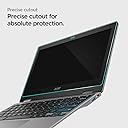


๐ก๏ธ Elevate your Chromebookโs defense with invisible armorโbecause your screen deserves the best.
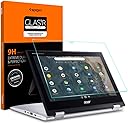
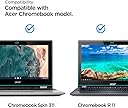
The Spigen Acer Chromebook R 11 Convertible Screen Protector is a precision-engineered 9H hardness tempered glass designed specifically for 11.6-inch Acer Chromebook R11 and Spin 311 models. It offers full-screen coverage with an oleophobic coating to resist fingerprints and smudges, while maintaining flawless touch responsiveness. Easy to install with bubble-free technology and included accessories, it ensures durable, crystal-clear protection for your convertible Chromebook.


| ASIN | B0727QM98F |
| Best Sellers Rank | #72,941 in Computers & Accessories ( See Top 100 in Computers & Accessories ) #1,318 in Laptop Screen Protectors |
| Brand | Spigen |
| Brand Name | Spigen |
| Clarity | 10 |
| Color | Glas.tR Slim |
| Compatible Devices | Acer Chromebook R 11 Convertible - 11.6", Acer Chromebook Spin 311 Convertible - 11.6" (CP311-2H-C3KA), Acer Chromebook Spin 311 Convertible - 11.6" (CP311-2H-C679) Compatible Devices Acer Chromebook R 11 Convertible - 11.6", Acer Chromebook Spin 311 Convertible - 11.6" (CP311-2H-C3KA), Acer Chromebook Spin 311 Convertible - 11.6" (CP311-2H-C679) See more |
| Compatible Phone Models | Acer Chromebook R 11 Convertible - 11.6", Acer Chromebook Spin 311 Convertible - 11.6" (CP311-2H-C3KA), Acer Chromebook Spin 311 Convertible - 11.6" (CP311-2H-C679) Compatible Phone Models Acer Chromebook R 11 Convertible - 11.6", Acer Chromebook Spin 311 Convertible - 11.6" (CP311-2H-C3KA), Acer Chromebook Spin 311 Convertible - 11.6" (CP311-2H-C679) See more |
| Customer Reviews | 4.5 out of 5 stars 2,277 Reviews |
| Finish Type | Oil Rubbed |
| Item Dimensions L x W | 11.6"L x 11.6"W |
| Item Hardness | 9H |
| Item Weight | 14.2 g |
| Manufacturer | Spigen |
| Material | Tempered Glass |
| Model Name | GLAS.tR SLIM |
| Model Number | 8809522197302 |
| Number of Items | 1 |
| Part Number | S01GL21806 |
| Product Dimensions | 11.6"L x 11.6"W |
| Screen Size | 11.6 inches |
| Screen Surface Description | Glossy |
| Special Features | 9 H Surface Hardness |
| Unit Count | 1 Count |
M**A
Perfect fit and easy to install in 10 mins. NO BUBBLES!!
I can't believe people actually left bad reviews because this is the best screen protector that I've seen and applied. Its super easy to put on and I didn't even notice there was a manual in the package until AFTER I had applied the protector! I didn't get any bubbles at all either! The other reviewers didn't take the time to wipe down the screen properly and didn't use the stickers they give you to catch the lint that's left on the screen. Before you start make sure you have everything set up and ready to go within arms reach. See which side the screen protector faces down so you won't be having to figure it out after the lint process causing lint to settle on your screen again. Turn off any fans and try not to move too much causing lint to get stirred in the air. There are 4 small stickers and I only used 1 and use your phone's flashlight to see the leftover lint (to grab with sticker) after you wipe down the screen. Make sure you get the lint in the corners too. Once you've gotten most of the lint with the sticker then get the screen protector ready (don't peel yet) and do a onceover with the light on the screen to check for lint, if all is good then peel the adhesive side off and slowly position screen protector. I always position my screen protectors with the camera holes and then look at the top corners as I apply it and let one top corner touch first in order to align the rest with screen easily. Then slowly let the protector stick to the screen from left to right (vice versa). Take out any bubbles (if you have any) using the cloth they give you BEFORE taking off the plastic with the "ears" so you won't scratch the screen protector.
A**E
easy to install, no bubbles, invisible
I purchased this protection screen for my kindle, and I like it very much. It was so easy to install: I just followed directions, ran the wipe across the screen and dropped the protective cover onto the kindle screen. Like magic, the air bubbles worked themselves off the screen -- no need to run something over the top to squish bubbles to the side. Now the screen is invisible. It is amazing. I will note that for the first week or two, the protective screen picked up finger prints like crazy. They were easy to remove, but I am glad to tell you that the fingerprints are no longer an issue. Highly recommend.
R**N
Super easy to install if you clean the screen properly,then line the protector up carefully at the beginning of the installation
I used my new chromebook for a few days then added this protector. It was the first time I ever added a glass protector, so I was nervous about it, but it went on easily. I cleaned the screen with the same moist wipe that I use on my reading glasses, then followed the installation instructions for the protector. I didnt have to "help" any after touching the middle of the protector during installation, it just magically applied itself and I got to watch it! When it was finished, there were two small imperfections that disappeared by the next morning, I supose I hadnt cleaned the screen well enough, but I honestly cant see them at all now. The protector seems smoother than the original screen on my Chromebook and there seems to be less reflections, so I am extremely happy with this product. My wife just received her new Chromebook a few days ago so I will be ordering another one of these soon.
A**R
Good Quality
This screen protector is good. It was easy to install and came with all the little things to make that easier and more effective- like screen cleaning pads, and a tool to get the bubbles out when you install the protector. I'm giving 4 instead of 5 stars because the directions say that you simply press in the center of the screen protector (once it's in position) and it will adhere well... I found that method to make a lot of extra air pockets and had to redo that a few times. I eventually put it on from one end to the next using the tool as I went which was more effective.
P**E
Best product out there
This protector saved my daughterโs $300 chromebook! Firstly, the screen is EASY to install, the easiest installation Iโve ever done. Secondly, it does exactly what itโs supposed to! My 17 year old has Aspergers and routinely drops her stuff, laptop included, especially when agitated. She paid for this chromebook on her own, but still, after having the chromebook over a year, the anxiety got to her and in frustration she dropped her chromebook on the ground. Instead of the screen breaking, the protector broke. It came off all in one piece and was easily replaced. I will ALWAYS TRUST SPIGEN.
M**S
Best electronic protection company ever!!
I don't even have it yet, but I know it will be of quality. I have used Spigen products on all my phones since the Nexus 4 and I'm now on a LG V30. When I saw this screen protector from Spigen, I just had to get it for my new R11 Chromebook. Spigen has always had Top Quality for products. Will always buy Spigen. Update, had my screen protector for a month now. Installation was a breeze. Not sure why others are having trouble with bubbles. It was neat watching it adhere itself to the screen. Didn't have to touch it really. Anyhow as I said before, Spigen = Greatness!! Hey Spigen, I need some Garmin Fenix 5X protection!! Something to think about. Thanks!
R**S
Installation is almost fool proof
Over the top packaging protects this screen protector and keeps it from getting damaged in transit. Once opened, the kit includes wet and dry wipes to clean the screen you plan to protect and also small tabs to collect any dust specks you might have missed. The protector itself has a protective film on the back and a thicker one on the front with tabs on it. The tabs were my favorite part. I wish I'd thought of it. They allow you to confidently handle and align the protector without actually having to touch it, No finger prints under the glass, no fumbling with the edges. Once it's all lined up, the glass pretty much sealed itself without pressing it or wishing I had a squeegee.
L**A
Does not work well with touch screen
I was very easy to install. It seems to be very protective. I did not like that I was no longer able to accurately use my touch screen. This product does not work well with touch screen computers. I was able to do things using the touch screen but not what I was trying to do. I think that it maybe it isnt flexible enough to use for a touch screen device. When you touch the screen while using this product, the computer screen becomes insensitive to being used as a touch screen. After 3 days I finally got fed up with it and removed it. Its not worth the money to use on a touch screen device.
J**N
Best Screensaver yet
Got this for a Chromebook CP11 2H and it fits perfect. Went on very easy and zero air bubbles due to the fact it was such a great fit. This is by far the easiest and best screensaver I have ever installed.
A**A
Excelente qualidade !!!
Excelente qualidade, entrega rรกpida e muito bem embalado.
D**J
Perfect match for Spin 511, touchscreen works, easy to install.
I know it's for Spin 311 and R 11; i have a Spin 511 and this fits perfectly... Same size, hard glass and the camera and sensor holes are in the perfect spot on 511. Super easy to install after you clean the screen with included cleaning kit, has absolutely no air pocket dot. Touch screen works beautifully, same as before, writing, drawing or anything else. Very pleased with this screen protector, i'll buy again for sure.
F**D
Screen protector
It was easy to install, except one corner is not sticking as it should. Doesn't change the functionality of the touch screen.
S**T
Not easy to install
Installing it was not as easy as most people say. First, the "Gorilla Glass" sticker on the screen of the Acer can't stay there... it has to be removed otherwise it won't work. Then, working out the air bubbles was easy enough. But the dust bubbles were hell. No matter how many times I removed them they kept coming back. Unfortunately, after a few retries, the corner of the glass wouldn't stick anymore. So now there's a permanent air bubble in the corner and it will not go away. I guess next time I'll go to a computer store and ask an employee to do it. It might cost more but at least I can ask them to retry until I'm satisfied.
Trustpilot
1 month ago
3 weeks ago