Desertcart purchases this item on your behalf and handles shipping, customs, and support to Brazil.
๐ค Command the room, captivate your crowd.
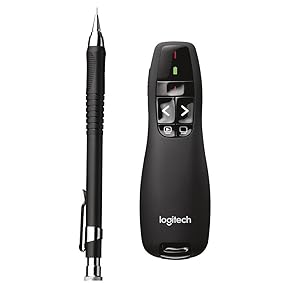
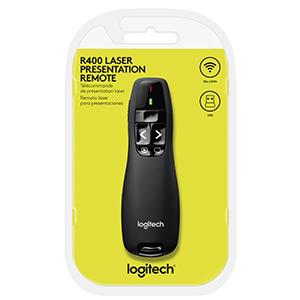
The Logitech Wireless Presenter R400 is a sleek, ergonomic PowerPoint clicker featuring a bright Class 2 red laser pointer and a 50-foot wireless range via 2.4GHz RF technology. With plug-and-play USB connectivity and intuitive touch controls, it offers seamless slide navigation and reliable battery status monitoring, making it the go-to tool for confident, professional presentations.


| Additional Features | Battery Indicator, Radio Frequency, Wireless |
| Asin | B002GHBUTK |
| Battery Type | AAA |
| Best Sellers Rank | #825 in Office Products (See Top 100 in Office Products) #2 in Office Presentation Remotes |
| Brand | Logitech |
| Built In Media | 2 x AAA Batteries, Carrying Case, Quick-Start Guide, R400 Presentation Pointer, Wireless Mini-Receiver |
| Button Quantity | 4 |
| Color | Red Laser |
| Compatible Devices | Computer, Personal Computer |
| Connectivity Technology | Radio Frequency, USB, Wireless |
| Controller Type | Button Control |
| Customer Reviews | 4.6 4.6 out of 5 stars (11,515) 4.6 out of 5 stars |
| External Testing Certification | Nรฃo aplicรกvel |
| Global Trade Identification Number | 00097855061614 |
| Item Dimensions L X W X H | 4.55"L x 1.08"W x 1.49"H |
| Item Type Name | Logitech Wireless Presenter R400, Wireless Presentation Remote Clicker with Laser Pointer |
| Item Weight | 0.1 kg |
| Manufacturer | LOGAM |
| Maximum Number Of Supported Devices | 1 |
| Maximum Range | 50 feet |
| Mfr Part Number | 910-001354 |
| Model Name | R400 |
| Model Number | 910-001354 |
| Number Of Batteries | 2 AA batteries required. (included) |
| Number Of Items | 1 |
| Unit Count | 1 Count |
| Upc | 097855061614 097855063458 |
| Warranty Description | Manufacturerโs warranty can be requested from customer service. |
User
An Effective Presentation Remote for Those Who Need a Presentation Remote
I am a teacher and I purchased this presentation remote after damaging my previous one beyond repair, a Targus (I'm not sure of the model number). The previous Targus remote that I had opened up to keep the USB radio transmitter, held a spare battery, had the ability to move the mouse pointer (albeit very slowly) with both left and right click, volume control, a laser pointer, a toggle switch for Mac, PC, and PPT, and (of course) worked with presentations. I was quite disappointed when it was damaged.I searched on Amazon for either that model of remote or something similar. I came across the Logitech R400 at that time. The price point was in my range, but it was "only" a remote. This made me apprehensive as it did not have all of the capabilities of my previous remote. After analyzing how I really used the remote during a presentation and reading the rave reviews (and my previous happy experience with Logitech products), I decided to take a chance on this remote.I am very pleased with the R400. It comes with a nice little carrying case and battery (nice touch, in my opinion). It works equally well on my Mac and my Windows machines (Windows 7 & 8). I have used this remote with Keynote, PowerPoint (Windows and Mac), and Prezi. The "blank screen" and "start presentation" buttons are a nice touch, especially the "blank screen" button. As a teacher, sometimes you want to hide the presentation for a moment. However, I have only used these buttons with PowerPoint in Windows. I have not yet tried them with any other OS and software combination.The presenter fits very well in my hand. The remote has a slightly rubbery feel and I am not worried about it leaping from my hand during a presentation (I am very animated when making presentations). It stores the USB radio receiver in the base of the unit (you should be able to see that feature in the product pictures). I was concerned that when the receiver was not in the unit that this void would impact the feel of the remote. However, I never notice the gap when the remote is in my hand.The laser pointer is reasonable. I probably wouldn't rely on it in an auditorium with a very large screen, but in my classroom (which has a reasonably large size screen for the projector), it works very well.The power switch is on the side. I am not worried about it being accidentally powered on while in the carrying case. However, I do occasionally forget to turn it off. While this is my problem, my previous remote did have have an auto-off function to save the battery if I did not use for a very long period. But the battery life seems to be excellent with this remote. I have had the remote for a little over a month. With nearly daily use for several hours a day and accidentally leaving it powered on several times overnight, I am still on the same battery. I would not be able to say that about my previous remote (which had a spare battery for a reason).In regards to effective range, I cannot offer too much guidance. I use the remote in a classroom and it has absolutely no problem. Also, we have a large amount of radio/wireless traffic in our environment. While this radio traffic sometimes interferes with the each other, I have not had any issues with the remote. But I have not used it in auditorium setting, so I cannot say whether this remote would be effective in that environment.Overall, I am extremely pleased with this product and recommend it to anyone needing a presentation remote. It does not have any of the extra features to which I was accustomed, but I have discovered that I also do not miss those features.
User
Great for presentations โ compact and well designed
I purchased this clicker to improve my PowerPoint presentations at work, and itโs been a great addition.I really like how small and compact it isโeasy to carry and doesnโt feel bulky at all. One of my favorite features is the built-in storage for the USB adapter. You donโt have to worry about losing it, which is a huge plus.It also comes with a nice carrying case, which makes it easy to keep everything together and organized.Overall, itโs simple, reliable, and perfect if you want to be a little more prepared and polished during presentations. Definitely recommend!
User
These things work great for your wandering presentation needs. 5 stars!
There are a lot of remote presenter and PowerPoint clickers out there, but for lots of things like this (wireless laptop accessories - mouse/keyboard combos, remote presenters, USB cameras, etc.), Logitech is my go-to vendor. I have been disappointed by other vendors over the years, but so far, never disappointed with Logitech kit.And so this nice little easy to use, palm-sized presenter remote has proven. It does everything I need - forward, backward, and "return focus to PowerPoint" buttons all work as expected. My cat loves the laser pointer, and is writing his own review that you should ignore because he does eventually get frustrated with that damned dot that he can't catch.Sometimes the laser pointer works for presenting, mostly it does not these days, due to either a glass screen on large TVs in use today, or one-way screens for rear projection that the laser does not show up on... but none of that's a ding on the presenter remote, which projects a very nice laser beam. It's more a commentary on our need to be flexible when traveling and presenting in various environments.I have walked 30-40 feet away from the laptop doing presentations, and had no issues with advancing my slides. I can't really imagine getting much further from the laptop and screen, and not losing my audience, so as far as I'm concerned, this has all the distance I'll ever need. I can't advise on the max distance, since I'll never go looking for those limits, but it's lots further than 40 feet.Lastly, this is a very pleasant device to hold and use, in an ergonomic sense. It is extremely well-designed for the human hand, and I would say for any size of human hand. Many of these I've owned and used as loaners from various venues are straight tube shapes, cylindrical, longer than necessary, slightly unwieldy and awkward feeling in your hand. This one - from the first second, it was comfortable and the buttons are just where they should be for easy, intuitive use. Exactly what I wanted, and what I've come to expect from Logitech - my go-to for stuff like this. FIVE STARS, no dings, all good, highly recommended.Boot-note: this one has no timer function. Logitech makes a couple with that feature, but I don't find it useful and don't want to pay $20 extra for a feature I don't need. Your call entirely which way to go on that consideration, but I'm extremely pleased with my choice and my new toy.
User
Easy to use and effective
Phenomenal, absolutely worth the buy. Super easy plug and play
User
Affordable and Sleek Presentation Clicker: A Reliable Choice with One Small Drawback!
I recently purchased this presentation clicker remote, and I must say, it's an impressive little device that ticks a lot of boxes for me. At a great price point, it offers functionality that rivals more expensive options on the market.Pros:Affordability: One of the standout features of this remote is its price. For the quality and functionality it provides, itโs a fantastic value.Sleek Design: The remote has a modern, streamlined look that fits comfortably in hand. Its lightweight design makes it easy to carry around, whether youโre heading to a meeting or a lecture.User-Friendly: Right out of the box, it was incredibly easy to set up and use. The buttons are intuitively placed, making it a breeze to navigate through slides during presentations.Works Well: The clicker performs reliably, with a solid connection that doesnโt drop out even from a distance. I was impressed with how responsive it is, allowing me to focus on my presentation rather than fumbling with technology.Cons:Laser Pointer Limitation: While it does come with a built-in laser pointer, I found that it doesnโt work effectively on TV screens, which was disappointing as this was the main reason I purchased this product. Itโs a nice feature for pointing out details on physical presentation boards, but if you're expecting it to function on a screen, you might want to consider this limitation.Overall Impression:If you're in the market for a presentation clicker that combines style, functionality, and affordability, this remote is a solid choice. Just keep in mind the laser pointer's limitations if you plan on using it primarily with screens. Despite this minor drawback, itโs a reliable tool that has significantly improved my presentation experience. Highly recommend!
User
Very nice quality remote
This is a really nice remote and is perfect for anyone who regularly has to give presentations. It feels very high quality, is confortable to hold, and I have had zero issues getting to to connect to any of the computers I've used it on. It come with a nice pouch for carrying it around, and there is a slot in the remote to hold the usb stick that it connects to. The laser is also nice and bright and has been perfect for pointing out specific items in presentations. Would definitely recommend!!
User
Simple, Reliable Presentation Clicker That Just Works Every Time
Iโve been using this wireless presenter for presentations at work and church for a while now, and itโs been rock solid.Setup couldnโt be easier. Plug in the USB receiver and it works instantly, no software needed. The buttons are perfectly placed and easy to feel without looking, so I can stay focused on speaking instead of fumbling with controls.The wireless range is great. I can walk around the room freely and the slides still respond immediately. The laser pointer is bright and easy to see, even in well-lit rooms, which makes highlighting key points simple.Build quality feels solid and comfortable in the hand, not cheap or flimsy. Battery life has also been excellent. Iโve used it for months without needing to replace the battery.If you give presentations regularly and want something dependable, simple, and professional, this clicker is a great buy. It does exactly what it should and does it well.
User
Highly Recommended for Mac OS or Windows
The Logitech Professional Presenter R800 with Green Laser Pointer is a quality presentation control option with the following features:* Built in timer with silent alarm.* Green laser pointer so you see the pointer even on plasma/LCD screens and in brightly-lit rooms.* 100 foot wireless range.* Smooth slideshow controls.* Works with PowerPoint or Keynote.* Less expensive than an iPod Touch or iPhone.It says that system requirements are for Windows only...but the remote acts like a wireless USB keyboard and so it can be made to work great on the Mac. On Mac OS all buttons work fine on Microsoft Powerpoint and Keynote except the Play Slideshow button (Start button) on Keynote. Here's how to get the Start button to work in Keynote by remapping the default Play Slideshow keyboard shortcut:1. Open System Preferences.2. Click on the Keyboard icon.3. Select the Keyboard Shortcuts tab.4. Click on Application Shortcuts.5. Click the Plus button to assign a new shortcut.6. Scroll to the bottom of the list, select Other... and then select Keynote from the Applications:iWork '09 folder or wherever you installed it and click on Add.7. In Menu Title: field, type "Play Slideshow".8. Move the cursor to the Keyboard Shortcut: area and press F5.9. Click on Add and close the Keyboard system prefs.10. Quit out of Keynote and open it again. You'll see on the View menu that "Play Slideshow" is now linked to the F5 shortcut. (The default is Command-Option-P.)Now all the buttons of Logitech Professional Presenter R800 or R400 will work perfectly.Notes:* If you use any other Logitech products on your Mac that require the Logitech Control Center, it is possible that you may need to uninstall this software for proper functioning of the remote.* There is a great application that aids in doing presentations or demos on the Mac (usually non-PowerPoint/Keynote) called Mousepose.It dims the screen and puts a spotlight on the area around the mouse pointer, easily guiding the audience`s attention to an area of interest. Mousepose maps F5 to display keyboard typing keystrokes. You must disable this key if you want to use the start presentation key on the Logitech remote. Here's how:1. From the Mousepose menu icon, select Options... Open Settings Window...2. Click on the Keystrokes item.3. Under Activation Hotkey: click on the X to remove the F5 hotkey. You might also click on Deactive if you never want this feature.
User
ู ูุชุฌ ุฌู ูู
ุนู ูู ูู ู ุชุงุฒ
User
Good one.
Good quality product. I like the ergonomic design and the green light. Perfect for presentation.
User
Five Stars
Works well, saves my legs and enables me to move from my desk!
User
Entry level - ottimo in tutto
Semplice ed intuitivo, si collega in pochi secondi. Funziona bene anche su Mac anche se non รจ nativo
User
Awesome
Heaps easy it use, just plug and play I use it for PowerPoints and it works really well
Trustpilot
3 weeks ago
2 weeks ago