Desertcart purchases this item on your behalf and handles shipping, customs, and support to Brazil.
🎮 Level up your audio game with Razer Leviathan V2 — where power meets precision and style.
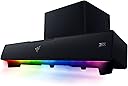
The Razer Leviathan V2 is a high-performance multi-driver gaming soundbar with a wireless 5.5-inch subwoofer, delivering immersive THX Spatial Audio 7.1 surround sound. Featuring Bluetooth 5.2 for low-latency multi-device pairing, customizable Razer Chroma RGB lighting, and a compact desktop form factor, it’s designed to enhance both your gaming and multimedia experience with powerful, precise audio and sleek aesthetics.


| ASIN | B09VX86JR6 |
| Additional Features | Bluetooth 5.0, Chroma RGB, THX Spatial Audio |
| Age Range Description | Adult |
| Antenna Location | For Computers |
| Audio Driver Type | Dynamic Driver |
| Audio Encoding | Dolby Digital 7.1 |
| Audio Latency | 60 milliseconds |
| Audio Output Mode | Surround |
| Best Sellers Rank | #12 in Home Audio Sound Bars #117 in Computer Speakers |
| Bluetooth Range | 10 meters |
| Brand | Razer |
| Built-In Media | Soundbar, Subwoofer |
| Color | Black |
| Compatible Devices | Desktop, Laptop, Nintendo Switch, Smartphone, Tablet |
| Connectivity Protocol | Bluetooth |
| Connectivity Technology | wired, wireless |
| Control Method | App |
| Controller Type | App Control |
| Customer Package Type | FFP |
| Customer Reviews | 4.0 out of 5 stars 622 Reviews |
| Enclosure Material | Metal |
| Frequency Response | 20 KHz |
| Is Waterproof | False |
| Item Dimensions D x W x H | 4.5"D x 23.6"W x 3.5"H |
| Item Type Name | Gaming Soundbar |
| Item Weight | 9.6 pounds |
| Manufacturer | Razer |
| Maximum Range | 10 meters |
| Model Name | Leviathan |
| Model Number | RZ05-04160100-R3U1 |
| Mounting Type | Tabletop Mount |
| Number of Audio Channels | 7.1 |
| Number of Items | 1 |
| Number of Power Levels | 1 |
| Power Source | Corded Electric |
| Signal-to-Noise Ratio | 98 db |
| Speaker Maximum Output Power | 150 watts |
| Speaker Size | 1 inches |
| Speaker Type | Soundbar |
| Specific Uses For Product | For Computers |
| Subwoofer Connectivity Technology | Wireless |
| Subwoofer Diameter | 5.5 inches |
| UPC | 810056142872 |
| Unit Count | 1 Count |
| Warranty Description | 1 year manufacturer |
| Warranty Type | Limited |
| Water Resistance Level | Not Water Resistant |
| Wireless Technology | Bluetooth 5.2 |
| Woofer Diameter | 5.5 inches |
I**R
Surprisingly good sound (with real volume), but the sub takes up space
I picked this up for my wife’s gaming setup. I’m not typically a fan of Razer audio gear, but her setup is mostly Razer already, so this fit the theme. It sits cleanly under dual 27” monitors and looks good on the desk. Setup was straightforward, and once it was in place, it’s been mostly “set and forget,” including the RGB. Sound quality is surprisingly good. It’s not quite on the level of my Sound Blaster Katana, but it’s closer than I expected — and it actually gets louder. The THX processing is also more effective than I anticipated and helps give games a more immersive feel. The biggest real-world difference is how much it changed usage. My wife was previously using a Turtle Beach Stealth headset and before that a cheap ONN soundbar. Since getting this, she almost never uses the headset anymore. That alone says a lot. No distortion issues at higher volumes, and it handles both gaming and occasional music without any problems. The only real downside is the subwoofer. It’s not massive, but it’s a noticeable cube under the desk and takes up more space than slimmer designs (like the Katana’s side-firing sub). It’s functional, but you’ll need to plan for it. If you want a clean desk sound solution that’s loud, immersive, and good enough to replace a headset for a lot of use cases, this is a solid choice. If you’re very particular about audio or tight on space, there are better (and usually more expensive) options.
A**R
Best all around audio I have experienced with my PC
Deep bass and perfect high and mid range makes gaming immersive and music practice a dream. Pair it with the Razer Clio and enjoy a practice experience like no other
M**L
A step down from the original Leviathan in every aspect
Final Update: After over 7 weeks since opening the ticket and 10 days of silence from support, Razer has basically told me to shove it. They have "raised this concern" and have said "There is no ETA". They have also closed my ticket. After more than a month of jumping through hoops and providing logs, there's going to be no RMA, no refund, and no fix from Razer. Update 2: it’s now been 3 weeks, I’m still getting told by Razer support to repeat steps I’ve already said doesn’t work. They’ve now asked me to run test software and provide logs twice now, I guess I’m paying them to be their QA team. Update: it has now been 2 weeks since I reached out to support. They have asked me to repeat the exact same steps I reported to have no effect, and then promptly ghosted me when I pointed that out and asked for a RMA. Where do I even start. Everything from the build quality, sound quality, bugs, and support on this product has been awful. Not only is this a huge step down from the original Leviathan which I've owned since its release, it's hands down the worse Razer product I've ever owned in almost a decade. What works on this sound bar stops working when you try to fix the things that don't work, and the things that don't work make this sound bar unusable. Build Quality: The v2 sound bar about the same width, shorter, and deeper when compare to the original. It's also more rectangular in shape. The sub is also a bit larger than the original. At the same time, the v2 is somehow lighter than the original, which makes it feel a bit cheap. You only get a single USB C port on the back for connectivity, no aux, no optical, both of which were available on the original. You also get the same proprietary connector for the sub, with no extension available from either Razer or 3rd parties. Sound Quality: It's bad, it's really freaking bad. Out of the box it sounds worse than every other speaker, headphone, and earbud that I have (Leviathan v1, Samsung HW-R450, Bose QC35II, Bose NC700, Sony XM3, XM4, XM5 headphones, Sony XM4 earbuds, Echo Buds, Powerbeats Pro, and Beats Buds). A lot of these are provided through my work as a mobile developer. Worst part is that I figured out the sound quality is trash because Synapse is enabled, the very software the sound bar is designed to work with. Killing Synapse immediately improves the audio quality immensely, but also disables the features I need for the other Razer peripherals I have. Even after fidgeting with the equalizer settings in Synapse for over an hour I cannot get the sound quality to improve to the level of the v1 or with Synapse disabled. The bass is weak and the mids are muddled, and enabling Spatial Audio and/or Center Focus does little to improve the quality. Bugs: Synapse causing awful sound quality isn't even the worse bug. The firmware/driver for this thing causes awful buzzing and interference for recording and streaming. If you've got the Leviathan set as the primary audio output, any audio/video you capture is accompanied by a deafening buzzing sound. This makes the sound bar entirely unusable if you ever intend to record or stream. I'm almost certain it is caused by firmware/driver because it persists regardless of whether Synapse is running or not, and regardless of whether the THX drivers are installed or not. I've also been able to reproduce this issue on two Windows machines. The only thing that fixes this issue is to disable Signal Enhancements in the Speaker Properties through Windows' sound settings, which also disables the Spatial Audio, Center Focus, and Equalizer settings within Synapse. Support: At the time of this writing, I've been going back and forth with Razer support a full week now. I've provided screen shots, videos, and have had to repeat the issues I’ve experienced multiple times. Support has confused my ticket with one made for a Razer Blade, and has twice asked me to try troubleshooting steps I've already tried and reported to not be successful. They are even trying to gaslight me into thinking that disabling Signal Enhancement fixes the issue as if it doesn't disable ALL of the software features they're advertising. I would just return the v2, but I no longer have the original packaging since it took me several days to put together my set up after moving. I've got the original sitting on my desk, waiting for support to sort out the problems with the v2. Looking around online, there are multiple reports from people facing the same issue as me, so it’s not an isolated problem. If you have no intention of installing Synapse and don't plan on ever streaming, I think you would avoid most of the issues I've ran into, but barring that, this thing has been nothing but a nightmare.
C**A
Loud with good bass. Easy cable manage
great product. replaced my Logitech g560 speakers. not as loud or bass heavy, but way better clarity and good bass. im happy how simple the connections are as well. makes it easy to cable manage
G**Z
Absolute banger
First off, after reading the reviews / razer subreddit reviews, I did not install synapse nor did I have it on my PC when I plugged it in the first time. I have no other razer products and if I want to change the lights on the soundbar, I use the chroma iphone app. Not installing synapse / not having it on your PC when you plug this in for the first time enables windows to download a different driver with the name "razer leviathan v2" as opposed to the THX driver that is making everyone have a bad time. This thing sounds amazing ! I am not an audiophile and would consider my self a casual music listener, but now after getting this soundbar i've been listening to a lot more music now. Bluetooth is just as amazing as well. Easily pairs to all my devices with no issues. Sub is perfect for my living room in my one bedroom apartment. My only complaint is the price, but when you compare to other soundbars on the market, this is relatively cheaper than all the big name brands. If you've been eyeing this and thinking about getting it, pull the trigger. I do not regret my purchase at all. One thing to note though is that most of the reviews for the synapse problem came forth a couple months ago, so I'm not sure if they fixed it via software update by now. I am considering doing the Dolby upgrade that another reviewer here mentioned / on reddit as well. But until then, I am enjoying every minute with this thing !
B**N
The subwoofer need at least a system volume level of 50 in order to be heard.
Hooked up this system to my computer yesterday and spent a little over an hour trying to figure out how to get the subwoofer to wake up and give me some sound I could hear without having my ear right up next to it. Well, the instructions are bare minimum and are printed in the smallest font known to man (I had to use a magnifying Lense to read it.) Long story short; there is a software you need to download in order to make sound adjustments and adjust the led lights, it's called synapse and the download dashboard showed up on my screen when I connected all the components, which is actually very simple. I've included screenshots of the software after downloading it below. I actually used "copilot" for some helpful direction on the software download, it seems a reboot of your computer is necessary after download and install in order for all the components of the software to materialize. After finally getting everything in working order, much to my dismay, I discovered that the subwoofer, even after adjusting the output on the equalizer in the software, will not be heard very well unless you have your computer volume turned up to at least, level 50. I went with the settings of the subwoofer and bass equalizer settings that pilot suggested and, yeah, at volume 50 or above, this system sounds really good and you can feel the subwoofer in your chest. Really nice sound; however...I don't like to listen to my computers volume at level 50, it's much too loud. I normally listen at a volume level around 26 to 28, and at that level, the subwoofer is useless, it's quiet as a mouse because the system isn't sending enough amplitude to it to wake it up. Bummer! But, like I said, at 50 or above, that little subwoofer comes alive and kicks you in the chest. I played Boston's "More than a Feeling" at level 50 and the bassline just jumped out of the music, it was great. Ok, so much for that topic, onto the next. The led lights. Well, they are pretty lame. You can adjust what they do and adjust the brightness of them in the software, but even at the highest brightness setting, the lights are hardly noticeable even in a dark room. The pictures used to illustrate the lights are extremely enhanced and not anything like what they really provide. Very disappointing and the makers of this component should be ashamed; they could easily have put brighter lights into this device. Nice idea, but they really dropped the ball on it. Overall impression: It's a nice sounding system (when operated at optimal settings) but you have to crank up the volume to experience its true potential. The soundbar is about 2" wider than a standard size keyboard and sits nicely in front of the computer screen. The controls are easy to use and the software is simple enough once you learn where to find things. Not a bad system for the price. Only 3 wires to connect, one to power, one to the computer and one to the subwoofer and all the connections are on the back so they are out of the way. It's a decent system, the only drawback is how the subwoofer works, being that it's tied into the system volume and although you can boost its presence with the equalizer, it's still tied into the system sound and in order for it to come alive, it needs system amplitude which it doesn't get until volume level 50. If I'm not mistaken, if you want to hear the subwoofer at lower system volume levels, you'd need a speaker system that has a subwoofer with its own amplifier built in. All in all, it's decent, it has a clean, clear sound and it can be adjusted to taste via the equalizer.
S**O
Satisfecho
excelente
B**I
It’s decent, not what I expected for the price tho
I like the design of it, it looks pretty cool thats the reason I bought it so I could use them on the gaming pc. You need to enable thx Spatial Audio to have the best sound possible on these and that wasn’t fun at all. You have 2 ways of enabling thx Spatial Audio, you either try to enable the free version that comes with these on the razer app or you download the paid THX Spatial Audio app from razers website. Whenever I tried enabling the free version I wouldn’t notice a difference in sound so I decided to try installing the thx Spatial Audio app and boom I enabled it there easily, they give you 15 day free trial and then you have to buy it for 20$ I believe, night and day difference in sound. They should just give you a code to get the app free because the free version doesn’t even work. The sound quality is good, but what does disappoint is the sub woofer, I’ve had Logitech speakers with a subwoofer for less than 100$ and that thing was actually better sounding than this one. I would only recommend this if you don’t care about not having good bass sounds. Actually I wouldn’t recommend this at all just for the heavy price and the fact that there’s better sounding speakers for less than half the price of these, also cant forget about the struggle of enabling thx audio, I decided to buy the actual thx app because the free way of enabling wouldn’t work and that’s another 20$ on top of what I already spent on getting these. Bad for price.
T**L
Good sound quality.
The sounds from this is really good for the price point. Works really well with mac and PC. Quality sound. Lots of bass. Razer quality.
R**U
Extremadamente recomendable
Estoy muy feliz con esta compra. El audio suena increíble, el subwoofer le da mucha más potencia a los bajos (incluso hace vibrar el suelo) y tiene sonido envolvente. Los videojuegos se escuchan mucho mejor. Incluso el empaque por dentro y por fuera me gustaron al momento de abrir el producto. Recomiendo comprar por separado el software de THX. Es un poco difícil porque la página de Razer dónde lo descargas te pide una dirección en estados unidos obligatoriamente para terminar la compra, pero puedes buscar cualquier dirección en estados unidos, agregarla y ya te deja comprar y descargar el software de THX. Se hace un solo pago y no es suscripción. Es una licencia perpetua. El único tema es que las luces RGB no brillan tanto como aparece en la imagen, pero es un detalle nada más, todo funciona perfectamente.
S**R
Literally flawless
Amazing sound, amazing Chroma lighting effects. Yes I overpaid a little for a 2.1 surround sound system, but this will be a centerpiece for years and compliment my other Chroma products.
F**O
Excelente audio y fácil de configurar, pero…
En pocas palabras es lo que se espera por el precio, sin embargo, conociendo la marca es un tiro al azar, ya que se sabe que el control de calidad de Razer es bastante pobre, por lo que, por mi experiencia con diferentes artículos, al primer detalle que tenga su producto deberían de solicitar un reembolso, ya que esperar a que la marca decida repararlo (siempre pondrán peros y trabas) o que se te remplace el artículo (Casi nunca lo hacen) es muy poco viable, por lo que la recomendación es usar la facilidad que da Amazon para el reembolso.
R**A
Casi perfecta
Es casi perfecta solo le encuentro 2 detalles. El primero es que no se apaga cuando apagas la PC, tienes que apagarlo manual del botón de arriba. La segunda es que si compras el software de THX (la bocina mejora un 1000000% si lo compras) a veces se desconfigura y tienes que moverlo en las configuraciones de windows. Fuera de eso, el sonido con el software de THX es increíble.
Trustpilot
2 months ago
3 weeks ago