🚀 Upgrade to the Wi-Fi system your smart home deserves — no dead zones, no compromises!
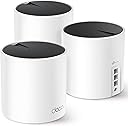
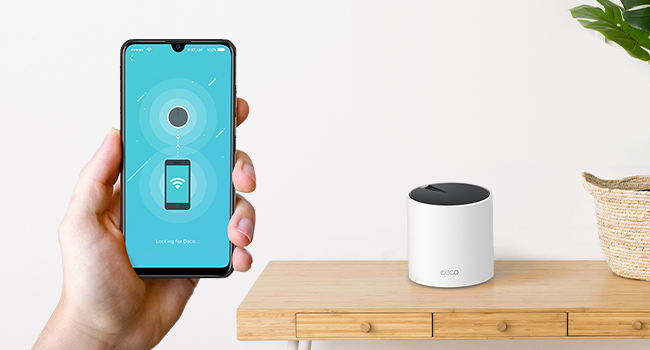
The TP-Link Deco AX3000 Mesh System (Deco X55) is a powerful Wi-Fi 6 solution designed to blanket up to 6500 sq.ft. with ultra-fast, reliable internet. Featuring tri-unit coverage, 3 gigabit Ethernet ports per device, and support for Ethernet backhaul, it replaces traditional routers and extenders to deliver seamless connectivity for up to 150 devices. Easy to set up via a user-friendly app, it’s perfect for modern homes craving buffer-free streaming, gaming, and smart device integration.


| ASIN | B09PRB1MZM |
| Are Batteries Included | No |
| Best Sellers Rank | #699 in Computers ( See Top 100 in Computers ) #4 in Whole Home & Mesh Wi-Fi Systems |
| Brand | TP-Link |
| Color | Black, White |
| Connectivity Type | Wi-Fi |
| Customer Reviews | 4.4 4.4 out of 5 stars (15,435) |
| Date First Available | 31 January 2022 |
| Item Weight | 2.33 Kilograms |
| Item model number | Deco X55 |
| Manufacturer | TP-Link |
| Number of Ethernet Ports | 9 |
| Operating System | Omada |
| Product Dimensions | 11 x 11 x 11.4 cm; 2.33 kg |
| Series | Deco X55 |
| Voltage | 12 Volts |
| Wireless Type | 802.11ac, 802.11ax, 802.11b, 802.11g, 802.11n |
O**Z
Easy to setup and connect.
Good set of wifi6 devices. Easy to setup and connect through the app. I've not had any problems thus far.
E**T
Super easy to install
Recently moved into a new home - which was larger than our previous. The three pack covers it perfectly. It is a game-changer for home connectivity in a larger home. With blazing-fast speeds and reliable coverage, it's a breath of fresh air for anyone tired of dead zones. The setup is a breeze, thanks to the user-friendly app, and the small Deco units seamlessly blends into almost any decor.
A**R
منتج جيد للاستخدام وسهل في التثبيت وشبكة مستقر خلال البيت
A**R
Decent coverage and easy to setup
Provide good coverage and easy to setup. Once connected an update is needed for the firmware, other than that it should be straight forward. I’m giving it a 4 star rating due to the range it covers. Most of the rooms (4 rooms) have at least 4/5 signal strength except for 1 room where the signal is weak and keeps dropping.
C**V
Great system
Really easy to set up and gives great coverage. Also easy to add on to with external units available as well.
H**A
Easy setup
I am very happy with the product very easy to setup and they cover very , i am buying 2 more bundle for familly house.
N**R
Don’t waste your money!
Generally, a terrible piece of equipment! I could be stood next to it, and my phone will still try to connect to the satellite device downstairs with the worst signal. Devices constantly drop out, satellites constantly drop out. I’ve tried all the methods mentioned on the app to improve coverage and reliability, but have come to the conclusion that it’s just a terrible expensive product!
A**S
As usually
No comment for this great product Really 💯 satisfied
A**N
Keeps disconnecting from the . unstable operation. I returned 2 of them, got stuck with one because I lost the box.
C**.
Also Sie funktionieren super. Kein hängen bleiben auch bei geschlossenen Räumen
M**D
كنت بعاني من ضعف اشارة الوايفاي بالمنزل لما اكون بعيد من الراوتر، ومنتج الـDeco X55 حل هذه المشكلة بكل جدارة. المنزل بالكامل الان اصبحت اشارة الوايفاي 2.4G/5G تغطيه وبسرعات ممتازة بل حتى خارج المنزل صارت توصل اشارة الوايفاي! يستحق كل ريال.
M**P
Great Mesh network. Easy to setup.
G**G
This is a great product perfect for gamers and streaming movies on amazon prime and others seamless maximum internet speed trough the entire house. Always reaching near the maximum speed in any room. The setup is extremely easy, plug any of the boosters on the the main modem then it becomes automatically the main one. I found that where it gets a little tricky is placing the two other boosters. For an optimal performance, you should not have more then one wall separating the boosters from one an other and not have to many electronics around it (magnetic field) otherwise it looses significant speed. but after about one hour trying to figure out where are the optimal places for each unit i get near maximum speed regardless of the room or level I'm on. WIFI 6 is a faster signal but also a shorter one so the units cannot be places to far apart. The time it took to setup and find the perfect spot is really worth the results and hassle free experience of high speed internet the the house. It really is trial and errors on where you place each unit. my suggestion connect the first one on to the router then plug the second unit where you would think is most appropriate then with your phone go on the deco app make sure your phone is connected to the second unit and do a speed test until you get the maximum speed (or at least near it) then repeat for the 3rd unit. An other tip : if you can try to put them at a certain height to get less interference. My las unit is placed near the basement ceiling and just by doing that i gained about half more of the speed. i love the fact that each unit has 3 ethernet ports on the back to be able to plug things that could be too far to reach the maximum speed on WIFI. 3 units was enough to get the main floor and basement covered at maximum WIFI speed. pros: Easy setup app is really easy to use and offers many options create a guest connection in less than 10 seconds small and discreet seamless internet trough the house (does not disconnect when changing unit connection) gives you a weekly report about your WIFI cons: if you have more than one wall separating one unit form another it looses significant speed but this is not due to the product but to the type of signal overall score A+
Trustpilot
1 month ago
4 days ago