Desertcart purchases this item on your behalf and handles shipping, customs, and support to Brazil.
🚀 Elevate your home network to pro-level speed and coverage — because buffering is so last decade!
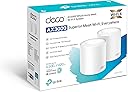
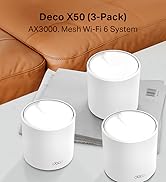
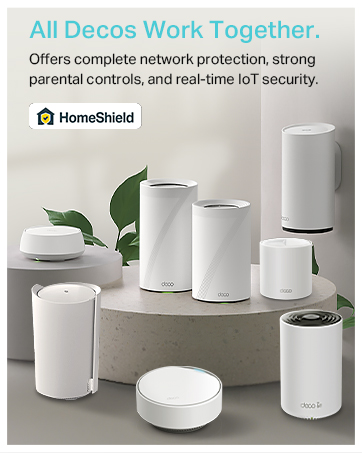
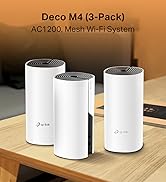
The TP-Link Deco X50 (2-pack) is a Wi-Fi 6 mesh system delivering combined wireless speeds up to 3000 Mbps across dual bands. It intelligently adapts to your home environment with AI-driven mesh technology, providing seamless coverage up to 4,500 sq ft and supporting over 150 connected devices. Each unit includes 3 Gigabit Ethernet ports for wired connections, while HomeShield security safeguards your network and IoT devices. Easy setup via the Deco app and a 3-year warranty make it a future-proof solution for demanding home and professional environments.


| ASIN | B09QMN7PRZ |
| Antenna Location | Home |
| Antenna Type | Fixed |
| Best Sellers Rank | 351 in Computers & Accessories ( See Top 100 in Computers & Accessories ) 1 in Whole Home & Mesh Wi-Fi Systems |
| Box Contents | Deco X50(2-pack) |
| Brand | TP-Link |
| Brand Name | TP-Link |
| Colour | White |
| Compatible Devices | Laptop, Personal Computer, Smart Television, Tablet |
| Compatible devices | Laptop, Personal Computer, Smart Television, Tablet |
| Connectivity Protocol | Wi-Fi |
| Connectivity Range | 4500 Square Feet |
| Connectivity Technology | Wi-Fi |
| Control Method | App |
| Country of Origin | China |
| Coverage | up to 4500 ft2 |
| Customer Reviews | 4.3 out of 5 stars 12,559 Reviews |
| Data Transfer Rate | 2402 Megabits Per Second, 3000 Megabits Per Second |
| EU Spare Part Availability Duration | 3 Years |
| Frequency | 5 GHz |
| Frequency Band Class | Dual-Band |
| Frequency band class | Dual-Band |
| Global Trade Identification Number | 04897098681664 |
| Has Internet Connectivity | Yes |
| Has Security Updates | Yes |
| Is Modem Compatible | No |
| Item Dimensions L x W x H | 11L x 11W x 11.4H centimetres |
| Item Weight | 0.38 Kilograms |
| LAN Port Bandwidth | 1000 Mbps |
| Manufacturer | TP-Link |
| Manufacturer Part Number | Deco X50(2-pack) |
| Maximum Upstream Data Transfer Rate | 1201 Megabits Per Second |
| Model Name | Deco X50(2-pack) |
| Model Number | Deco X50(2-pack) |
| Model name | Deco X50(2-pack) |
| Number of Antennas | 3 |
| Number of Ports | 3 |
| Operating System | Linux |
| Other Special Features of the Product | Beamforming,QoS,Parental Control |
| Router Firewall Security Level | Advanced |
| Router Network Type | hybrid |
| Security Protocol | WPA3 |
| Special feature | Beamforming , QoS , Parental Control |
| Unit Count | 2.0 count |
| Wi-Fi Generation | Wi-Fi 6 |
| Wireless Compability | 802.11ax |
| Wireless communication standard | 802.11ax |
A**9
Easy it is to set up and manage
I recently set up the TP-Link Deco X55 (3-pack) AX3000 Mesh WiFi 6 system across two properties sharing the same connection, and it’s been incredibly effective. The coverage is excellent, providing a strong, stable signal in both buildings without any dead zones. Even at a distance, the connection remains reliable, making it ideal for extending WiFi beyond a single home. Performance has been consistently impressive, with fast WiFi 6 speeds handling streaming, work, and multiple devices with ease. Setup was quick through the Deco app, and once running, the system manages everything seamlessly in the background. It’s a great solution if you need dependable, wide-reaching WiFi across larger or separate spaces.
L**S
856 Mbps Wi-Fi Everywhere when Wired is 900! - Absolutely Flawless Mesh System - 3 Pack
I purchased the TP-Link Deco X55 (3-pack set) with a very clear, demanding goal: to completely overhaul my home network, eliminate a frustrating wireless dead zone on my top floor, and future-proof my infrastructure (2-storey house). As a university professor, my career depends on absolute network stability and unthrottled bandwidth for high-definition, live-streamed lectures on Microsoft Teams. I have tried various networking solutions in the past, including an aging BT Smart Hub 2 paired with wireless BT discs, but nothing prepared me for the spectacular performance of this TP-Link mesh system. It is, without a doubt, a magnificent piece of engineering. The Wireless Paradox: Faster Over the Air Than via Cable!Before installing the Deco system, a standard speed test on my incoming wired line clocked right around 900 Mbps. However, once this 3-pack set was fully live and optimized, the system pulled off a truly mind-blowing technical paradox: I ran a wireless speed test on my first and second floors and my device clocked a breathtaking 856 Mbps over Wi-Fi! The wireless performance actually managed to come close to my initial wired baseline. To achieve nearly a thousand Megabits entirely over the air is a stellar hardware triumph. What is even more impressive is that this phenomenal near-gigabit speed isn’t just localized to one room; it carries seamlessly all around the main areas of the house.My Custom House-Wide 3-Pack Layout:To get these kinds of premium results, I utilized a robust Cat 7 Ethernet backbone running through the walls of my property to link the nodes together: Node 1 (Ground Floor - Under the Stairs): This is the master unit. It is plugged directly into a central network switch via a Cat 7 cable, which feeds from the main BT Hub. To prevent any network confusion or data collisions, I logged into the BT Hub manager, turned the old BT wireless signal completely OFF, and configured the Deco app into Access Point Mode. This setup allows the Deco mesh to handle all the wireless heavy lifting while keeping my network architecture completely clean. Node 2 (First Floor Office): This unit is hardwired directly into a Cat 7 Ethernet wall socket, creating a pure, unthrottled "wired backhaul" link to the ground floor. It acts as a local wireless power station for the middle tier of the house, and it is right here where my wireless devices are catching that maximum 856 Mbps breakthrough speed over wifi. Node 3 (Second Floor / Top Floor Hallway): This final unit runs completely wirelessly to bridge the upper level. Initially, I ran a speed test on my top-floor computer and was highly disappointed to see it capped at 318 Mbps. However, after methodical troubleshooting, I discovered the bottleneck had absolutely nothing to do with the Deco—it was a plug-in Dell hardware hub/docking station choking the line! The exact moment I bypassed that legacy Dell hub and ran a Cat 7 cable straight from my PC's Realtek network card into the back of the wireless Deco unit, the speeds instantly exploded to an incredible 837 Mbps! Flawless Smart Home Integration & Security:During setup, I used a clever trick: I mirrored my old BT network name (SSID) and password exactly within the Deco app. Thanks to this, my wireless Hikvision CCTV cameras instantly reconnected to the new mesh network without me needing to manually reprogram a single camera. The Final Verdict:The Deco X55 3-pack set is an absolute revelation. Even on the top floor, a wired connection into the wireless node completely eliminates local Wi-Fi jitter, giving me more than 80 times the bandwidth required for flawless, crystal-clear high-definition video streaming. If you have a multi-story home, thick building materials, or highly demanding bandwidth requirements, do not hesitate. This system is magnificent and worth every single penny. I am still smiling! I have not received any credit for this review, which is solely based on my opinion of the product. I hope my review is of assitance.
J**.
Powerful, reliable Wi‑Fi that finally covers the whole house
I’ve tried a few Wi‑Fi setups over the years — from a single router to old extenders — and struggled with rooms where the signal was weak or just didn’t reach. The TP-Link Deco X55 (3‑pack) mesh WiFi system has, quite frankly, solved those problems — it’s robust, fast, and has transformed internet coverage across my whole home. I first got the 3‑pack because we have multiple devices — phones, laptops, tablets, smart‑home gadgets — and needed coverage across different floors and rooms. Setting it up was surprisingly simple, even for someone not particularly tech‑savvy: plug in the main unit, use the Deco app to follow the prompts, and before I knew it the mesh network was live. The coverage is impressive — rooms that previously had weak or patchy signal are now solid and stable. Whether upstairs, in the kitchen, or tucked away in a corner room, I get strong, consistent Wi‑Fi. Even outdoors on the patio I noticed a usable signal, which has been great for music and streaming devices. Performance has been top‑notch. Streaming videos, video calls, gaming, working from home — everything feels smooth, with minimal buffering or connection drops. The WiFi 6 boost makes a difference, especially when multiple devices are connected: there’s no noticeable slowdown even during peak usage. I also like the extras: the three gigabit ports on each unit give flexibility if I want to connect wired devices, and the system’s ability to handle up to ~150 devices gives plenty of breathing room for current and future gadgets. The built‑in HomeShield security gives extra peace of mind, which feels important with so many smart devices around. Overall, the TP-Link Deco X55 (3‑pack) has been a real upgrade — it turned our home network from a weak, patchy system into a stable, high‑speed mesh that covers the entire house. For anyone struggling with poor Wi‑Fi range or juggling many devices at once, this mesh system is a strong recommendation.
R**.
Good product
Works very well, good wifi coverage and easy enough to set up.
L**D
Makes all the difference
Early days but so far am delighted with this mesh kit. Our wifi was deplorable despite our megafast broadband . Deadspots and slow speeds- Vodafone wifi extenders didn’t help much either. These little round things were amazing. Very easy to set up. No more dead spots. Speeds to match our BB package. Fairly expensive but definitely worth it .
M**7
Easy setup and excellent whole-home coverage
I bought this because my previous Gigaclear Linksys mesh WiFi setup kept dropping connection, which was getting frustrating. I wanted something more reliable that would give good coverage around the whole house without needing constant attention. Setup was really easy and didn’t take long. I’m already familiar with the Deco app and fairly comfortable with tech, so I found the process straightforward. The main thing I noticed was how much more stable the connection has been compared with the system it replaced. What I liked: - Very easy to set up through the Deco app - The connection has been much more reliable so far - The dedicated 2.4GHz IoT network is really useful for smart home devices - It works seamlessly with my older Deco M5 mesh kit, so I now have excellent whole-home coverage - I’m already a big fan of the TP-Link WiFi and smart home ecosystem, and this fits into it nicely What could be better: - No real downsides so far. Overall, I’ve been really impressed with the Deco X55. It has been a big improvement over my previous mesh system and has given me much more reliable coverage around the house. I’d recommend it if you want a strong, easy-to-manage mesh WiFi system, especially if you already use TP-Link or Deco products.
G**E
Forensic evidence proves systemic firmware failure
I am a Senior Enterprise Architect, and I purchased this unit for a professional home office. After weeks of instability, I performed a 6.5-hour forensic log analysis on the device. The results are undeniable: the firmware is fundamentally defective. The logs show 21,152 hard system errors in 6.5 hours—averaging one system-level panic every 1.12 seconds. Key technical failures confirmed by the system logs: Systemic DHCP/ARP Failure: The router repeatedly wipes its own internal IP lease table (clear ip events) and ARP table (client_mgmt evictions) without any client-side request. IETF Protocol Violation: The device violates the IETF RFC 2131 standard by purging leases immediately after confirming them, breaking connectivity for both Wi-Fi and hard-wired Ethernet devices. Daemon Failure Loop: The internal roaming/steering daemon (nrd) continuously crashes due to MLD (Wi-Fi 7) protocol mismatches, triggering a cascading network collapse that requires a manual hard reboot to recover. TP-Link Support has been dismissive, labelling these 21,000+ system errors as "benign." If you are a professional user or require a stable LAN, stay away from the Deco BE65 Pro. The hardware is promising, but the firmware is currently in a state of perpetual software panic that makes it unfit for purpose.
A**R
Fast, Stable, Easy to connect, Easy to manage
Easy - peasy to install, works amazingly well and fast, very secure connection, excellent network coverage within my whole flat, strong signal literally everywhere. For those who writes bad reviews — a small and free tip from IT expert, DO NOT Enable Fast Roaming if you don’t know what is it, okay? Do not touch “Advanced” section in “Security” settings if you don’t know what are you doing. Once you Enable “Fast Roaming” - you can’t just turn it off and move on. You’ll net to RESET everything and start from the scratch to get Stable network. Because if you don’t - your TP Link will be Up and Down and you’ll not have a clue Why, but this is because you turn on something you have no knowledge about. You’re welcome.
M**S
Mesh
Riktigt bra!
A**9
Works well
I have not had any issues with this mesh since initial set up. The set up is easy to follow and straight forward. I did have a minor issue, but that was on my end and my service provider was able to give me the correct information needed to set up. It has been running now for about 4 months and we have had steady connection across all devices - computers, TVs, gaming systems, smart home and surveillance systems. The back room that was often a dead zone now gets a good strong signal. I like that I am able to hard wire certain devices into each unit if I want to. We currently have the main home computer connected to the second unit, and the Xbox and smart TV on the third unit. Not that any of these devices were experiencing any lag or connection issues on wifi. It also has the option to set specific devices to priority on wifi or to set a device to only connect to one unit rather than the mesh to maintain a steady connection on items that are stationary. The parental controls are also a great feature. You do need to pay to unlock everything, but the free features are enough for my needs. It allows to filter content, block websites, and set up screen limits. The only inconvenience on the free side is that you cant set multiple time limits for differentdays of the week. While I can set a bed time daily, if I want to give extra time on the weekend I do need to manually reset it every week. However, it is not a big deal with the app. Wifi to all devices you set to your child's profile will be turned off at the time you set, and not turn back on until a time you set. Bedtime routines have gotten smoother as they quickly learned there is no "just a minute". They now take note of the time and hurry to finish, save their progress and say goodbye to friends before the time runs out.
A**H
Excellent Coverage, easy set up
This has worked out really well for us. We live in a good sized 4 bed villa and had lots of places with weak or no wifi. We now get good coverage everywhere and in the garden too. It was pretty easy to set up using the app, I just haven't worked out how to switch my Alexa and Sonos over to the new network, I'll fix that when I have some time.
J**Y
Très très bien
Pratique, simple à mettre en place Très bonne portance
M**K
Good product
Unfortunately I made a huge mistake by getting this product from the UK The power adapters are not suitable for the Australian market and I would need to buy converters. Also I am unable to get Australian power adapters anywhere They are not sold as a separate item
Trustpilot
3 weeks ago
1 month ago