Desertcart purchases this item on your behalf and handles shipping, customs, and support to Brazil.
🎥 Elevate your smartphone filmmaking game—because your feed deserves the pro touch!
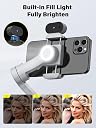
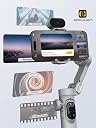
The Smart X Pro Gimbal Stabilizer is a portable, foldable 3-axis stabilizer designed for iPhone and Android smartphones. Featuring powerful brushless motors with SMART 7.0 anti-shake technology, a built-in RGB fill light with adjustable brightness, and a 3200mAh battery offering up to 12 hours of use, it enables professional-quality video shooting. The intuitive AOCHUAN app supports AI tracking, gesture control, and multiple creative shooting modes, making it ideal for vloggers, live streamers, and content creators seeking smooth, cinematic footage anywhere.


| ASIN | B0D69HZ48P |
| Audio Recording | No |
| Best Sellers Rank | #89,218 in Mobile Phones & Communication Products ( See Top 100 in Mobile Phones & Communication Products ) #285 in Mobile Phone Handheld Gimbals & Stabilisers |
| Brand | AOCHUAN |
| Built-In Media | 1×USB-C charging cable, 2×User Manual, AI tracking sensor, Smart XPRO Gimbal, Tripod |
| Color | Grey |
| Colour | Grey |
| Compatible Devices | Cellphone |
| Compatible devices | Cellphone |
| Customer Reviews | 3.8 out of 5 stars 85 Reviews |
| Exposure Control Type | Manual (M) |
| File Format | MP4 |
| Folded Size | 12 cm x 6 cm x 3 cm |
| Folded size | 12 cm x 6 cm x 3 cm |
| Image stabilization | Yes |
| Item Weight | 310 Grams |
| Item weight | 310 Grams |
| Manufacturer | AOCHUAN |
| Manufacturer Part Number | AC XPRO AI GREY |
| Maximum Weight Recommendation | 250 Grams |
| Media Type | EnhancedContent |
| Model Name | AOCHUAN X Pro |
| Model Number | AC XPRO AI GREY |
| Model Series | X Pro |
| Number of Items | 1 |
| Number of Packs | 1 |
| Shooting Modes | Photo, Video, Panorama, Portrait |
| Video Capture Format | MP4 |
| Video Capture Resolution | 1920 x 1080 |
| Viewfinder Type | LCD screen |
| Water Resistance Level | Not Water Resistant |
H**O
Awesome gimbal with not so good instructions
First off, the instructions that come with this leave a lot to be desired. I had to fiddle around and read some websites/watch videos to get a good handle on how this works. With that being said, this is a pretty amazing gimbal that has allowed me to get some pretty cool shots. I have tried it with an iPhone SE 2022 and works great with this size phone. The phone doesn't seem to get in the way of the arms when moving it around with the joystick. I could imagine some larger phones might have some clearance issues but didn't test this. I prefer smaller phones myself as my hands are on the smaller side. The gimbal does a nice job of stabilizing my phone and gives me nice and clean stable videos. No way you could get this smooth with your hand holding the phone. I could see this being useful when filming activities on the go like skateboarding and such. You can use the AI tracking abilities of the software or use the tracking device to follow a object, subject, person or face which is pretty nice making it easier to get the perfect shot. I did find that the gestures used to control the tracking and features, are sometimes not recognized and you may have to perform them a couple times for them to be recognized. A minor issue that could potentially be improved through software/firmware updates. The gimbal can be used with other software and you can still use the AI features by using the AI tracker device that clips to the top of the gimbal. A nice feature as who knows how long the app will stay updated going forward. It is nice that it comes with a mini tripod that attaches to the bottom. I guess you could use a normal size tripod on this as well. Pretty nice feature. What I really like about this gimbal is the wireless charging feature. No idea if this is common on gimbals but I was pleasantly surprised when I read about it. It does indeed work. I also really like the removable 18650 battery. You can charge it through the device but I have a dedicated 18650 charger with extra 18650 batteries for another hobby and I'm glad they use the same batteries. Perfect for me. Overall, this is a great gimbal to use to get smooth professional looking shots. I urge you to go online and learn a little about gimbals and their abilities before using this as I think that will cut down on the learning curve if you are new to gimbals. I wish the instructions we more helpful as well. But overall, a very nice product that seems to be exactly what it claims it is.
M**K
Excellent Gimbal Stabilizer with Smart Features
I recently started using the AOCHUAN X Pro Grey AI Version Gimbal Stabilizer for my smartphone, and it has been a game changer for my video recording. This 3-axis gimbal stabilizer offers a range of features that enhance video quality and ease of use, making it a standout choice for both amateur and serious content creators. Stabilization and Performance: The 3-axis stabilization is highly effective, delivering smooth and steady footage even during dynamic movements. The gimbal does an excellent job of minimizing shakes and jitters, resulting in professional-quality videos. Whether I’m recording a fast-paced action scene or a simple walk-through, the stabilization keeps the footage fluid and smooth. AI Tracking and Ease of Use: One of the most impressive features is the AI tracking capability. The gimbal can automatically track subjects without needing an app, which is incredibly convenient. The tracking is precise and reliable, making it easy to keep subjects in the frame and in focus. This feature has made it simple to capture dynamic shots and follow action without manual adjustments. OLED Display and Controls: The built-in OLED display is a great addition. It provides real-time feedback on the gimbal’s status, including battery life and mode settings. The controls are intuitive and easily accessible, allowing for quick adjustments and settings changes. The interface is user-friendly, making it straightforward to switch between different modes and features. Built-in Light: The built-in light is a fantastic feature for low-light environments. It provides ample illumination for close-up shots and ensures that videos remain clear and vibrant even in challenging lighting conditions. The light is adjustable, allowing for customization based on the shooting environment. Compatibility and Build Quality: The gimbal is compatible with both iPhone and Android devices, making it versatile for different users. The build quality is solid and durable, with a sleek design that feels robust yet lightweight. It’s comfortable to hold and use for extended periods, which is important for long shooting sessions. Overall: The AOCHUAN X Pro Grey AI Version Gimbal Stabilizer is an outstanding tool for anyone serious about smartphone videography. Its 3-axis stabilization, AI tracking, OLED display, and built-in light make it a comprehensive and powerful device. The ease of use and high performance have greatly improved the quality of my videos, and the added convenience of not needing an app for tracking is a major plus. Highly recommended for its impressive features, build quality, and overall effectiveness in enhancing smartphone video recording!
F**O
Precio calidad
Se ve de buena calidad y funcionalidad
O**A
Calidad precio
Muy buen estabilizador. Tiene errores y se vuelve loco, pero no dura mucho
A**T
Very compact gimbal, packed with features
This gimbal, when folded is very small which makes it a perfect travel companion. It is lightweight and easy to handle and does a great job at holding your phone level while recording. The app for the gimbal is very interactive and has some great features that are easy to use and work extremely well. The problem with the app is that there is really no instruction as to how to use it or how to set the features so you will probably spend quite a bit of time learning the app and how to manipulate it to suit your needs. The gimbal is pretty much the same thing and the manual that it comes with it is pretty much useless for anyone who is new to the world of gimbals. (that includes me) Watching the tutorial videos helped a bit but they still left me trying to understand what I was seeing, hearing and experiencing with the gimbal. I like the picture smoothness and the quality of panning that I get from using the gimbal but quite often, I find myself asking “why did it just do that?”. The more I work with the gimbal, the better my understanding of how it works and what modes I should be using so I guess my point here is that if you are new to gimbals, there is a learning curve so be prepared to watch plenty of tutorial videos and practice a LOT with it to get the results you want. The phone holds securely in the gimbal and the charging feature works well but it will drain your gimbal battery quickly. The gimbal however does charge fairly quickly and is ready for use again in no time. The initial levelling process can be a little frustrating when you are installing the phone and there doesn’t seem to be any way to get it perfectly level on a consistent basis before turning on the gimbal. You will think that you have the phone levelled out as per the video tutorial and you bump the gimbal and suddenly it is no longer level. Makes me wonder if I am doing it wrong but it has been a little frustrating. The hand gestures work, but they are slow to react and tedious to use. While there is the on-screen prompts as to what gestures to use for what functions, if you are going to be that close to read the prompts, then you can just press the feature you want on the phone. I don’t really see a need or a use for the hand gestures. The light works well and does a pretty good job at illuminating your subject but it doesn’t seem to light up an area very much and it seems to provide more of a vignette effect rather than illuminating the area. The small included tripod mounts securely to the bottom of the gimbal and allows it to stand on a tabletop or other flat surface. The tripod is sturdy and very stabile and I have had no issues with instability when using the tripod mount. The box that this gimbal is shipped in is the only form of a case that you will have and it would have been nice for a carry case to be included to protect the gimbal while travelling. All in all, this is a nice gimbal that works very well and does a great job at getting professional style video shots on your smartphone. The drawback is the learning curve and the lack of instruction. I still like it though.
Trustpilot
4 days ago
3 weeks ago