🚀 Upgrade your workflow with speed and resilience!
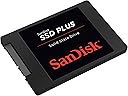
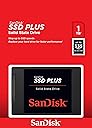
The SanDisk SSD PLUS 1TB is a high-performance SATA III 2.5" internal solid state drive delivering up to 535 MB/s read speeds and 350 MB/s write speeds. Designed for both business and personal use, it offers shock and vibration resistance for durability, making it a reliable and cost-effective upgrade from traditional 5400 RPM hard drives.


| ASIN | B09NQJMW28 |
| Best Sellers Rank | #93 in Internal Solid State Drives |
| Brand | Sandisk |
| Color | Black |
| Customer Reviews | 4.7 4.7 out of 5 stars (5,214) |
| Date First Available | December 16, 2021 |
| Flash Memory Size | 1 TB |
| Hard Drive | 1 TB Solid State Drive |
| Hard Drive Interface | Solid State |
| Hardware Platform | PC |
| Item Dimensions LxWxH | 0.28 x 3.96 x 2.75 inches |
| Item Weight | 1.12 ounces |
| Item model number | SDSSDA-1T00-G27 |
| Language | English |
| Manufacturer | Western Digital Technologies, Inc. |
| Product Dimensions | 0.28 x 3.96 x 2.75 inches |
| Series | SanDisk SSD Plus Solid State Drive |
T**N
Great SSD
Awesome and reliable. Installed into my laptop to upgrade the storage for games and it slotted right into the SATA port. Always had great response time as I use it for nearly all of my Steam library. SanDisk is a reliable digital storage manufacturer and I would buy from them over and over.
A**R
Game-Changing Speed and Space—Reliable SSD Upgrade!
Swapping out my old hard drive for the SanDisk SSD PLUS 1TB was like giving my computer a shot of adrenaline. This thing is blazing fast! Boot-up times went from minutes to mere seconds, and programs now load almost instantly. Seriously, it’s like my laptop had a complete personality makeover. The 1TB capacity is a dream for someone like me who juggles tons of files—photos, videos, and hefty programs. It’s more than enough space to keep everything organized without running into those dreaded “disk full” warnings. Installation was a breeze. Whether you’re tech-savvy or a total newbie, you’ll find it straightforward to pop this in. And it’s so quiet—no spinning or humming like the old hard drives. Performance-wise, the advertised speeds of up to 535 MB/s hold up. Transfers are lightning-fast, even with larger files. It’s made multitasking a joy again instead of a chore. If you’re on the fence about upgrading your system, don’t wait. This SSD is a cost-effective way to breathe new life into an aging computer or give a newer one an edge. Highly recommend for anyone who values speed, space, and reliability.
J**N
Trusted brand, great price
I have trusted SanDisk for many years for reliability. I snagged this at an amazing price. No complaints. It's fast and has plenty of storage. It's small, and fits any 2.5 slot in a case.
C**S
Excellent data transfer speed
So far it has worked perfectly, my laptop works super fast
L**S
Excellent product
This is a very well made product. Several exhaustive disk tests revealed zero errors on the drive. Quick transfer rate and an excellent value.
R**N
Like a whole new computer!
Just installed this new SSD and I must say my old PC now has some PEP! However, cloning with the provided software was a grueling 2 day process that had me searching the software providers support forums for hours! In my case you couldn't just go through the standard "clone" process. When I tried cloning via the software I would get through some of the steps, and then if would just take me back to the beginning... No error messages whatsoever. On the occasion I would make it to the final step and click "proceed" the software interface would just vanish from the screen. I could see it was still running via the task manager, but was it cloning? Who knows? After searching I came across a post on the software providers forum that said don't clone, but create a recovery USB with the software. Once the recovery USB is made, restart the PC, go into the BIOS and change the boot order (you also may need to disable secure boot as well) THEN when you restart the PC the recovery software will run THEN you can use the actual clone process via the recovery software. I did run into one error there where it said my "disk was locked" but a restart seemed to fix that issue. It took about 2 hours to clove my 987 GB of data. Unplugged my old HDD and plugged in the SDD, restarted the PC, got a BOOT error (just need to enable secure boot again) restarted again and BAM! Lightning fast computing here I come!
D**G
Very happy with the SSD and would buy again
Massive space for extending life of computer. Genuine Sandisk product verified with one call to Sandisk! The cloning software from the Sandisk website works perfectly but is a massive 1G download...... Very happy with the SSD and would buy again.
S**E
Exactly As Hoped
SanDisk SSD PLUS 1TB Internal SSD - SATA III 6 Gb/s, 2.5 in This SSD worked as hoped right from the box. First I copied a single 375 GB file to it from a rotating disk, writing at about 240-250 MB/s (according to Microsoft) the whole way, no throttling down for overheating. Then it was installed permanently in the desktop computer and the side cover closed. Using a test script, RoboCopy copied a single 57.8 GB encrypted file 5 times in immediate succession from a RAM drive to the SSD in an average of 190.2 seconds, for an average speed of 304 MB/s. We're talking real MB here BTW, not some dopey Microsoft MiB labeled as MB. Then when the /J RoboCopy option (no buffering) was used the speed dropped to about 250 MB/s, which is about what the computer gets from modern SATA or USB-connected rotating drives. Not great, but much better than the ancient 5400 RPM drive that it replaced. The computer was built here a little over 3 years ago, with an AMD 5950x CPU in an ROG Crosshair VIII Dark Hero mobo. It has 128 GB of fast memory, half of which is allocated to the RAM drive. The new SSD was (and still is) connected to a standard SATA port on that mobo and mounted in one of the computer's drive slots with a 2.5-in to 3.5-in adapter. No special cooling was used. Two days earlier I had received a Silicon Power "SP 1TB SSD 3D NAND A55 SLC Cache Performance Boost SATA III 2.5" Internal Solid State Drive." Installed in the same way, and using the same practical tests, that drive initially seemed to perform well. However it soon started throttling down during a big transfer from RAM, from about 440 MB/s to 30 MB/s. This was unacceptably slow, and didn't improve when I attempted to cool the drive. It was initially faster than the SanDisk, but the heat-management algorithm was way out of whack. That drive is already packaged up for return. Too bad - I've had other experiences with SP that were quite good.
L**N
Used for a PS3 HDD swap from the stock 120gb to 1tb, runs and transfers much faster, btw I also recommend cracking open your system and replacing the thermal paste, as most people don’t know how much that helps. Happy gaming!
J**L
it's working as describe so far, using it in a Eufy security system
M**S
Great piece of kit, had a bit of trouble cloning drives but used Disk Genius {free download} took a while to do but connection via Startech transfer lead which uses USB to transfer data. Be warned many of the alleged free cloning software programmes are not free, once installed you have to pay to use them unlike Disk Genius. Once cloned replaced drives and away she went. Using on 7 year old HP laptop boot times down from 2 minutes plus to just over 20 seconds. Well impressed. Very quiet as expected.
M**T
Muito bom, funcionando perfeitamente
M**S
Buen rendimiento y velocidad, agilizó mi equipo ya que ya estaba muy lento, tardaba mucho en iniciar, pero ahora se inicia rápido.
Trustpilot
1 month ago
3 weeks ago