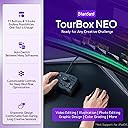
🎨 Unlock your creative superpowers with TourBox NEO — where control meets inspiration!
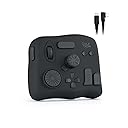
TourBox NEO is a next-generation productivity controller designed for creators across image, audio, drawing, and video editing. Featuring 42 customizable controls, macro automation, and multi-preset management, it integrates seamlessly with all major creative software to streamline workflows and enhance creative precision.
| Asin | B08HCV1JGB |
| Item Model Number | TourBox NEO AMTBG_H_L_N |
| Language | Spanish |
| Product Dimensions | 17 x 4 x 14 cm; 370 g |
W**N
Great time saver for video editing
The TourBox didn't have a pre-built profile for CapCut, but it was easy to build one customized how I like it. I probably would have changed the default settings anyway. It works great for video editing, saving many clicks, keystrokes and mouse movements. I love the precision of the wheel for moving frame by frame and how it scrolls proportionately faster as you turn it faster. I also built a profile for editing photos with Luminar Neo. It saves some time, but video editing is where it really shines. It's heavy enough and has rubber feet with decent grip, so it doesn't slide around. It feels very well built. I highly recommend the TourBox for video editing.
E**I
منتج جبار للمحترفين
افظل جهاز تحكمي ومريح عملا هو هذا الجهاز الجبار ، افادني كبرامج الرسم ، اشترها ولا تترددوا
A**9
"TourBox NEO Quick Key Tools: A Helpful Shortcut Device for Creators, but with a Few Cons"
I recently purchased the TourBox NEO Quick Key Tools for Creators and I am blown away by how much it has improved my workflow. With its 14 customizable shortcut keys, I can easily access my most-used tools and functions, saving me time and increasing my productivity. The TourBox NEO also offers over 100 customization options, allowing me to fine-tune the device to fit my specific needs. The software interface is user-friendly and intuitive, making it easy to set up and customize. One of the things I love most about the TourBox NEO is its compact size. It's small enough to fit comfortably on my desk without taking up too much space, but still provides all the functionality I need as a content creator. Overall, I highly recommend the TourBox NEO Quick Key Tools for Creators to anyone looking for a reliable and efficient way to streamline their workflow. It's a game-changer for anyone who wants to work faster and more efficiently. Cons - While the TourBox NEO offers a lot of customization options for creators, there are some cons that potential buyers should be aware of before making a purchase. Firstly, the device can take some time to set up and get used to. The customization options are extensive, but this can also make it overwhelming for some users. The device can also be bulky and take up a significant amount of desk space, which may be an issue for those with limited workspace. Additionally, the TourBox NEO may not be compatible with all software programs, which limits its versatility for certain creators. Some users have also reported issues with the device not functioning properly or disconnecting from the computer. Overall, while the TourBox NEO offers many customization options for creators, it may not be the best fit for everyone. Potential buyers should consider their workspace limitations and software compatibility before making a purchase.
S**G
Hervorragend geeignet für DCS Flugsimulator
Habe mir das Teil gekauft, weil ich weder an der Tastatur, noch am Hotas Warthog (Joystick/Schubregler) Drehregler habe. Installieren ist problemlos und das Programm öffnet sofort in Deutsch. Die Belegung der Drehregler und Tasten ist simpel und selbsterklärend. Einsatzmöglichkeiten nahezu unbegrenzt: Höhenmesser einstellen, Beleuchtung des Cockpits, Lautstärke der Funkgeräte, Reichweite des Radars etc. Es gibt 3 Einstellungen für die Feinheit Drehregler. Falls man eine feinere oder gröbere Einstellung wünscht. Für die Höhenmesser in der A-10 und Hornet lässt sich der Luftdruck so präzise einstellen. Durch unterschiedliche Formen der Drehregler und Tasten ist das Gerät auch blind zu bedienen. Also ideal geeignet, wenn man den Feind nicht aus den Augen verlieren darf….. Eine ideale Ergänzung zum Elgato Stream Deck!
A**R
Love it since first touch. (Get bluetooth one before is late)
Love it since first setup and touch. Spinning wheels are just something what I needed for editing. So easy get through your frames in videos a cuts. Just love it. I struggled so badly to memorise keyboard shortcuts, this product is more touchy and click bastard that your hand will love it haha. I wish I could switch it for bluetooth version now. However still happy with the product and recommend. Software is great and also helps you with transparent bar on your screen to figure out which button or combination does what. Works great with DaVinci Resolve, new update comes for color grading.
Trustpilot
1 month ago
3 days ago