


💼 Elevate your digital workspace with unstoppable speed and storage power!
The WD My Book Duo 36TB is a high-capacity external RAID hard drive featuring ultra-fast USB 3.1 Type-C connectivity, flexible RAID modes for speed or redundancy, dual USB hub ports for expanded accessory support, and robust 256-bit AES hardware encryption to safeguard your data—all designed to meet the demanding needs of professionals and creatives.
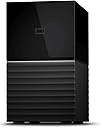
| ASIN | B08L979HLT |
| Additional Features | Hardware Encryption |
| Best Sellers Rank | #2,080 in Computers ( See Top 100 in Computers ) #15 in External Hard Drives |
| Brand | WD |
| Built-In Media | AC adapter, Disk Replacement Tool, Drive Replacement Guide, Desktop RAID Hard Drive, WD Discovery™ software†† for backup, security, and drive utilities, Quick Install Guide, SWR, USB-C to USB-C cable, USB-C to USB-A cable |
| Cache Memory Installed Size | 36 |
| Color | black |
| Compatible Devices | Desktop |
| Compatible Video Game Console Models | Microsoft Xbox SERIES S |
| Connectivity Technology | USB |
| Connectivity technology | USB |
| Customer Package Type | Standard packaging |
| Customer Reviews | 4.1 out of 5 stars 830 Reviews |
| Digital Storage Capacity | 36 TB |
| Digital storage capacity | 36 TB |
| Enclosure Material | Metal |
| Form Factor | 3.5-inch |
| Hard Disk Description | Mechanical Hard Disk |
| Hard Disk Interface | USB 3.0 |
| Hard disk description | Mechanical Hard Disk |
| Hard disk interface | USB 3.0 |
| Hard-Drive Size | 36 TB |
| Hardware Connectivity | USB 3.0 |
| Installation Type | External Hard Drive |
| Item Dimensions L x W x Thickness | 18L x 16W x 10Th centimeters |
| Item Weight | 2 Kilograms |
| Manufacturer | Western Digital |
| Media Speed | 360 Megabytes Per Second |
| Mfr Part Number | WDBFBE0360JBK-EESN |
| Model Name | WDBFBE0360JBK-EESN |
| Model Number | WDBFBE0360JBK-EESN |
| Number of Items | 1 |
| Read Speed | 360 Megabytes Per Second |
| Special features | Hardware Encryption |
| Specific Uses For Product | Gaming, Multimedia |
| UPC | 718037878652 |
| Unit Count | 1 Count |
T**S
Terrible Product
Stopped working after 1 hour and did not show on my macbook again. Sent it back inside 3 hours of use. Complete waste of time.
O**V
Defective unit – shuts down immediately
The device powers on briefly, fans spin for about a second, then it shuts down completely. It is not detected by any computer, indicating a hardware or power-related defect.
S**-
3 gün içinde ikiside çöktü mybook20tb mybook36tb
36 değil 32 terabayte bukadar büyük fark varken ya byte diye pazarlayın yada tam 36 yapın artık 1000 1024 çarpanı geride kaldı. Başlangıçta herşey iyiydi veri gönderim hızı vs my booktan my booka teracopy ile kopyalama yaparken driver ve partitionlar hepsi göçtü günlerce uğraş sonrası dosya dizililimi stabil olduğundan sürücüleri kurtarabildim şu an verileri başka bir hazneye atıyorum ancak veri aktarIm hızı 4 25mb snlerde veri kaybına karşılık aktarmayı da kesemiyorum my blokların ikiside çöktü ürünü geri gönderin arızalı hatası veriyor veri kurtarna sonrası tam format çekip duruma göre iade etmeyi düşünüyorum. NOT MY booktan my booka her dosya kopyalama cabalamda teracopy ile aniden çöküyor istisnasız herzaman windows ile kopyalarken zaten çok yavaş başlıyor sonra 4 5 dk içersinde erişim hatası verip diskleri kapatıyor. Su an başka bir hd ye veri atarım çabalarıma rağmen max veri hızı 4mb ile 25mb arası gidip geliyor bu gidişle haftalar dahi sürebilir not ikinci my book u baglayana kadar 20tb olan olan güzel çalışıyordu ama sonuçta 15 gün içersinde 2side şu an göçük tüm partitionlar silindi ext fat formatından dosya indexi alip kurtarabiliyorum ama ntfs tamamen gitti sonuçta iki partition u da tavsiye etmiyorum hpfs 3. Parti yazilimla kurun daha sağlıklı olabilir exfat çok sık çöküyor ama kurtarmaya daha çok imkan veriyor ntfs çökerse dosyalara ulaşmanız daha zor çökene kadar daha dayanıklı ama çökmüş harddiskte veri kurtarma çok sınırlı.
C**W
I love these, it's the BEST way to buy WD Red NAS drives
So far I have bought 12 of these WD My Book Duo drives (The 24TB capacity model). I have 3 NAS servers at home, one of which is a media server, another is used to backup the media server and the third is my main network server for all my data. I had previously purchased WD Red 6TB drives to populate the servers and as time has gone on, the drives have started to get quite full (Each server takes 6 disks in a RAID 5 config, meaning that each server had around 27TB of storage space available). I had been looking to upgrade the servers to a higher storage capacity, but reader, as you know, buying hard drives is very expensive and for some bizarre reason, prices can fluctuate by around +/- £100 in a day on Amazon, which makes no sense whatsoever. I found out about "shucking" drives which is an ok way of getting drives of a higher capacity at a cheaper cost to go inside servers, but they can have issues with one of the pins needing to be covered so that the drive will power up. I don't know if my servers would have that issue - and as the drives in the servers are in a RAID config, I didn't want to run the risk of losing all my data. I then saw these WD My Book Duo drives that come with WD Red drives inside them. I downloaded the manual to see if the drives can be easily removed - and it said in the manual that Western Digital provide a plastic tool for popping the drive box open so that the individual drives can be removed. So, I took the plunge and bought 3 of these so that I would have a total of 6 x 12tb WD Red drives. On the day that I placed the order, they were down in price - and if you put these in your "wish list" you can monitor on a daily basis how frequently the prices change. I bought them on a day when they had dropped in price by approximately £100. So, thanks to Prime, the My Book Duo's arrived the next day and I set about removing the disks from their cases. This was a bit fiddly at first, but once I got the first drive out of it's plastic holder, the rest were easy. I downloaded WD's own drive diagnostics program from the WD website as I wanted to make sure the drives were all ok and had no bad sectors. I have a external hard drive enclosure that I connected each drive up to in turn and ran the extended diagnostic test that checks every single sector of the drives. This takes around 18-20 hours per drive, but my data is important, so I was happy to take the tests slowly. All 6 drives passed the tests and I was then able to put them in the NAS. While the diagnostics were running, I used that time to backup the main media server NAS to it's backup server, just to be on the safe side and then when all 6 drives had been thoroughly tested, I set about putting them in the media server. I won't bore you with that process as it's irrelevant to the review, however, it worked ok and at the end of it, I had around 55TB of usable space on the media server. Once that server was completed, next time that Amazon reduced the price of the My Book Duo's again, I purchasd more for the rest of the servers. And, best of all, as I had previously used 6TB WD Red drives on my servers, once each disk had been removed and partitions deleted, I was able to put 2 6TB drives inside each My Book Duo so that I have additional backup storage available for all my other data. So - if you plan on shucking the drives to increase capacity in a server, these are the best way of buying WD Red drives. If you plan on just using the drives as they are, inside the My Book Duo enclosure, then again, these are the best way of buying WD Red drives. WD Red's are the best drives for use on servers and I also find them to be the best to use for backups.
D**U
That's a lot of backup right there!
I don't like the WD Software so much, it only opens a small rectangle window from the system tray, haven't tested the Acronis software that comes with it as I already have one, but it's a great addition. Make sure to save a copy of the software installtion files located at the root of the drive before changing the RAID configuration as the WD is not copying itself back onto the drive. Right now I'm transferring the data from my old 18Tb onto these new 36Tb, been a couple of hours, both drives seems to be pretty quiet. They are bigger than my single 18Tb drives but much smaller than I'd thought. Comes with a USBC cable and a USB3 -> USBC cable. The RAID configuration takes a few minutes. if you need encryption like I do, run bitlocker before transfering any files, it will then be a lot faster, haven't tried veracrypt or a LUKS encrypted partition but I'm guessing that they would both be a lot slower, especially veracrypt.
C**N
compatible RAID 0 et RAID 1
Un très bon Système de Sauvegarde. certes un peu bruyant, mais comme tout les disque dur, il reste super rapide surtout en RAID 0. Vue qu'il combine la vitesse de 2 disques. La possibilité de l'évolué dans le temps et un de ces plus grand atout. il est possible de retirer les disques, de modifier le type de sauvegarde ou de l'utilisé comme un seul point d'accès a ces données, par exemple si on a plusieurs disque dur, on les copies tous la dessus et on se retrouve avec un stockage unique et facile d'accès. JE LE RECOMMANDE VIVEMENT!
S**I
très bon produit, qui reste assez fiable dans le temps
J'ai choisi cette marque avant tout pour sa fiabilité sur le long terme. En effet il y a pas mal de différence de prix pour les mêmes capacités et un disque dur reste un disque dur. De mon côté, je ne me base pas sur les performances en terme de vitesse, car elles sont presque tout au similaire, mais je me bats plus sur la fiabilité sur le long terme, car le but d'un disque dur et de stocker, il serait embêtant d'avoir un disque dur qui lâche au bout de 1 ans ou 2 ans, et de tout perdre. Concernant ce disque dur, il s'agit tout simplement d'un boîtier rack, avec l'emplacement de deux disques durs. Il n'y a rien d'exceptionnel, à part le design qui est plutôt sympa. Il y a la possibilité de retirer les disques si on le souhaite, et de mettre d'autres disques par la suite. Il y a bien sûr que 2 emplacements, et les deux emplacements sont occupés par deux disques durs fourni d'origine. Il est fourni avec un câble USB classique, et un câbles USB type C. En ce qui concerne USB type C, je trouve ça très pratique notamment pour les nouveaux MacBook Pro de chez Apple, ou tout simplement pour effectuer la sauvegarde de son téléphone portable directement sur le disque dur sans passer par un ordinateur. La notice est ridicule, et ne sert à rien du tout, La Documentation se trouve en ligne, mais nous avons quasiment besoin d'aucune documentation, tout se fait automatiquement.
Trustpilot
1 week ago
2 weeks ago