


🎥 Capture Every Moment in Stunning 4K—Stream Like a Pro, No Compromises!
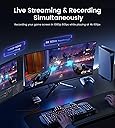
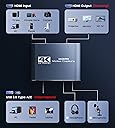
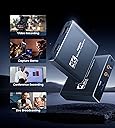
The MOYOON 4K Capture Card delivers ultra-HD 4K@60Hz pass-through and smooth 1080P@60FPS recording with ultra-low latency via USB 3.0/Type-C. Featuring a durable aluminum shell and 3.5mm mic input for live commentary, it supports plug-and-play use across Windows, MacOS, Linux, and Android, compatible with all major consoles and cameras. Ideal for gamers, content creators, and broadcasters seeking professional-grade streaming and recording with minimal setup.






| ASIN | B09CDMDNKY |
| AV Output | YUV |
| Antenna Location | Video Recording |
| Best Sellers Rank | #286 in Internal TV Tuner & Video Capture Cards |
| Brand | MOYOON |
| Built-In Media | USB3.0 to USB/Type c cable |
| Compatible Devices | Gaming Console, Nintendo Switch, PS4, PS5, Xbox one, Camera, Personal Computer, Tablet |
| Customer Reviews | 4.1 out of 5 stars 1,208 Reviews |
| Hardware Interface | USB 2.0 |
| Item Weight | 0.1 kg |
| Manufacturer | MOYOON |
| Mfr Part Number | AUB09CDMDNKY |
| Minimum System Requirements | Windows 7 (64-bit), Mac OS X 10.10 or later, Linux kernel 4.4 or later, Android 5.0 or later, USB 3.0 port, 1 GB RAM |
| Model Name | AUB09CDMDNKY |
| Model Number | AUB09CDMDNKY |
| Number of Items | 1 |
| Number of Packs | 1 |
| Operating System | Android, Linux, Mac, Windows 7 above |
| Other Special Features of the Product | Recording Scheduler |
| Platform | Nintendo Switch, PlayStation 4, PlayStation 5, Xbox, Xbox One |
| Recommended Uses For Product | Video Recording |
| Special Feature | Recording Scheduler |
| UPC | 754909813543 |
| Unit Count | 1 Count |
| Video Capture Resolution | 1080p |
| Warranty Description | 1 month |
H**H
Decent Budget Capture Card
kind of tricky to use, but all in all a great capture card if youre on a budget! 1080p and 30-60fps IDK if it can go 4k cause i stream in 1080p. First time setup i found a good video to get rid of the sound delay but youll have to figure that out. i have been using this for half a year and it has treated me nicely!
S**A
Works great but one slight problem. UPDATE
11.2.21 UPDATE I decided to ask for a replacement on this capture card to see if I still had a static sound issue. Upon unboxing and hooking the capture card, I realized the cable that goes from the card to pc didn’t work. I talked to customer service who reached out quickly after my review and they apologized profusely, and offered to send another replacement. Luckily the cable from the last card works, so I didn’t need another replacement, but customer service gets a 10 out of 10 from me. Very kind and understanding, I’m glad they are a seller who cares about their customers opinions and making things right. Thank you again so much for reaching out and helping me, I sincerely appreciate it. I bought this to stream my switch gaming to twitch, one of the very first things I noticed is there is a static-y squealing noise within the switch audio. I don’t have problems with my audio on my pc or switch so I’m assuming it’s probably the capture card. Regardless of that it works amazing. I may buy another capture card to make sure it’s not my pc, like I said I never had issues with noise like that until I plugged my switch & pc into the capture card.
M**E
It works!
I got it working, and I am happy with it so far. I am capturing video from a camera. I had some trouble at first. It seems the USB cable I was using doesn't work for this purpose, or the USB-C port on the computer doesn't provide enough power. The documentation is very sparse and doesn't say anything about power. There is no power adapter or place to plug one it. It must be getting power from the USB port.
J**E
Customer service well appreciated
After unsuccessfully being able to get the first capture card to work the company reached out and was more than willing to fix the issue no matter how hard they had to work, the company was nice enough to address my issue and fully see to the fact that they were able to meet high customer satisfaction. I am highly satisfied with the replacement device they were able to send me and after a while of troubleshooting finally found that the capture card works perfectly with streamlabs unfortunately could not get it to work well with obs but I believe could be a software issue I have been recently using the device to live stream to twitch as well as record my game plays and save them to my MacBook. Would definitely recommend the updated version of this capture card thank you to the company for reaching out quickly and helping resolve the issue.
N**.
Malfunctioned on 2nd use.
1. I finally managed to get the device working with OBS Studio (free). The USB A was the connection to my computer, no USB-C port. I was able to record a bit of some movie and playback faithfully with sound. 2. I then set the device aside for about a year. Other than installation and initial testing this was the first time I was actually being used. 3. There is a webinar that I am attending that I thought would be of interest to the other members of my American Legion post. I got out the device and hooked it up again. The device will not allow any information to pass to the monitor. I verified both the input and output cables by: 1). running from my computer to the monitor (sound and video); 2). running from my Playstation 3 to my monitor (sound and video); 3) using a female-female HDMI cable and running from my computer to the monitor (sound and video); and finally running tests 1-3 to another monitor (sound and video for all 3 configurations). I tried connecting running with the USB cable connected to my computer and with the USB not connected. The unit gives a red dot when plugged into my computer via device's USB port connected to the computer via the USB-A terminal. I have added a USB-C card for using with a Meta Quest III. I tried using the USB-C port. The monitor reported "No Signal". One very strange thing I did notice. If I had the computer directly connected to the monitor (so I had a display), OBS Studio was reporting detecting sound and it was matching in amplitude what was playing on the computer. The strange this is the input for the device was had no cable attached. When I paused the bar dropped to zero. When I started back up the bar bounced up and down. When I turned to a movie on Amazon that had loud noise the bar kept pegging out. I had no microphone or speakers/headset connected. Further the little red dot of the device would be on if the USB cable was connected but not an HDMI cable and/or when a HDMI cable was connected to either the input or the output. I had made no changes to the computer except Microsoft Updates. I ever removed the OBS Studio, downloaded the current version and installed that version 30.0.2. Windows 10 Pro 64bit ASRock Z87 Extreme IV i7-4770K 32GB RAM Lots of hard drives (both HDD and SSD - total 277TB not all connected at the same time due to running out of SATA III connections (32 counting on motherboard))
L**Y
There isn't enough tech support for this brand of Capture Card
I got his product so that I may game and live stream on Twitch via pc or PS4. After I got this Unit the setup for just chatting live streams through the PC was a simple and really easy setup - and I love this Unit for that. Unfortunately, the main issue that I am facing is working to get captured audio from a PS4 through the Capture Card and onto any stream. Trying to find a solution to this problem is maddening to say the very least because there is more information out there for other brands of Capture Cards as opposed to this particular brand. But I am stubborn. Upon looking more closely at this item here on amazon, I found a couple of hopeful solutions - so I followed the instructions to the letter. Sadly however there is still no game audio being captured for any future streams. I am frustrated that there isn't more information on this item out there on youtube, or a google search - but I am hopeful that this issue will be resolved; either by tech support who is familiar with OBS se.live or friends that also have experience with lesser-known Capture Cards. As I said I am hopeful, and even if this issue isn't resolved, at least I have the ability to use this Unit for another form of a stream. I will modify my review upon resolution of this particular issue.
K**T
Great for streaming my switch
I was a bit hesitant to buy a cheaper capture card after warning from a friend that it may not work well, but I went ahead and didn’t it anyways. I’ve been using it for a while now to stream my switch to discord and it’s great! Even with my cheap laptop it works perfectly. I have tested it with recording software as well, and the video had a great picture and audio capture. Definitely recommend for anyone who’s hesitant to buy this product!
B**E
WORKS PERFECTLY
I started streaming in November and quickly realized that I needed a capture card to preserve quality. It was basically plug & play and my quality is great. I highly recommend this to ANYONE who is on a budget but wants to stream.
T**S
Works great for the price!
So far I've had zero issues with this product! It works great for streaming my Switch games and there is barely any noticeable delay. In my opinion, if you have ANY OBS experience or knowledge, this takes no time at all to set up. Good quality visuals and the audio works as well, no desync noticed between the two. The only notable thing is, the product does get a little warm, so I do unplug it from my PC when not in use. I highly recommend this item if you have a budget and don't want to spend over $100 on a higher end capture card.
J**I
4 stars because it needs more instructions
This was a gift for my son to stream his games, wasn't very easy to use at first as the sound wasn't passing. it took some time to work out how to set it up. It does work and he is very happy with it now but i think the instructions are on the poor side.
A**I
Excellent
Im recording my PS3 gameplay with this product using “streamlabs” in PC, Everything is good
評**ん
店舗で2台のモニターに使用
壊れることなく数年動いております。安価で同じ画面を出したいときは良いです。出力元はPCからの動画です。
ほ**�
コスパの良いキャプチャーボード
YOUTUBEで簡単なSWICHのゲーム実況用に購入しました。 値段が安く初めて使うので心配していましたが、ケーブルをつなぐだけで WINDOWS11 PROのOSでも普通に認識され、OBS Studioでもそのまま、デバイスの認識できたで配信環境の構築も楽でした。 また、バススルー接続でメインモニタに接続してゲーム画面を表示させてプレイもしましたが、 特に切なる部分はなく普通にゲームができました。 画質は4kや高画質の動きを求められるものでなければ十分だとおもいます。 初心者入門向けにちょうどいい価格で外付け導入で接続も楽で購入してよかったです。
Trustpilot
3 weeks ago
3 weeks ago