

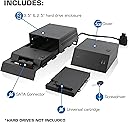
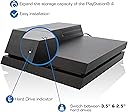




Nyko Data Bank Plus - Data Bank 3.5" Hard Drive Enclosure Upgrade Dock for PlayStation 4
Product ID: 35674616
💡LED access indicator
💾3.5" & 2.5" drive support
🔄Replaces PS4 top cover
🚀 Level Up Your Storage Game!
The Nyko Data Bank Plus is a versatile upgrade dock for PlayStation 4 that allows gamers to expand their internal memory by adding a 3.5" or 2.5" hard drive of their choice. This product not only replaces the PS4's top cover but also enhances storage capabilities, making it a cost-effective solution for game saves and installations. With universal compatibility and an LED access indicator, it’s the perfect addition for any serious gamer looking to optimize their console.

K**A
UPDATE WITHIN:6 TB Hard Drive Works Great!
UPDATE : Sony has released update 3.15 on January 13th, 2016. This update allows larger hard drives to be used natively in rest mode with the PS4. I have a 6tb drive, and it works perfectly now. No more messing with shutting it down or turning it on. Everything now works as it should. I purchased this enclosure in order to upgrade my ps4 to a 6TB hard drive. The enclosure comes in some pretty nice packaging, and is easy to get out. The instructions are pretty clear and precise, and installation was a breeze. Once installed, I loaded up my ps4 with new firmware, and all worked well. At first I kept my playstation in rest mode, and had issues turning it back on, but after searching on the internet I found a solution that will allow you to use rest mode without the ps4 going into safe mode all the time. TIPS Using Rest Mode with 6TB Hard Drive Rest mode can be used with larger hard drives but when turning it on you must physically press the power button, and hold it for about 6 seconds. If you turn on the ps4 this way it will not boot into the safe mode asking you to reinstall the firmware. About 99% of the time I do it this way my ps4 will turn on fine, and any game that was downloaded in rest mode has worked for me. It's a bit of a hassle but the convenience of using rest mode to download games, and updates is worth it along with the extra storage space. When turning on my ps4 this way I have encountered very little problems. While it is a bit annoying it is still worth it, and everything else works perfectly. I highly recommend this if you are looking to upgrade your ps4's hard drive. EDIT: I am having issues with rest mode now. My ps4 did have a power outage, and now it seems to always boot into rest mode. I am not sure if the outage is the cause, but I just wanted to notify all of you. My ps4 doesn't have anything to download anymore so that may be it as well. I am thinking of doing a reinstall to test, and will update once everything is completed. EDIT 2: It seems that when the ps4 has something downloading it will work in rest mode, and shut down properly. But if there is nothing downloading the ps4 does not know how to shut down the large hard drive, and that is how the safe mode issue is caused. I also can't shut down the ps4 unless something is downloading, but modes have issues.
A**N
Works fine with a little effort
Short Review: Reccommend this with up to a 4 TB HDD. The Data Bank works ok so far with my 4 TB WD Green HDD. Data Bank looks nice enough, seems halfway sturdy. Instructions that come with the Data Bank are very nice, but I think you may need to follow them step by step because I didn't and ran into issues. Maybe you actually do need to install the OS in safe mode. You get to the safe mode by holding down the power button until the second beep. Whole Story: I bought the Data Bank and a 4 TB WD My Book since it was cheaper than any other 4 TB hard drive I've ever seen (it was $96) and decided that I'd just remove it and stick it in the Data Bank. Removing the hard drive from the enclosure wasn't too hard, there are probably even videos on how to do it. Regardless of that, whether you decide to buy an external drive and remove it or just get an internal hard drive, I HIGHLY recommend downloading the software to your USB drive first before you get to work on anything else since it takes the most time out of the whole process. Also, I recommend downloading all of your save data to a USB drive prior to swapping out the hard drives. You don't necessarily need to do this as much if you're a PS Plus member, but it's not too bad of an idea to be on the safe side. When I first booted up my PS4 with the new HDD in it, everything worked well for a while. Once I put in a physical disk though, it said the data was corrupted and asked me to delete it and reinstall it. I did this, and it said the same thing again and again for a few times. Used the "rebuild database" option on the PS4 a time or two, nothing worked. The games would install, but I couldn't play them, and I always got the same "data is corrupted, delete and reinstall" message. I had to initialize my PS4 again, and once I did my games started working. The first time I transferred the OS onto my PS4 HDD I did NOT do so in Safe Mode, and I think this may have been the reason for my aforementioned troubles. I haven't imported my previous save data to the new hard drive yet, I just installed and booted up a game to make sure it actually worked. I'm going to install the rest of my games and import my save data and hope everything continues to work, either way I'll update this post with more information. Four stars so far, five if I can come back to this in a week or so and still say I recommend it and everything works. Update: Might not have been my non safe mode OS install that made my hard drive not recognize any games. I did however get the hard drive to recognize some games once I reinstalled the OS under safe mode, but there was still one game that wouldn't launch after the update file for it installed. I then took the hard drive out and reformatted it to exFAT and that seems to have solved my problems. Since I reformatted my hard drive to exFAT haven't had the usual "corrupt data" or "disk unreadable" messages, nor have I gotten the error codes 30012 or 30034 to come up when launching my games. Still using the same WD Green 4TB hard drive that I pulled out of a 4TB WD My Book. So far I'm happy with both the Data Bank and the WD 4TB Green hard drive, even though it takes a little bit of effort to make it work properly.
G**N
Great, but be mindful of some sleep mode issues on larger drives.
Easy to install, though you do have to re-download everything (expected but a pain). The extra space is a dream! I'm using a 4TB hybrid drive and functions great for gameplay. Though with such a large drive I'm not able to use the PS4's sleep mode any longer. The system hard crashes and must run through system checks on next boot if you allow it to go to sleep. I have to power down completely after each play. For me it's worth the trade-off to have the extra space though I wish Sony would release a patch to address this. It's not Nyko's fault.
R**Z
Do Your Research, You'll Come Out Very Happy!
****UPDATE 5/11/16: As of the latest PS4 firmaware update -- "suspend" mode now works with non laptop/3.5 inch mass storage drives. My 4TB Hybrid SSD now properly suspends. Thank you Sony gods!********** Let me start off by saying that you, as a customer, must do your research when adding any hardware accessory that modifies the function of your PS4. Most reviews criticizing this unit for not allow you to use a hard drive with 5/6 TB's is not the limitation of this accessory, it's a limitation of the PS4. Will higher capacity drives work? Yes, but there's exception to the functions of your PS4, which is not permeated by this Nyko accessory, but by the PS4 operating system itself. I believe Nyko could have done a better job educating the consumer in it's boxing/manual perhaps, however, I feel this is the responsibility of the consumer to research this prior to any modification to their console. It's like someone jail breaking their iPhone, but they don't know the potential negative affects of doing so, because they didn't do their research beforehand. This accessory, essentially, allows you to use a standard 3.5 desktop hard drive. Currently, I use a 4TB SSHD by Seagate inside. From my research, people whom upgraded to anything larger than 4TB's have been having issues (sleep mode, power issues, restarts), which again, is not this accessories fault. You may see people stating that 5TB+ hard drives work, and they're not wrong. However, many (not all) run into functionality issues where bootup times are actually longer, access times for loading while playing games are longer, and other related issues. But this is NOT caused by the Nyko Data Bank!! It's an issue with the PS4's operating system of handling large volume storage. Now on to my actual review of this unit: Hardware -- It comes with a screw driver that you use to unscrew the single screw that's required to swap out the hard drive. The quality of the actual unit itself is on par with the PS4 itself. It's made of plastic, and in my estimation, feels exactly like the PS4's material. The fit of the unit is great; no forcing or struggling to slide and snap anything in. It slid into place and fit like a glove. Functionality -- It does what it advertises, it allows you to upgrade your PS4's internal storage to that of a higher capacity, 3.5 inch, desktop hard drive. I formatted the hard drive FIRST to exFAT (PS4 plays very nicely with this format), slid it into place, safely and securely into the Nyko expansion bay (make sure the connection is solid and firm, it should not wiggle at all). I'm using a Seagate 4TB SSHD, and after doing a clean install of the PS4 firmware, I've loaded my restore data onto this hard drive, and everything works as normal, with the benefit of a larger capacity drive. No problems with sleep mode, no problems with restarts. My tip for ANYONE questioning whether they should get this or not because of the other reviews. 1.) Do your research. 2.) Use hard drives 4TB's or smaller in capacity (a soft performance limitation caused by the PS4 OS, not Nyko's expansion bay) 3.) Using a PC, format your new hard drive as exFAT first, before putting into the Nyko unit 4.) Double check ALL connections prior to booting up your PS4 with the new hardware installed ***Problems you may run into NOT because of this accessory 1.) The PS4 OS, currently doesn't play nicely with large volume storage. This is why, for the meantime, Nyko recommends 2TB's. I'm currently using a 4TB drive which I'm happy with. 2.) You WILL have issues with suspend mode when using higher capacity drives, however again, this is NOT a problem caused by this Nyko unit, this is a limitation of the current PS4 firmware. Sony will need to put out an update that supports suspend/sleep mode with higher capacity drives. For now, you will just have to shut off your PS4 normally until then. If you're ok with this, then there isn't any issues.
K**.
Great Newer revision for using both the 2.5 and 3.5HDDs
I purchased this Nov. 12th. This is the newer revision of the Databank noted by "PLUS"... this unit allows the physical properties of keeping the smaller sized 2.5 HDD and also allowing the increase of the larger desktop 3.5" drives. Both drives will be installed outside of the PS4 Unit itself in a double stack configuration with the 3.5" Drive on top. Internally a cable and connector will be installed internally as shown in diagrams and from the website... The newer version has vent holes on either side and so far after a month no problems with heating though that will vary with each individuals room temperature and location of unit. Everything went well except for a couple of snags... I had to remove the screw and white plastic washer... make sure to keep that when installing the 2.5 drive in the data bank. That screw and washer then went internally of the unit.. sorry I didn't take a picture... you'll understand when installing it though nothing on their website, youtube or instructions explain this... Another problem was my data cable would not connect properly, I had to take it apart and adjust my cable then put back together.. just a few screws. Also my original HDD had an older system software and when I installed the newer drive and having to install the newest software I had issues... just make sure to either be running the same system software or upgrade via the older drive system software first then install the newer HDD. I purchased the Seagate 4TB drive with built in SSD which everyone was buying at the moment except Amazon didn't have anyone supplying it at the time... so I ordered from Newegg for around $170 price point. A dual red LED is light when there is a power connection to the unit. You can only select 1 physical drive to boot from at either time, not together. Button a little flaky when selecting between one another. Do this before powering on your PS4. This unit also only fits the original PS4 system at this time not the SLIM nor the PRO. Another thing I noticed is that when switching and booting from one drive to another I had to physically plug in my controller cable in order for it to work. After that you can unplug it... only when switching between one drive or another... other than that it works great so I have a 1TB 2.5 and a 4TB 3.5 HDD working, standby/sleep mode works fine. Nice product works great. UPDATE 4-12-17*********** For first time installers and problems with Firmware updating.... First I recommend manually updating the firmware when you request it... turn automatic to OFF... next if first time install... update your current Hard Drive to the newest firmware... then proceed to follow the instructions per Nyko on setting up your new HDD and downloading and installing the firmware via USB flash drive. For future Firmware updates... download and shutdown on Hard Drive #1 do not re-boot to finish the update at that time... switch to Hard Drive #2 and boot... download latest update and you can now reboot on either drive to finish the install without issue. If you update and reboot on 1 without the other the PS4 system will not like that when you switch over to the other drive! I hope this saves you time and headaches... not need to re-initialize or format your drives.
M**D
Better off with an eSATA enclosure
Attempted to use the Nyko Data Bank with a 6TB WD Green drive. Installation went fine. Restore from a 2TB external drive went fast and smooth. I knew the PS4's "rest mode" wouldn't work correctly but I am willing to live with that for the extra space. However, after everything was completed I can't actually play any games larger than a few hundred MB. The PS4 shows the loading image with the dashboard music. After 30 seconds it shows an error. I've seen a few different error numbers but the most common is CE-38612-0. Mine did shut off randomly once when left downloading overnight. The drive was physically hot. It's not clear what the cause was but it didn't do that before the Nyko. I tried restoring the firmware from safe mode, rebuilding the PS4 database, re-initializing the PS4, and re-downloading. In every case the same problem occurs. No response from Nyko support via email after 36 hours. No one who has done this mod with eSATA enclosures has had issues with the 6TB drives. So I've ordered a good external eSATA enclosure and cable. Hopefully I can use the 6TB drive successfully with the PS4 that way since I can no longer return it. Plenty of people have done so successfully. ========================= Update June 19 2015 ========================= Today the external eSATA drive enclosure and cables to connect my WD Green 6TB drive to the PS4 arrived. After performing a re-initialize and re-install of the system software from the PS4's safe boot menu I restored a backup to my PS4. After downloading Witcher 3 I'm happy to report the error I received above did not occur. It's certainly possible that the Nyko Data Bank I received is defective. I'm not going to take the chance of overheating the $250 6TB drive just to save $40 on the enclosure. Admittedly the external enclosure doesn't look as nice as the Data Bank... but it actually works!
Z**H
Great product, with a few caveats.
Note: Rest mode will work with the PS4, but you must power off the console by holding the power button down for 6 seconds, almost like you were going to go into safe mode, but when the console is in rest mode, this will actually turn off the console. Then just turn the PS4 back on and anything that was downloading should either be done or close to done. This will in effect disable Suspend mode though because of powering off the console. I credit Konessha for this information, so look at Konessha's review for more information. To my review: I had a lot of hassle with this at first because I kept having to backup my data multiple times, and every time I would restore, it would get to 65 GB before saying that it "could not read the USB storage device". When it finally did restore everything (I had to shorten the description of the backup for this to work, which I learned from a support forum on the Playstation website. Shorten it from 17 or 18 characters to 5 characters. Example: Description says "PS4-700 (06/29/2015)", shorten it to "PS4-7"), I went to play a game that I have a physical copy of, and I got the corrupt data error message. I was mad, but then I found out on a Playstation website forum that the hard drive had to be initialized, so I did that, backing up a few things (P. T. mainly, which still works for me BTW :D) and deactivating my system first. Restored that data, put in the disc, and it works fine now. Redownloaded everything IN REST MODE, read my note if you didn't already, and now everything is all downloaded again after about a couple of days. Performance: it performs like it should, and it actually doesn't give off too much heat, though maybe I just got lucky with mine. I am using a Seagate 4 TB SSHD, spindle speed 5900 with 64 MB cache, and while the benchmarks for the drive are average to subpar in most categories, this drive actually performs its best when running games (source from hardware.info, link: us.hardware.info/reviews/5313/seagate-desktop-sshd-4tb-review-the-ultimate-hard-drive, go to the PCMark7 and PCMark8 scores pages). The games load up faster in my opinion vs. the 1 TB 2.5 inch SSHD from Seagate that I had installed prior, and the spindle rate was 5400 RPM so just so, and I have not encountered any problems while using the Data Bank with this hard drive. It runs quietly, and so much so that even getting close to the system I can just barely hear it. It gets warm, but that's how it should get. It doesn't get hot, and it has no problems maintaining a running state for long periods of time. I think the reason why people may run into problems with this product is because of the fact that Nyko in its early days did not have well functioning products. They have gotten better in recent years though, but people will still hate on Nyko anyways, and that's fine if they want to. Nyko's most recent failed product was a battery for the Wii U Gamepad I believe, and that was because they reversed the polarity on the connection, which would cause the battery to not generate enough power to the gamepad. There were people that did get it to work, and those people reported excellent battery life with the gamepad as opposed to the stock battery. Case in point, some Nyko products may require a little tinkering before they will work. Summary: There will be a few steps people will need to take before this will work properly, but once those steps are taken this works like a charm, so for those that have a little patience, this will not disappoint. Four stars though because of the hassle I went through with my games, though I was still able to save P. T., and play it! :D
A**R
Some Tips and Tricks...
I don't know what the complaints are about, this thing works perfectly. It made installing my 3.5 inch Hybrid drive a total breeze. My main concern was reinstalling games and losing access to a game that is no longer available on the PS store called P.T. Using an External Terabyte HD, I did a complete full back up of everything. Took 6 hours just for that alone. Then I grabbed a thumb flash drive, looked up the full reinstall PUP file (not the upgrade PUP file) then I was ready. Installation of the Data Bank was unbelievably easy. I think the entire install too about 2 minutes. Then I started it up, the PUP file went in, once installed it was as if I just bought my PS4 fresh from the store. Then I did the Full Restore from the External HD, took 3 hours. One complete, everything was ready, I didn't have to download and reinstall a single game or app. it was all there including P.T. The only thing extra I had to do was Activate As My Primary PS4 and Restore the License's so I can play certain games again (like Batman Arkham Knight). But that's it. During the entire process I kept checking to see if there was any overheating, and there was none. The PS4 gets warm, but no more warmer than it did with the regular HD that it came with. For those who are still concerned with heat, just place the PS4 on a Laptop Cooler. They are very cheap, it covers the entire body of the PS4 and works perfectly. I had one collecting dust and I use it as a precaution. Although it was never really needed, but it does keep the system cooler which is a good thing. if your worried about USB ports (which a Laptop Cooler uses) just get the 5 USB port adapter.. however do not use the 5 USB port adapter when restoring your PS4 after upgrading your Hard Drive. Once everything is installed, then the 5 USB port adapter will work. Enjoy!
E**R
Extension disque dur PS4
Boîtier d’extension pour disque dur PS4. Très simple à mettre en œuvre, robuste, il suffit de suivre la notice fournie et tout roulera comme sur des roulettes! Et vous pourrez bénéficier d’une capacité de mémoire nettement supérieure, tout en éliminant les problèmes de lags et ralentissement de la console. Il vous faudra un disque dur interne en plus, une clé usb (9 GO) formatée en FAT 32 pour y installer la version de la console (à télécharger sur le site SONY et à mettre directement sur la clé USB, sinon, la console ne reconnaîtra pas le firmware dans votre clé usb). Mais ça vaut vraiment le coup 😉👍
L**.
Tolle und durchdachte Speicher-Erweiterungsmöglichkeit...
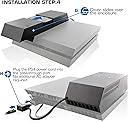
Da ich selbst als Gelegenheitsspieler immer wieder auf das Problem gestossen bin, dass meine aktuelle Festplattenkapazität nicht ausreicht (Original PS4 vom Erscheinungstag mit 500 GB) und ich noch eine 2 TB-Festplatte ungenutzt im Bestand hatte, dachte ich mir, ich probiere diese Erweiterungsmöglichkeit einmal aus. Die Installation ist wirklich einfach, selbst wenn man die beiliegenden (im Posterformat) Informationsblätter nur kurz überfliegt: Es ist lediglich eine Schraube mit dem im Set enthaltenen Schraubenschlüssel zu lösen und später wieder festzuschrauben. Der Adapter nimmt sowohl die alte 2,5"-Zoll-Platte, wie auch die neue 3,5"-Zoll-Platte auf. Eine Wechselmöglichkeit zwischen den Platten besteht über einen vorhandenen Knopf. Nach dem Einbau muss zunächst die aktuelle PS4-Firmware heruntergeladen werden (Achtung: Unbedingt die "größere" Download-Variante mit ca. 800 MB für die Neuinstallation wählen). Diese wird auf einen, im FAT32 formatierten, USB-Stick aufgespielt und zum Start der PS4 im USB-Slot platziert. Bevor die PS4 im Safety-Modus eingeschaltet wird, muss die zu verwendende Festplatte mittels vorhandenem Auswahl-Schalter gewählt werden (3,5")! Nun startet die PS4 und es kann das "nackte" Betriebssystem installiert werden. Langwierig war bei mir das Sichern der Altdaten auf einen externen Speicher, was jedoch nicht der hier zu bewertenden Hardware angelastet werden kann. Also am Besten bereits nach der Bestellung des Adapters mit der Sicherung beginnen :-) Diese Sicherung zurückspielen, et Voila man hat seine alte PS4 mit einem wesentlich größeren Festplattenspeicher... Fazit: Für alle die kostengünstig ihren Festplattenspeicher erweitern wollen eine ideale Lösung!
A**R
Five Stars
Good buy works good must get.
B**N
Excelente!
Es una maravilla, todo llego en perfectas condiciones y con los manuales muy bien explicados con imágenes muy precisas. 100% recomendable, en mi caso instale un disco duro de 2 TB que es lo máximo que recomienda Nyko y que es el limite soportado oficialmente por Sony hasta el dia de hoy, el disco que instale es un Seagate ST2000DX001 SSHD y la verdad que va muy bien y el precio al igual que este accesorio lo encontré en este sitio mas barato que en ningún otro lugar.
衝**郎
一応使えました
WD 内蔵HDD Green 2TB 3.5inch SATA3.0とセットで購入しました。 他の方のレビューやNYKO(英文)HPでのレビューで2TB以上は サポートされていないようなので2TBHDDを取り付けました。 (小心者です(^.^)) 結論から行くと、動作は問題なし。スタンバイモードも使用可能で 単純に内蔵HDDが3.5インチになって使用可能領域は約1.8TBくらいあります。 取付も簡単でしたが、ここで注意!! 自分はCUH-1200AB01のPS4なのですが、内蔵HDDを固定しているビスの位置が それ以前の型式のPS4と変わっています。どの型からなのかはわかりません。 付属の取説の写真や、Webサイトで交換した人の写真を見てもビスは HDDの横についているのですが、自分のPS4はHDDの正面についていました。 (PS4から見て真正面) DATA BANKの2.5インチ側ユニットにはビス止め用の穴が耳のようについていますが これがPS4のフレームに引っ掛って入りません。 ビス穴(耳)をカットしました。 このあたり注意が必要です。 それ以外の機能的なものは十分満足です。
Trustpilot
1 month ago
2 weeks ago