


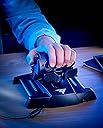


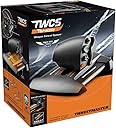
Thrustmaster TWCS Throttle (Compatible with PC)
Product ID: 35175533
🎮14+ programmable buttons
🔄5 (+3) axes with 8-way POV hat switch
⚙️S.M.A.R.T sliding rails for smooth precision
Buy anything from 5,000+ international stores. One checkout price. No surprise fees. Join 2M+ shoppers on Desertcart.
Desertcart purchases this item on your behalf and handles shipping, customs, and support to Brazil.
🚀 Elevate your cockpit game — precision throttle control that puts you in the pilot’s seat!
The Thrustmaster TWCS Throttle is a mid-range, PC-compatible flight sim controller featuring advanced S.M.A.R.T sliding rails for smooth throttle motion, 14+ programmable buttons, and 5 (+3) axes including an 8-way POV hat switch. Designed for ergonomic comfort and deep customization via T.A.R.G.E.T software, it’s ideal for serious flight and space sim enthusiasts seeking precise, immersive control without breaking the bank.


| ASIN | B01L28LVUG |
| Best Sellers Rank | #605 in Video Games ( See Top 100 in Video Games ) #3 in PC Game Flight Controls |
| Customer Reviews | 4.3 4.3 out of 5 stars (8,203) |
| Date First Available | August 22, 2016 |
| Is Discontinued By Manufacturer | No |
| Item Weight | 1.86 pounds |
| Item model number | 2960754 |
| Language | English, French |
| Manufacturer | Thrustmaster VG |
| Product Dimensions | 10.51 x 9.09 x 5.51 inches; 1.86 Pounds |
| Rated | Everyone |
| Release date | November 1, 2016 |
| Type of item | Video Game |
J**B
Amazing Entry Level Value! Feels Great to Use!
I received my TWCS Throttle on Wednesday 01/02/2018. As of the time of this review I have spent approximately 8 hours on DCS: A-10C Warthog. Amazon shipping was great as always. The throttle itself was lighter than I expected inside of the box. Upon opening, I was surprised by how good the material quality was. The surfaces are smooth and tactile to the touch. The overall build quality feels great, although it doesn't seem 100% bullet proof. I still handle it with care to make sure it'll last me several years. For the money, I think this is an amazing entry level solution for those looking for a quality HOTAS experience on a budget. With regard to the functionality of the throttle, the TWCS Throttle also gets high marks. The Thrustmaster software you can download makes configuring the throttle a breeze, although mine came centered perfectly out of the box. I also find it handy to identify the individual button / slider names when mapping the controller as they are not labeled on the control itself. I have very large hands, but I find the button positions are extremely ergonomic with the exception of the 'Slider 0' (Antenna) dial. It's not uncommon for me to accidentally rotate this slider with my little finger when manipulating the throttle or pressing the #2 or #3 buttons. Perhaps being able to increase the friction on this slider would help me, although I can see this being a non-issue for others. Overall, this is a great product that feels like it'll last a long time after my initial first impression. It's a great value and a must have for anyone interested in trying out flight simulations / games. If you enjoy the flight sim / gaming experience, then this will take you pretty far before you would need to consider upgrading to more expensive options.
A**X
Great While It Lasts, But Sensors Have a Shelf Life 4/5 Stars
Thrustmaster TWCS Throttle – Great While It Lasts, But Sensors Have a Shelf Life 4/5 Stars This is my third Thrustmaster TWCS Throttle. Yes, third. Why do I keep coming back like a lovesick pilot? Because when it works, it’s a dream—especially for space sims like Elite Dangerous, my personal obsession. It’s likely just as stellar for other sims, too. Let’s start with the good. Don’t let the all-plastic build fool you (those side metal rods are just for show, like a spaceship’s hood ornament). What it lacks in ruggedness, it makes up for in ergonomics and control options. The layout is a space captain’s delight: a main throttle, a left/right slider for lateral thrusters, three thumb nubs, a hyperspace/supercruise thumb button, and two front finger buttons with an up/down switch (perfect for throttle tweaks in my setup). Pair these with Voice Attack macros, and you’re triggering complex sequences like a pro. The top thumb nub offers 8-way control, while the middle and bottom ones give 4-way options—assign them to whatever your heart desires. Everything’s placed so intuitively, I don’t need to fumble or peek at the controls, unlike some clunky real-hardware replicas out there. Paired with a Thrustmaster joystick for my right hand, it’s a tight, immersive setup that makes me feel like I’m commanding a starship. Now, the bad news. The sensors are the Achilles’ heel. My first two units clocked about 1,000 hours before tapping out. The little rubber finger joystick (used for head-look in my case) is usually the first to go, followed by the main throttle, which starts sending signals even when parked at zero—like it’s itching to blast off without me. The left/right throttle slider isn’t as smooth as I’d like, feeling more like an on/off switch than a gradual curve, but it’s manageable. The main throttle’s glide isn’t as buttery as the brochure brags, either, but it gets the job done. Then there’s the dial wheel on the left—a feature that sounds cool (like a radio dial) but flops hard. On all three units I’ve owned, it’s been a glorified on/off button. Turn it a smidge, and it’s either full signal or nothing, no matter how much I tweak calibration or hunt for firmware fixes. It’s a small gripe, but it’s annoying when a feature just doesn’t work as advertised. Overall, I love this throttle for its ergonomic brilliance and control versatility, especially for Elite Dangerous. It’s a fantastic companion to a Thrustmaster joystick—until the sensors inevitably call it quits. If Thrustmaster could beef up the sensor longevity to outlast 1,000 hours, I’d be docking at their station for life. For now, it’s a solid buy if you’re okay with eventual replacements and a wonky dial wheel. Just don’t expect it to survive a galactic marathon.
A**R
Great throttle well worth the money.
This throttle is a very good throttle for flight sims. I have had it for about a month or so. Initially I was skeptical due to their reviews saying that it didn’t slide on its motion rails for increasing and decreasing speed without some slight sticking or not being slippery smooth. Some said due to this making precise motion with the throttle was impossible. I have found this to be inaccurate. I’m a 250lb male with generous sized hands with some weight to them and found making the throttle move it does not stick or seem impossible to make precise throttle settings. Maybe these are problems for kids with whimpy deer hands or something. The throttle also has a generous amount of programmable buttons which helped with DCS world tremendously. It’s a great addition to my flight sims and well made. I think now I manipulate my throttle settings more than I ever did now that it’s there. I say the reviews don’t do this throttle justice for what it costs. Yes they’re are many other more expensive options out there but this is what I’d say is a good solid option that isn’t exactly inexpensive but isn’t necessarily breaking the bank either.
T**A
Fantastic throttle that's worth every penny.
I love this throttle. I would have given it 4 stars because it needs a little more weight to it and it feels a little cheap because of the plastic used but it deserves 5 stars for the price. It does bind at first but completely smooths out with use. Same goes for the pinky dial. The layout is one of the best out there. Period. The forefinger thruster hat is very precise. The ergonomics aren't the best but turning it at a slight angle resolves most of this. If you play elite dangerous bind throttle to the rudder also. This gives you instant forward and reverse throttle and will make your fa off turns significantly faster.
B**Y
Good Throttle, Not Happy With the Analog Stick Placement
I've been using this throttle for several months now. Before this throttle, I've used a X-55 Rhino and CH Products throttles. Overall, I like the product and its features for the price I paid for it. The Thrustmaster T.A.R.G.E.T. software works well with it. I don't have any issues with setting the throttle to zero since I use the software to adjust dead zones. It's also a bonus that it has pre-installed 6mm nut inserts in the base for permanent mounting. The buttons are decent for the price. My biggest complaint is the placement of the analog stick. I would much rather swap the the location with the middle hat switch on the side so it could be used as a thumb stick and have the hat switch under my index finger. I find it very uncomfortable to use the paddles and analog stick at the same time which is what I need to do if I want to map all 3 axis for thruster control in space games with 6 D.O.F.. A button can usually be mapped to swap the throttle axis from forward to reverse but pushing the throttle forward to go backwards is counter intuitive and it slows me down when I'm in combat. Plus, an analog thumb stick feels much more natural since most people are used to using them on traditional game controllers.
J**N
The best throttle for Space Sims at this price point
I bought this to to try an Alternative to my old Saitek X52 Throttle because I wanted something with more buttons on it. so I got this and tried using it with the X52 Stick and I'm not disappointed. The biggest benefit, and I cannot stress this enough, is the analog stick on the back of the throttle. The X52 throttle only has a hat switch, and many other throttles, even the more premium ones like the X56 have even less. This analog stick is extremely useful for space sims like Elite Dangerous because it will give you analog lateral and vertical movement, making maneuvering so much easier and smoother than with a hat switch. Even if you're not playing a space sim, I can see this being really useful as a headlook control if you're not using VR. The Analog stick also feels really good and even clicks inward like a button press with really nice feedback no matter what angle it's at. Then there's the analog paddle on the back. Okay, so I wasn't expecting to use this, but I tried assigning it to forward and backward movement in Elite Dangerous and I did not realize what I was missing. It's perfect to augment your standard throttle movements with this allowing you to do quick bursts backwards and forward, and if you don't use docking computers, then you will find that using these to land is also a pleasure. The only problems I have with this Throttle is that it's a bit awkward to rest on compared to the smooth plastic/rubber I was used to with the X52 Throttle. It's pretty much just a plastic slab with the bare minimum of ergonomics. It takes a bit of getting used too honestly, but it's well worth it I think. I've read some other reviews saying the build quality is bad but I wouldn't say that. The plastic certainly doesn't seem cheap and it has a sort of grainy texture that makes it easy to grip. Also, if you're used to using full range throttle in games like elite or Star Citizen where you 0 the throttle by centering it, you might have trouble getting used to this. Especially in Star Citizen which at the time of writing has no in-game throttle indicator like Elite, but that's not really the throttles fault. If you play Elite however, I recommend using forward only for the throttle and using one of the many buttons to change to reverse. All in all I can't recommend this Throttle enough at this price point. I wish it was a bit more comfortable to use, but honestly I'll probably get used to it and its well worth it for all the control it gives you.
T**S
Excellent throttle for the price - a step up from my aging CH Products Throttle
After a good 13 or so years, and with it still working fairly strongly, I reluctantly began a search to replace my CH Products Throttle. The free-form x/y access hadn't properly been reporting for a while, and the max and min on the z axis were a little shaky. Amazingly, I could actually still buy the exact same throttle from CH, but in the intervening years the resolution on the controllers means that you can get something that is that much more precise. Enter the rolls-off-the-tongue Thrustmaster VG TWCS Throttle Controller. I got it at quite a discount off of the normal retail, which heavily swayed it in favor of a purchase. I'm not necessarily going to find myself in a situation needing to control the throttle of my two engines independently, so it being a single throttle was not an issue for me. Ideally it lasts the decade+ of the CH Products, but I'm not holding my breath. First, the good: * Can be used independently of the joystick (i.e. I'm using a CH Products joystick and rudder), with a note that you'll lose the ability to use most mapping software if your game doesn't support multiple joysticks (which hasn't been a problem for most games for years now, but worth a note) * Bevy of buttons, and it's enough to meet my needs flying DCS. (The pinky potentiometer really does wonders when trying to control radar elevation) Broadly speaking, the buttons are well placed and if your hand is in the right position, everything but the big orange thumb one can be accessed with ease. (In my setup, that gets mapped to TrackIR's centering, so doesn't get used a ton) * Like most modern joysticks, does >8 bit resolution on the axis elements, so you get a more fine grained control as you use whichever axis. It has made a great deal of difference on those Helicopter modules in DCS over my older throttle. * Orange accents means that I get more of my favorite color on my desk * Slide action is smooth, base is sturdy / weighty / grippy enough not to move around when you're in the heat of it. All of the axis controls are similarly tight and work well, smooth in action but otherwise staying firmly in place. Downsides: - Ergonomics could stand a bit of work. Compared to the CH Products Throttle, which required some Seinfeld "Man Hands" to operate all of the buttons effectively from resting position, from rest my hands only have a problem reaching the big orange "thumb" button on the right-hand side. Ergonomically, however, my hand doesn't naturally seem to find the proper placement - I have to really think about getting it lined up - which was the exact opposite of my experience with the CH Products. I haven't had any greater issues with long-term holding of the throttle than with the CH Products. - Slide action can be a little less than smooth if using it at the 'wrong' angle - and it's sometimes difficult to avoid that 'wrong' angle All told this was a good purchase for the price I paid for it. Compared with my old throttle (the same model still being sold 13 years later), this was about half the price. The matching joystick really won't cut it for anything semi-serious, but this throttle is the gem of the set.
P**R
Solid choice, great for VR
I bought the throttle by itself, not the combo. Needed a throttle for VR use, that would also have rudder function so I can upgrade to a non Z twist joystick later. Really wanted a warthog combo but I don't want pedals and you can't see the extra warthog base controls in VR anyway. Voice control is a must in VR flight sims. The good: Lots of controls. Rudder axis bar, rotary axis knob, great fingertip X/Y axis mousestick w/ select, 2 way toggle sw, 8-way hat, 2 4-way hats, 3 buttons, and of course, a throttle slider. Jack to connect add-on pedals. All controls are accurate, seem well constructed, and work great in DCS. Solid throttle movement action and the resistance is also adjustible. The bad: Even though the action is solid, the throttle is all plastic except for the metal internal rails. This gives it a lightweight plastic feel overall. The 3 buttons are not as crisp as the buttons on my old, cheaper thrustmaster top gun fox. If the molded plastic hats had crisper edges they would grip your fingers better. The action will lose its initial smoothness and become more sticky with use. I am happy with my TWCS throttle, reasonable price, great for VR, decent quality. Easy DIY upgrades: Mousestick - Add a small O-ring using double stick tape. Adds a few mm height for more accuracy, better grip and finger centering. Throttle - Carefully open the throttle handgrip and add tape wrapped lead/metal weights. The extra mass will reduce stickyness, and give the motion a more realistic feel. Base Rails - The internal rails are coated in a light silicone grease. Wipe that off and recoat with a heavy duty clear silicone grease for improved movement feel. You can get a small packet from an auto parts store. Afterburner detent - There is a ~1cm gap internally at the front of the throttle base between the bottom plate and the internal mount. Get a flat metal clip from a pen and attach it to a small block of wood with duct tape. You can place this in the gap so that the internal throttle car rides over the "bump" on the clip tip creating a detent near the end of the throttle travel.
T**T
Honesta e precisa
Vi um review antes de comprar e este foi favorável. Não parece haver contras pois ela não se propõe a ter tantos botões e nem é necessário nos meus aviões civis. No quesito de maciez, calibração e precisão é muito satisfatória. Ergonômica. Botões bem dispostos.
S**A
Sorprendente
Muy me gusto super
E**1
Great product but with some small issue
Got the throttle on 14/3/2019, start having ghost input issue on RZ axis after two weeks. Overall the throttle is amazing, the amount of button and their layout is awesome. I am using it with the CH fighter stick in DCS, mostly in helicopter. Refund and bought a new one, deliveried on 15/4/2019. Start having ghost input issue on RZ axis again on 20/4/2019. I am fking out
お**ん
機能は十分、ただし精度や耐久性に疑問
気に入った点: ボタンの数、種類ともにマイクロソフト・フライトシミュレーターでの使用には問題なく、満足できます。 だめな点 ただし、そのスイッチの精度に問題があり、正しく反応しないことや、軸のブレがキャリブレーションしても改善されないなど問題があります。 プラ製なので耐久性にも不安あり。 これに代わるスロットルの選択肢があまりありませんが、オススメできません。
A**R
Great bang/buck.
Really great throttle for the money. I have many, I've collected HOTAS since the days of the 286 PC, my primary throttles being the Warthog and of course the CH Throttle. I've had several CH Throttles since the gameport and USB models have been out, and IMO this throttle is really the only stand alone competitor to the CH as of right now. Every other decent throttle comes with a stick, although you can now buy the WH throttle by itself, it's usually $300 after shipping. This is under $60 right now, and does a great job, the buttons are all a bit more positive than the CH IMO, the tension screw is a phillips head which works well too. The slider for rudder pedals will be great for those who liked the old Saitek sticks like their X36, X45, etc, which had a rudder bar as well. Some prefer this to pedals or twisty sticks, and brings back that option, or you can use it for an analogue slider instead for something else like radar azimuth/whatever. The hand sits in a different position on this unit than on the CH, and the slider moves accurately and to full throw/zero in all the Win10 flight sims I tried it with, which is essentially all of the majors and many of the minors. It sits very low, and has a slightly wider footprint than the CH unit, but otherwise the size is comparable. This unit is 1/2 the cost of a CH throttle, and is every bit as good.
Trustpilot
1 month ago
2 months ago