Desertcart purchases this item on your behalf and handles shipping, customs, and support to Brazil.
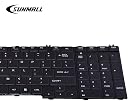
โจ๏ธ Upgrade your Toshiba typing gameโbecause your workflow deserves the best!
This high-quality replacement keyboard is specifically designed for a broad range of Toshiba Satellite laptops, including C650, C655, C660, L550, L650, and more. Featuring a durable black ABS enclosure, 19-key QWERTY layout, and USB connectivity, it guarantees 100% tested functionality and seamless installation. Perfect for professionals seeking reliable, office-ready laptop parts with proven customer satisfaction.
| ASIN | B01K7B6SPW |
| Additional Features | High Quality and Reliability |
| Antenna Location | Office |
| Best Sellers Rank | #672 in Laptop Computer Replacement Parts |
| Brand | SUNMALL |
| Button Quantity | 19 |
| Color | Black |
| Compatible Devices | Toshiba Satellite C650, C655, C660, C665, L550, L650, L655, L670, L675, L770 series |
| Compatible Operating System Family | Windows |
| Connectivity Technology | USB |
| Customer Reviews | 4.3 out of 5 stars 371 Reviews |
| Enclosure Material | Acrylonitrile Butadiene Styrene |
| Hand Orientation | Ambidextrous |
| Keyboard Description | Laptop keyboard compatible with specific Toshiba models |
| Keyboard Layout | QWERTY |
| Manufacturer | keyboardseller |
| Mfr Part Number | LYSB01K7B6SPW-CMPTRACCS |
| Model Name | C655 |
| Model Number | c655 |
| Number of Items | 1 |
| Number of Keys | 19 |
| Number of Packs | 1 |
| Recommended Uses For Product | Office |
| Special Feature | High Quality and Reliability |
| Style Name | Classic |
| UPC | 712809994793 |
| Unit Count | 1 Count |
S**W
Works, fits in a L655 model. Worth the money!
Fits snugged into my L655. Works perfectly. This is my second replacement of the same laptop. Previous one lasted for 4 years (from a previous seller who at some point ran out of stock) till the keys W and 2 were showing signs of failure (unresponsive, delay, or double input when pressing once); prior to that the windows logo and FN buttons became unresponsive but were not a huge inconvenience. Clean, perfect condition. Money well spent, especially for 2 day shipping! (I could not wait a week). Money well spent. Thank you! :D
A**R
Fits Toshiba Satellite Perfectly
Got it today and had my laptop back in operation within ten minutes! Toshiba Satellite L755. I tried everything including factory reset to get the old one to work. If your laptop will work with a separate keyboard but the integrated keyboard only works intermittently or not at all this should resolve the issue. It was a pain trying to haul the USB keyboard along with the laptop and I would usually leave it behind. I can't really afford a new laptop so this was the best $12 - 13 I've spent in a while. Highly recommend it.
G**.
Brought new life to old laptop
Crisp, clear characters on all keys. Same fit and functionality as my original laptop keyboard. Caps lock LED is very small and dim. There is no num lock LED at all. Installation took 15 minutes but I had disassembled my laptop for a CPU upgrade so I had previous experience removing and replacing the keyboard.
A**D
Replacement at a great price
8 year old Toshiba laptop L655. Some keys became loose from breakage of the white plastic "clips" connecting between the key caps and the electrical board. I bought the Sunmall just to harvest its keys. Surprised at its pretty good quality, so I replaced the old keyboard. Thank you Toshiba for making this fairly easy. A quibble is that the left side of the new keyboard is slightly raised after installation, and the space key requires some adaptation to press it reliably. The Sunmall keyboard is new, so I don't know its long-term performance. Disassembly of the L655 requires removing a top bezel strip by digging under it with a thin tool. Then removing 4 teeny tiny screws with a jeweler's phillips screwdriver. I used one from an eyglasses repair kit. The keyboard is removed/replaced by engaging tabs and slots at the edges, fairly easy. A hard part at first was inserting the electrical ribbon of the keyboard into the connector on the circuit board. But, here is the way. Work gently. Lay the new keyboard on the L655 keys down and bottom edge toward the screen. The ribbon is in easy reach of the circuit board connector. That connector has a thin, brown clip that rotates up. Lay the ribbon edge into the connector by 1/8", and rotate the brown clip forward and down to clamp on the ribbon. If you break the brown clip, you are in trouble. The brown clip doesn't snap in until the ribbon is there, so it is puzzling at first. Then, flip the keyboard and insert into the case. There are installation videos on YouTube.
M**4
Perfect Replacement For My Laptop
I bought my 1st replacement keyboard due to my original keyboard would either double type the key I pressed or just simply not type the character at all. It got really old when every second word I'd type would have extra characters in it or missing letters - very time consuming to have to go bacck (oops - back) and correct every other word. Big pain when typing a Word Doc. So, I bought my 1st replacement. That one lasted about a couple of days. THEN it started happeningg (happening) again! So I bought a 2nd one. Well, yo guessed it, this 2nd one started acting up in the same way. I have concluded it is NOT the fault of this replacement kyboard (keyboard). I am beginning to think that the fault lies within the laptop itself. So my choices are to get an auxiliary plugin/wireless keyboard or a new laptop. The laptop is 11 years old now (windows 10), So I am inclined to do choice #2. I see a new laptop in my future. Yet this keyboard is super easy to install and feels GREAT when pressing the keys with good tactile and presssure. I would buy one if your laptop keeys are beginning to act up !
M**M
This works perfectly as a replacement.
I bought my laptop at a local pawnshop for $50.00. It needed a battery ($20.00) and a laptop key was missing. It worked fine except the backspace key didn't work and with the Zero key missing on the 10 key pad it got on my nerves. I bought this awesome replacement keypad and now I am stress free. Thank you.
E**.
very unsatisfactory product
this product quality was very very poor. i dont even think it deserved one star. as i attempted to attached this keyboard to my laptop many of the keys was observed to be falling off before i can even use it. i had to buy an adhesive to attempt holding keys in place for me to use my laptop. NO WAY i will be buying any other products from that company
A**I
It works.
Well, it works. Does not sit level on my Toshiba. It seam very flimsy/bendable, hold with care. I believe it was a different brand I bought before. Just glad it works!!!!
A**I
Five Stars
good usable keyboard, working properly up to the mark
M**R
Four Stars
Fait la job et pas cher
A**R
Satisfied
The keyboard is a exact replacement. Easy to install, took only 2 minutes.
R**D
The price was also good and fast shipping as well
Keyboard was well packed and worked well when installed. The price was also good and fast shipping as well. I recommend this item to anyone.
M**N
NUM Lock
NUM Lock didn't work(no indication light) Price wise not bad, however functionality shouldn't be a concern......
Trustpilot
2 weeks ago
2 weeks ago