Desertcart purchases this item on your behalf and handles shipping, customs, and support to Brazil.
โก๏ธ Double the color, double the impact โ engrave your mark with style!
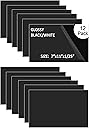
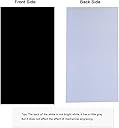
This pack of 12 ABS double-color plastic sheets (7" x 11" x 0.040") features a black top layer and white core, designed primarily for rotary engraving with partial laser compatibility. Perfect for professional interior signage, badges, and decorative applications, these durable sheets deliver sharp, high-contrast results across multiple industries.


| ASIN | B07QT93LN9 |
| Best Sellers Rank | #177,316 in Tools & Home Improvement ( See Top 100 in Tools & Home Improvement ) #257 in Engraving Tools |
| Brand | XLNT TECH |
| Brand Name | XLNT TECH |
| Color | White |
| Colour | White |
| Customer Reviews | 4.1 out of 5 stars 107 Reviews |
| Grade Rating | Commercial |
| Item Diameter | 0.04 Inches |
| Item Dimensions | 29 x 19 x 0.1 centimeters |
| Item Form | Sheet |
| Item Shape | Sheet |
| Item Thickness | 0.06 Inches |
| Item Weight | 1 Kilograms |
| Item diameter | 0.04 Inches |
| Item dimensions L x W x H | 29 x 19 x 0.1 centimeters |
| Manufacturer | XLNT |
| Material | ABS (Acrylonitrile Butadiene Styrene) |
| Model Number | ABS12071102 |
| Number of Items | 12 |
| Part Number | ABS12071102 |
| Shape | Sheet |
| UPC | 750076505014 |
B**O
parfait pour la gravure laser
รฉcriture blanche sur fond noir
C**B
problem no more
i have a engraving sideline ,getting material was a problem
M**K
Yes, Laserable with proper ventilation. Not PVC so no Chlorine fumes. Background not bright whtie.
First of all, laser cutting ABS does not produce Chlorine gas like burning PCV does. So never cut PVC with a laser. That being said, burning ABS can produce hydrogen cyanide gas. How much? Difficult to say, but hydrogen cyanide gas is produced by burning many things, including cigarettes. Lasering wood also produces many toxic compounds. So no matter what you engrave or cut on a laser good ventilation and avoiding inhaling any of the fumes is necessary. Now to this particular material. Finding the right setting for your laser may take some significant trial and error. I have a Boss 1630 105W CO2 laser and ran at least 30 combinations of speed, power, air and painters tape before getting so reasonable results. The pictures are from a 6 inch wide placard I made. From 12 inches away the engraving is smooth and clean. If examined closely, you can see ridges in the cut from the laser scanning. The settings I settled on are 400 mm/sec at 35% power for the fill and 35 mm/sec at 60% power for the outline cut. Air was on and the surface was covered with painters tape to prevent smoke staining around the edges of the engraving and cut. I tried leaving the top film on instead of the painters tape but the result were not as good. The engraving was done at 300lpi. Lower lpi increased the ridges in the engraving. My only real complaint is that the "white" bottom layer is not very white - more of a grey.
P**O
Excelente
Muy buen producto, se recomienda
A**R
Review is Contingent Upon Your Need
My first disclaimer is an apology for this being a little long. My second disclaimer is that I am a novice laser user, and I am still learning applications on both the Glowforge and CO2 laser machines. I lean heavily on reviews when I am purchasing items that I am not that familiar with or I'm looking at purchasing something totally new for the first time. Because the reviews were so conflicting, I wanted to see if I could help the person like me who may be looking at this product. It is possible to cut/engrave on this material with a Glowforge or CO2 laser machine. Like with all things in life, there is a learning curve and here is what I learned. If you want a clean cut/engrave and you are using a Glowforge machine, you should remove the plastic film. When I attempted to cut/engrave without removing the film the plastic bubbled, warped, and was hard to remove. If you want a clean cut and you are using a CO2 machine, you should not remove the plastic film. When I attempted to cut/engrave without the plastic film, the charred areas turned white and the print and material looked old and badly worn. I even had to use multiple settings so I would not cut through the material when I was engraving words. Ultimately, I was able to produce a rather nice print on both machines. Most of the bad prints that were produced were from me not knowing the correct settings for my machine and not from the product. Now with that being said... the material was slightly warped after the cutting/engraving was completed on both machines. If you bend it a little and place it under something a little heavy, it will take out some of the warping, but it wasn't completely flat again. The white is 100% grey on the product that I received. I gave it three stars instead of the four that I wanted to give because of this reason. I was supposed to produce a black and white sign, and I produced a black and grey sign. For the naysayer, the grey was not that color because of the engraving. If you take a new sheet and place it beside any white material, the sheet is clearly light grey and not white. So, if you need a truly black and white sign, this product will not give you that finish. Also, the finish is not a glossy black. It is a matte finish, and it is very easy to leave fingerprints. After all of that... I would purchase the product again if I needed to make a quick sign and didn't need a true white. However, I probably would not attempt to sell it to anyone. I do plan to try some of the other colors to see if I get the same results.
Trustpilot
1 month ago
3 days ago