Buy anything from 5,000+ international stores. One checkout price. No surprise fees. Join 2M+ shoppers on Desertcart.
Desertcart purchases this item on your behalf and handles shipping, customs, and support to Brazil.
🖨️ Elevate your home office game with classic reliability and modern speed!
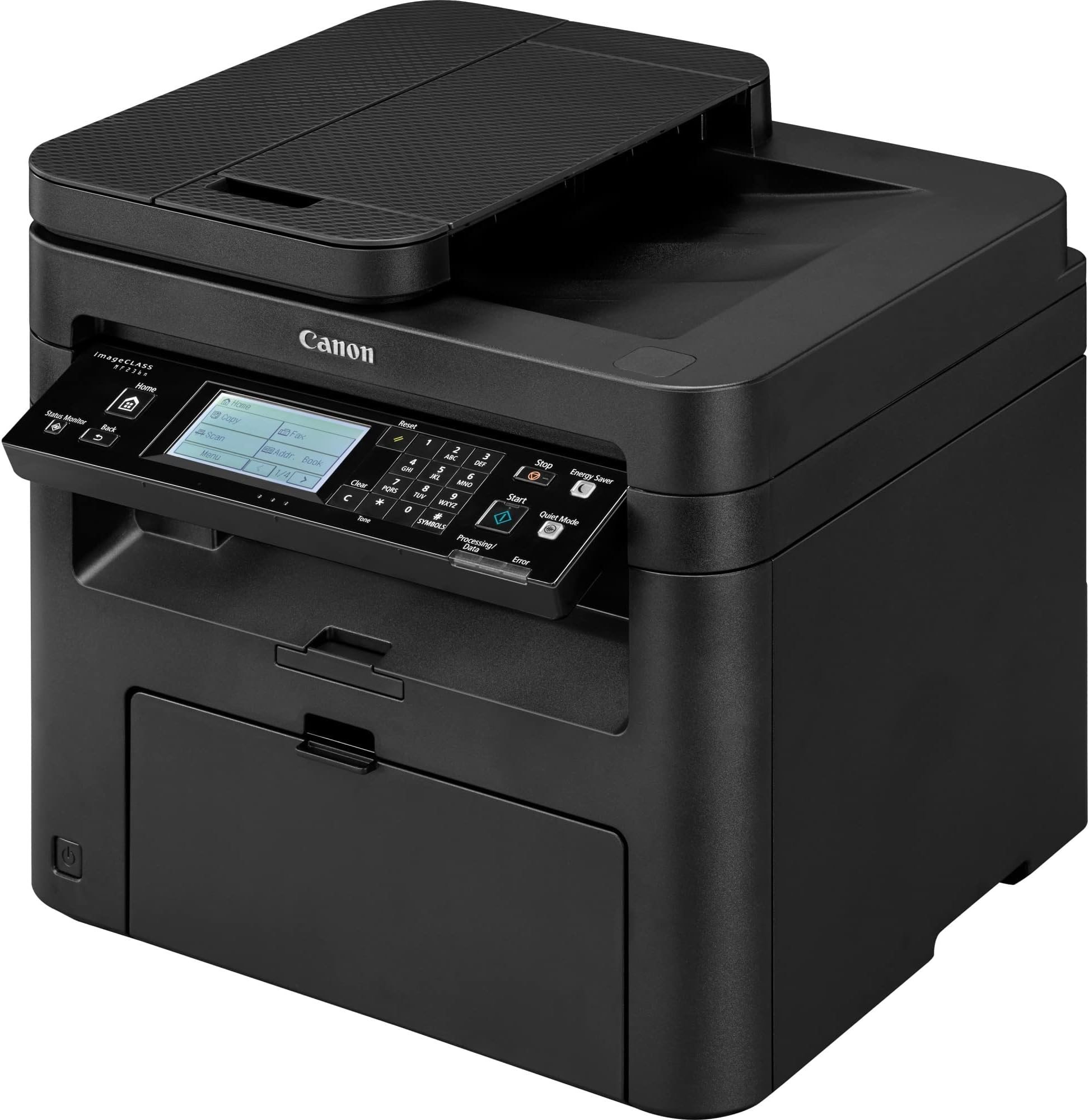
The Canon imageCLASS MF236n is a monochrome all-in-one laser printer designed for small or home offices. It delivers sharp 600x600 dpi prints at up to 24 pages per minute, supports print, scan, copy, and fax functions, and features a 250-sheet paper capacity with a 35-sheet automatic document feeder. Energy-efficient with a 2-watt saver mode and Ethernet connectivity, it combines dependable performance with cost-effective operation.


| ASIN | B01K1KUQHK |
| Additional Printer Functions | Fax |
| B&W Pages per Minute | 24 ppm |
| Best Sellers Rank | #92,905 in Office Products ( See Top 100 in Office Products ) #108 in Laser Computer Printers |
| Brand | Canon |
| Built-In Media | MF236n Product, Power Cord, Starter Cartridge 137 (Starter Yield: 1,700 Pages, ISO/IEC Standard), Starter Guide, User Software DVD-ROM |
| Color | Black |
| Color Pages per Minute | 24 |
| Compatible Devices | Laptops, PC, Smartphones |
| Connectivity Technology | USB |
| Control Method | Touch |
| Customer Reviews | 4.1 out of 5 stars 2,255 Reviews |
| Display Type | LCD |
| Dual-sided printing | Yes |
| Duplex | Automatic |
| Global Trade Identification Number | 00013803275124 |
| Hardware Interface | USB |
| Ink Color | Black |
| Is Electric | Yes |
| Item Dimensions D x W x H | 14.7"D x 15.4"W x 14.2"H |
| Item Type Name | Laser Printer |
| Item Weight | 25.4 Pounds |
| Manufacturer | Canon USA (Lasers) |
| Maximum Copy Speed Black and White | 24 ppm |
| Maximum Media Size | 8.5 x 14 inch |
| Maximum Sheet Capacity | 250 |
| Model Name | Canon imageCLASS |
| Model Number | 1418C036AA |
| Model Series | Canon imageCLASS MF236n |
| Number of Ethernet Ports | 1 |
| Number of Licenses | 1 |
| Number of Trays | 1 |
| Other Special Features of the Product | Seamlessly navigate through all the features with the user-friendly 5-line, tiltable, black/white LCD panel. |
| Paper Size | 8.5 inch x 14 |
| Power Consumption | 13 Watts |
| Print media | Paper (plain) |
| Printer Connectivity Type | USB |
| Printer Output Type | Monochrome |
| Printer Type | Laser |
| Printing Technology | Laser |
| Resolution | 600 x 600 |
| Scanner Type | Sheetfed |
| Special Feature | Seamlessly navigate through all the features with the user-friendly 5-line, tiltable, black/white LCD panel. Special Feature Seamlessly navigate through all the features with the user-friendly 5-line, tiltable, black/white LCD panel. See more |
| Specific Uses For Product | home office |
| Total USB 2.0 Ports | 1 |
| UPC | 013803275124 |
| Unit Count | 1.0 Count |
| Warranty Description | 1 exchange / carry in |
| Wattage | 2 watts |
N**L
Great Printer so far, glad I bought it
I've had this printer for a couple of months now. I mainly purchased it as a copy machine. So far it has scanned and copied very well. You have to look hard to tell a difference between the original and the copy. You can tell a difference, but you have to be looking for it. Its not quite, but it's not exactly noisy. You will hear it kick on and it might get annoying. It has more function than I will ever need. It has a touch screen which I was not expecting. I have not tired the wireless feature yet. Its is light enough to be moved around but not light enough you will want to do it every day. My one concern is the top of the lid where you manually scan is not secured as well as I could like it to be. When you lift it up it wobbles. I would like two solid connections for the pivot/hinge, not one solid and one lose. If you have kids, that might be a concern for you.
M**T
It really is a fantastic printer, no issues at all.
I have had good luck with Canon printers. Toner lasts a very long time (3200 pages) and quality, compatible toners are less than $10 ea. This printer does all I needed it for... Print/quick copy/dedicated FAX line/auto-document feeder/ethernet connection. It really is a fantastic printer, no issues at all. Unlike HP products, I have never had a software conflict issue with the Canon printer software. That in itself is the reason I only purchase Canon printers.
A**J
WARNING: Does not come with ETHERNET or USB connection cables!
Just finished installing this printer. My PC is connected via ethernet cable to a wireless router, so it was necessary to connect the printer to the wireless router via ethernet also. Unfortunately, this printer does not come with an ethernet cable. It ALSO doesn't come with a USB A to USB B cable for a direct connection. What kind of sense does it make for a non-wifi printer to come with NONE of the connection cables necessary for connection? Luckily, I had a spare ethernet cable lying around, but if you are buying this, make sure you also order the required cables you need because Canon didn't bother. Seems stupid to me, but whatever. Maybe I missed some other means of connection, but for certain this printer doesn't come with either of those two cables. It comes with a telephone cable. This is not an ethernet cable and it will not connect your printer to your PC or to your router. Just a heads up if you aren't a network admin and didn't pick up on that right away. So far I have printed a test page. It works. Set up was straightforward outside of the cable issue; the downloaded driver software detected the printer immediately and it was set up in under a minute. It took longer to peel the stickers off everything than it did to install the drivers, so that part was nice. The actual design of this printer is very smart; nothing pokes out too far or requires a lot of clearance which is great because I put it under my desk. Haven't tested scanning functions yet but I'll be doing that soon and will update with any issues. 3 Stars for not putting the connection cables in the box, or at least giving customers a heads up. UPDATE: Scanning through both the feeder and using the glass works perfectly once you download the MF Scan Utility. In fact, everything on this printer is working so easily and flawlessly that I have no choice but to increase my review to 4 stars. If I didn't have my own ethernet cable to spare I'd probably leave it at 3 stars, because it's honestly ridiculous not to include Ethernet or USB connectors, but this is a solid product at a good price. I recommend it anyway.
J**N
Excellent home office upgrade
I have worked from home for years and gone through many different brands of inkjet printers, but this Canon may be the last printer I ever need to buy. It works incredibly well to print a few pages a month with weeks between uses - something that frequently led to clogged ink jets in my previous printers. The sleep function works great and allows me to print instantly without pushing any buttons on the printer to wake it up. The print quality is clear and sharp and only takes a few seconds from waking up to finishing the first page. The only negative points are things that I could have paid more for: duplex printing and a better document feeder. It is easy to manually print on both sides with the software prompting you to insert the pages after the first side is done. I have had a few cases where the software didn't recognize when pages were inserted into the auto document feeder tray to scan, but a quick unplug and re-seating of the USB cable fixes that issue every time. I also appreciate that Canon doesn't require intrusive apps to monitor my printer usage like some other brands.
K**1
NOT WIRELESS -FAILED SUPPORT
NOT WIRELESS I do not have this printer running yet and when I do I suspect I will edit with a more favorable rating . Canon does make a good product. Here is the problem. I thought I was ordering a wireless printer which I really wanted. It took as poster on YouTube to declare it is not wireless (he thought it was as well). I read the shipping box and the Amazon ad and sure enough it does not say it is wireless. My bad. First, are big companies still making products that are not wireless? I guess so. My much more important frustration is that in the box is the manual but the manual does NOT include information for this model number. I then went to the Canon Website per instructions in the manual telling me I could find wireless set up there. I visited that site and, voila, my model number is NOT available in this catalog for wireless set up. Are you kidding me? Why would a manual in the box of the machine I ordered direct me to an irrelevent website (now I know). I then found a troubleshooting dialogue box in Canon and described my problem. Yesterday I sent them an e-mail, still not aware that my printer is not wireless. No answer as of today. Not an ackowledgment, nothing. Only this morning did I discover the printer is not wireless, no thanks to Canon. I have never had such poor "support" from a major corporation. Would I buy this again? We'll see after I set is up but what a fustercluck. Update: The printer and scanner are now working as they should and are a significant improvement over HP printers I have had. I will not improve my rating though. It is extremely important to me when I reach out to a vendor to get a reply. Canon did not reply. And, the manual does include the right instructions but does not list my model number; I just guessed that the chances were good. Really shoddy support and sales. 11/20/2017 This is my wife's amazon account. She bought it for me as a gift....John
D**.
Solid printer/scanner that doesn't want your data, and earns it's keep being a good printer.
This printer is old school and I love that. Modern printers have subscriptions to overpriced ink, you'll need an account to download drivers, and collect your data, and a steady supply of revenue for ink. This printer is not disposable, it's worth getting additional toner cartridges. A simple with USA and an ethernet interface, Windows will automatically detect it (and most phones will too). It just works, then when the cartridge is empty, you buy a cannon cartridge, or any number of compatible types which are readily available and reasonably priced.. This printers not smart enough to steal your data, not greedy enough to force you to but a cannon cartridge, but it is smart enough to answer as a printer, scanner, or ( FAX ? ) and sleep when not in use. But it's old school... You have to set the time yourself.
J**E
2017 Good value, terrible software setup I would have given ...
from BPS on September 2, 2017 Good value, terrible software setup I would have given more stars but the setup was horrible. This was a replacement for an HP M1522nf All-in-one Laser Printer that had served me well for probably 10 years or more. The good: Careful packaging, compact printer. Easy to unpack and physically set up. Print quality is good. First page out is fast. Control panel is relatively intuitive The bad: Software setup, driver installation, etc. was horrible. Issue 1 - Out of the chute it wants you to be a local administrator (this is on Win 7 Enterprise, SP1). Even though I am a member of the Administrator group, I had to create a Local Computer Admin user and log in as that. This after calling Canon Tech Support and being told they "had no idea, must be a Windows issue..." Searched Google for the error and got a dozen hits before finally coming upon the local administrator lead. Issue 2 - even after installing the software (download from Canon's support site ), I couldn't scan. Turns out I needed to download the MF Scan Utility separately. Issue 3 - Trying to add to Google Cloud Print - Don't bother with the printer control panel route on the printer, nor with going to your Google settings to add. Use the web interface for the printer (browse to the Printer UI at the assigned IP address so - Printer_IP_Address/m_network_cloudprint and manage it from there Issue 4 - See attached photo. Some piece that was broken off when I unpacked the printer. Everything works so I'm disinclined to return the printer but opens the question as to whether there is further damage that will manifest itself later. Stay tuned for updates on that... Issue 5 - The printer control panel ( I am referring to the physical panel on the printer itself) rotates up nicely so you can see what you're doing but you have to hold it up with one hand while pressing buttons with the other as it doesn't lock up in place. A minor annoyance but would be nice. Maybe that piece that broke off...? Bottom line - Would I buy this again? Right now I would say a qualified Yes given that I now know the issues. Time will tell after I use it for a while. The price was good, print quality and overall usability is good once past the setup issues.
B**W
A super reliable and sturdy all in one printer!
This prints fast, scans fast & doesn’t jam up easily. It’s also incredibly sturdy. I had my printer in a non temperature controlled storage unit (extreme heat and freezing cold) for two years. I got it out today, plugged it in and it worked perfectly! I will definitely get another one when this one dies.
R**Y
I'm impressed.
This is the first amazon warehouse item I've purchased, and I've got to say it's been smooth sailing. Printer arrived well packaged, no damage whatsoever. For the price I don't see how you could get a better printer. Plugged into 5-way ethernet switch coming straight from our ISP's wifi router, this printer connected straight away to every device on the network (airprint on iphone over wifi worked straight away) with no issues. The network scanning function works well, just be sure to install the canon mf scan utility (built-in windows scan function can't see it on the network). So far there has been no need to connect the unit directly with USB. The toner cartridge replacement is as straight-forward as can be, and the canon page yields (at least on paper...haha) seem to be worth the price over the cheaper off-brand 137 toner cartridges, so you may actually get what you pay for. The photo scans are very good quality (see attached scan of a flattened Ryzen CPU box), scanning a stack of documents seems to work well (it puts all scanned documents in order in one PDF file from default). The prints are super crisp and the printer warms up and prints very quickly, not obnoxiously loud either. For the price ($150 CAD amazon warehouse used with free shipping) you can't go wrong. Will update review if things change.
C**N
DESEMPEÑO INSUFICIENTE
No imprime a dos caras. En la información publicada no se hace ninguna referencia a la falta de esa característica
M**N
MY FIRST LASER PRINTER, AND IT'S PERFECT. SUPER CRISP PRINT, AND SUPER EASY SETUP
I have owned several ink jet printers, but this is my first laser printer. The quality of the print is incredible. The absolute smallest print is so crisp and clean. 5 minute wireless set up, with no issues at all. Print from my phone, or tablet. For $250, it is a steal. Each toner cartridge prints 2500 pages at 40% coverage. Copy, fax, scan, print, lcd touch screen, all work flawlessly. I will never buy a different kind of pri term again. I bought the 3 pack of toner cartridges, so I can now print 10,000 pages at 40% coverage. YOU DON'T NEED TO BE A TECHNO GEEK TO HOOK THIS UP WIRELESSLY. OUT OF THE BOX, AND PRI TING IN 10 MINUTES. SUPER PLEASED!!
A**R
Timely Delivery and Easy Setup
Plugged it in and wired it directly to my laptop and it worked right away. Prints well. Kevin
H**H
Good but BE AWARE OF THE LIMITATIONS
This printer has some nice features. It's fast, it's quiet, and the quality is great. For the price, it's a handy little laser printer. However, it does not do duplex (2-sided) printing. Also, despite supporting AirPrint, it does not have wifi capabilities. It will need a wired ethernet connection to a wireless access point in order for you to be able to print from your phone. Finally, it's just a black-and-white unit. No colour printing here. If don't depend on 2-sided printing, don't need a wireless printer, and don't need colour, you'll be happy with this unit.
Trustpilot
1 month ago
3 weeks ago