

Buy anything from 5,000+ international stores. One checkout price. No surprise fees. Join 2M+ shoppers on Desertcart.
Desertcart purchases this item on your behalf and handles shipping, customs, and support to Brazil.
๐ฌ๏ธ Elevate your air, elevate your lifestyle โ control comfort like a pro!
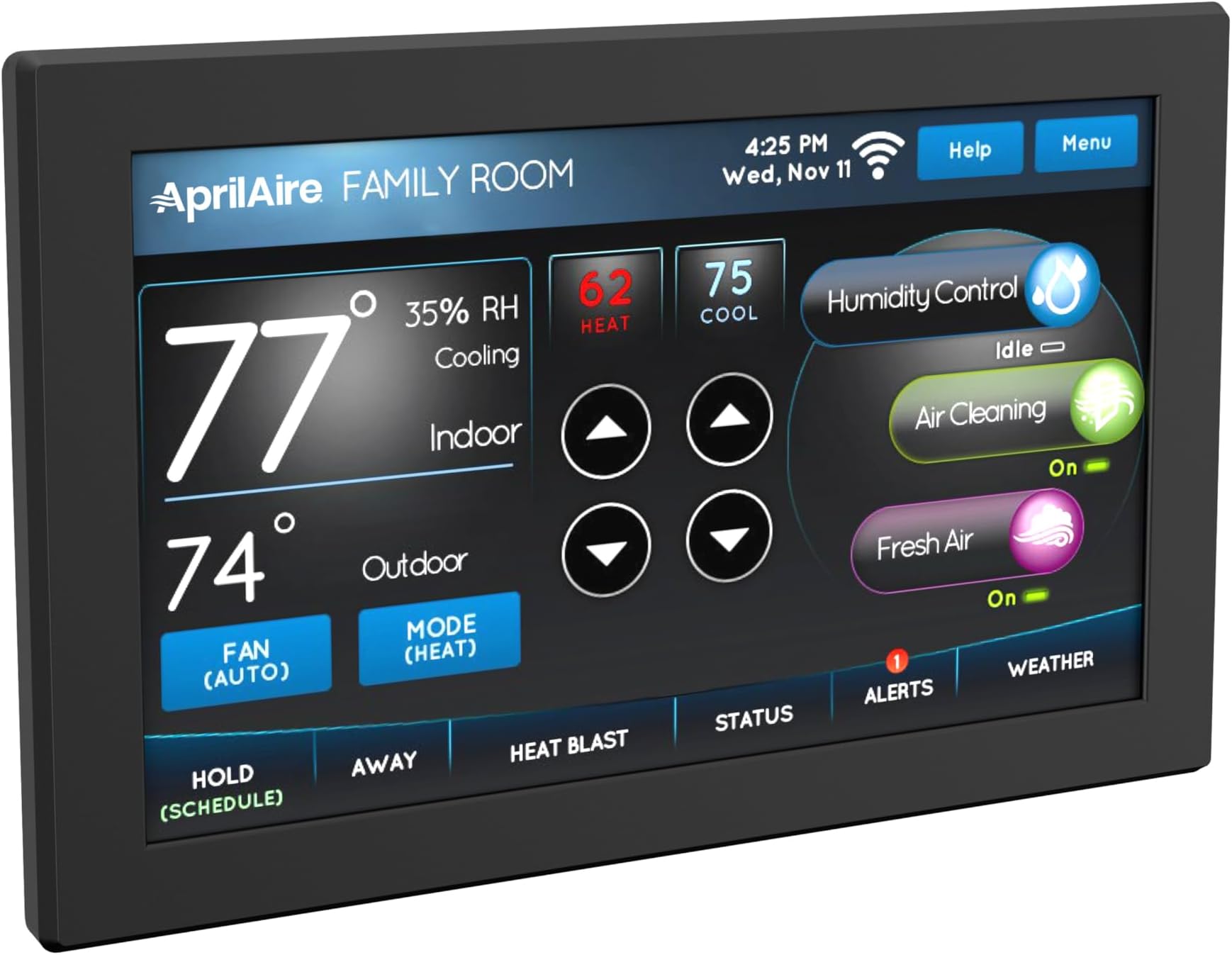
The Aprilaire 8920W is a programmable Wi-Fi thermostat featuring a vibrant 7-inch full-color touchscreen, Alexa voice control compatibility, and comprehensive indoor air quality management including humidity and air purification. Designed for easy installation with just three wires, it offers remote monitoring and energy-saving scheduling via the Aprilaire app, making it the ultimate smart home HVAC control solution.


| ASIN | B01KU0NLCS |
| Additional Features | Programmable |
| Backlight | Yes |
| Brand | Aprilaire |
| Brand Name | Aprilaire |
| Color | Black |
| Colour | Black |
| Connectivity Protocol | Wi-Fi |
| Connectivity Technology | Wi-Fi |
| Control Method | App, Remote, Touch, Voice |
| Control Type | Voice Control |
| Controller Type | Amazon Alexa |
| Controller type | Amazon Alexa |
| Customer Reviews | 4.1 out of 5 stars 77 Reviews |
| Display Type | touchscreen |
| Global Trade Identification Number | 00686720892035 |
| Included Components | thermostat |
| Item Weight | 0.69 Pounds |
| Manufacturer | Aprilaire |
| Manufacturer Part Number | 8920W |
| Material Type | Stainless Steel |
| Model Name | 8920W |
| Model Number | 8920W |
| Model name | 8920W |
| Mounting Type | Wall Mount |
| Power Source | Hardwired |
| Screen Size | 7.01 Inches |
| Shape | Rectangular |
| Smart Home Compatibility | Smart Home Compatible |
| Special features | Programmable |
| Specific Uses For Product | Air Conditioner |
| Specific uses for product | Air Conditioner |
| Temperature Control Type | Heating, Cooling |
| UPC | 686720892035 |
| Unit Count | 1 Count |
| Voltage | 24 Volts (AC) |
| Wattage | 10 watts |
K**N
Works great
Works great.
J**Y
All good - 6 Stars
This is the 2nd house we have lived in that had an Aprilaire 8920W thermostat. In our last house, the builder provided it so I was not the one to install it in that house. We used it for about a year until we moved. During the time we lived in that house, the 8920W did all it was called on to do. The house we live in now was new construction when we moved in and the builders Tstat was a bottom of the line generic model to control a basic heat-pump system with one stage of auxiliary heat. Then we added a whole-house dehumidifier and a fresh air ventilation system, so we need to upgrade the thermostat to properly control the entire HVAC system. Since we had good success with the 8920W in our last home, I decided to do more of the same in our new home. The 8920W system is two parts. The user interface screen (looks like a thermostat) and a remote Equipment Control Module (ECM). I mounted the ECM next to the air handler unit (AHU) in the attic. The wiring between the thermostat and the ECM is a "data highway" that consists of 3 conductors. I used the red, white, and blue wires in the original multi-conductor cable for this hook-up. The connection between the ECM ad the Air Handling Unit (AHU) is a typical 8 conductor thermostat wire but I only used 4 of the 8 conductors. The connection between the ECM ad the Condenser is a typical 8 conductor thermostat wire but I only used 5 of the 8 conductors. After installing the thermostat and the ECM and updating the wiring, I powered up and from then on it was pretty uneventful. Now the thermostat "talks" to the ECM and the ECM "tells" the Air Handler, the Condenser, the Dehumidifier, and the ventilation systems what to do and when. I had no issues syncing the thermostat to my Wi-Fi. And with the Aprilaire app on my Android phone, I paired it to Google Home and now I can adjust and control the entire HVAC system in "Routines" or by my voice commands. The 8920W is the only Wi-Fi thermostat the works without hubs and add-on modules to communicate with the HVAC hardware. The ECM has full functionality to control the HVAC, dehumidification, ventilation, and an electronic air cleaner all at the same time while using ASHRAE parameters to save energy while ensuring optimal healthy Indoor Air Quality (IAQ). The bottom line, it works and you get what you pay for. When I changed the low voltage control wiring to accommodate this equipment, I learned to like lever-lock wire connectors instead of using conventional wire-nuts. The lever-nuts work and they work well.
D**H
Great but difficult to connect.
Pros: emailed temperature/ humidity alarms, hardwired OA temp sensor, dual fuel compatibility, controls humidifier and air cleaner, Wi-Fi enabled, Geofence capability Cons: might be difficult for those that aren't handy to install, difficult to get connected online, screen is always on (but does dim). Overall, we are happy with this little gadget. The screen looks great and it is easy to use. Installation was easy enough to do. This model has a wired OA sensor instead of relying on internet for local weather data. Nice feature for vacation homes that might not have internet year round. The full color touch screen looks really nice with the black frame. While the physical installation was easy (I used to do automation systems) some folks that aren't too handy might be overwhelmed with all the wiring for the HVAC and humidifier and air cleaner. The real downer was getting it connected. It simply would not connect when using the app as instructed. I found that connecting the Stat manually through the touch screen got it online. That got it an IP address. Then I disconnected it from my router and went back into the app. Worked fine that time. I can only guess that something internal was not allowing it to obtain an IP through DHCP when using the app. Once it had an IP by connecting through the screen, it kept that reservation so it would work with the app.
M**!
Good buy, if you have limited/low expectations
This is a good Indoor Air Quality (IAQ) device. Consolidates various equipment well. Disappointing in other functionality and user interface. I seriously question the $320 price tag because of the negatives below. Positive: 1. Easy setup - easily connect and control various devices. Took me less than 2 hours to connect furnace/ac, Humidifier and air exchanger. This is a BIG plus and the major reason for me to buy it. 2. Ability to control devices from phone. 3. Thermostat has a screensaver function that can show the temperature and time. Very convenient. Negative: 1. Outdoor temperature/humidity sensor needs physical wiring. Hard to do if you don't have easy access. I expected the equipment to pull outside data using WiFi function, in the absence of the physical sensor. 2. WiFi interface is extremely disappointing. I haven't seen the weather functionality work yet after a couple of weeks. 3. You can connect the display to WiFi without the app. However, the device guides you to install the app on your phone. 4. The app interface feels old and scattered. Needs a big face lift. The app also insists on having location on at all times. I sense some serious data collection. 5. HUGE NEGATIVE - The thermostat reverts to default setting whenever power is lost. I turn off the AC unit's power ever time I change the air filter. This is a BIG hassle. I have to reset the date, time, schedule settings every time! 6. There's no air filter change reminder option. Big minus for me. Timely Filter changes are important and the thermostat will be an appropriate place for the reminder.
J**R
Best Thermostat Available - Just Get One!
An awesome thermostat in every respect. Big beautiful color display with all the important stuff on the front screen. Simple hookup with only 3 wires between the thermostat and the controller (mounted on air handler). Has connections for everything you could want (Humidifer, Dehumidifer, Fresh Air intake, Electronic Air filter, multiple temp sensors). The display quality is top notch, and installation was a breeze. Most of the negatives you might see (in other reviews) are due to a lack of user knowledge rather than any kind of product shortcoming. The one thing I will say is that the intial setup utility where it attempts to set up it's own wireless network and connect to it leaves a bit to be desired. I highly recommend manually connecting the thermostat to your existing home WiFi from the front panel of the thermostat (not from the app), and then adding the thermostat to the App (manually) by entering the MAC address that will be displayed on the front screen of the thermostat after you connect it to your Wi-Fi. I did have a single occassion where the thermostat seemed to think there was no internet after exiting the installed menu (it reboots). I simply rebooted it a 2nd time and it was fine. For those complaining about difficulty staying connected to your WiFi, please keep this in mind - the WiFi antenna is inside the CONTROLLER, not the display part of the unit. This means you need to have a good wireless signal where your air handler is located - having strong signal near the thermostat display is not relevent. You might need to add a WiFi booster in the area of your air handler, especially if it is in a basement, or garage.
Trustpilot
1 month ago
2 weeks ago