Desertcart purchases this item on your behalf and handles shipping, customs, and support to Brazil.
🚀 Elevate your remote control game — 4K clarity, zero lag, total command!
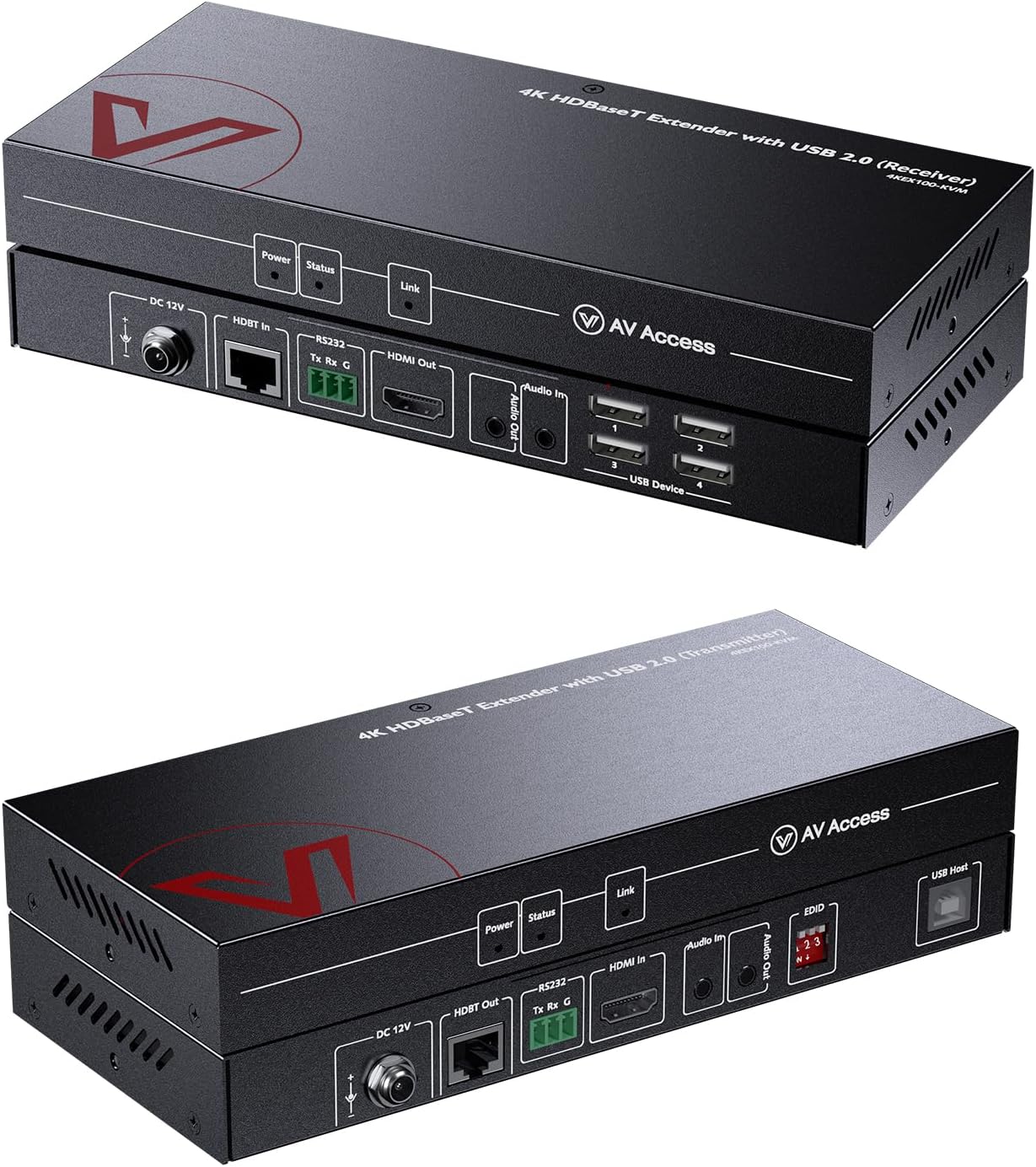
The AV Access HDMI KVM Extender delivers flawless 4K@60Hz video and USB 2.0 peripheral control up to 100 meters over a single Cat6 cable. Designed for professional environments like server rooms and control centers, it features Power over HDBaseT for simplified setup, advanced EDID management for stable display output, and supports RS232 and audio pass-through for seamless AV integration. Plug & play with no drivers required, it ensures ultra-low latency and reliable 24/7 performance, making it ideal for remote workstations, gaming, and industrial control.


| ASIN | B01GYKVWC4 |
| Best Sellers Rank | #103 in KVM Switches |
| Brand | v AV Access |
| Brand Name | v AV Access |
| Circuit Type | 2-way |
| Color | Black |
| Compatible Devices | PC |
| Connectivity Protocol | Cat 5e/6 /6A (U/FTP) |
| Connector Type | Plug In |
| Contact Material | Metal |
| Contact Type | Normally Open |
| Control Method | Remote |
| Control Type | remote |
| Controller Type | HDBaseT, HDMI, HDCP 2.2, CEC specifications, IR, RS232 |
| Current Rating | 3 A |
| Customer Reviews | 4.0 out of 5 stars 119 Reviews |
| Included Components | Tx, Rx, Power Adapter, USB Cable, Male Connectors, Brackets, Manual |
| International Protection Rating | IP54 |
| Item Dimensions | 9.84 x 5.12 x 0.79 inches |
| Item Weight | 1 pounds |
| Manufacturer | AV Access |
| Material Type | Metal |
| Model | 4KEX100-KVM |
| Mounting Type | Surface Mount |
| Number of Items | 1 |
| Number of Positions | 4 |
| Operating Voltage | 12 volts |
| Operation Mode | manual |
| Part Number | B01GYKVWC4 |
| Specification Met | CE |
| Switch Type | Push Button |
| Terminal | Through Hole |
| Unit Count | 1 Count |
| Upper Temperature Rating | 45 °C |
| Warranty Description | We offer 1-year and 30-day hassle-free return to end-users. |
| Wattage | 12 watts |
R**I
**get the newest version with HDMI 2.0 support** -- flawless for low latency PC gaming on a TV!
*disclaimer!* -- get the newer version with HDMI 2.0 support! leaving a review on this one too because it was great as well, but i'm copying my review from the newer one here: pricier than the alternatives, but you get what you pay for -- fantastic KVM that is much more stable and well-built compared to previous cheaper ones that i have tried. i chose this one because the previous one i tried had very limited USB support -- the drivers for the USB ports were for mice and keyboards // HID devices *only*, so no USB bluetooth dongle support like i needed -- and this one doesn't have that issue. i don't have hard numbers or measurements, but the latency is basically imperceptible for gaming. i played through jedi survivor and just finished bloodborne at 1080p + 120hz on my samsung QN90D TV, and it has worked flawlessly. so i really have no complaints at all, this is absolutely worth the money! i would recommend it to anyone who wants to use their computer for PC gaming on a TV in a separate room like i did minor things to watch out for (but which are not issues with the KVM itself!) -- *make sure to get the newer version with HDMI 2.0 support*, and use HDMI 2.0+ cables if you want to use higher refresh rates (120hz) or resolutions (4k, although i typically use 1080p). HDR support is kind of finicky on my GPU + TV combination, but i don't think it has anything to do with the KVM. if they release an updated version with HDMI 2.1 support, i will almost certainly upgrade to it this is a fantastic KVM that has worked perfectly for my needs, and i've had no issues with it at all. highly recommend it!
S**T
100% functional - Great product
I'm very impressed that it meets all of the functional requirements. First time, everything worked! Source: Mac Book Pro M2 with two USBC ports with cables for the 2 HDMI cables and the USB connection Network: 82' Cat 7 cable Receiver: HDMI 1: HDMI to VGA converter with Audio connecting to a KVM switch which shows on a 1080p monitor. I was able to switch between devices and experience no problems reconnecting to the remote machine (unlike other KVM Extenders I've tried). HDMI 2: HDMI to VGA cable with audio connecting to a 1080p monitor. Video and sounds works great! USB1: Connects to KVM USB switch for remote keyboard/mouse operation. Zero Lag! Huge win! USB2: Connects to an iPhone for software development. My Mac & Xcode connected with no problems. No loss of connection for debugging code, etc. USB3: 2nd mouse. USB4: I tried both a Logitech webcam (audio/video) and a HyperX Solocast microphone and both worked without problems. The microphone's better sound quality persisted. I have yet to test using USB3 to connect to the microphone and the USB4 to the webcam (video only) and verify I can use both devices in a virtual meeting. I've used this setup for about 4 hours now. Everything worked - No lag. No issues reconnecting. No video flashing or loss of quality (that I can tell). I maxed out what this product says it could do and it performed.
S**K
just works
My PC is now in the basement where it is nice and cool, and I will eventually put inside a dedicated conditioned/filtered cabinet. Monitor and wireless keyboard/mouse are upstairs. Everything works great with no lag. I won't say zero because i haven't measured it, but its so close to zero that I can't tell. It wakes up my PC when I jiggle the mouse. The 4 ports are nice so I can put in a usb stick and transfer files. Not as fast as the USB3 at the PC, but good enough for smaller files. The only downside that I've found is that when I have windows set to extended desktop, it can't figure out if one of the two monitors is disconnected. Usually if you have two monitors hooked up to a single windows machine, it can tell if one is unplugged and will automatically switch to a single display. With this device it always thinks the monitor is connected. So if you sometimes work on a local monitor and other times at the remote, you'll need to manually tell windows which monitor is your active desktop. You can leave it in extended mode, but you'll have windows open up on the other desktop and its a pain to drag a window into the active screen when you can't see it. Even with that little bug, I'm happy with the performance. I only have a 1080p monitor, so I can't comment on the 4k capability. I purchased this for an eventual 4k monitor for future proofing.
B**D
This product works perfectly!
Absolutely plug and play. I ran an unshielded Category 6 cable just a little less than 100 meters in a huge warehouse from the IT room to the main offices. Plugged in the HDMI cable into my NVR which outputs 4K. I have over 45 four megapixel cameras in the NVR. Plugged in the HDMI on the other end and a wireless mouse. You only need power on one side. Now my customer can control the NVR right from the 4K TV in his office and look at the entire facility, zoom in, configure, etc. The display is amazingly crisp and clear. We used a wireless mouse on the receiving end and it also came up right away through the USB port. Great product. I looked at other products costing $700-$800 and read reviews and a lot of time they didn't work as advertised. Ryan at AV Access answered my questions right away by email and made me confident it would work and it did! I picked a winner.
C**T
Buggy power, poor but working video, excellent USB
It works, but not well. Mine only works when the transmitter has power. When the receiver had power and the ethernet cable was connected between them (this should have powered both devices), the transmitter did not power up. When power was applied to the transmitting box and the ethernet cable was connected, both boxes had power. This slowed us down trying to figure out why nothing worked. Aside from that, the device does work. The instructions that come with the device are not detailed. Video quality - very poor. I am using the box to type this so it is possible to use it, but the color quality is poor. There are color splotches where they don't belong. For very basic work like powerpoint with long cable runs, a person might not care. For my purposes (photography, art), it doesn't work well enough. USB - excellent The USB port is the only thing I will wind up using on this device. USB extenders are generally $130 on up, so the additional $100 this box costs is a waste but I may just keep it rather than shipping things back and forth to get a basic USB extender over ethernet.
E**D
IT WILL NOT WORK FOR TWO MONITORS, CHEAP PRODUCT
PAY ATTENTION: If you buy the doul monitor cover for your two monitors, DO ONT BUY, I WILL NOT WORK OR WILL BREAK SOON, this is very cheap product which for single monitor could do the job for you but once you plug two monitors it will keep going on and off to black screen as it shows how cheap the product is and no way it can handle two monitors,,. but once you plug our one of the monitors then it works,. it just simply is not what they advertized and they charge you for dual monitor where as it just works with one,. so save ur money either buy the single monitor or go with more expensive brand with decent quality
K**K
Superior KVM Extender
I was apprehensious due to the price, but i am extremely satisfied. Had a little hiccup on installation with HDMI. Apparently my monitors HDMI was not compatible (Maybe DHCP requirement?) Anywho... I used a HDMI to DVI cable and everything worked great. Also, upon connecting any additional connections make sure to power cycle the extender if they do not work. I attached a second monitor through USB using "Plugable USB 2.0 to VGA / DVI / HDMI Video Graphics Adapter for Multiple Monitors up to 1920x1080" and at first my computer could not see it. Power cycled the extender and low and behold it worked! And, the single 12 V power supply must plug into the transmitter side. On mine, plugging power into the receiver side only powered up the receiver side, but plugging power into the transmitter side powered both sides. Also, system seems to be very stable (No random colorize issues or drop outs of connections (unlike other products... AGPTek, *cough cough*)). Also, at 50 meters, there was no noticeable lag in any way with mouse and keyboard (unlike other products... AGPTek, *cough cough*).
T**D
"Visually Lossless" is a joke
Functionally, the boxes are flawless - completely plug and play, no dropouts, no issues whatsoever. However, the picture quality is extremely lacking, especially if you're trying to do anything with text. You'll go cross-eyed trying to read all the compression artifacts, especially with lower-contrast color combinations. Attached is the AVAccess product page, just to show you the ridiculous artifacting. I reached out to the only email I could find for support, and as of the time of writing, 3 days later, I have not received a response to indicate if this is 'normal' or not. However, judging from pictures in other reviews, it appears to be normal.
M**E
Over priced but works
Use a SHIELDED cat6 cable when using these. You'll never have an issue. Solid product. Bought 5 direct from manufacturer. Amazon seller overprices these.
D**Y
to be able to extend your workstation or gaming PC by such a long distance is simply amazing!
WOW. This is so good!! I received this HDMI USB KVM extender dual monitor by AV ACCESS, This is a serious piece of hardware for gamers or for extending your workstation! There is no lag, this is seriously amazing! You get two main units in this pack - a transmitter and a receiver and two power adapter sets, a USB A to USB B cable, wall-mounting brackets, packs of screws and a manual to follow for installation/guide. You will need to have your own ethernet cables to connect one pc (your main PC) to your second monitor to link them together. The dual HDMI kvm extender can work with all operating systems, including Windows 10/8/7/XP, Mac OS and Linux. There is no extra software or driver required; just plug and play. It has a built-in PoC function, the HDMI extender transmitter can be powered by the receiver via an ethernet cable, so only one power supply is needed at the receiver side to power both units. Overall, once this is set up it is amazing! NO LAG, NO DELAY. Fantastic, and you can use this up to 80m away from the main PC! To be able to extend your workstation or gaming PC by such a long distance is simply awesome.
H**L
Amazing 4K picture and no lag. All audio formats via HDMI. USB passes gaming controllers.
Amazing product. I can send a 4K 60hz signal from my gaming computer 50ft away to my Sony 4K TV perfectly. There is no input or streaming lag, the USB 2.0 extension lets me connect a 2.4ghz gaming controller and a separate mini keyboard/mouse. The HDMI also passes all audio formats perfectly, I've tested compressed and uncompressed Atmos+TrueHD and no issues at all with any surround format. Yes it is pricey compared to cheaper ones, but I've tried a no-name and OREI and the picture quality of this AV Access extender is like I've got my computer directly plugged into my TV. The others the compression is very noticeable and text is pixelated. Also, the other extenders with USB it may only pass keyboard and mouse signals whereas this one has no problem with webcams or controllers. Also good service, my extender came with a faulty USB cable and they refunded me a small amount to buy a new one.
A**N
Works super well
I have in wall cat 6 cables throughout my apartment that all terminate in the garage at the NBN box. My wifi setup consists of a base station at the NBN box, plus an extension at the living room LAN connection point. I use this in a setup to go from the downstairs office, up to the TV in the living room for when I want to play games on my television. The downstairs office is directly under the living room, which actually allows me to stil have a pretty good bluetooth connection between the computer and peripherals like headphones, keyboard, mouse and controllers. It's awesome as it lets me game from the couch without hauling around the large PC tower. The latency is there, but only really noticeable with button feed back in game. Like, when you toggle something and hear the click and see the animation like, so briefly after actuation. I'm pretty picky when it comes to that kind of latency, and find that using Dolby Digital audio with my xbox is super painful (known issue as pointed out by many posts in the xbox forums). The latency with this is nowhere near that, and completely playable even in more fast paced first person games. Super happy with this device.
A**E
Lache après 4 mois d'usage standard et très compliquer d'en avoir un autre
N'est pas aussi fiable qu'ils disent très désus de leurs soutien technique
Trustpilot
3 weeks ago
2 weeks ago