Buy anything from 5,000+ international stores. One checkout price. No surprise fees. Join 2M+ shoppers on Desertcart.
Desertcart purchases this item on your behalf and handles shipping, customs, and support to Brazil.
🚀 Elevate your data game with RocketRAID — where speed meets scale and control!
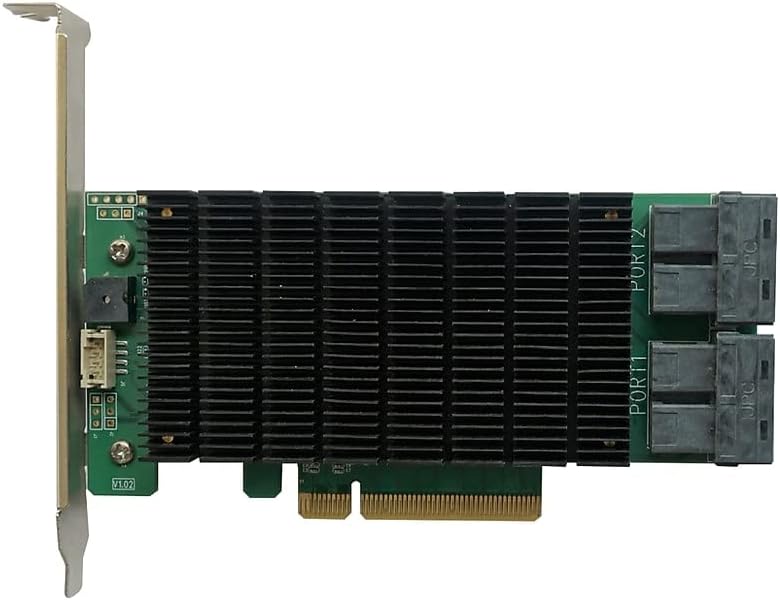
The Highpoint RocketRAID 2840C is a professional-grade PCIe 3.0 x8 RAID controller featuring 16 high-speed 6Gb/s SAS/SATA ports. It supports a wide range of RAID configurations and offers comprehensive management tools across Windows, macOS, and Linux. Designed for enterprise and NAS-class drives, it enables seamless online capacity expansion and RAID migration, ensuring scalable, reliable, and future-proof storage solutions for demanding professional environments.


| ASIN | B08TM38F25 |
| Best Sellers Rank | #20 in RAID Controllers |
| Brand | HighPoint |
| Compatible Devices | Personal Computer |
| Customer Reviews | 4.0 4.0 out of 5 stars (233) |
| Hardware Interface | PCI Express 3.0, PCI Express x8, PCIE x 8 |
| Item Type Name | HighPoint RocketRAID 2840C PCIe 3.0 x8 16-Port 6Gb/s SAS/SATA RAID Controller |
| Manufacturer | HighPoint Technologies, Inc. |
| Model Number | RR2840C |
| Operating System | Only supports 64 bit operating system. • Linux (Support Linux Driver auto Compile) • Redhat/Ubuntu/Debian/Fedora/Proxmox/Rocky Linux(Kernel 3.10 and later) • Unraid6.9.2, Windows 11, 10, 8, 7; Windows Server 2022, 2019, 2016, 2012R2, 2008; Microsoft Hyper-V; Only supports 64 bit operating system, macOS 10.9 ~ macOS Ventura 13.x |
| Style Name | 4x Int. mini-SAS HD Ports – up to 16 HDD |
| UPC | 643653284023 |
| Warranty Description | 2 Years |
M**.
Best raid controller for windows 11 hands down
Pros: Easy to use web based management software Supports sata too Supports larger capacity hard drives Alert you when a drive is failing and the management software tells you which drive is failing where it’s connected (the alert states it based on the corresponding connected connection and the fact my cables are labeled and my drives are also labeled doesn’t hurt either) it automatically rebuilds raid 1 arrays You can mute the really loud shrill noise it makes when you have a failing drive It’s not too slow (then again I had a raid controller that was pretty old and slow and was a pcie 2.0 pulled from a retired r710 server after i upgraded the r710 so really anything was better than that Dino) Drivers support windows 11 Easy and painless to install and use Physically durable and well built. Doesn’t feel cheap Supports multiple large capacity drives on multiple arrays Compatible with multiple operating systems including windows 10 and 11. Definitely has windows 11 compatibility. This includes drivers. Functions well hasn’t crashed or froze up my computer It costs less than $200 for me it was about $150 plus tax Well packed. Drivers are easy to find on the manufacturer website. Works in desktop PCs Includes low profile bracket if you need one Is a true one slot card not a 1.5 slot with tall heatsink It’s pcie 3.0 not some stupid halfarsed pcie 2.1 or something older Doesn’t overheat and thermal shutdown or BSOD due to overheating Good for 24/7 use (so far) so it’s good for home labs and NAS RAID setups that are used as primary centralized data and application software. You can run and access multiple arrays at once with minimal slowdown And best of all it absolutely totally DOES NOT SUCK!!!!! Definitely worth picking up especially if you’re a Windows 11 centralized data and application server user There’s also a similar controller by the same manufacturer here on Amazon for $100 if the extra $50 plus tax scared you off. If so I recommend that one as well it also supports windows 11 and 16 sata drives across the same type of cables and is also a 4 port card. So keep that one in mind too if you want. These are great controllers with great compatibility and easy to install and easy to use so DEFINITELY pick one up! Cons: Doesn’t include cables but you can get some cheap third party ones here on Amazon. I got a 2 pack of relabeled mini sas to sata ones for less than $30 including tax on Amazon. This controller supports 4 cables and 16 drives total It states it supports Linux but I’m a Windows user not a Linux user (I can’t Linux even if my life depended on it) so I can’t really speak on that myself No support for Mac according to what I see Sorry rich 1% people and major conglomerates who are so filthy rich they can afford a Mac without using their mortgage money entire life savings work five 9 to 5 jobs not eat for a year and go into massive debt to afford a Mac like everyone else in Main Street America would have to do to afford a Mac. This is not the card for you!
P**C
Excellent Cards *UPDATED* - UPDATED Twice
I have used Highpoint cards for many years. I used to use the 2322, and now I use the 2722. I have probably a dozen of the 2722 model now in my own Mac Pro systems and client Mac Pro systems. These cards have always been great performers. A couple of years ago one of these RAID systems almost succumbed to the Seagate firmware fiasco. But to my amazement the RAID array held together and I was able to migrate the data to a new set of drives. I have never had reason to contact their tech support - until about a month ago. I took the bleeding edge approach with a new server - going with a Mac mini and a Thunderbolt PCI expansion chassis. And yes I bled. :-) The card would not be recognized by the OS. The experience with Highpoint's tech support was prompt and ultimately successful. Highpoint was able to update the driver, and now a new Mac mini is happily hosting a 12-TB RAID 5/0 array. The reviews prior to mine just don't make sense to me, unless perhaps these reviewers were using consumer-grade desktop drives in RAID systems. The use of desktop drives in a RAID system would completely explain their woes. I use nothing but RAID drives in RAID systems. There are important differences between desktop drives and enterprise drives, and pretending these differences don't exist will result in much angst. Desktop drives should not be used in RAID systems, and enterprise drives should not be used as stand-alone drives in a desktop. I do have one nit to pick with Highpoint. They should update their documentation for the Mac explaining that it is unnecessary with OS X 10.8.x to install the driver that is included on the CD or available for download. All that is necessary is that the Web GUI be installed by doing a Custom Install of the driver installer. If the driver is installed along with the Web GIU, it will conflict with the driver included with the OS. This point should be made clear as day in the documentation and on the download page for the driver. In fact there should be two installers - one for the driver and another for the Web GUI - not both rolled into one. Nit pick aside, I do highly recommend Highpoint products on the Mac. Next I will try one of their RocketStor docks. *UPDATE* I am having to reduce my rating from 5 stars to 2 stars. If you are using this in a PCI based Mac Pro then my 5-star raing still applies. However if you are using this in a Thunderbolt system then avoid this product. I discovered a serious performance bug in this card in Thunderbolt systems: I placed a RAID & this card on a Mac Pro with internal PCI and measured the performance, which was excellent. I then took the same RAID & card and placed it in a Mac mini with a Sonnet Thunderbolt enclosure. The write performance was excellent and matched that of the Mac Pro. However the read performance was 1/5 - an 80% degradation. I contacted their tech support and they were able to confirm this behavior, and they said it could not be corrected. Tech support said the 472x line would have better performance. I have about 5 of these cards in Thunderbolt environments. I have repeatedly contacted their sales department with the request of an upgrade to the 472x card. All attempts have been ignored. Meanwhile on their web site this card is still listed as compatible with Thunderbolt. The performance is so poor in my opinion this card cannot be qualified as compatible with Thunderbolt. Due to this brush-off by sales I am going to standardize on a different manufacturer's card. I'm done with HighPoint. *UPDATE 2* March 2015 And a happy ending to this Thunderbolt situation. Somewhere along the line Highpoint fixed the performance issue with Thunderbolt environments. I was using one of the Mac minis with the RAID to do some testing. I noticed with Yosemite that the performance was as expected. Yosemite comes with driver version 4.3.3. So as a test I wiped the OS and installed a Mavericks (which comes with driver 4.0.0). Sure enough the performance was back to terrible. Next I downloaded & installed driver 4.4.4 from Highpoint. Now under Mavericks the performance was again terrific. I will revise my rating back to 5 stars. Although I am not in the least bit pleased by the brush off by their tech support with saying that the problem could not be fixed. Had the numbskulls not brushed me off like that that and had instead fixed the problem I wouldn't have gone and recommended cards from another vendor.
D**N
I have 5-4TB drives connected in RAID5 using SAS to SATA Cables. Has been running for several months with no issue at all. Performance is great for a mass storage device, no issues playing 4K movies from it. Setup was painless.
S**X
最初のものは動作が安定しなかったので交換しました。特定のPHYでエラーが多発しました。 V1.0のものは非インテルマシンでも正常でしたが、今回買ったV2.1は非インテルマシンでHGSTのドライブを正常に使えません。BIOSが関係しているように思えます。V2.1では背面のNVRAMや電源周りのICが無くなっています。 スペック的にPCIe gen2 なので高速SSDx8では性能を発揮できません。2枚使って分散させるのも手でしょう。 ディスクフェイル時のブザーの停止方法が不明でした。 純正のソフトウェアRAIDの機能は評価していません。LinuxのMD RAIDで評価しました。 あと、ケーブルが付いてくる物の箱のパッケージが表示されていますが、この製品にはケーブルが付いてきません。ケーブルが付いてくるのはRocketRAID 2722LFなのでしょうか?ケーブル付きなら安くていいのですが。。。
海**き
元々RocketRaid2300で4台のHDDにてRAID5で運用していたのですが、2300はPCIeが1レーン、HDDも3Gps対応と、HDDのパフォーマンスを生かせないのと、容量に不足が出てきそうだったのでこちらにリプレイスしました。 環境:Mother:Asrock H61M-ITX CPU: Intel Core i3-2120T 2.60GHz定格 Memory:4GB System SSD:Intel 520 60GB DATA HDD :Seagate ST3000DM001 3TB×4 RAID5にて運用。使用可能容量9TB OS:WindowsHomeServer2011 にて、特にトラブルなく運用できています。 RocketRaidはハードとソフトのハイブリッドRAIDですが、特に転送速度も問題なく(下記データ参照) HDD本来の転送速度の3倍近く出ています。 今回は2300に繋げていたHDDをそっくりつなぎかえたので、そのまま認識してくれました。 前回の2300は時々SATAケーブルの認識不良が起きましたが、今回は評価の高いファンアウトケーブルを同時購入して接続したためか、使用後全くエラーが出ていません。 11月頭に購入したので、BIOSは最新の1.5でした。スリープが使えないのが難点ですが、他の方のレビューでサスペンドは使えるようなので、試してみます。 --------------------------------------------------------------------- CrystalDiskMark 3.0.1 x64 (C) 2007-2010 hiyohiyo Crystal Dew World : http://crystalmark.info/ ----------------------------------------------------------------------- * MB/s = 1,000,000 byte/s [SATA/300 = 300,000,000 byte/s] Sequential Read : 434.445 MB/s Sequential Write : 432.581 MB/s Random Read 512KB : 53.853 MB/s Random Write 512KB : 37.241 MB/s Random Read 4KB (QD=1) : 0.819 MB/s [ 200.0 IOPS] Random Write 4KB (QD=1) : 0.394 MB/s [ 96.1 IOPS] Random Read 4KB (QD=32) : 5.689 MB/s [ 1388.9 IOPS] Random Write 4KB (QD=32) : 0.534 MB/s [ 130.3 IOPS] Test : 500 MB [F: 74.8% (6270.4/8383.2 GB)] (x2) Date : 2014/12/23 5:36:52 OS : Windows Server 2008 R2 SP1 [6.1 Build 7601] (x64)
A**S
Unfortunately having purchased 3 of these cards found to my dismay that only one functioned correctly So retuned item unopened to save all the headaches trying. To set it up
C**E
Sto usando da oltre 6 mesi diversi modelli della HighPoint in aggiunta a delle StarTech. Questa scheda configurata in raid0 su 8 dischi standard da almeno 7200 giri porta ad una velocità strabiliante, quasi 2 giga di bitrate. Con gli SSD si va oltre e persino su un Magma TB1 ottiene quei risultati con un MacBook. Non è necessario usare il suo software di amministrazione raggiungibile in localhost:7402 per ottenere la velocità: sul Mac basta che i dischi vengano letti dal sistema e si possono creare set RAID0 con l'assistente Raid di Apple Sierra. La differenza è che i dischi gestiti in quel modo sono leggibili anche da una StarTech miniSAS. Certo, quella ha un solo canale miniSAS da 4 dischi e non supporta il Raid5 o altre configurazioni. I dati di configurazione sono scritti sui dischi, non ha memoria tampone, quindi se sposti i dischi su un'altra scheda nella maggior parte dei casi vengono riconosciuti e automaticamente ri-configurati senza perdita di dati. Anche il RAID5 si è dimostrato eccellente consentendomi di cambiare un disco rotto con circa 24 ore di ricostruzione del set mancante, mentre lo usavo.
Trustpilot
2 months ago
2 weeks ago