🎯 Elevate your workspace with precision and freedom — because your desk deserves the best.
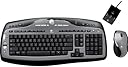
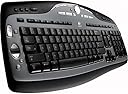
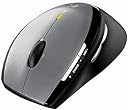
The Logitech MX3000 Cordless Keyboard and Laser Mouse Desktop combo offers wireless convenience with advanced laser precision, ergonomic design, and intuitive media controls. Featuring SecureConnect wireless technology, an LED battery indicator, and a zero-degree tilt keyboard, it’s engineered for professionals seeking reliable performance and sleek aesthetics in their workspace.
| ASIN | B000AY649C |
| Batteries | 4 AA batteries required. |
| Best Sellers Rank | #2,834 in Computer Keyboard & Mouse Combos |
| Brand | Logitech |
| Color | Black |
| Customer Reviews | 3.8 3.8 out of 5 stars (72) |
| Date First Available | July 2, 2004 |
| Is Discontinued By Manufacturer | No |
| Item Dimensions LxWxH | 20 x 9.8 x 3.7 inches |
| Item Weight | 4.4 pounds |
| Item model number | 967553-0403 |
| Language | English |
| Manufacturer | Logitech |
| National Stock Number | 7025-01-544-9771 |
| Operating System | Windows 98, Windows Me, Windows XP |
| Power Source | Battery Powered |
| Product Dimensions | 20 x 9.8 x 3.7 inches |
C**N
Best Keyboard
You really get what you pay for when it comes to keyboards (and most other things in life). The quality and feel is unsurpassed, and I've experimented with quite a few keyboards. I've tried the EX 110 which was a big piece of junk, and the LX 300 which was a little better than the EX, but still was crappy. Some of the buttons felt cheap and the mouse was not ergonomica nad it made annoying creeking sounds. The MX 3000 laser is more precise, has a much nicer feel with the ergonomic design of the mouse, and the keyboard is solidly bult and durable. The mouse wheel doesn't make noise and is easy to move. This is just better in every way. It's also better when compared to Microsoft Keyboards also. Microsoft keyboards have poor reception and the keys are not as sensitive. Many times I've had to move the keyboard or mouse closer to the reeiver, so it would get the signal. The buttons on the logitech also have a better feel and are easier to type with. Buy this brand and this model, and you'll be very pleased.
N**S
exceeds expectations
I have been enjoying my mx3000 for about two weeks. Out of the box setup was trivial. With my input devices about four feet away from the antenna, the responsiveness of the mouse and keyboard have been excellent with no delays or missed keys. The logitech software has been easy to use for changing keys and provides lots of configuration choices. The only negatives are that the function keys are a little small and the packaging was somewhat annoying in that it was hard to extract the equipment from the packaging. We'll have to wait and see about the reliability and battery life. However, I'm thrilled with the performance and options so far and provide it a 5 of 5 for price/performance.
A**R
Amazon lies
Amazon says that it is in stock. Do not believe it. I ordered it at 8/26 and they could not even ship it at 10/1. They delayed it several times saying that it is in stock. Of course the website says that it is always "IN STOCK" and can ship it now. Maybe their now is like 3 months... My current keyboard has broken keys, and I have serious inconvenience because of this.
S**L
May have to return it
After reading the reviews for this product I thought this is a very nice wireless keyboard and mouse for the money. I ordered it through Amazon and it came quickly. When it arrived it was an absolute snap to set up. Just plug it in and start using it. Initially there was a lag time with typing but it seemed to correct itself and typing was instantaneous on the screen. The mouse was a bit jumpy and sensitive close to the monitor but calmed down nicely when it was moved away a bit from the screen. Everything went smooth for a couple of days. Then all of sudden the keyboard lost it's connection with the computer. None of the keys worked or they worked wrong. Shutting off the computer and rebooting the program worked but only for a short time. After each 15 minutes or so of use the keyboard would lose it's connection again requirering a reboot. Time and time again this happened. I don't know what the defect is in the keyboard but it is not something that should happen. I will call Logitech for support in the morning but if it keeps happening I will return it for a refund and buy another brand.
J**N
Decent wireless keyboard and mouse set
I just set up my MX 3000 keyboard and mouse set today and here are my initial impressions. The keyboard: Pros: - Very nice, quiet, big keys. The keyboard has a great feeling to it. - Nice big delete key and no insert key! - Lots of media keys. - Volume dial moves volume in very small increments. Cons: - Very noticeable keyboard lag when I type quickly, which is only about 80wpm. This might be a problem for me eventually. For other owners who don't believe me, just mash your keyboard very quickly and suddenly stop. You'll see characters continue to appear after you stop. - Backspace key is noticeably farther away than my old Logitech Elite keyboard. I have to stretch a bit to reach it. - Arrow keys are slightly lower the rest of the keys. - All of these issues may cause problems for touch typists. The mouse: Pros: - Feels just as accurate as any of the other Logitech wireless mice that I've owned over the past couple of years. - Lots of buttons to use. - Supposedly has great battery life and no need to constantly charge or swap batteries. Cons: - The design is different from the MX-700, G5, G7 series of mice. The mouse provides less support at the base of my palm and thumb. Basically, only my fingers are resting on the mouse, the rest of my hand is arched above the mouse. - The back of the mouse doesn't have any feet or skates so the mouse will tip backwards slightly when I pull back on the mouse. Conclusion: As I finish up this review, I think I'm going to return this set to Amazon once again. The keyboard lagged as I typed out this review. The mouse wasn't very comfortable to use. It's definitely not performing up to my standards.
M**T
works well
Great keyboard! I haven't have any problems with it at all. The keys are very quiet as well. The one downside is that there is no multimedia key devoted to launching a web browser (I reassigned a different key). Past Logitech keyboards have had one. The mouse is also very good. I like that it has an on/off button on the bottom. It allows me to shut it off and save battery life if I'm going away for a vacation. The extra buttons did not initially work with Mozilla Firefox, but upgrading the SetPoint software fixed the problem. Only downside left is that the scroll wheel does not wake the mouse up. When reading articles online, I have to move the mouse before I can scroll the page. Overall, I am very happy with the combination.
Trustpilot
5 days ago
2 months ago