Desertcart purchases this item on your behalf and handles shipping, customs, and support to Brazil.
🔥 Stay cool, save energy, and control your comfort like a pro! 📲
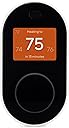
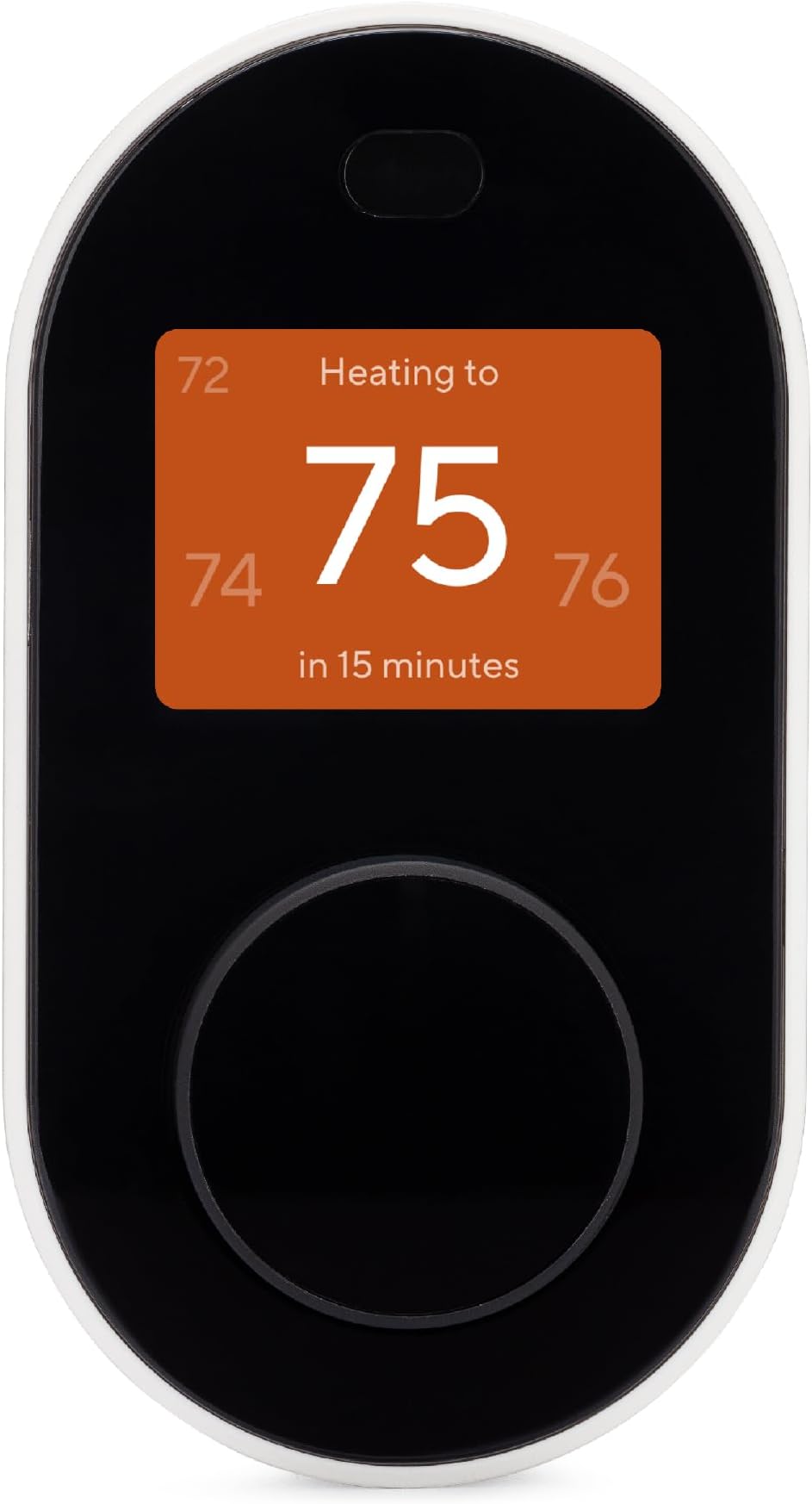
The Wyze Programmable Smart WiFi Thermostat offers easy DIY installation with guided app support, compatibility with 90% of home HVAC systems, and includes a C-wire adapter. It features app-based remote control, voice assistant integration (Alexa & Google), motion sensor automation, and 7-day customizable scheduling. With energy usage tracking and actionable insights, it empowers users to optimize comfort and reduce energy bills effortlessly.


| ASIN | B08W1V9YB3 |
| Additional Features | Motion Detector, Programmable, Temperature Display |
| Best Sellers Rank | #265,695 in Tools & Home Improvement ( See Top 100 in Tools & Home Improvement ) #288 in Home Programmable Thermostats |
| Brand | WYZE |
| Brand Name | WYZE |
| Color | Black |
| Connectivity Protocol | Wi-Fi |
| Connectivity Technology | Wi-Fi |
| Control Method | Voice |
| Control Type | Voice Control |
| Controller Type | Amazon Alexa, Google Assistant , Vera |
| Customer Reviews | 3.9 out of 5 stars 2,525 Reviews |
| Display Type | LCD |
| Finish Types | Matte |
| Global Trade Identification Number | 00859696007769 |
| Included Components | Wyze Thermostat |
| Item Dimensions D x W x H | 1.2"D x 2.5"W x 4.7"H |
| Item Type Name | Works with Alexa and Google Assistant |
| Item Weight | 481 g |
| Manufacturer | Wyze |
| Manufacturer Part Number | Thermostat |
| Model Name | Smart Wifi Thermostat for Home with App Control |
| Model Number | Thermostat |
| Mounting Type | Wall Mount |
| Number of Batteries | 1 AAA batteries required. |
| Number of Items | 1 |
| Power Source | Ac/dc |
| Product Dimensions | 1.2"D x 2.5"W x 4.7"H |
| Product Style | Wyze Thermostat |
| Shape | Rectangular |
| Special Feature | Motion Detector, Programmable, Temperature Display |
| Specific Uses For Product | Home Heating and Cooling Control, Smart Home Integration |
| Specification Met | energy |
| Temperature Control Type | Heating, Cooling |
| UPC | 784300666127 859696007769 |
| Unit Count | 1 Count |
| Voltage | 24 volts |
| Wattage | 3.5 watts |
T**O
Works great after overcoming some bumpy start. C-Wire issue. PRO/CON. Some helpful tips.
Attached are the wires for my old Thermostat (Honeywell CT3500) and Control Board. As you can see the C-Wire is on the Control Board but not on the Thermostat. This means that a C-Wire Adapter (Provided in the box) needs to be installed next to the Control Board. (Realized later that there might be a C-Wire floating in the hole behind the Thermostat. My Thermostat uses batteries, so C-Wire is not required. There is no harm in pulling the wires out from the hole after removing them from the old Thermostat and checking if there is a C-Wire. It is much easier to install if the C-Wire is presented) Now comes to the fun parts for installing the C-Wire Adapter. There are two Y-Wires and one C-Wire on the Control Board. The instructions from the WYZE App did not have this configuration. Called tech support. After several checks, I got the answer to leave the C-Wire open and merge two Y-Wires. It is simple and easy by following the WYZE App instructions and finishing the installation. Turned on the power and again it was straightforward to add the Thermostat to WYZE App. During the testing, heating passed but cooling failed. Called tech support again and some time troubleshooting without success (Tech supports were overall very good, no long waiting time, follow up closely, easy to communicate with both phone and email for pictures etc. The issue was resolved on the same day before tech’s further follow up). Did some research and tried to put back the original C-Wire to the Control Board (with the C-Wire from the C-Wire Adapter on the same terminal). It worked surprisingly. Later it was realized that the diagram from the WYZE App did indicate that the original C-Wire should be kept with C-Wire from the C-Wire Adapter (See attached picture). But there is no word. PRO: The Thermostat looks nice (see attached for installed) and well made. Though there were some bumps for me due to non-standard configuration, the installation and setup are overall clear and straightforward. CON: WYZE Thermostat did not qualify for local utility discount or rebate. Some helpful tips: 1. Do not forget to remove the plastic cover sheet, otherwise the motion sensor to activate the display won’t work (Still works if you touch or turn the display wheel with the sheet on). 2. The Thermostat was first tested without fastening to the wall (So it wouldn’t damage the wall in case it was not working). Got the problem to remove the face panel. Finally, a small flat head screwdriver was used to pry it out through the gap. If I knew this issue early, I would have used a small Bolt/Nut to fasten the base plate to the optional wall plate (Provided in the box). So, it will be easy to just pull the face panel out by holding the wall plate. This problem will not exist if you follow the instructions and fasten the base plate to the wall before putting the face panel. 3. Make sure the setting value in the Temperature Preferences and Schedule is indeed what you wanted to prevent surprising action of the HVAC system. 4. There is no harm to calibrate the temperature and add temperature correction in Advanced settings. Mine was 2~3 degrees off. The temperature correction is a better place to adjust the temperature setting temporarily while keeping it at Auto. Here is an example: turn on the AC 1degree cooler – it is much easier just to add 1 degree in the temperature correction. Decrease 1 degree (Got 1 degree hotter) if you want to save energy. After using it for about a week, the Thermostat ran well as expected and the App is easy to use. Update rating to 5-star from 4-star after running for more than three weeks: Never has issue and is easy to control. Update after 9 months: never had a problem; found out that the climate sensor (default is the room sensor) can also be used to control the room temperature with rules; in case there is wifi-off issue, do not reset from the device, instead reset by power off and on through the power panel.
A**Y
The best upgrade ever!
New comers to this... ignore the absolute negative reviews about this product. 100% of the negative reviews are literally people with super old systems, handyman installations and simply have no idea about this. I have zero experience in anything hvac and I literally moved the wires to the new system, plugged it in, installed the app and it works immediately. It’s already doing it’s thing not giving any lip or issues. It connected to the wireless network without a hitch. App works smoothly. In all honesty, there’s no possible way to screw this up because the app itself although I already hooked it all up, specifically gives you thorough instructions on installing this. For those watching YouTube reviews, ignore that nonsense too because they don’t know either. A lot of them are saying you need a common wire converter... no you don’t. IT COMES WITH IT FOR IN CASE YOU NEED IT. It does not lock out and crash, it does keep settings. It does not magically change settings. For those literally scared to purchase because of the inexperienced user reviews... ignore them and Order it. Note: My instruction says for me to not connect the two wires from RH and RC together but I know I had to and it works. Simply follow the instructions as Wyse tells you too. For goodness sake they even tell you to take a picture of the wires before you install... SMART! Understand this is not a one size fits all system although they were really close... if you have gas, you install it a certain way, if you have gas and ac on the same system, you install it a certain way. Electric... etc. the instructions will guide you in the right direction.
F**M
It's OK so far ...
Pros: The unit is attractive and appears well made. Setup is easy. Very reasonable price. Cons: A software error prevents setting the minimum temperature below about 50 degrees. This is a fault that would cause excessive energy consumption for an unoccupied house during the winter. The "workaround" is when the unit is set to OFF, it is supposed to control at that lower limit. I had to figure this out for myself, and then verify with Wyze. (Good customer support, BTW.) There is really no way to test this, and the software was contracted out, so the actual coders are elsewhere. Such a stupid error and one so easily corrected. The display is very limited, as is the info presented on the app. For example, there is no way to tell if the backup (AUX) heat is on. Again, so dumb, and easy to get right the first time. Conclusion - It's a decent product, but the functional specification for the software was #*&$%. Maybe this will be fixed in the future. Update: Unit must be power cycled if it looses Wifi connectivity, which it does randomly about every 48 hours. In an unattended location, this is obviously impossible. So, sports fans - this thing is an utterly useless piece of junk. (All of this came from a long call w/CS, and was verified as a known problem.) An absolutely shamefully bad design.
T**N
Works great and as expected
I got this ~2yr ago because my previous thermostat was going to be removed by the power company. It was the tech that changed it, so I can't personally speak to how easy they are to install. However, he explained it to me and it made sense if you're familiar with how they work, he/we didn't have any trouble or frustration. The only concern he had was related to whether my (1979) house had a certain wire to the unit. It did, but he said it was simple to fix if it didn't. I really like the ability to set up schedules, routines, behaviors, & lock it in the app. All that is also as expected and why I wanted it. My only complaint is trivial, but I was actually prompted to write this as a REQUEST for them to add the option to have the display always on. It comes on when I walk near it, but my desk is right next to it. I could see the temperature simple by *looking* at it, but since it's always off I have to walk over to it for it to *show* the temperature. It's trivial, but annoying enough a few times a day or week. I do recommend it.
T**R
Fairly quick upgrade - huge improvement over programable thermostat.
I had been needing to upgrade my old programmable thermostat for a while. Finally bit the bullet and purchased this. My system only had two wires going to it. I could not figure out where the power would come off my furnace controller, so I opted to purchase a new transformer. I purchased as 24v DC (40vA) unit. I probably only needed 20Amps, but the price difference wasn't that great, and I may change my other zone thermostat eventually. I mounted the transformer in the basement ran the wires up through the wall and connected it. The actual connection/install was about 20 minutes. I had about 2 hours trying to figure out if I could power with the two wires. You cannot. It requires the two wires you currently have to control the furnace and additional wires to supply power to the unit all the time. I already had the WYZE app installed, so adding the thermostat to it was a simple 'add device'. Then programming via the phone. That was so much EASIER than working with the old thermostat. It also instantly was connected to Alexa. I am able to turn the temp up/down with my voice or via the WYZE app as I am traveling home. The one issue I did have was the thermostat was OFF by default. WIthout having used the app before I didn't realize I needed to put it into HEAT mode. Other than the few hiccups during install I love the device and for the pric, you can't go wrong.
R**D
Game-Changer for My Home — Affordable, Smart, and Actually Built Well
Wyze really nailed it with this one. I’ve been a Wyze customer since the early days (cameras, sensors, plugs—you name it), and while some of their newer products have felt a bit hit or miss, this Wyze Smart Thermostat absolutely brings back the quality I remember them for. It’s one of those rare products that not only lives up to the hype, but genuinely improves your day-to-day life from the moment you install it. Installation was surprisingly easy—I’m no electrician, and I still had this wired and running in about 20 minutes. The app walks you through the steps super clearly, and Wyze gives you everything you need in the box (including a C-wire adapter if your setup needs it). Once it’s up, it just works. Instantly responsive, well-designed interface, and the screen is bright and easy to read. But what makes this a must-have—especially for anyone in a place like Colorado where the weather flips from freezing to sunny in a matter of hours—is the schedule feature. Being able to set different temps for mornings, afternoons, and nights has made a huge difference in both comfort and energy usage. I’m not waking up freezing or coming home to a sauna anymore. It just automatically adjusts, and I barely have to think about it. The remote access via the Wyze app is also perfect for those unpredictable days when you’re out longer than expected or coming home early—you can bump the heat or cool air from your phone and walk into the perfect temp. It’s one of those little modern conveniences that feels like magic once you have it. This thermostat is proof that Wyze still knows how to build reliable, thoughtful, affordable tech. It feels solid, runs great, and honestly makes me wonder why I didn’t upgrade sooner. You don’t need a $200+ fancy name-brand model—this one does the job just as well (if not better) at a fraction of the price. If you don’t have a smart thermostat yet, this is your sign to get one. Especially in a state with unpredictable weather like Colorado, the energy savings and comfort are totally worth it. It’s been a total game changer in my home, and I highly recommend it to anyone looking for smart home upgrades that actually deliver.
D**R
Toss up
I purchased one of these 3 years ago and it has worked great. This winter I purchased one for our vacation home and I couldn’t get it to work at all. I returned it as defective, but now I’m afraid to try another one. This is why I gave 3 stars, 1 great experience, one terrible.
D**S
I am loving WYZE
Okay, first off, I am NOT a company representative, nor am I being paid or compensated for this review. That being said, I accidentally discovered WYZE when I needed to replace a security light, and their version was on sale for some reason. Since then, I have purchased the doorbell, additional cameras, and the thermostat. I absolutely love how well-designed and easy they are to install. I had never installed a thermostat before, but a quick YouTube video and a little prep (and a magnifying glass because I am going blind in my old age) was all that was needed. The installation was super-simple, and once the power was turned back on, it worked like a charm. The display is clear, and I like that it is only on when you are near it. The software is pretty good and easy to use, but I think it could still use a little polishing to make it better. Everything is controlled by your iOS (or Android) device, allowing you to set schedules, etc. You can automatically share this across any device with access to your account (no charge to use the thermostat). It is very refreshing to find a product line that just works. After using it for a few days, we realized that it seems far more accurate than our original (Honeywell) device, and we have had to adjust our settings to compensate a little (it was a bit cold at our old setting). Loving it so far, and would happily recommend it to anyone looking to upgrade thiers.
R**E
Easy to install, works great but a few minor issues short of perfect
I was at first, a bit hesitant to buy this product. It was the cheapest smart thermostat I could find and it seemed to have all the features I was looking for, but it's an American product with little to no official Australian support, and it clearly emphasizes that it does not work if your old thermostat does not have a C wire connector. In my house, I have a 26 year old Brivis gas ducted heating system with an old mercury based two wire thermostat with no C wire (one of those mechanical ones with the lever on the bottom and an arm that shows you the current temperature). So although it's not officially supported by this thermostat, a lot of anecdotal reports suggest it does work, although you will need to supply your own power. Relying on other people's success stories, I took a risk. I bought a cheap AC transformer that plugs into a standard household socket, converts 240VAC to 24VAC, and wired it in along with the two wires from the old thermostat, and it worked. The thermostat works quite well. The unit itself has a nice design with a big base plate which will cover any holes if your old thermostat has left a big hole in the plasterboard. It's black so it stands out more than a neutral coloured thermostat, but its design is modern and not too outstanding, so it blends in well. The face is simple with a decent sized colour screen and a clickwheel, which you can use to set the temperature and change the mode. The app is easy to use as well, although it has two similiar features - schedules and rules. Schedules allow you to set the thermostat to run on a predefined schedule though it seems to rely on the assumption that you will always want the thermostat running on either "Home", "Away" or "Sleep", with set points available for each, but never below 10°. So you can't for example, have a schedule to explicitly turn it off. However, rules do allow you to do this, and to also have the rule triggered by things other than time, such as location or triggers from other Wyze products. One issue I did have is that the temperature varies around my house. This isn't a fault of the product - the smaller rooms in my house heat up faster. However, one issue I do have with the thermostat is it seems to generate a lot of heat itself, tricking the internal thermometer into thinking it is hotter than it actually is, and causing the heat to shut off before I want it to do so. I decided to buy the add on thermometers which help the thermostat to average out the temperatures. I have a few issues with this set up: - the additional units all show temperature in Fahrenheit. Despite the fact that they clearly have LCD grids to show Celsius, there is so far, no way to change this behaviour. The app does report the temperatures in Celsius. - the averaging is not very flexible. You can set each thermometer to be balanced, cost saving, or comfort prioritising. It's not exactly clear what happens in the background, but presumably, this changes the weight of each thermometer in determining an average temperature. Whilst this is a great idea, I have found the averaging to be very imprecise and too coarse. It would be better if there was more transparency and the ability to fine tune this further. - they have a sensor, so that only the thermometers in occupied rooms are included in the averaging, however, as it relies on motion, if you sit still for a while or place it in a sleeping room, it often excludes the room after a while. Also, I have had trouble integrating the product with Google Assistant and Alexa. Alexa refuses to recognise the device at all. Google recognises the device, but often has trouble controlling it, and the only reliable command is changing the mode between home, away and sleep (but not on/off). Overall, it's a great idea and a well designed product, however, there are a number of lingering issues that make it far from perfect. The design also seems to factor a very specific use case - someone who is happy to have their heating running all day if the temperature is low enough, even if they are outside. This might make sense in the US where it does get freezing and you don't want frozen pipes, but less so for Australia. However, the competitive price is a very strong redeeming factor and more than enough to make up for these shortcomings.
C**N
No funcionó
Tuve que regresarlo, porqie no funcionaba
D**N
Great thermostat for half the price
I have now installed four of these on gas forced air and AC systems with humidifier control for friends and family and have not had any of the issues that many are complaining about. The features are as good or if not better than systems at twice the price. The fan can be set to run extra during and after a heat/cooling cycle and extra 'temperature equalizing" hourly circulation controls. Temperature settings are adjustable so your furnace or AC doesn't doesn't cycle 4 or 5 times an hour (i.e. Honeywell). It has standard schedules, motion and geo away functions if you need them (BIG HINT, turn OFF the AUTO SWITCH (Geo fencing etc) in settings as it is ON by DEFAULT until you are ready to use it). This is Wyze's biggest goof trying to make it simple. The first install kept trying to change the temperature all day when we were home and from what I have read here, it messes up a lot of people. Alexa and Google integrations are good and very easy. I feel that those that have problems with this thermostat would have problems with any retrofit thermostat due to odd and handyman installs. I have not used the included C wire adapter. I have never had to call tech support as the app install instructions are VERY good. I am not impressed with some youtubers who think they know everything. They don't. I bought this because the Ecobee lite at twice the price doesn't control the humidifier and the bargain Nest was just plain cheap and paying $30 for a plastic backplate (included with Wyze) is just plain nasty. Do some homework, take photos at every stage, label the wires and don't be too fast to write a scathing review because you didn't. If you have standard Heat and AC, you will need 5 wires to the thermostat or it gets a bit complicated but not impossible with the included adapter but you WILL have to get to get into and know your furnace wiring. +Power, -C, heat, cool, fan and maybe a humidifier wire. It isn't that complicated if you take the time to know how a HVAC works. (eg, for heat, the thermostat makes contact with the heat demand ( normally white but don't count on it hence the labels) with the RC power (normally red) which tells the furnace to turn on). If you know how things work then trouble shooting bad wiring or minor mistakes can be easy, one function at a time. Great Thermostat, great features, great price.
M**R
Keeps going offline every few days
Keeps going offline every few days and the only way to get it back to switch main power off from circuit breakers (too much trouble).
R**A
Comes with c wire adaptor
It’s works good if your already a wyze cam user , has most the feature of other smart thermostats , it does don’t learn your habbits like the nest , but having had the nest a I like that it does not have that feature . It is really easy to set up, comes with a c wire adaptor , for the price it is really hard to beat . It has been 100 percent reliable for me . Check your furnace , if you have at least four wires it should be able to be set up no problem .
Trustpilot
1 month ago
2 months ago