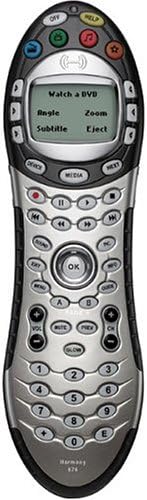
Harmony 676 Universal Remote Control
Product ID: 27727239
💻USB connectivity for updates
🔋4 AAA batteries for long use
🎛️Controls up to 15 devices
Buy anything from 5,000+ international stores. One checkout price. No surprise fees. Join 2M+ shoppers on Desertcart.
Desertcart purchases this item on your behalf and handles shipping, customs, and support to Brazil.
🎯 Master your media universe with one remote to rule them all!
The Logitech Harmony 676 Universal Remote Control offers professional-grade convenience by integrating up to 15 home theater devices into one intuitive interface. Featuring one-touch activity buttons, backlit controls, and customizable faceplates, it streamlines your entertainment setup. With USB connectivity for easy updates and a guided online setup wizard, it’s designed for seamless control and personalized style—making it the ultimate tool for the modern media manager.
| ASIN | B0003QER7S |
| Additional Features | Backlit, Universal |
| Battery Type | AAA |
| Best Sellers Rank | #55,805 in Remote Controls (Electronics) #906,383 in Electronics Accessories & Supplies |
| Brand | Logitech |
| Button Quantity | 1 |
| Color | Red,Silver |
| Compatible Devices | Home Theater |
| Connectivity Technology | USB |
| Controller Type | Button Control |
| Customer Reviews | 3.7 out of 5 stars 177 Reviews |
| Global Trade Identification Number | 00097855028570 |
| Item Weight | 0.85 Pounds |
| Manufacturer | Logitech |
| Max Number of Supported Devices | 15 |
| Maximum Number of Supported Devices | 15 |
| Maximum Range | 10 Meters |
| Mfr Part Number | 966177-0403 |
| Model Name | 966177-0403 |
| Model Number | 966177-0403 |
| Number of Batteries | 4 AAA batteries required. |
| Smart Home Compatibility | Not Smart Home Compatible |
| Special Feature | Backlit, Universal |
| UPC | 097855041272 097855028570 |
| Unit Count | 1.0 Count |
G**R
Excellent universal remote, works better than I expected
The remote is better than I expected and I having played with one for a weekend before this purchase my expectations were high. I was not convinced I would like the "activity" philosophy of Harmony, but after seeing how well guests are able to use the remote controlling 4 to 5 interconnected devices, all I can say is it just plain works. It is very nice to have a main set of buttons that anyone can master after a few minutes of explanation, while at the same time having the capability to have every desired option for the power user available with a few more clicks is just what I wanted. I will say the setup is not for the faint of heart or the impatient, whoever sets this up and maintains the remote will likely spend a while in the setup on more than a few occasions. The setup application is a web-based application and an online connection is needed. The interface can be confusing until, fortunately if you have the make and model of your A/V devices (very important) the first time setup wizard will get most of the major buttons working. If you are like me setting up the buttons are more important than the LCD listing. After getting the basic buttons working you will likely then try to cram more functions on the remaining buttons and soon run out. Initially this frustrated me as I did not want to change modes to access additional functionality. There are so many buttons available, so you need to find out what works for you. Harmony provides quite a few alternatives for you to choose from. These include LCD listings, an individual device mode, Picture and Sound modes, or combinations of the three. Personally I like the Device mode and put functions that map well to the buttons on the buttons and added ambiguous functionality to the LCD, but this is a subjective choice and everyone will do something different here. On of the big positive aspects of the setup was that the Harmony site is constantly updating for new devices on the market. I was astounded to find a Monoprice branded switch and a brand new (less than 4 months on the market) AV Receiver available with presets. No trial and error with brand odes. This led to a problem, even selecting the exact make an model of a device not all the functions work correctly. The above mentioned AV Receiver was there and about 65% of its remotes functions were listed but I would say only about 20% worked properly. Initially I was upset but I found the learning function of the Harmony works very well. Not only was I able to teach the labels the correct IR command, but I could add the missing ones I wanted and add new lables or rename old ones. Again patience pays off with the Harmony. It might not all be correct but you are able to correct that which isn't. Last thing I want to mention is customer support. After a year with the remote happily working, my father sat on it and the battery cover no longer latched properly. This caused the cover to drop out and sometimes the batteries. Not a critical problem but clearly somewhat aggravating. I called the support line and found the first rep clearly wanting to help. After getting the particulars on the remote I was told a cover would be shipped right out. That did not happen, instead a series of email ensued to determine exactly what the problem was. After 3 or 4 replies to replies I was promised they would ship one. Within a week 2 new covers were sent, configured slightly differently. The second one fit perfectly. Both were free and ultimately I was very happy with how the incident worked out. From my perspective: PROS: Once setup even both of my completely non-techie parents were able to easily watch TV and DVDs without having to navigate 4 different remotes to do so. For all but the most rare use of functionality I do not ever have to reach for my other remotes. If I do I almost always note it and add it to my device listing. When I added a new AV Receiver and removing 2 other devices at the same time reconfiguring the remote was cake, all the previous activity buttons still worked without having to setup again. Having my configuration saved outside the remote means that if I have a disaster with the remote or upgrade to a different remote my setup will be transferable. CONS: Buttons are a bit small for my hands, but still usable. Some of the labels used do not match the default commands being issued, particularly for new or rarer devices. Battery life has been 2 to 3 months for me, but 4 batteries seems to be quite a load. The application interface is pretty cumbersome, but it does work. The application stays resident in the system tray and occasionally consumes heavily on CPU cycles, but it can be easily shutdown and restarted when needed. Bottom line, even though the price seems a bit high, it is truly a universal remote that allows you to shelf the others with confidence.
T**S
A solid choice...
You read a lot of reviews about universal remotes, good and bad, but often the writer doesn't say what equipement they are controlling. For reference, I'm controlling a Explorer 8300 DVR, a Panasonic receiver, a Sony TV, and a PS2 I use for both games and as a DVD player. For this this setup, this remote works really well. If you have a more elaborate setup, perhaps that changes things. I think most of the positives of this remote (the elegant button layout, the very good and easy setup, the intuitive "help" when things don't power up as expected, etc.) have been well covered. But my few complaints on the remote are: - As others have stated, having the setup software on the web, running through a browser, seems needless and can be problematic. In Windows, because of SP2 browser security, etc., you're always fighting with alerts and right-clicking to allow files to download and open--it would really be a LOT better if they had an app you ran directly from your machine. I have no idea why Logitech chooses to set this remote up through a browser, but no matter how well they have implmeneted this it would be MUCH faster and MUCH more reliable to have the setup application on your machine. It's almost a "square peg in a round hole" situation. Get this stuff in a desktop app. - Buttons. Why do so many universal remotes (including this one) not have a dedicated "List" button? This is the most prominent key on all the DVR remotes I've seen, yet you have to set this up through the LCD screen. It's strange. Also omitted is a "C" button, which again, is used on almost ever DVR that I've seen. Not sure why these are ommitted and buttons like "Media" have had room cleared for them. "Page Up" and "Page Down" would also be nice additions. I set these up on both the LCD and instead of the "Repeat" and additional "Forward" button are, but these are important features that would be better on the remote itself. - Media button. I found this whole feature useless. Having any guide or show information coming through a remote, favorite channels, etc.--I just don't use this at all. Would rather they dump this entirely and make way for buttons that to me seem necessary (like List, Page Up/Page Down, "C", etc.) -The "Pic" and "Sound" buttons are also somewhat limited because you can only specify that they point at one device each. The "sound" menu, for instance, has to point at a receiver, and the "pic" has to point to a TV. This is difficult to explain, but the "Pic" menu, for instance, typically offers things like "PIP" functions. My TV does not have a PIP feature, but my DVR does. But because I can't have any DVR device functions in the "Pic" menu (it points to the TV only), these features are not as useful as they could be. So Pic and Sound would be more helpful if offered greater customization. - Key Repeats. Don't push on a volume or channel button too many times. If you do, the device will keep advancing/decreasing long after you stop pressing. The remote seems to "queue" up your clicks if you go to fast--that's taken me some adjusting to. On the positive side, what's surprising to me about it is how much better it is than the remote I eventually got frustrated with (but is slightly more expensive)--a Home Theater Master MX-500. The Harmony remote has a much better key layout and has a much broader range than the MX--you can point the remote almost anywhere and it seems to pick up the signal. With the MX I had to point the remote "just so" to get things to happen. Overall for me I found this to be a great purchase--but, like me, you'll probably find there's still a little room for improvement.
X**S
Great potential, but not quite there
PROS: The concept behind this remote (configure via the web) is absolutely outstanding! The remote will always be fully-customizable and compatible with all IR devices. The web allows for easy configuration using a fully-graphical interface and wizards. The IR transmitter is pretty powerful. The rubberized backing, interchangeable covers, and ergonomic shape make it pleasing to handle. Fully customizable buttons allow great flexibility. Ability to learn from existing remote controls ensures that all IR devices are supported. CONS: Almost all of the buttons on the remote have the same oval shape and size and they are placed too grid-like. Why is this a con? I like to use my remote without looking at it. I like to keep my eyes on the TV as I feel for the buttons on the remote. Tivo did a wonderful job with their remote -- each key has a unique shape and placement, making it easy to find any key. Using this remote without looking will take a lot of getting used-to (learning touch-typing is probably easier). While wizards are wonderful for initial configuration, there should be non-wizard properties pages for advanced users. I don't want to go trough a wizard every time I want to make a small change -- just show me a properties page. The wizards can sometimes make setting up a customized configuration difficult. While the remote supports several 'activity' buttons (which are wonderful), it does not support any sort of macros or programming. People that need this remote probaly have moderately complex entertainment systems are probably techno-savvy. This is the type of person that probably wants to be able to fully control the remote, so something like ability to create macros or a scripting language would be greatly appreciated. I use it to control all of my devices (DVD player, receiver, cablebox, etc.), but not for my Tivo. When simply watching TV (a.k.a. watch the Tivo), I use the Tivo remote because of its easy-to-use key placement. Great product overall, but it needs a few enhancements -- both physical and logical.
N**R
Impressive!
I have owned several universal remotes in the past, including programming remotes with LCD assited labeling and pure touch-screen interfaces. All of them did their job but setup was laborous and changing home theater equipment caused pains relearning miscellanious macros. None of my previous remotes also did a good job of controlling my home theater as a whole. You know the drill - turn TV on, turn receiver on, turn cable box on and so forth. Macros were static, i.e. they operated well only for the most basic commands but could not handle various modes and intricacies of the Home Theater setup. Finally, I decided, on the friend's advice to give a try to Logitech's Harmony line. From my experience I hated touch-screen remotes as they always required looking at them for pressing pretty much any button. On the ohther hand, pure button remotes were always restrictive and required learning what the generic button means for this or that device. So the combination of the generous hard button layout and LCD screen labeling for device-specific funstions appealed to me. My friend owns Harmony 880 and I had a chance to use it a bit. I was not big fan of the touch-sensisite buttons and the way remote lights up when you shift it. Both were a distraction to me. So I looked at the 6xx series with distinct hard buttons that your fingers learn and can press without glancing at the thing. 676 was on sale and had the best layout for DVR devices which all modern TV boxes are, so I plunged. The original setup only took me about 20 minutes. I was sceptical at first of 'Activity' based modes because this was not a conventional design, but once I synched my setup back to remote and turned on my Home Theater with it for the first time, I was converted right away. The thing that nobody seems to mention about 'Activity' modes is that this is the first remote (at least from the ones I've known) that remembers state of all of your devices. No more stupid macros that could only work in one mode but were completely screwed up in another. This remote works wonders switching my video and audio outputs, controlling picture and sound preferences for each device in the group. And I have a lot of them. TV, Receiver, HDMI switch, DVD Player, PC1, PC2, Xbox 360, Wii. One remote now made all old remotes obsolete, did not lose any of the original remotes functionality and gained state awareness of each device at any time. Impressive! Pros: - easy setup through the software interface - very impressive online library of devices (including rare ones) - state-awareness of each and any device at any time - very flexible setup of video and audio switching - accomodates both direct and sequential switching between inputs - great button layout - better then the original Manufacturer's remote for DVR - controls your game consoles - very convenient in hand - only three direct activities tied to the buttons but unlimited number of additional activities that can be set up with LCD screen - MEDIA button - allows to set up favorite channels for your TV, so you no longer have to study TV channel line up and find what obscure channel number is assigned to your most viewed channels - very useful HELP button - in rare cases when one of the devices in activity failed to either turn on or switch to the proper video/audio input it will correct the situation and remember it, so it does not happen again - price. I bought it on sale (sixty dlrs) which is unbeatable for the class of the remote you get. Please do not try to compare this remote to the $20 universal remotes found at Wal-Mart. They can not hold a candle to this one in the everyday use - functionality-wise this remote is the same as any other in the Harmony line, including much more expensive ones. It has the same limitations as well (for example, not being able to control BT devices, like PS3). The software to setup any of the Harmony remotes is the same and they all use the same online database of different Home Theater devices. So if you can control your rare device with one of the Harmony remotes, you can control it with any other remote as well. Cons: - really none. The best I can come up with is that it uses AAA batteries instead of more readily available AA. Also, the LCD screen is pretty small (880 model has much better bigger color LCD screen).
K**R
Great idea - not so great execution
The idea behind this product is excellent - one of those "why hasn't someone done this earlier" ideas. In practice, though... it's not quite ready. I purchased this to see if it would be a good option for my not-so-tech-savvy parents. So far, the answer is no. Some obvious setup questions are not addressed - in my case, a Dish Network DVR appears as a digital set-top, PVR, and satellite receiver... what is the proper selection? The web-based configuration system is awful. The Dish DVR has a "DVR" button to display the DVR menu. I stumbled on a screen that allowed me to add "DVR" to the 'A' button. Seemed simple enough but this changed the operation of the remote, entirely. And, of course, I don't know how to get back to that screen. So I thought I'd change my Dish selection from "set-top" to "satellite" to see if I could clean up operations a bit. I clicked the link to add the box, and the next screen had "Media Center PC" for my "watch TV" selection. I don't have a Media Center PC and never selected that as an option. I thought about just "starting over" but there's no option to do that (other than to just create a new username, I suppose). Web-based applications are, more often than not, poor substitutes for a decent client-side application. Aside from not being nearly as easy to use as a real Windows or Mac application, network latencies can be quite frustrating (did it do anything or not?). Web developers often seem to forget that users aren't connected to the company LAN. In the past, I've been quite pleased with Logitech products. Hopefully, Logitech can clean this up and make an excellent idea into a useful product.
G**P
Excellent...while it lasts!
I've owned this remote for about 13 months. First let me say, it has a solid feature set and it works as advertised. I control a Samsung TV, a MacMini, a Pioneer 5.1 sound system and a Tivo all from the same remote. The setup is relatively easy (could be more intuitive) and it's still customizable. It's a little annoying that you have to have an online account to set it up, but for the most part it's worth it. But now it's starting to wear. The play, pause, fast forward and skip forward buttons take extra ooomph to work. They used to work great. Maybe as a Tivo user I rely on them too much? I honestly don't know. But now, I have to really press on them for it to work. I imagine in another month, it will become unusable. I had expected this remote to last the life of my Television and Tivo. Eight-five dollar is a a steal for this remote. But $85 ever 14 months is a complete rip. Edit: December 18, 2008 I was reading other posts complaining about the longevity of the buttons when I came across a suggstion made by Terry Solomon. Following Terry's advice I disassembled the remote (six screws in total) and cleaned all the contact with nail polish remover . . . good as new! Ten minutes of effort and I now once again love my remote. It'd be nice if Logitech made it easier to take apart to clean or better still if they provided some instructions. I've would now give this remote four stars.
A**V
Highly customizable remote
Probably the most overlooked aspect of a home A/V center is the remote control. Instead of having to deal with a host of remotes (4 in my case), with Harmony 676 you get a fully customizable single remote to control all of your components. The online configuration tool is flexible and gives you almost full control for programming the remote the exact way you like it. The activity-oriented interface saves you time and frustration when changing from one device to another. And the online database is so extensive, chances are slim your components won't be there. Note that the free web tour on Logitech's web site does not do justice to the actual interface once you purchase your remote. Some very useful unadvertised features: - Explicit control over timings per device: pause between commands, boot time, pause between commands for different devices, duration for input switch - Dual mode of operation - activity mode and device mode to control an individual device - Three sets of layouts for each activity - activity, sound control and picture control - Multiple tabs of programmable buttons (in groups of 6 or 4 plus title for the Harmony 676) and you can cycle through them; this is very useful if you need more than the provided number of extra buttons, which was the case for my Cox Scientific Atlanta 8300HD DVR - You type the title for each programmable button - you are not constrained to the predefined device function names Some small gripes I have with the remote are: - The default timings for my Olevia 237V TV were very far from reality and needed radical adjustments (I still haven't found the right ones it seems since the TV sometimes doesn't switch the input correctly on power up) - There's no control over the duration of each IR signal and as a result my TV always increases and decreases the volume by two notches (accepts two presses for every one); this also leaves a feeling of slight general sluggishness, but not very pronounced (you'll only notice if the original remote is faster as was the case with my Olevia remote) - Harmony 676 is advertised as targeting DVRs, but it lacks a C button in addition to A and B for my Cox Scientific Atlanta 8300HD DVR, thus I ended up reprogramming the Prev button to be C; the other important and missing DVR buttons from my original remote were: DVR list, Live, Replay, Page- and Page+, which while I assigned to the programmable buttons, are still cumbersome to reach Other observations: - No support for macros aside from the activity buttons (I haven't needed macros myself for now, just mentioning in case it's important to others) - Supports multiple modes for switching inputs based on device capability - Supports multiple modes for direct channel input based on device capability - Intended for tech savvy users; don't go for it unless you like tinkering with the settings
J**C
Close to Perfection
I just received my new Harmony 676 remote control today, and I am impressed. Set-up: It was relatively simple, with the directions being straight-forward and the whole process taking just over an hour to complete. Although Harmony says set-up is around 30 minutes, you will need extra time to work out the kinks, and add more activities (if you need them.)The only kink I haven't been able to fix yet is my Panasonic HTIB, is having trouble switching to AUX for watching TV etc., it stops at Front Music Player, which the original remote, had you press twice to get to Aux. Thanks for the music port Panasonic! However, I'm going to call support tomorrow, since from what I hear, they are very helpful. I added activities for: 1.)TV 2.)DVD/Surround Sound 3.)CDs and Radio 4.)Xbox 360 (works flawlessly) 5.)PS2 (need DVD remote to program, at least thats what I think it told me, but you can set inputs and surround sound) 6.)Wii (not compatible due to bluetooth, can only set inputs and surround sound) 7.)Computer (need to create a generic activity, then change name. I think they should have a preset activity for using TV as monitor by now.) Ergonomics: Very well-built remote with soft silicon keypads and high-quality rubber (reminds me of VW dashboards) which covers everything else. Button placement is good, but the numerical keypads I find are a tad too small and low for channel surfing. There are also finger holds on the bottom, which hold your hand in an ideal position for using the multi-direction fob, but nothing really below it. Oh yeah, and those removable faceplates are very high-quality as well. The grey matches my wireless Logitech keyboard and mouse, but as we speak, I am rocking the burnt red (just in case you were interested...) Conclusion: It's not perfect, but pretty darn close. Go buy one, and free yourself from the traffic jam that is your coffee table full of remotes! Update 8/8/07: Fixed Aux problem myself after going through menus, and input to Rear instead of Aux. Support was pretty useless on the phone, they dragged me through a 1/2 hr. of the usual tech support idiot-checks then said they were forwarding to lvl. 2 support. After listening to an hour of classical music on speaker phone, I hung up. This support might be atypical, but I just want others to know.
Trustpilot
1 month ago
2 months ago