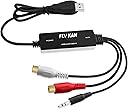
🎧 Preserve your classics, own the digital future!
The FLY KAN USB 2.0 Audio Capture Card is a compact, plug-and-play device designed to convert analog audio from vinyl records, cassette tapes, and other sources into high-quality MP3 or WAV digital files. Compatible with Windows 7 through 10 and Mac OS 10.7 to 10.14, it supports 3.5mm and R/L audio inputs and comes bundled with Audacity software for professional audio capture and editing. Ideal for audiophiles and nostalgia enthusiasts, it enables seamless preservation and portability of your vintage audio collection.


| ASIN | B019T9KS04 |
| Best Sellers Rank | #305 in Video Converters |
| Customer Reviews | 4.2 4.2 out of 5 stars (846) |
| Date First Available | December 25, 2015 |
| Is Discontinued By Manufacturer | No |
| Item Weight | 2.39 ounces |
| Item model number | 8541594591 |
| Manufacturer | FLY KAN |
| Product Dimensions | 3.54 x 0.59 x 1.18 inches |
S**8
Works Well, Just Need to Adjust Software
Needed this to rip copies of my rare records (and maybe cassettes soon) so I can listen to them wherever I go and not be stuck in my bedroom with the record player. The device itself is fine and very easy to setup and use. The instructions for the hardware process didn't quite match the system screens I saw, which confused me for a minute, but it was okay. The trick is the Audacity software, which I already had installed on my laptop anyway, so I didn't need the included disc. But you really need to take the time to check Audacity settings and fix the volume and everything, or you're going to wind up blaming the device for your issues. The device is great, just be patient and learn to work Audacity a little bit and you should be fine. If you run into some minor issues with recording glitches like I did, check the latency settings and bit rate and all of that stuff. Your issue is the software, not the device. Once I fixed the software to eliminate the one glitch, everything was fine and honestly the rip from vinyl sounds like it is a CD recording, it was that clear and without any surface noise or hardware issues, etc.
D**.
Niche Product but WORKS!!! macOS 10.14 compatible, macOS 10.15 partially compatible
It truly is plug-n-play, even on the latest macOS, 10.15 Catalina (Preference pane shows live signal meter). BUT... Audacity (the digital recording software most people use with it) is slightly incompatible with OS X 10.15. For privacy reasons, macOS 10.15 is now requiring user permission to use any microphone devices, but the current version of Audacity was released pre-10.15 and does not request permission, meaning while OS X 10.15 can see the input levels (System Preferences -> Sound -> Input -> USB PnP device), Audacity 2.3.2 is unable to see/record the audio signal. When I initially used it, even Garage Band didn't request microphone access and couldn't see the audio. Thankfully, QuickTime Player in OS X 10.15 does request permission to access the microphone and allowed me to adjust input levels and record audio, and I brought it into Audacity to process it. Apple's Garage Band does work now (as of November 9 2019). I'm a happy camper, especially now that I can import using either Quicktime Player or Garage Band. I imagine soon Audacity might add the microphone permission function. I reached out to tech support for the product and I heard back a few days later stating they don't recommend macOS 10.15, but that it works fine in macOS 10.14. Luckily it is may not be a problem at all if you can just import straight into Garage Band if it meets all your needs.
B**.
Just Works and Right Solution For Me
I have some old lower-quality cassette tapes, both full-sized and micro, that I used to record some conversations about 20 years ago. I needed to reference some of those tapes again. The sound only plays through the left channel on my headphones. To get the audio to play through both channels, I thought digitizing the tapes was the best solution. I also figured the digital files could be loaded onto my phone so I could listen to them anywhere at any time when I needed to. It was easy to get working. I just plugged the USB A end of the adapter into my iMac and the 3.5 mm plug on the other end of the adapter into the headphone jack on the tape player. I then started up Garage Band on the Mac, selected "monitor" in the software, pressed play on the tape player, and started to hear sound. I didn't need any additional software or drivers. It just worked out of the box. The sound is not perfect. I'm getting a soft electrical hum that shouldn't be there, so this probably isn't the right solution if your final output needs to be high quality audio. Then again, I'm not an electrical or sound engineer so maybe there's a way to filter that sound out, or I've got a bad jack somewhere. Those with more knowledge may be able to weigh in. For my project, the tape audio quality is so low that the additional hum isn't a problem. I was also pleased to discover that GarageBand automatically outputs the single channel mono audio to both channels, so I didn't need to configure anything to get the result I was looking for. I just pressed "record" and it began capturing the sound from the tapes into a digital file. This was exactly what I needed.
G**G
It works fine.
Yes, By coincidence, I already had the Audacity app on my computer, and when I plugged in the Audio Grabber capture device to my computer's USB port, the required drivers also loaded automatically. I have a HP laptop with Windows 10 with all the latest updates. Then I was able to start capturing nearly immediately. I was able to capture and record two 40 year old cassette tapes to mp3 without incident. Frankly, the instructions for the Audacity app are not easy to understand, but I was able to fiddle with the "record" settings on the front panel and it worked. Perhaps eventually I will be able to do more with it. The instructions for the Audacity app are very technical and hard to understand. I already owned a patch cord with 3.5 inch male connectors at each end. I used the included female to female 3.5 inch adapter. I plugged the patch cord into my Sony boombox with cassette deck, and into the Audio Grabber capture device using the included female to female 3.5 inch adapter. I was afraid the signal level from the boombox would be too high, but it was not too high. In fact, I had to set the volume control on the boombox nearly all the way up to get the required record levels. There is probably an attenuator in the included female to female 3.5 inch adapter. With the patch cord plugged into the headphone jack, there was no way to listen during the recordings, however, that I could figure out. So I had to record silently, and then play back in order to test the setup. It worked very well!!! Perhaps in the future I will figure out how to monitor the recording in real time. The device works well. Thank you, Bill
L**N
So far so good. I am not a tech person and if I can use it I think anyone can. It is user friendly. At 1st it looks overwhelming. But once I check out a few youtube of how it works, and some practice it was smooth sailing from here. I like it, the fact that I don't have to watch it and if I recorded too long (like when the cassette tape is done I had forgotten about it for a lengthy time, it will continue to record until I stop it. But no problem, I can always trim it down. So no babysitting involved while you are recording.
T**R
So easy to set up - just plug it into the computer and then into the stereo cassette player. Haven't used it for the turntable yet.
C**L
I used this to connect my record player to a Raspberry Pi so I can stream it to my Sonos speakers (no line-in or bluetooth). Works great! Very satisfied with the audio quality and ease of use.
M**R
je m'en sert pour enregistré directement de mon mixer, sans avoir a installer quoi que ce soi.
K**K
Simple interface between analog audio device that uses RCA connectors, and the USB port of your computer. I have a small mixer that I connect to my computer and this works as advertised.
Trustpilot
1 month ago
1 week ago