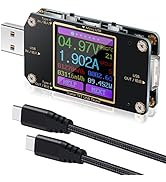
🔌 Stay ahead of the charge game with Eversame’s smart USB-C tester!
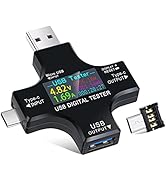
The Eversame 2-in-1 USB-C Tester is a compact, multifunctional digital multimeter designed to measure voltage (3.6-30V), current (0-5.1A), and capacity (up to 99999mAh) of USB-C devices. Featuring 8 customizable color LCD screens and advanced safety protections, it supports fast charging protocols like QC3.0 and PD, making it an essential tool for professionals who demand precise charging diagnostics and device safety.


| ASIN | B07JYVPLLJ |
| ASIN | B07JYVPLLJ |
| Batteries Included? | No |
| Batteries Required? | No |
| Best Sellers Rank | #5,749 in Tools & Home Improvement ( See Top 100 in Tools & Home Improvement ) #15 in Multi Testers |
| Color | Black |
| Customer Reviews | 4.4 4.4 out of 5 stars (2,822) |
| Customer reviews | 4.4 4.4 out of 5 stars (2,822) |
| Date First Available | 19 November 2018 |
| Date First Available | 19 November 2018 |
| Is Discontinued By Manufacturer | No |
| Item Package Quantity | 1 |
| Item Weight | 31.1 g |
| Item model number | 00005 |
| Item model number | 00005 |
| Manufacturer | eversame |
| Manufacturer | eversame |
| Material | Plastic |
| Package Dimensions | 10.9 x 9.2 x 1.8 cm; 31.18 g |
| Package Dimensions | 10.9 x 9.2 x 1.8 cm; 31.18 g |
| Part number | 00005 |
| Power source type | Battery Powered |
| Size | 60mm x 60mm x 11mm |
| Specification met | CE Marked, RoHS Compliant |
| Style | Digital |
J**E
Not bad
The item works well, shows everything. But it didn't live up to my expectations. Maybe it's my problem, not the item's. I'm not smart enough to accurately understand the numbers it shows 😀
S**E
Tres utile, je ne pourrais plus me passer de cette item
J**J
This tester is quite useful and is reasonably priced. It takes a little time to master its operation so I offer the following description to help other users: I purchased the Eversame 2 in 1 USB Digital Tester which seems identical to the KJ-KjayI 2 in 1 Multifunctional Digital Multimeter Tester. When powering the tester with the type-C input, either a type-C device must be connected to the output or the micro USB adapter must be connected for the tester to function. The tester will also function when it is powered using the USB-A input regardless of the USB adapter. Even though the tester can be powered using the output connectors (according to some Youtube videos) it does not function correctly so don't do it. When first powered, the tester displays the first of several screens. All of these screens switch to the "Standby" screen (which can be changed in "settings") after one minute regardless of any load connected to the tester. Pressing the button once in "Standby" returns to the screen that was active before timing out. Clicking again advances to the next data screen. Double clicking resets the amp-hour field. Triple clicking resets the watt-hour field. Clicking four times resets the timer. Long pressing resets all three fields. All data is logged in the current test group. Data logged in a particular test group are separate from data in other test groups. There are 10 test groups that can be selected by clicking five times. The current test group will be displayed after cycling tester power. Individual data Screens: 1) This display shows voltage and current on the top line using a medium font. The second line shows power and ohms (the equivalent load resistance). The third line shows watt hours, temperature, and amp hours. The last line is a timer (that only counts while powering a load for calculating time dependent values) and test group number. Click once to go to screen #2. 2) On the first line, the voltage of the negative power line is shown (isn't this always zero?) followed by USB protocol in effect and the equivalent resistance of the load. The next two lines show the data line voltages and the bottom line is the voltage of the positive power line. Click once to go to screen #3. 3) This display is mostly in Chinese which is the same data as screen #4. 4) This screen is self explanatory. 5) Large fonts without time. 6) This screen graphs voltage and current with the color and range of voltage on the left with current on the right. Time resolution ranges from 0.5 to 5 seconds and is selected by long pressing. The variance of voltage and current is shown center on the bottom line. 7) This screen is also a graph similar to #6 except the data lines are shown. The vertical scale is from 0 to 5 volts. I'm not sure what the two lower center voltages show but they always seem to be 1.0V. Time resolution operates the same as screen #6. 8) System Settings: Long press to enter this function. Step thru the parameters by clicking once. When the desired parameter is highlighted, perform a long press until the highlighted parameter starts flashing. Clicking once decrements the parameter. Long pressing while highlighted quickly lowers the value. Double clicking increments the value. After incrementing the value, long pressing will quickly raise the value. Single click to go back lowering the value. After a few seconds of not clicking, the displayed value is saved and the tester shows "OK". There are eight system parameters: 1. Over Voltage Protection (OVP) (supposedly it beeps when over this value) 2. Lower Voltage Protection (LVP) 3. Over Current Protection (OCP) (I think it shuts down and must be reset) 4. Screen Rotation with long press (flips display 180°) 5. Default Set with long press (return to factory default values) 6. Clear Data with long press (clears all data in all test groups) 7. Standby Style screen after timeout (either original or volts, amps, watts are displayed) 8. Capacity Ratio (I guess it calculates power bank capacity as percentage) 9. Exit now with long press instead of waiting for timeout 9) This display starts a countdown timer to turn the display off. Click once to advance to the first display screen before the countdown finishes and turns off the display. To re-enable the display, long press which brings up reference settings. Voltage and current are displayed and I guess can be modified to calibrate these values and I'm not sure how this works but my tester seems fairly accurate as shipped. Happy testing!
L**Y
I wanted to check the charging current supplied to my phone or tablet by various chargers and cable combinations. Most of the time I want the slowest charge rate to minimise wear on the battery of my phone. One plugged in, this item automatically lets me know these details, and additional information if I want. It also lets me see which devices automatically stop drawing current when they reach full charge. The printed manual that comes with this item is ridiculously tiny. The pictures on Amazon that show the item's applications plus how to change settings are much more legible. I suggest you save copies of those images from the Amazon product page for this item.
V**E
1. Working as expected. 2. Value for money. 3. Lots of review here are about measuring wrong current , where they show a current in mobile app and current measured by this USB tester are different, but the app shows the addition of input and output current of battery while this USB tester shows only input current and voltage of the battery , so the difference in the current shown by the app and this tester is acceptable. 4. Some people says that it is not measuring wrong capacity (mAH) but if you see how it calculates capacity then you can manually calculate the capacity by dividing the Wh reading by 3.7 volt. For example , in the image i have attached with review, it is showing 38Wh. And it is showing 2804mAh. But my battery is 10,000mAh. The reason it is showing 2804 mAh is because , while charging ,it was Charging with 14V fast charging voltage, so it divided 38Wh by 14 which comes around 2804mAh. So to get the accurate mAh capacity just divide the Wh reading by nominal voltage of single battery that is 3.7v , if we divide 38Wh by 3.7V , it comes around 10,000mAh, so this tester is accurate. So accuracy is good. 5. Quality is also good.
A**I
very useful when you need to troubleshoot some devices.. Works well
Trustpilot
3 weeks ago
5 days ago