Buy anything from 5,000+ international stores. One checkout price. No surprise fees. Join 2M+ shoppers on Desertcart.
Desertcart purchases this item on your behalf and handles shipping, customs, and support to Brazil.
📷 Snap from Afar: Elevate Your Photography Game!
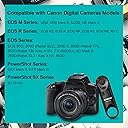
The AODELAN Camera Remote Shutter Release is a wireless remote designed for Canon cameras, offering a convenient way to capture photos and videos from a distance. With a range of up to 10 meters, it's compatible with various Canon models and includes a battery for immediate use. Lightweight and portable, this remote is perfect for photographers on the go.


| ASIN | B07KGC258H |
| Battery Types | CR2032 |
| Brand | AODELAN |
| Brand Name | AODELAN |
| Button Quantity | 1 |
| Colour | black |
| Compatible Devices | Camera |
| Connectivity Technology | Wireless |
| Controller Type | Button Control |
| Country of Origin | USA |
| Customer Reviews | 4.2 out of 5 stars 687 Reviews |
| Item Type Name | remote |
| Item Weight Unit of Measure | 13.6 Grams |
| Manufacturer | HAOXI |
| Manufacturer Part Number | Remote control - 1 |
| Max Number of Supported Devices | 1 |
| Maximum Number of Supported Devices | 1 |
| Maximum Range | 10 metres |
| Model Number | For Canon |
| Network Connectivity Technology | Wireless |
| Number of Batteries | 1 CR2 batteries required. (included) |
| Product Features | Wireless |
| Smart Home Compatibility | Not Smart Home Compatible |
| Special Feature | Wireless |
| UPC | 653846094247 |
J**E
Love the autofocus.
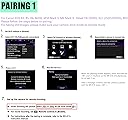
I have the Canon EOS M50 that I purchased in 2021. The remote works perfectly. The auto focus is very useful for selfies. I would definitely recommend you buy this product. I put together a step-by-step procedure based on my own experience and information from videos on You Tube. For all the detail it is very simple to set up. 1) For the remote, set the control on the side to the solid white circle. 2) For the camera, set the camera to any camera icon on the top dial. 3) Then go to the Menu and select the camera icon, the red menu. 4) Select the “Drive mode’ and then select “10 second mode”. 5) Then go to menu settings under the wrench icon, the yellow menu. 6) Select “Wireless Communication Settings” 7) Then select “Bluetooth Smartphone”. 8) You will now see the option to select “Remote”. 9) Now select “Pairing”. In this step, hold and press the W and T on remote control simultaneously for 3 sec. or more. The indicator will blink in the pairing process, and it will blink one more time when pairing is complete. 10) The camera is now set to work with the remote for photos. Press the shutter release button a couple of times. 11) For movies, set the camera to the projector icon and the remote to projector icon. 12) On the camera open up the Menu and select the camera icon, the red menu. 13) Go to “Remote control” and select “enable”. 14) If the remote doesn’t work, repeat Step 10. The remote is now set up to run the camera in two modes, no delay and a two second delay.
F**O
Ottimo
Perfettamente funzionante piccolo è leggero
6**S
Parfait
Très facile d'établir la connexion avec le boîtier, (Canon EOS 6D Mark II), après il ne faut pas oublier dans les paramètres du boîtier de revenir sur la connexion télécommande si on est parti entre deux sur la connexion avec un smartphone par exemple. Mais une fois que c'est initialisé, l'appareil reconnaît systématiquement la télécommande. La qualité est parfaite, le rapport qui a été pris par rapport à la commande d'origine canon est très bien ! Achat validé.
B**.
Works as advertised
Camera remote works very well in picture mode on my R5C, but not in video mode. However, I knew that was the case before I bought it so no problem. I think it works in both modes in the cameras, R5C is the odd system.
P**A
Muy útil y práctico
Lo uso para mi Canon M50 Mark II y funciona excelente. La primera vez que se usa, ya enlazado, activa perfectamente la grabación de video pero la de foto no, pero gracias a otra reseña que por aquí leí me di cuenta qué hay que poner la cámara en “espera de tiempo de dos segundos” es decir el relojito para que la cámara espere unos segundos antes de sacar la foto, en dos segundos y ya!! saca la foto con el control remoto. El enlace es muy fácil poniendo la cámara en modo enlace y seleccionar “control remoto” y en el control remoto oprimir simultáneamente los botones W y T hasta que parpadé el foquito rojo, seguir instrucciones de pantalla y ya!! muy recomendable!!
Trustpilot
1 month ago
3 weeks ago