Buy anything from 5,000+ international stores. One checkout price. No surprise fees. Join 2M+ shoppers on Desertcart.
Desertcart purchases this item on your behalf and handles shipping, customs, and support to Brazil.
⌨️ Unlock your workflow’s secret weapon with X-keys XK-24 — where precision meets personalization!
The X-keys XK-24 is a 24-key programmable keypad featuring individually addressable blue and red backlighting, wired USB-A connectivity, and broad OS compatibility from Windows XP through Windows 11 and MacOS 10.14 to 13. Designed for professionals in trading, photo editing, court reporting, and more, it stores macros directly on the device for software-free operation after setup. Its relegendable keycaps and compact, ambidextrous design make it a versatile tool for enhancing productivity and workflow customization.


| ASIN | B003MB780E |
| Additional Features | Backlit, Hotkeys and Media Keys, Lightweight, Programmable Keys |
| Antenna Location | Business, Education, Everyday Use, Gaming, Multimedia, Personal, Photo Editing, Programming, Student, Video Editing |
| Best Sellers Rank | #920 in Computer Keyboards |
| Brand | X-keys |
| Built-In Media | USB Cable |
| Button Quantity | 24 |
| Color | Black and Grey |
| Compatible Devices | Laptop, PC |
| Compatible Operating System Family | Linux, MacOS, Windows |
| Connectivity Technology | USB-A |
| Customer Reviews | 4.4 4.4 out of 5 stars (370) |
| Enclosure Material | Plastic, Metal or Plastic-Metal Composite |
| External Testing Certification | FCC class B, CE, WEEE |
| Global Trade Identification Number | 00703273002404, 05050914712921 |
| Hand Orientation | Ambidextrous |
| Item Dimensions L x W x H | 3.8"L x 0.94"W x 5.8"H |
| Item Weight | 10 Ounces |
| Keyboard Backlighting Color Support | Single Color |
| Keyboard Description | Multi Functional |
| Keyboard Layout | QWERTY |
| Manufacturer | X-keys |
| Mfr Part Number | XK-24-USB-R |
| Model Name | X-keys XK-24 USB Keypad |
| Model Number | XK-24 Keypad |
| Number of Keys | 24 |
| Number of Sections | 24 |
| Power Source | Corded Electric |
| Style Name | Classic |
| Switch Type | Rubber Dome |
| Theme | Office |
| UPC | 703273002404 |
| Unit Count | 1.0 Count |
M**R
Incredible device for reducing strain
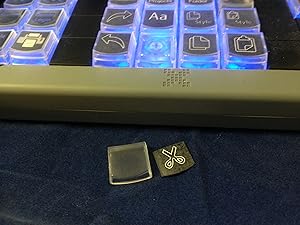
I was hesitant about buying this product for a while as I was unsure if it would do exactly what I wanted it to. I wanted to reduce the number of actions I have to take with one hand, like click and drag, and I needed it to be compatible in a variety of settings. The device supports two forms of programming: hardware and software mode. Hardware mode is where you tell the device what to do and whatever it is plugged into simply receives messages. Software mode has many more features such as keys that do different things in different apps. I chose hardware mode because I need it to be a driverless (Plain USB) device. I have mine configured to simulate a mouse with left/right clicks, double clicks, ctrl-left click, and mousse nudging. I also have been mapping all of the shortcut keys that I use onto a single XK-80 key. The device supports two layers so I programmed one layer to work on Windows and the second layer to work on the Mac. Works like a charm. I even have the lights set to match: blue for layer one or Windows, red for layer two or MacOS. Seems very well built - the keys even have little slim caps which pop off the top for a legend to go under. My main beef is that the device can only be programmed from Windows. That's annoying as my only windows machine does not allow me to install anything. So I use VMWare on my MacOS to program it. I also wish it was easier to make nice key legends. Mine look like crap but they work.
B**S
This thing is simply amazing. It Just Works
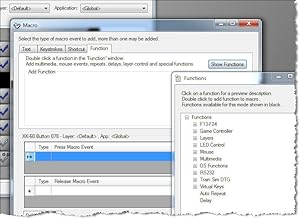
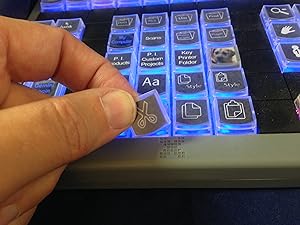
This thing is simply amazing. It Just Works. You don't even need software-resident on your computer-- you can store the keys or keystrokes directly into the device's memory, and then? Never need to re-load the software again, if you don't want to. The software is pretty easy to use; basically you're given a simple graphic of the keyboard, which you double-click each key, to change it. I would be very nice if the software was "smart" enough to blink the corresponding key, when you did that, but as I understand it, the individual key lighting isn't addressable by the main keystroke-programming software. You use a separate utility for that feature. Oh well. When I bought this, I also purchased an assortment of double-keys-- some "tall" and some "wide". These are not interchangable! Depending on how you place the keyboard, these accessories will go left-to-right, or up-and-down across two keys. So you need a pack of each, if you plan on having some double-wide keys, and some double-tall. You can also purchase blanking plates, for unused keys, which can help to highlight your layout. I found the keycaps a bit tricky at first, to remove-- it comes with a little tool (a stainless-steel "tweezer"), but I kept pulling up the whole key--not just the key-cap. With some practice, I found just where to grab with the tool, to *just* remove the thin top-part, and not the whole key. I had ordered several sheets of key-labels, for hand-written legends. I used these at first, and they were okay. However, with 80 keys, it was tiresome hand-writing all those individual legends, to say nothing of my handwriting being too large for the standard sized keys. So I used yet another utility that came with the software, and painstakingly typed in all 80 legends, one key at a time. The interface wasn't too bad-- double-click on a key, click to select one line, two lines or three lines (max). The default justification is centered, but you can left- or right- justify too. I found if you leave it on 3 lines, but click on the middle of three lines, and only use that, it's a wee bit faster, per key. What I wish it had? Was multiple selection feature-- and apply the same legend to a set of keys, then you'd just need to *edit* individual keys some-- it would be much quicker, I think, to edit a minor change or sequence, than to edit each key individually. Even better? Specify a sequence, as in a special symbol is replaced with a sequence, starting with 1, then specifying an adder (usually +1) up to as many keys as is selected in sequence. Or start with "A" and going up the alphabet in sequence. That would have saved me a couple of hours. Once I got all the keys labeled, I simply printed it--on plain paper. The labels it came with? I found rather cumbersome to use, and do *not* recommend them at all. They have mild sticky--but only to hold them to the sheet! The label itself is plain paper, one removed! And between the small size, a mild static electric charge? It was rather a pain to get the keys labeled. With plain paper, I simply cut the individual labels apart with scissors-- an entire row, then individual keys as I was installing them. Very much a pain--and impossible to keep square. Oh well--the printed labels are ever so much better than my hand-written ones anyway. What I would love to see? Is Post-It type glue on a sheet of labels-- that *would* let you keep them perfectly square. I may see if I can find this as a larger sheet, that I can put through my laser printer. I should point out, that the labels are underneath a little plastic cover--so once you have them in place? They are protected, and ought to remain for the life of the keyboard. All in all, this is an amazing product! I would buy it again, in a second. Indeed-- I have considered purchasing a second one, to use as a dedicated directional keypad--but I am worried a bit, that the software would be confused as to which unit was which. So I purchased a different product for that role (keypad) (see my review on a Razor gaming keypad). One additional nit-to-pick: if you allow their programming software to remain resident (in memory at boot-up)? The light pattern you programmed, using the little lighting utility, is messed up the minute you re-start your computer. Then, you are obliged to re-start that utility--which immediately restores your pattern. My solution was to disable their software from remaining in memory-- you don't need it, if you use the "write to device" and "hardware mode". I recommend using hardware mode anyway: many games bypass the built-in software engine that Windows uses, and talk directly to the keyboard at the hardware layer. Such games would simply ignore the resident software key programming, and the keyboard would not work-- or worse, some games would see such software as a "cheat", and disable your game ID! But using *hardware* mode, all the keystrokes are saved to the keyboard's copious memory-- and the game simply sees it as another USB keyboard. To be sure, I have not tried the keyboard's ability to simulate a mouse, so if that is a feature you need, you may need to experiment.
K**I
Excellent device
I purchased the XK-24 for use with PhotoShop, and am very pleased with the results. Setting the keys in software mode is extremely easy, and took perhaps all of 15 minutes, plus just a couple of minutes reading the instructions. I understand that the use of hardware mode is rather more involved, but i have no need for such, and imagine most people will come to the same conclusion. Printing the key legends is quite easy also, and I simply used plain white paper. The only work is cutting them from the sheet. A sheet of label blanks is included, but I decided to save them for later. To me, the only real advantage to them is that they are pre-scored. Some people seem to have difficulty installing the labels, but I think that this results from poor procedure. My approach is to pull the key cap, insert the legend label, then hold the XK-24 at an angle, such that the key faces slightly downward. When the cap is then placed on the key, the alignment is perfect every time. One can also use the tool to pull the entire key, and thus effect upside down assembly, but I see no reason to use this approach. I used the X-keys backlight Utility to set the background key colours, mixing red and blue for a nice violet/purple background. I was puzzled when the settings kept being disabled, but found one must first “disable scripted backlighting”, from the Advanced Tools dropdown. Since each can have settings for multiple applications, or for global specification, one can have multiple key sets. I primatily use two: one for PhotoShop, and one for Explorer so that I can directly invoke my 24 most used programs. The keypad itself retains only one legend, so I set up small Excel matrices containing the other mappings. About PhotoShop, I have mapped the keys using a combination of PhotoShop Actions and embedded key strokes. This has greatly simplified the edit process and saves a great deal of time eliminating repetitive operations. Much of this, of course, could be accomplished by use of PhotoShop Actions alone, however hitting the key with the right legend is far more instinctive for me than remembering a lot of different function key sequences, and much less prone to error. Having read all the other views posted here, I infer that many people simply enjoy complaining about things. This is a great device, and I wish I had purchased it long before. If I had more desktop space I would get a larger one, with more keys.
C**D
Good for gaming
I am a long time user of the CH Products Multi Function Pad. Unfortunately, that product was discontinued almost a decade ago and after years of pounding on it to kill monsters, I needed to find something else. (Incidentally, X Keys, you should get a license to the MFP and bring it back, many gamers are hungry for that product!). Anyway, back to the X Keys product: Positives: Keys seem well made and sturdy. Hopefully they will stand up to long fights with dragons and the like. The programming software is pretty easy to figure out. The two colored back light is nice Can add delays between keystrokes in macros The paper key designations are placed under a key cover, so they will not get dirty / bleed from extensive use. Zero problems installing either the hardware or the software in Windows 11 Negatives: This is a traditional keypad. Once a key wears out you will be stuck with a dead one. While the software was relatively easy to figure out, there is no manual. I had to contact tech support to get more esoteric questions answered. While you can add delays between keystrokes, they are limited to 500ms increments. No playing around to get the minimum delay that a game will recognize. The non-sticky key covers you get are very limited. One page of colored symbols, which does not include the whole alphabet and is missing keys people would want -- such as "esc," "enter," "alt," etc. The first page you get is colored, with black, green and red key covers. That sounds great, but the second page you get is blank, white key covers. So, if you use the pre-prepared sheets your keyboard will have a variety of different colored keys on it. Some may consider this a feature, I don't. There is no software for printing out new key symbols easily. It would be preferable if the blank key cover sheet came in a 8 1/2 * 11 sheet that you could put in a laser printer. Treating it as a Google document, X Keys could easily make a template for us to easily print out our own key messages. While I think the cost of the pad itself was ok, the cost of accessories is ridiculously high. Key blockers (a tiny piece of black plastic) cost $1 a pop. They probably cost the company around 2 cents per to manufacture. So, all in all I give it 4 stars. it is easy to use, will likely serve its purpose and is the best programable keypad I have found currently available for playing MMORPGs. Some misses on the software and the cost of accessories drop it from 5 stars.
D**X
Does enough for me
I've had this about a year now so I can give a full review of it. I got the pad with the intention to make a left handed keypad for my tenkeyless keyboard -- I'm right handed but the keypad pushes the mouse too far over on a regular keyboard. I also added some coding shortcuts like braces, brackets, parenthesis, etc. Then there is a group of selection keys for selecting text in various ways. I put the arrow keys in there and the page up/down, home/end keys. I added cut/copy/paste keys. Navigation shortcuts. I still had 3 full rows of keys left after all of that. I ended up labeling those as A-J in 3 different colors and I reprogram those as needed to suit my current task load. That gives me 33 keys to fully customize. I do have several hard set already to create a prepend to file names, in variable situations, that I use for file organization. Even after that, I still get nearly 30 keys to do whatever it is I want. You simply can't go wrong here. The only reason not to buy this model over any other is if you simply cannot maintain the mental inventory of what you've programmed or you will never need more functionality -- I always go long in that situation. Shorting yourself is more expensive in the long run. If you don't mind making and switching labels (the company provides blanks that you can customize, I used GIMP to edit them) you can get a smaller model and switch out more. I'm more of a nailed down type, so I want extra for temp stuff. The software has not shown any issues thus far, but I do not use the scripting issues as that was not my use case. 2018-12-16 This review is for the XK-24. My XK-80 review stands on its own, the pad still works great. The 24 I got for my workplace because the software shortcuts require too many hand gymnastics for me. I have really beat this thing up since I bought it in July 2018. Made my own labels from the blanks, had to do that. I want to note that I have had two contacts with customer service between both models, and both contacts went well: 1) I couldn't download their software at all -- problem was my nic had been fried, but it passed data, just corrupted data 2) The pad resets the lights to blue every time, even when programming. That is because there is a scripting setting enabled in the software that you should turn off in the menu area if you don't want scripted lights. I had muddled through and found the offending lines in their software and sent them the fix, LOL. At least their tech support knew what I was saying unlike many other companies tech support. I'm keeping the five stars between the two products.
S**E
Used to be good.
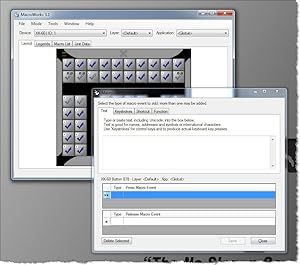
I bought this keypad back in 2015 and it used software called "ControllerMate". A very easy-to-use GUI with drag & drop modules that can be stacked to make easy single-button macro sequences. In 2018, they stopped supporting that software and switched to MacroWorks which, by comparison, is little more than a pain in the butt. Getting it to do what I want it to do, what I've had it do before, seems near impossible. I used it all the time and even intended to buy more, larger keypads for different applications, but now, it seems like a waste of money and I've stopped using the keypad all together. The keypad is still good, but programming it is a lesson in patients but quickly becomes aggravating. Because I know how this device COULD perform, but no longer can, I'd suggest not wasting your time and money. Unless Pi Engineering comes up with a better programming UI, something more like ControllerMate, I would not recommend.
S**X
XKeys 128 Review
There's nothing else quite like it to compare it with, and it's so immensely useful, that it gets a 5-star rating by default. Supporting this rating is PI Engineering's superb support staff, cross-platform programming software, "industrial quality" build and sturdy, firm feel of the buttons. It's also quite easy to customize the button layout using the supplied removal tool. The unit comes with a sampler pack of alternative button styles, and PI sells separately a useful variety of alternative keycap shapes and colors. They even sell button "blanks" which I use to provide tactile landing points for one-handed, eyes-off operation. The free version of ControllerMate software is immensely powerful. Button function and illumination can easily be made application-specific. Buttons can output single keystrokes (with or without modifier keys), long text strings (such as URLs), simulate mouse movements and clicks, and even trigger system sounds. The full version of ControllerMate (a bargain at $25 from orderedbytes.com) adds MIDI functionality (send and receive). One or more buttons can be programmed to act as a "shift" or "swap" function to provide multiple layers of functionality from every button. And backlighting of each button is individually addressable. I do have a few critiques, listed here under the banner of "FYI" and not in any way meant to "bash" this product. As mentioned in another review here on Amazon, backlight bleed can be a bit of a problem. If you've programmed illumination on a single button, the light bleeds in such a way that any button below it may appear illuminated too. Next... the USB cord is not detachable. While this shouldn't be a problem for more permanent installations, it might be a bit of a nuisance if the unit needs to be frequently moved (as is the case with my setup). Finally, the labeling utility is only available for PC. Being Mac-centric, I find this to be quite inconvenient. Though I have a PC, the labeling utility will only work if the unit is connected to it. This means I have to dedicate time to programming the labels rather than being able to do it on a more casual schedule while I continue to work on my Mac. Critiques aside, between the great feel of this unit, extensive programmability and great customer support, I don't hesitate to recommend this unit if you need to pack a whole lot of functionality into a compact surface area.
C**S
Onboard memory is limited
I found that this 80 key model is very good. There are two modes to saving key configurations and macros. The onboard memory of the keypad has a finite amount of memory. Where if you save the key layout on the PC, you can store a lot more macros. If however you do this anytime you press the programmed key on your keyboard, it will end up doing the macro. You will basically be writing a script in notepad and saving it as an AHK file. Otherwise known as auto hotkey. You can adjust the delay time between the key presses as well for programming more than one key after another. There is also the ability to combine keys together such as control + another key, alt + another key, shift + another key. So it is possible to get a lot of binded keys for this device to be able to do with one keypress. You can make goto statements in your script to start another macro if that key has a macro programmed for it. I have only done this a few times as you have to give enough of a delay for the macro you referenced through the keybind to complete. Otherwise you will be having inputs interfering with each other before it completes. Anything you run on your PC will work, as long as you match they keys that are mapped for whatever software you are using. Have to be aware of what keys you shouldn't use for mapping that may be used already. As some I found can't be used. It is a trial and error process to find all the unused keys. I only wished the internal memory of the keypad could be increased to a higher amount and once programmed didn't need the software and could plug it into another device once programmed.
M**E
Exceeds all expectations!
I am extremely satisfied with this product, the build quality is excellent and the programming software is flexible and easy to use. I love the design of the key with the removable key caps to allow for easy application of legends and the interchangeable keys make it easy to create custom layout. I am equally happy with the vendor, the customer service is excellent, there was a MINOR mix up with my shipment and they not only responded quickly but they exceeded my expectations in resolving my concern and making sure I was satisfied, I highly recommend Xkeys keyboards and PI Engineering, I will buy from this vendor again.
S**J
... a little on the expensive side but is a great piece of kit
May be a little on the expensive side but is a great piece of kit. Was bought to work with lighting control software to give me quick access to programming. Very easy to set up and also after a quick look at the webpage about led backlights got it working just how I wanted. Very useful in hardware mode as it then stores the keys/macros/shortcuts in the unit so you do not have to have the software on a computer. With the software running however you do get more options like text strings etc. to set to your keys.
H**O
Work very well with vMix
I've customised and used it for vMix for over 2 months now - zero complaint! The keys have good tactile feedback, easy to pull out if needed and the software make printing custom label a breeze!
C**.
Bene.... ....ma non benissimo
Per chi ha Linux necessita l’aggiornamento del firmware fornito dal produttore, che deve essere fatto SOLO ED ESCLUSIVAMENTE con Windows... insomma “un gatto che si morde la coda”. Per il resto ottimo, soddisfa le aspettative
J**R
saved my left wrist
I had been feeling some pain in my left wrist for years at work, I decided to buy one of these, and I don't wana go back. I can't install any software at work, so this is perfect, u just program it at home with the native software , save the hotkeys to the memory and plug it in any computer, on windows or linux(I haven't tried it on macos, but I bet it works). It takes some time to get used to it, I had to start little by little using first only 4 keys for a few days, then 8, then 12 and so on... Good thing is you can write the hotkeys in the keyboard to remember it. It also took me a few times to get the layout just right to be optimal, but it is definately worth it. I wouldn't buy a bigger one, this one is big enough. I use it in Maya only(3d software).
Trustpilot
1 month ago
1 month ago