Buy anything from 5,000+ international stores. One checkout price. No surprise fees. Join 2M+ shoppers on Desertcart.
Desertcart purchases this item on your behalf and handles shipping, customs, and support to Brazil.
🎯 Master your workspace with precision and style.
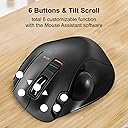
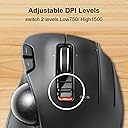
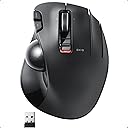
The ELECOM EX-G Trackball Mouse combines advanced optical tracking with six programmable buttons and tilt scroll functionality, delivering precise, customizable control. Its ergonomic design and durable ruby ball bearings ensure comfort and smooth operation, while adjustable DPI and wireless connectivity make it a versatile tool for Windows and Mac professionals seeking efficiency and style.


| ASIN | B016QCPNUW |
| Additional Features | 4 Way Scrolling, Ergonomic Design, Programmable Buttons, Wireless |
| Antenna Location | Creative Software, Home, Office, School, Video/Photo Editing, Work |
| Are Batteries Included | No |
| Are Batteries Required | Yes |
| Best Sellers Rank | #18 in Computer Trackballs |
| Brand | ELECOM |
| Built-In Media | English manual, Japanese manual, Receiver, Trackball mouse |
| Button Quantity | 6 |
| Color | Right Handed |
| Compatible Devices | Laptop, Personal Computer |
| Connectivity Technology | USB |
| Customer Reviews | 4.1 out of 5 stars 9,473 Reviews |
| Enclosure Material | Plastic |
| Finish | Matte |
| Global Trade Identification Number | 04953103473683 |
| Hand Orientation | Right |
| Hardware Platform | Laptop, PC |
| Item Dimensions L x W | 4.9"L x 3.7"W |
| Item Type Name | ELECOM 2.4GHz Wireless Thumb-operated Trackball Mouse, 6-Button Function with Smooth Tracking, Precision Optical Gaming Sensor (M-XT3DRBK) |
| Item Weight | 7.04 ounces |
| Manufacturer | ELECOM |
| Mfr Part Number | M-XT3DRBK |
| Minimum Required Operating System Version | Windows 10 |
| Model Name | EX-G |
| Model Number | M-XT3DRBK |
| Mouse Maximum Sensitivity | 1500 Dots per Inch |
| Movement Detection | Optical |
| Movement Detection Technology | Optical |
| Number of Batteries | 1 AAA batteries required. |
| Number of Buttons | 6 |
| Operating System | Windows 10, Windows 7, Windows 8.1, Windows Vista |
| Power Source | Battery Powered |
| Range | 10.0 meters |
| Special Feature | 4 Way Scrolling , Ergonomic Design, Programmable Buttons, Wireless |
| Style Name | Wireless_BlackBall |
| Theme | Versatile |
| Warranty Description | 1 year manufacturer |
M**S
Great and Configurable!
This is comfortable, wireless, and configurable! I actually wore out the Right and Left click buttons on my old one... but just reconfigured the Forward and Back buttons (to the left of the left button) to be Right and Left Click, and limped along for another year or two.
S**H
Works with Mac OS 10.13
To start with, I bought this after returning a Logitech M575 which doesn't work with my older Mac OS. Logitech can't be bothered to support Mac OS 10.13. Once I downloaded the software for this, the buttons can all be programmed easily. This replaces a Logitech M570, which I loved and used for many years until it finally started to fail. I was pleasantly surprised that the Elecom EX-G fit my hand even more comfortably than the M570 ( I am a male with fairly large hands). There was an initial problem when the trackball wouldn't work at all, but this was due to the battery that came with it being completely flat. I can't remember ever testing a battery before that had 0 volts on the multimeter. I debated whether to subtract a star for this, but decided not to because of its superior functionality and ergonomics. It has only been one day so far, but hopefully it will last a long time, because I really like this trackball.
A**X
Ok mouse, flimsy construction and build quality. Lasts a surprisingly long time.
The buttons have a break in period where they hang and stick, eventually they wear in and work correctly. The button design is not comfortable and way to easy to accidentally click for the left and right buttons, and the left and right scroll. and is not ergonomic or designed for the human hand to use easily. It is a usable but kinda unpleasant device to use, you have to learn how to use it rather than it feeling natural. It is cheaply made and poorly designed. I will likely be keeping it as it works acceptably after a short break in period and the function keys work well for gaming, but I won't be buying another as I am not impressed with the build quality or feel of the device.. It gets the job done, but is not great at it. Unfortunately I have not seen a better gaming trackball yet. Which is disappointing. It's build quality makes the Logitech M750 seem well designed and robust. (The M750 repeatedly failed for me 6-9 months after purchase like clockwork) Hopefully this one holds up better. But I kinda hope it doesn't so I have an excuse to buy a different brand. It really is a mediocre device. Update 5/18/2022 After a break in period, the mouse buttons work more reliably, but accidental clicks are still an issue, but the scroll wheel stopped working, it occasionally reverses direction while scrolling making it unusable... Two months after purchase. Update 10/15/2024 Amazingly the trackball is still working, The main mouse buttons all work correctly, but the middle mouse-wheel button is worn out and rarely works, it often double clicks when it does, I found a way to remap the input on the mouse-wheel so that scroll works properly on Linux, for some reason the mouse wheel was throwing out multiple button codes for each scroll event. It still doesn't work right on windows. Extra buttons can be reprogrammed on Linux using a program called Input Remapper The main issue I have found with this device is that the wireless receiver randomly loses connection and loses range over time. For the longest time I thought my computer freezing issues were due to running Firefox in snap on Ubuntu Linux, until I had two mice connected to the same computer and found that it was the wireless signal hanging instead. I found that I had to unplug the receiver and power-cycle the mouse to get it working again. Also the receiver initially worked up to 30 feet from the computer, but now it barely works when it is 5 feet away and needs direct line of sight to the plug. The gradual and random failures made me think my computer was having ram or storage issues. I want to hate this device, not because it is bad but because it could be so much better, Even with all its many issues it is much much longer lasting than the Logitech equivalent and has better features (when they work). Reluctantly changed rating from 1 star to 4 Due to longevity and reliability of main buttons. It Isn't great, but it blows Logitech out of the water in longevity and reliability. Which is a scathing condemnation of Logitech. I will probably be buying the next step up from Elcom (the EX-G Pro (M-XPT1MRXBK)) because the extra buttons and response rate are great for gaming, it also supports Bluetooth and wired connections so the crappy receiver won't be an issue. I would prefer to buy Logitech, but they keep phoning it in on features and using shoddy switches that break way too fast. Elecom is an acceptable substitute that makes me hate the fact that I love trackballs. Computer trackballs should not induce Stockholm Syndrome.
Z**S
This has become my daily driver
This mouse is cheap and it works very well. I have been using it for about two months now everday on the H setting, which drains the battery faster, but the supplied battery hasn't given out yet. The bearings take a little bit to break in though and I have to wipe out grime and gunk on occasion. I used dry lock lube to initially get it rolling smooth but now I'll clean out the gunk and it gets rolling again. Sometimes I use the oil on my nose to lube the ball, it's a little gross and does cause a bit more gunk build up but it is free and effective. The third mouse button isn't mapped to anything, but I heard an old hardware revision of the trackball came with it mapped as a "sniper button", meaning that the mouse speed is reduced when the button is held. I haven't downloaded their driver utility to map a it to a function since I'm running linux. For gaming it works, but due to years of using a standard mouse I'm not as good at using the trackball as I am using a standard mouse. I'm still practicing and getting better every game. I play casually and I'm already bad at games so no one really notices anyway ;) I would recommend this to any one who is looking for a thumb trackball.
D**A
Not a match for a large trackball
I just recently started using trackballs, where previously I used gaming mice such as the Razer Naga with all the buttons binded to all functions I could think of on After Effects, C4D, Unreal and multiple suites of graphics programs. My workflow was carefully set for that hardware, and I couldn't think I could improve it. Then I tried the Kensington Expert Trackball and after a couple of weeks of readjustment I was never going back. The increase in precision and control is extreme. I was amazed when I abandoned all of my key bindings for a trackball that had only four buttons and could not ever get close in customization and functions, but still left me much more satisfied. So I decided to try the elecom for my secondary computer. I wanted a smaller trackball that had a bit more portability, and I was particularilly wondering if the set of extra buttons and customization could get me near where I was before workflow-wise. I was thinking I would get the best of both worlds. First, precision is not great. A thumb trackball is quite a different beast from a large, index finger trackball, and I didn't get the improvement the Kensingston gave me. Where with the Expert I didn't want to work with a mouse again, with the Elecom I found that many times a mouse would give me a finer control and the experience for this model was actually exasperating. A lot of this has to do with size and fingers used, but I also got to try a Logitech M570 and I found it a much smoother and precise experience. I would buy that one instead, knowing what I know now. As many users, I also found the ball was not of the best quality and would skip a lot on fine movements, as if there was some resistance inside the mouse. It was very noticeable and actually quite maddening. Smooth control was impossible and I didn't have an easy way to change the included ball, as many users had sugested. Luckily, I can report that after several weeks of using the Elecom the ball seems to have improved as if some rough edges inside had been smoothed by use. Now it is giving me a finer control, almost on par of the Logitech. But it did take a long time and I wish that "break in" hadn't been necessary. It is quite usable now. As for the customization, I don't find the position of the buttons natural, and I much prefer the software on the kensingston or even the Razer, as bad as and slow to detect applications as that is. The Elecom one is not terrible, it is stable and it does what it says, but I don't find it attractive, and I find it somewhat limited (for example, you cannot set arbitrary macros, there is a limit on the number of keys). The idea of the gesture system was interesting (you can use a key to enable a "gesture writing" mode, that in turn can activate multiple functions, theoretically giving you as many extra functions as you want). But in practice, I find it strange to use and slower than key combinations. Maybe with more practice it could become more usable, but it hasn't become part of my workflow and I don't see it happening soon. So, in a nutshell: Large index operated trackballs are the real deal for me. For thumb trackballs, the quality of the Elecom is not the best and I would go with the Logitech M570 for much better precision out of the box. The elecom is not terrible per se and improves with time, but I do not see a real practical advantage over the cheaper Logitech all things cosidered. The extra buttons and customizability I am not using as much because it is not as natural as I expected. I would actually consider the Elecom HUGE, and might try it on my next purchase. Maybe that one gets me on that ideal sweet spot of both precision and extreme customization. But I am not buying this model again. Based on what you have tried before, your expectations and what you are used to, your milleage might vary.
K**N
Excellent trackball for not much money.
Bought this as the switches in my 1st generation Elecom wireless trackball (M-XT1DRBK) started playing up. It was far easier to buy a new mouse, and I'm damn glad I did. The external design hasn't changed from Gen1 - they physically look identical - save for the forward and back buttons, which are now of a lower profile. This is a good thing - it was a fantastic thing to hold in the first place. Popping the trackball out reveals the artificial ruby bearings, which are much larger than the ceramic ones previously used. Having only used it for a day I can say that the movement is more positive, albeit a bit scratchier. A bit of PTFE on the bearings might fix that. No comment on maintenance intervals yet as I haven't had it for long enough - Gen1 lasted about a week or so before needing cleaning so I expect this to last longer. The two biggest changes in terms of feel are the switches for left/right click, and the scroll wheel - these are the reasons I'm glad I upgraded. The switches weight are perfect, being a little on the heavy side, with a loud and tactile engagement. Blows Gen1 out of the water in this aspect, even when they did work properly. The second change - the scroll wheel - is minor but makes a huge difference. Since the first day I got the Gen1 trackball the scroll wheel always drove me up the wall, as the scroll wheel had a lot of play; it would move up and down whilst scrolling, and when clicking it would move forwards, and therefore never delivered consistent performance or positive feedback. The new scroll wheel is much better though, despite the wheel itself not changing. Overall this is a great option for a thumb trackball, and is very reasonably priced for what you get. Better than previous generations AND the M570. The Logitech MX Ergo would have to deliver unbelievable performance to top this.
J**H
autoscroll function is horrible.
Last update: Replaced this with a Kensington Pro Fit® Ergo Vertical Wireless Trackball. Much better mouse and is comfortable and fits the hand and no accidental button clicks. 2nd update: I'm not real happy with this. The curvature of the mouse and the very light switches means needing to hold fingers up off the mouse and every time I relax my fingers it causes activating the switches... not good when that causes unwanted actions. I had to turn off the third finger button to help reduce that because every few seconds I would unintentionally cause it to activate. Perhaps if it was wider and supported the pinky finger it might help as well as a greater curvature side to side. As is it want to not have the third button finger in a relaxed normal curve of the fingers but tends to flatten out the fingers causing unwanted switch activation. Plus change out the switches for heavier duty ones that would require more pressure to activate them. Speaking of the switches... they tend to be wishy washy, you can depress the buttons in such a way during normal usage the switches doesn't activate. If not depressing the button directly downward at the exact center the switch may not activate, you think you clicked on something but nothing happens. There is a slight sideways roll to the button and it seems can cause the switches to move sideways instead of downward. I can feel the difference when pressing on the buttons. All together it's annoying and causes hand and finger fatigue quickly. On the other hand... the roller ball is very smooth and dpi is very good. Now if only I had a 3D printer I would use the internals of this (but replace the switches with heavy duty ones) and make my own mouse case for it. And like I mentioned before the software for it needs to have the auto scroll function removed and replaced with regular scroll that doesn't keep scrolling on it's own. I removed the software I downloaded from Elecom and if playing a game use the game's key remap to set the mouse's buttons. Update: After trying and trying to disable that auto scroll I finally removed the the software and the scroll works normally. But I did lose page up/down buttons. For me that's not a big deal as I scroll mostly and seldom use the page up/down. In games where buttons can be assigned a function in the game all the buttons are recognized and can be assigned a function and Elecom's software is not needed. Plus scroll works normally for zoom in/out and doesn't run away. I'm tempted to rate this at 3 stars since in order to stop that auto scroll had to remove the software for it and lose button functions. But in a game with user assigning button functions it works very well... wanting me to give it 5 stars for use in a game. So I'll stick with 4 stars. The scroll wheel after the first couple of clicks goes into auto scroll and scrolls a page up or down a long ways before stopping. If playing a game and need to zoom in or out it's uncontrollable, have to scroll other direction to try to stop it but just as often will zoom completely in the other direction. This is something that really needs to be fixed so it will stop scrolling (or zooming) as soon as the scroll wheel is stopped. Make it so it scrolls/zooms only while the wheel is being moved would be a 100% improvement. I've tried to find a setting that would change that but doesn't seem to be one. The ergonomics is it's a little small for the hand, could be wider and longer, but is something that could get used to. I think it needs to support the hand better, I find that when my hand is relaxed the weight of my fingers will actuate the left/right/ring finger buttons with the ring finger being the worst one. The ball moves smoothly and as far as I can tell accurately. There isn't a way to change the alignment of what is "up" on the ball as with logitec's M570 but the "up" direction seems to be correct for my usage and wouldn't have needed to be aligned anyways. The switches seems very light and will actuate with very little pressure. To me it seems too little and there are times it clicked on something and I could have sworn I never pushed the button. So almost just breath on it to make the main buttons actuate. (I did replace the M570s switches with heavy duty ones which does takes greater pressure to actuate the switches). The 1,500 dpi resolution is great. With having a system that is 4K res using the old M570 the 400 dpi was like using a standard def to input to a High def system. The M570 would skip over areas of the screen making it difficult to select items. This Elecom mouse doesn't have that problem. All in all if the switches stand up to usage for gaming this is a great replacement for the logitec M570. If there were heavy duty replacement switches for this I would replace the switches it came with for switches that required more pressure to actuate. Wanting to give this mouse a good try out I had been playing games (Eve online and Forge of Empires) with it for over 12 hours and the ball movement has been very smooth. The run away auto scroll is a real hinderance. The light switches can be gotten used to. My only real complaint is the auto scroll function... get rid of that and it would be a 5 star product. Time will tell how well the switches hold up to use.
W**Y
Great replacement for the Logi M570
If you are looking for a replacement for the Logitech M570, do yourself a favor and pick up this trackmouse! Keep the blue trackball from the M570 and put it in this excellent device. The only issue I've had with this Elecom is its inferior black trackball. I'm a website designer/developer and I've been through countless various trackball and regular mice and this is my favorite thus far. I almost spent $100 to pick up the new Logi Ergo but opted for this device due to quality issues I've had with other Logitech devices (M570 click issues mainly). I'm glad I went with this. It feels very sturdy and ergonomic compared with the M570. After a day of use, I attempted to go back to my M570 to compare them and it's a night and day difference. The Elecom feels much better in the hand and the buttons are very responsive compared with the M570. You can download the english version of the Mouse Assistant Software to map your buttons. I recommend the following mapping (At Least it works well for my web designing needs): Keep all buttons the same (Forward, Back, Left, Right) and map the Left Scroll Tilt to CUT - Right Scroll Tilt to PASTE - Scroll Click to ENTER and sixth button (the third button on the right) to Application Switcher.
A**B
منتج جيد جدا وسعر ممتاز ومناسب استخدامه 90٪ رائع حتى الان
كل شي جميل وبتصميم انيق واستخدمه سلس ، حيث استخدمت جميع اجهاز لوجتك M النوعين وهم ممتازين جدا
P**N
Muy parecido al Logitech M570, con mas botones, pero con algo menos de precision
Viniendo de dos Logitech M570 seguidos, con sus habituales fallos en los botones, el cambio ha sido muy facil, Es ligerisimamente mas corto que el M570 pero muy comodo y manejable. Practicamente no hay diferencia en la postura de la mano respecto al Logitech. Muy utiles los botones adicionales. La precision es mejorable. En ese sentido daria un 10 al M570 y un 8 al Elecom P.d.: añado que le he puesto la bola del Logitech y la precision es ahora absoluta. Parece que el dibujo de la trama de la bola Logitech funciona mejor
S**O
Super Responsive
After 25 years using the Logitech m570 , I will never look back. Go Japan all the way. It's half the price , has almost twice the buttons , and its smooth scrolling and feels natural in the hand. I love it !!!
K**H
Product failed within 6 months of purchase
Hi giving this a one as this is the second Elecom trackball I purchased that has failed inside of 6 months. Thought to save some money but with two units going down, I should spent the cash upfront for the Logitech instead
P**S
Love it!
I've been using this trackball for a while now. I absolutely love it. It's nice: heavy and sturdy. Beautiful really! Just what I expected from Japanese technology.
Trustpilot
2 weeks ago
1 day ago