We remain fully operational. Our teams are working around the clock to ensure your deliveries continue safely.

DOWNLOAD THE APP


Customer Services
Copyright © 2025 Desertcart Holdings Limited
DOWNLOAD THE APP


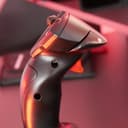
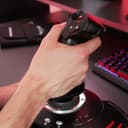
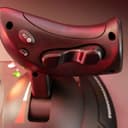


🛫 Elevate your flight game—command the skies with pro-level precision and comfort!
The Thrustmaster T-Flight Hotas X is a USB flight stick and throttle combo designed for PC gamers seeking an affordable yet feature-rich HOTAS setup. It offers 12 programmable buttons, 5 axes with adjustable resistance, and ergonomic design including a detachable throttle and wide hand-rest. With internal memory to save custom profiles, exclusive mapping and preset buttons for instant function switching, and a weighted base for stability, it delivers a plug & play experience optimized for flight and space simulation enthusiasts. Highly rated for its value, it balances solid construction with extensive customization at a budget-friendly price point.


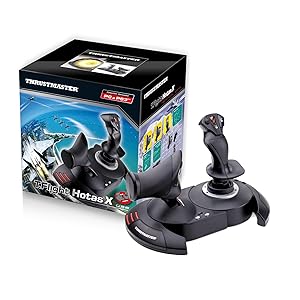


| ASIN | B001CXYMFS |
| Additional Features | Ergonomic |
| Best Sellers Rank | #1,014 in Video Games ( See Top 100 in Video Games ) #7 in PC Game Flight Controls |
| Brand Name | Thrustmaster |
| Button Quantity | 12 |
| Color | Black |
| Compatible Devices | PC |
| Connectivity Technology | USB |
| Controller Type | Flight Stick |
| Customer Reviews | 4.4 4.4 out of 5 stars (8,235) |
| External Testing Certification | Não aplicável |
| Global Trade Identification Number | 03362932913535 |
| Hardware Platform | Desktop, Laptop |
| Included Components | Instructions manual & flightstick |
| Item Dimensions | 10.39 x 9.53 x 10.43 inches |
| Item Type Name | Flight Stick |
| Item Weight | 2165 Grams |
| Manufacturer | Thrustmaster VG |
| Model Name | THRUSTMASTER T-Flight Hotas X Flight Stick |
| Package Quantity | 1 |
| Power Source | Corded Electric |
| UPC | 071030532366 088021805026 887166196026 012301871210 080000259578 151902985152 611101218685 088020767042 080000350657 021112254617 088020980311 084007483189 962327424283 071030530522 780320052803 080000327369 021111317245 086000368937 071030174641 803246208427 675904128305 079532181464 115971251358 132017947938 105221984143 644535525814 001910723973 071021143250 707003244966 021113169415 0129515960… |
| Warranty Description | One year |
S**D
A great price positioned joystick/throttle combo that won't break the bank
I have looked at Thrustmaster sticks over the years with envy, to me they represented an elite level in joysticks. While I really like flight and spaceflight simulations, I could never quite warrant spending the big bucks on Thrustmaster or Saitek joysticks. Logitech and others had reasonably priced sticks for my level of gaming. For the past several years I have been on consoles so joysticks were not a big option. Recently I stepped back into PC gaming and I purchased one of the "Elite" space combat games. Even in the video for the game, the character used a stick combo that was very similar to a Thrustmaster setup...clever subliminal marketing? Maybe so because after trying somewhat unsuccessfully to fly on just a keyboard and mouse, I was looking for a stick I thought about going with one of the Logitech sticks, like what I had before, then I saw this setup. Where it would be asy to close in on or surpass 400.00 US on Thrustmaster sticks, here was both for a very very reasonable price. Was it discontinued? An inferior model or refurb? Nope, it is just a specific model that Thrustmaster produced to solicit a niche of bargain PC gamers and PS3 gamers(Yes! The stick works on PS3!!! I find out AFTER I have moved on to the PS4( I have yet to see if it works on PS4, but even if it does there are not many games that call for a stick like this)) The T-Flight is a great stick for the price-point. It is not going to be the same quality as the 200.00 individual components, but that is not to say this is not a quality device...Au Contraire... This is a great bang for the buck. The unit arrives together in the box but not connected. You have the option of screwing the throttle and the stick together via installed screws in the base. There also is an allen wrench included in the base, complete with its own snap in nook. This is good because the screw heads are of a star type. That being said, you should put them together to see if you are comfortable with them being that close together. Maybe you have space limitations...who knows. I tried it and personally felt it was a little close together for me and how I was using it, so I opted to separate the stick and throttle. The cord that connects them is about 3 feet long and will wrap up in the base of the throttle if you choose to connect them. True to good quality sticks like Thrustmaster, there are many buttons and they are programmable. Additionally there is an tensioning adjustment under the flight stick, but it didn't make a great bit of difference to me. All in all the joystick has a good feel to it and responds well. With one exception which I have seen in several reviews, I will add in mine as well. The throttle has a middle or neutral spot if you will and I guess in lieu of making a spring based solution, they mad moving out of this spot a little hard. It's almost like it sticks, you definitely will feel it and it can affect what you are trying to do, especially thrusting forward. I believe in time, with a good amount of usage, the stick should wear sufficiently to be more smooth but for now it is almost certainly a hindrance. For many it can be lived with, others it could be the straw that breaks the camels back in deciding on this stick. If you can put your hands on one before buying, I think that would help you formulate a better decision. A joystick or gamepad can be 10$ and feel perfectly right for you or a 200.00 professional model and still not quite cut it. It really comes down to how it feels to you. In the end, I think this is a fantastic stick, especially for the price. It has many features, very programmable and feels really good with the exception of the throttle mid point. For me, I can overlook it given how I use the stick and the frequency.
M**W
T-Flight Hotas X
I was looking for a decent joystick at a low price to play some new titles (A-10C Warthog), and some of my older favorites (Freespace). This was the only stick I found with detachable throttle for under 50$ that looked good. I was not expecting anything great from it for 35$, but decided it was better to try this out first and if I felt it was inadequate I could upgrade at a later time and not have wasted too much money. (edit: I see now Amazon has put it back at 50$, I'm glad I got it for a low price while I could). Having tried it out I am very pleased with it overall, especially for the price. The construction is solid on this stick. While the materials used are not high end (lots of plastic), for 35$ you can't expect higher grade material. They work and they won't break on you any time soon. There are lots of buttons on the stick and throttle that you can map. I can't imagine needing more. The dead zone is pretty good on this stick. When I fired up my first game I was unimpressed with the way the stick handled and what I thought was a horrible dead zone. Moving the stick in any direction slightly resulted in no movement on the screen. I felt like I was having to push the stick half way in any direction just to get some movement. I can assure you that if you are experiencing this in any game, it's the game / game settings that are causing it. To test, install the latest windows drivers from the Hotas website for this stick. Run the device information tool and watch the graph on the screen as you move the stick in any direction. This will show you what is being detected when the stick moves. I noticed this tool was detecting more movement than the game was. In my case, I found settings for dead zone in the games settings and set it to 0 which resolved the problem I was having. Cable length on this stick is great. I had read some other reviews saying the cables between the stick and the throttle are not long enough. I'm not sure what people expect, but I can assure you they have a lot of length between them. I was able to fit a full size keyboard with number pad and media keys between the stick and the throttle. + Construction is solid + Very minor dead zone + Long cables + Lots of buttons that can be mapped - Lots of plastic +/- Unsure how this stick will hold up over time. For 35$ if I can get 1-2 years out of it I would be happy.
F**A
Una gran compra de este joystick. Yo lo utilizo para Microsoft Flight Simulator y Xplane 12, ambos en PC, y la verdad es que me ha sorprendido la facilidad de configuración que tiene. El tacto, a la hora de volar, es muy bueno, se puede ajustar la sensibilidad a tu gusto. Otro punto a favor es el poder separar ambos joysticks ya que te facilita el poner en medio el teclado para poder manejar mejor. Recomiendo la compra ya que es uno de lo mas baratos pero muy buena calidad.
M**Y
I love it. Smooth faultless operation, comfortable to handle, strong construction and most importantly works exceptionally well. I use it primarily with Flight Sim X Gold edition on Windows 10. Tip for those having problems using FS X on Windows 10 with registration problems is: To over-come the registration problem run FS X in "Administration" mode and registration confirmation is obtained.
P**I
Questo joystick-hotas da volo è da un po' in catalogo ed è stato aggiornato in versioni specifiche per console più recenti (il mio è quello per PS3) ma per PC/Mac nulla cambia per cui questo "vecchio" ha un prezzo estremamente favorevole. Qualità eccellente in generale, accuratamente costruito con buoni materiali, ha una miriade di tasti e un asse anche davanti alla manetta della potenza motore che può essere configurato come timone - molto pratico. Ricordate di fissare le due parti (base joystick e base manetta) tra loro con le viti a brugola da sotto (apposito chiavino fornito sotto la base stessa) perché all'inizio non mi era così evidente di doverlo fare e i due pezzi, pur incastrandosi reciprocamente, ogni tanto tendevano a... liberarsi. Utilizzato sia con PC (Win7) che con Mac (iMac 27'') con X-Plane 11 che ne prevede la specifica configurazione. Se sul Mac non sapete come calibrarlo (non ho trovato l'apposita utility), e quella dell'applicazione non basta, a me ha funzionato farlo sul PC (con l'apposita utility ThrustMaster) e poi una volta riallacciato al Mac lo si ritroverà... stabile (evidentemente memorizza internamente la configurazione). Ottimo, confido che duri!
M**N
Çok iyi
M**E
super a utiliser
Trustpilot
1 month ago
2 weeks ago