


Desertcart purchases this item on your behalf and handles shipping, customs, and support to Brazil.
🖱️ Stay active, stay ahead — the silent productivity hack you didn’t know you needed!
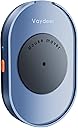
The Vaydeer Undetectable Mouse Jiggler M4 is a driver-free, USB-powered device that simulates physical mouse movement to keep your computer awake. Featuring an ultra-silent motor operating below 45dB and certified ISO/IEC27001:2013 security compliance, it remains completely undetectable by IT departments. With a simple ON/OFF switch and compatibility across major operating systems, it’s the perfect stealth productivity tool for professionals seeking seamless remote or office work efficiency.





| ASIN | B08DTXPS51 |
| Additional Features | 100% undetectable, Gift Ideal for Men/Women, Portable, keep PC awake, no driver needed |
| Antenna Location | Gaming |
| Best Sellers Rank | #2 in Computer Keyboard & Mice Accessories |
| Brand | Vaydeer |
| Button Quantity | 1 |
| Color | Navy Blue |
| Compatible Devices | Personal Computer |
| Connectivity Technology | USB |
| Customer Reviews | 4.5 out of 5 stars 9,944 Reviews |
| Enclosure Material | Plastic |
| Hand Orientation | Ambidextrous |
| Hardware Platform | Linux |
| Included Components | Vaydeer Undetectable Mouse Mover |
| Item Dimensions L x W | 5.12"L x 3.15"W |
| Item Weight | 140 g |
| Manufacturer | VAYDEER |
| Mfr Part Number | FM2011-US |
| Model Name | Mover M4 |
| Model Number | FM2081 |
| Movement Detection | Optical |
| Movement Detection Technology | Optical |
| Number of Buttons | 1 |
| Operating System | Chrome OS, Linux, Mac OS, Windows |
| Power Source | Corded Electric |
| Range | 5.0 meters |
| Special Feature | 100% undetectable, Gift Ideal for Men/Women, Portable, keep PC awake, no driver needed |
| Style Name | Button Control |
| Theme | Computing |
| UPC | 793565728877 |
| Unit Count | 1 Count |
| Warranty Description | 2 Year Manufacturer |
M**N
Perfect for Office Work
This mouse jiggler is great! I have it plugged into an external power strip and use it for my computer. It has been running constantly since July 2024 basically, and it is still going strong. The only time I turn it off is for week-long vacations. I just put my mouse on it, and I don't have any issues with my PC locking/going to sleep. It also makes zero noise. It's small enough to fit at the edge of my desk, and it is super easy to move if needed. Love this thing! I even ordered a second one to keep as a back up for whenever the original decides to break.
L**.
Convenient
This is easy to use and set up. Sometimes you can hear it move but not loud.
K**Y
Better design, works very well
Lifesaver— I have to work in two laptops for work. This allows me to stay open an active on both while i work in one or the other. This is actually my second one and I love that the size is a little larger to completely fit the mouse and get the sensor in the right spot. The smaller version required a more careful placement
S**D
A must have if you WFH!
Works great! If you WFH, you need this! I used to rush just to refill my coffee and comeback to my screen timing out. Not anymore!!!! Best work investment yet!!!
J**Y
Does as described, but know what you're buying!
UPDATE: Vaydeer has kindly offered me a refund for the product despite being past the return window (and NO mention or request of changing my review, so props to them for that). But I am doing it anyway because 1 star feels a bit unfair for a product that does as described. I still think you are better off buying a USB mouse jiggler, but this product will likely achieve what you're after. ORIGINAL REVIEW: I get it. I was like you, once. Distrustful of those shady USB mouse jigglers. "No software" they advertised...how can that be?? And surely Teams and Slack have cutting-edge mouse jiggler detection technology which immediately notifies your boss and CEO if it detects suspicious mouse activity, right??? So I coughed up the extra dough and thought to myself, "surely the peace of mind from knowing there is no physical difference between me moving the mouse and this device 'moving' the mouse will be worth the extra money...right?". And maybe for the first day, it was. But a couple of problems became immediately apparent: 1. I own a Logitech MX Master 3S mouse, which is quite wide. Wider than this device. This wouldn't be a problem as the mouse could just hang over the edge, but for some reason this device has raised edges. This makes it so that I have to place the mouse juuuuust right in order for it to work. I eventually got used to this but it was annoying and increased my anxiety every time I had to step away as I would worry it would move slightly and no longer be perfectly aligned with the mouse laser. 2. You need to REMEMBER to put your mouse on this EVERY time you want it to work. I didn't think I would have a problem remembering, but once you get comfortable stepping away from your computer for extended periods of time during the work day, you start to get sloppy. Or at least I did. I tried to remedy this by using a second, wired mouse that I then taped to this device such that all I needed to do was press the power button on the device to get my mouse to start moving. This fixed problem #1, but didn't really fix this issue, because now I needed to remember to press the button! 3. After a power cycle, the device must be manually turned back on by pressing the power button no matter what. This was the final nail in the coffin for me, as I tried to alleviate problem #2 by plugging the device into a smart plug that I was then intending to control via a script I wrote that would automatically power it on if no mouse movement was detected for ~30 seconds. This would maybe have finally solved everything but no, the device must be physically turned back on even if it was on when it lost power. So finally, due to the above, I looked again and bought one of those little USB jigglers that cost me about 1/3rd as much as this. It is literally perfect and is as undetectable as this is. And it has one huge feature that this device does not: 1 pixel jiggle mode. This means that it will jiggle your mouse 1 pixel left or right every second or so, which means you can LEAVE IT ON ALL DAY and your actual mouse will STILL BE USABLE. It's phenomenal, I can freely step away from my desk without even needing to think about. I never have panic attacks like "oh crap did I put my mouse on the mover". Do yourself a favor and just get one of those. Your computer (and thus whatever software might feasibly monitor your mouse activity) literally can't tell the difference between it and a device like this. I know it might be hard to convince your brain (it was hard for me), but the inconveniences of this type of device far outweigh the completely false sense of "security" from knowing no software is involved. TL;DR: Just buy a cheap USB mouse jiggler that simulates a mouse. They are cheaper and often have more options/flexibility than this type of device.
A**R
Very useful tool!
I only work remotely when work is slow, so it's not like I'm home glued to my computer with tons to do. This lets me seem online while I'm doing other stuff around the house. I still get email and Teams notifications on my phone so I can get back to colleagues quickly. It's very easy to set up, just plug one end of the cable into your computer and the other into the tray. Put your mouse on top of the tray and the little round part will start spinning very slowly and activate the red sensor on the bottom of your mouse. It will turn for a little bit one way, then pause (don't worry, it's not broken! it just pauses for a few seconds after each cycle), then spin the other way. If your work is checking that your mouse is actually clicking and interacting with things, this isn't going to work for you. This item only makes your mouse seem like it's moving so you stay in "online/active" mode on programs like Microsoft Teams. Some bosses will notice if you go into "away" mode on those programs, and this gets them off your back about not being constantly engaged with your computer all day. A friend asked a question about this and I want to answer this here: NO you don't have to plug it into your computer! You can plug it into any USB port (like a wall charger). As long as it's on. The signal going to your computer is coming from your mouse, NOT from this device. The USB only powers the device. Your mouse is sending the signal to move the cursor around. And if you are a manager reading this review, get off your employees' back! Nobody is 100% always engaged with their computer during the workday even when they're at work. People get up to use the bathroom, talk with colleagues, stretch, get coffee, etc. Calm down, as long as the work is getting done you don't need to breathe down everyone's neck about their online status on Teams!
C**W
Works really good, I’m so happy
Best money I’ve ever spent! Genius! Works well.
M**S
Works
Keeps my computer from logging off constantly.
P**R
Best device to keep your computer awake
Using this device for more than 3 months now, If you are working from home and If your employer tracks how long you have been on, this device is mandatory, gives time for doing your own work in between.
C**A
Très pratique !
Pratique et conforme à mes attentes.
J**A
Funciona justo como necesitas.
Es perfecto para lo que necesito. Puedes escribir en papel sin el problema de que el salvapantallas salte cada 5 minutos, y el movimiento del puntero es suave y aleatorio, de forma que tampoco molesta a la lectura de pantalla.
G**A
Útil pra quem trabalha em casa
atende a necessidade, cumpre o que diz
M**I
Efficace
Svolge perfettamente il suo scopo.
Trustpilot
4 days ago
2 weeks ago