🔧 Build it your way, showcase it your style!
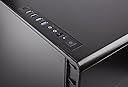
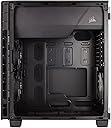
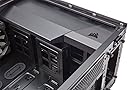
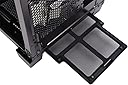
The CORSAIR CARBIDE 600C Inverse Full-Tower Case combines innovative design with practical features, including a full steel exterior, panoramic side panel, and exceptional airflow management. With easy access for cleaning and assembly, this case is perfect for gamers and PC builders looking to create a stunning and efficient setup.


| ASIN | B016IAM7D8 |
| Antenna Location | Business |
| Brand | Corsair |
| Case Type | Full Tower |
| Color | Black |
| Compatible Devices | ATX motherboards, mATX motherboards, ITX motherboards, graphics cards |
| Cooling Method | Air |
| Customer Reviews | 4.5 out of 5 stars 1,382 Reviews |
| Enclosure Material | Alloy Steel |
| Fan Size | 140 Millimeters |
| Global Trade Identification Number | 00843591068482 |
| Hard Disk Form Factor | 3.5 Inches |
| Item Weight | 10 Kilograms |
| Light Color | blue |
| Manufacturer | Corsair - IMPORT FOB HKG |
| Material | Alloy Steel |
| Mfr Part Number | CC-9011079-WW |
| Model Name | CARBIDE 600C |
| Model Number | CC-9011079-WW |
| Motherboard Compatability | Extended ATX |
| Number of Fans | 3 |
| Other Special Features of the Product | Inverse ATX Layout, Full Side Panel Window |
| Power Supply Mounting Type | Bottom Mount |
| Recommended Uses For Product | Business |
| Supported Motherboard | Extended ATX |
| Total Expansion Slots Quantity | 7 |
| Total USB 3.0 Ports | 2 |
| Total Usb Ports | 2 |
| UPC | 734911503090 843591068482 |
O**S
The 400c seemed like a perfect fit since it looked far more elegant ...
My PC needed a mid cycle refresh. Along with a few other parts, I wanted to replace the case as my old case was a NZXT model which yelled "gamer" too loudly. The 400c seemed like a perfect fit since it looked far more elegant but also included a side window. After having used this case for a few months, I'm glad I picked this case. I'll summarize my experience with it with some pros and cons (lot more pros). PROS: --Plenty of cooling options. You get a total of 6 fan slots which is plenty for a mid tower case. 3 120mm slots up front, 2 120mm/1400mm slots on top and 1 120mm slot in the rear. I run all 6 fans and this is very much a overkill. I have a 1070 and FX series processor (both run reasonably hot under load) and heat has never been a issue. --Bottom Shroud. The PSU and HDD cage shrouds are one of the highlights of this case and they results in a much cleaner build overall. Although other reviewers complained about the shroud being too difficult to remove/install, mine did not cause me any trouble. If a clean build is a priority for you (with the huge-side window on this case, it probably is), you will love the look of the shrouds. The only concern: if you have a triple fan radiator like a 420mm one, the HDD shroud may get in the way. -- Large Side Window. If you want to show off your internals, the huge acrylic window will make this very easy. It comes with a latch that can be used to swing open. The window (the entire left side of the case) can also be slid off the hinges which makes working inside much easier. I would recommend led strips as these improve visibility inside greatly and there are a few spots where these lights can be concealed. -- Modular Design. Although this term is thrown around by every case builder, this case really takes this to the next step. All the visual add-ons like the front plastic, side window and top mesh are easily removed and this prevents them from damage when building your PC. All the fan slots (aside from rear) feature easy to remove dust filters, including the bottom PSU fan slot. If you don't want the shroud, HDD cage or SDD cage you can remove these. The highly modular design makes working on and customizing your PC very easy. -- All usual features present. All the de-factos of modern computer cases such as a SSD cage, dust filters, cable management options are present. CONS: --Space is tight. Not a huge deal since any mid tower case will be a little tight with a water cooler and full-size video card. My only real issue was very little space between the top of the case and the motherboard. When I tried to top mount my 280mm radiator, I found out it encroached into the space for RAM and had to front mount it. This particular issue will depend on your motherboard layout. You may find that your initial set-up doesn't fit too well, but with enough experimenting you will likely find a fit. Overall the case preforms great and looks elegant. Looking at it anyone can tell it's a custom built PC, but the visual appeal is not lost at all.
N**O
First Impressions Review
As the title suggests, this is a review from having only been using this case for about 12 hours now, 6 hours of those are me being sleep. Later, I plan on updating this review to reflect how well this case fares against a....very rugged user. I guess I'll find out if this baby's built to last, won't I? Firstly, this case is gorgeous. Alot of reviews had people disappointed about how it looked in real life as opposed to how it looked in the promotional photographs. I have to say myself though, I think it looks amazing in person; I'd go as far to say better, even. From reviews, I expected the side panel to be some cheap, scratchy, wishy-washy piece of plastic, but I'm actually stunned at how rigid it is. On a side note, it's bigger than I expected. I mean, it's a mid-case tower with vertical spacing for an IO-shield, 7 PCI slots, and a PSU- same as my other case. I don't know what I expected there, in retrospect. The entire case is extremely rigid feeling- albeit metal helps, but I still was expecting something with a ton of wiggle at this price point. It didn't look particularly sturdy in pictures, but it's alot more...dense than I was expecting, and I'm actually very happy about that. My last case was one of those 'i'm a gamer look at my gamer case" type of deals, and it was mostly fancified plastic, and while it was a decent case, I'm glad to get away from that thing and to something that feels this amazing. The way Corsair worded the product description around various websites, I was sure there would be a lot of skimping out on the metal in various places, but the only part of plastic I know of is the shroud cover (which is also MUCH more solid than I expected), the feet, and the air grooves behind the metal front- so not very much. Just about anything else you touch will be metal. So if this case has an underlying plastic chassis, that's fine, because this still feels like it'll hold up very well for a long time. I'm not able to say much about installation- it's not too far off from many Mid-tower cases, honestly. Everything's pretty simple. I didn't particularly need the manual for anything- tool-less drive installations are officially a must have for me. My old case was trying to eat my SSD and the laptop hard drive I use for back-ups, so not having to go through something like that again with stubborn screws and wrong-sized screwdrivers (I have literally one Phillips screwdriver and that's it right now. Really sucks.) The only difficulty I had was actually tying down the motherboard. It seemed like my screws just weren't working, then I discovered that my unit was mailed without motherboard screws. I ended up screwing in three identical screws I had laying around from my old case. I don't particularly have any resentment towards this situation though, because hey, sometimes screws are forgotten; my computer's running (well and cool, too boot) so I have no real reason to be angry. I simply messaged them telling them I could use a shipment of them, and now I'm just waiting on that. So I got the nice little baby all hooked up, cut it on, and nothing set on fire, which is a plus. I'm extremely grateful for these super tall feet, because I have carpet, and my PSU is annoying (and probably gonna die soon, actually) so I have this fire-starter using the vents on the bottom because I have enough clearance now to do so without worrying about dust from the carpet being a serious issue. So thank you for that choice, Corsair. The case has very little (read: no) noise prevention or anything, and you'll be able to hear this thing at idle in a quiet room. So if quiet is your deal, you might want to consider getting a 400Q instead of this. I'm not a sucker for a silent build though, myself. However, my PSU's fan is dying on me, so when it starts whirring it's actually very very loud. I'm chocking this one up to EVGA for the PSU, not Corsair. A few final notes about the case, and I'll be done with this ramble of a review. The lighting behind the buttons and HD light are very emmissive and I love it. The buttons are also ultra solid feeling, and feel tough and responsive. The sidepanel door is easy to open- almost too easy, but unless you live with small children who like to bang on the side of your case, it'll be fine. PCs are made for sitting there, after all, it shouldn't be that much of a hassle. The plexiglass/acrylic/whatever is very thick and doesn't bend as easy as I'd expect from pictures. The case is nice and cool if your hardware is also nice and cool. Speaking of hardware, I'll close this review with a spec list; - AMD FX-8320 @ Stock (I'm going to OC it, now that I feel alot more comfortable with heat not being an issue) - Cooler Master Hyper 212 EVO - ASUS M5A97 R2.0 - 8GB (2x4GB) Corsair Vengeance DDR3 1600Mhz - MSI GTX 970 GAMING 4G - WD Black 1TB - SiliconPower 120GB SSD (actually really good, check it out if you're on a budget) - Some other 250GB laptop hard drive I ripped out of a dead notebook - EVGA 500w If you decide to pick up this case, I hope you enjoy it as much as I do!
K**K
Great case with minor setbacks.
Great case. I went with the 400q because I want a more subtle case than the 4 year old case I had that looked like a drunk rave. I'm not talking of about the classy rgb lit nzxt's or phanteks, I'm talking a trashy early-mid 2000's look. So I opted for this case which doesn't have a side window and has some built in noise dampening. It looks great, I love that it only has the logo on the front with no text. I current have 3 120 mm fans in the front for intake, 2 140mm fans up top for exhaust along with the included 120mm in the rear. In comparison to my old case which was a rosewill, my idle temperatures on my cpu went from mid 30's to mid-high 20's, the ambient temp in my room usually sits around 23-24 degrees C during the day. This case also comes with a fan controller that connects to your psu and supports 3-4 fans, which is nice because my older mobo only has 2 fan headers not including the cpu cooler. So having the option of controlling the speed when I need to is great rather than just having them on full blast all the time. It's very easy to build in for the most part. The ssd rack they included is nice, but can hinder cable management behind the motherboard. Also be wary of larger power supplies. The case comes with a psu shroud to help keep cables contained, at least that's my assumption as the 400q doesn't have a window so aesthetics on the inside don't matter very much other than for airflow. Unfortunately the shroud can be a space issue if you have a larger psu. The hard drive rack is located right in front of the psu compartment and can cause some space constraints. Speaking if airflow, I really like how the front of the case is designed. Large holes for air intake with a magnetic dust filter to help keep the inside of your case nice and clean while being able to move a lot of air in. The only downside as some others have said is that the front is built well, but the clips attaching it to the case seem like they might break easily, so handle the front with care when removing. It's safer to open up the case and push the plastic tabs to remove the front. The only thing to me that would make this case perfect is if corsair included a top dust filter with the q model. I'm glad they kept the top fan mounts, but the fans don't cover the entire top grid, so I can imagine it's fairly easy for dust to fall and settle in. Not a huge deal, and I know that using the top for fans does negate some of the noise dampening. However even with my fans maxed out and the hyper 212 Evo I have on my cpu, it's still very quiet compared to my old case. Pros: - good build quality - easy to build in - subtle minimalist design - lots of airflow options (supports aio/water cooling as well) and improved my thermal performance by about 7-10 degrees Celsius - nice magnetic dust filter for the front intake and included dust filter for bottom psu intake Cons - No included dust filter for the top fan mounts, and getting the filter used on the 400c looks like a pain in the butt - should have sturdier attachments for the front face of the case, rather than plastic clips. Overall a fantastic case, and one I will definitely use again next time I do a build for someone. UPDATE- I recently upgraded to ryzen. This case handled things beautifully and I was easily able to replace my mobo. Took about a half hour with some further cable management involved. I also got a Noctua NH D15 and this case had no issues whatsoever handling the gigantic cpu cooler arranged in a front to back airflow configuration. Great case, definitely planning to keep using it for years to come.
B**Y
Black Betty
Excellent case. I upgraded from an Antec case that was coming apart and I couldn't be happier. It's one sexy case, I've only gotten good responses about it so far. It is not perfect however, I'll explain more in my pros and cons. Pros: 1)Huge hinged window. Great for showing off your internals and its slightly smoked so you won't see every spec of dust in the case. 2)Dust Filters. Every intake on the case is covered with dust filters. The one on top is magnetic which is a nice feature. 3)Power Supply cover. I really like this feature, I know some reviewers on youtube don't but it really helps hide the mess of my non-modular power supply. 4)Airflow. The airflow on this thing is really nice, my cpu and gpu temps went down a couple C. from my antec case. 5)Build Quality. All the panels fit together nicely, nothing screams cheap construction at me. I'll see how it holds up in the future however. Cons: 1)Only 2 fans. Probably standard nowadays but I tried to find the same fans the case came with and Corsair doesn't sell them. So to fully cover the case in matching fans it would cost almost the price of the case. I hope Corsair releases just plain grey case fans like the ones that come in this case. 2)Cable routing. The cable routing is better than my old antec case, however the ssd carrier really gets in the way of trying to tidy up cables. Also the cutouts for the 24 pin on the right side of the mobo are pretty far away. I'm probably going to buy sleeved cables to make it look a little nicer. 3)Front Panel. To remove the front dust filter you have to take off both side panels and remove the front with a bunch of clips. I can only hope these clips hold up to multiple filter cleanings. Also its kind of a pain to remove the back panel because of my non-modular psu I have a lot of cables back there. Summary: I have a couple qualms with this case but overall I'm extremely satisfied with the finished product. I don't think any other case on the market with this form factor looks this sleek. The hinged side panel is also pretty huge step forward, allowing easy access to the internals without unscrewing thumb screws and having to take off the panel. I still give this case 5/5 stars because it gives me a chub every time I look at it. And what more do you want from a case? If Corsair is reading this, I wanna give big props to them for supporting Quakecon every year. Hope to see you guys there this year.
T**Z
Sleek, quite, and cool!
This is a very well made case. I was looking for a case that had the following criteria: enough bays for ssd drives, window, good but quiet ventilation, and something that looked modern and not over the top like some of the wild PC cases on the market. Setting up the my new PC was easy as there is plenty of room to maneuver your parts around. I installed the water radiator, cpu, ram, video card with water cooling, and power supply, there was still plenty of room inside for circulation and it didn't feel cramped. I really like the inverted case because the power supply is up top and hidden away allowing you just to view and access your main components such as the MB, video card, water cooling,etc The case itself has a very nice finish to it though the window is made of plastic and tends to bend a bit when you close the door. At times the hinges are a bit misaligned so the door doesn't close perfectly. I've had to adjust it on the back hinges a few times in order to get it closed properly. That's about the only con I've run into. I absolutely hate noise and this case is quiet thanks to the included fans. I mounted a 280 mm Corsair H110i GTX at the bottom and it keeps the 6700k at a cool 26 degrees when idle. I like the fact that you can adjust the fan speeds at the top of the case. I keep mine at the lowest setting. The filters in the front and bottom can easily be cleaned out but the front panel has to be completely taken off to clean the front filter. My build specs: Corsair Carbide 600C Asus Maximus VIII Hero motherboard 32 GB Corsair Vengeance DDR4 3000 Mhz Evga 980ti hybrid with water cooling 512 GB Samsung m.2 950 Corsair H850i power supply Corsair H110i GTX for cpu water cooling
G**O
Amazing.
All I can say about this case is 'wow.' This thing is by far and away the single best case I have ever purchased for 'under $100' (I paid $99.99). The side panel is crystal clear and is shipped with protective plastic on BOTH sides. The vast majority of the case is metal aside from the plastic openings on the front panel for the front fans. The build quality was incredible, as to be expected from Corsair cases at this point, but I was surprised to see the same quality they put into their 'D' series cases here. Rubber passthroughs from the back of the case are abundant and help to hide unwanted extra wires from showing. The front supports either 2x120mm or 2x140mm fans, with enough room to easily fit in a radiator if you remove the 3.5" drive cage. If you do not remove that drive cage, you can still easily fit a 120 or 140mm radiator in the top half of the front of the case. The top of the case can also easily support 2x120mm fans or 2x140mm fans and radiator (motherboard clearance may be an issue for some boards). One thing you cannot see in the pictures for the case is that there are 3 tool-less mounting brackets BEHIND the motherboard tray for 2.5" drives that work like an absolute dream to keep your drives out of the vision of the side panel. And on top of all that, it even includes a 2-piece plastic facade that slides/clips/screws into the bottom of the case to cover ALL of your PSU cables and even covers the 3.5" bay to give your build a professionally built look with little effort. Honestly, there's no way to build a PC in this case and it NOT look absolutely stunning. I mean, just look at how poorly colour coordinated the PC I just put into it is, and it still looks sharp.
D**S
Nice case. Poor "quiet" performance.
I had very high hopes for this case, but it fell short in a couple of key areas. Pros: Solidly built Elegant design Everything worked out of the box Lots of room for easy building Convenient fan controller switch Cons: PSU orientation Very poor sound dampening for a "quiet" case Essentially, this is a good case. I really like the look, and I like the inverse orientation. It pretty much eliminates any concern of GPU sag if your GPU has a back-plate. The case is heavy and solidly built, and it certainly doesn't feel like Corsair skimped on quality with any of the parts in this case. It came with all of the hardware needed and a great instruction manual. Unfortunately, the reason I bought this case with it's $149 price-tag, was the "quiet" part, and it just doesn't deliver. I was moving from a windowed Phanteks Enthoo Pro in a search for premium silent performance. I have all Noctua fans, using low noise adapters, and I'm using a Noctua NH-D15 cooler. All of these parts combined with a "quiet" case should have been near silent. But this case is nowhere near silent. If anything, I think it sounds a little louder than my Phanteks case (which was about $50 cheaper with equivalent build quality). My only other complaint is the PSU orientation. I'm sure Corsair wanted to dampen the sound of the PSU, which is good, but with this case the only way you can orient your power supply (realistically) is with the intake fan drawing air from inside the case. If you're like me and you have an air-cooled gpu, you're blowing hot air off your GPU and directly into your PSU. If you have a low-quality PSU, an air-cooled CPU, an air-cooled GPU, or any combination of these, this is not something you want to be doing, especially if you're looking to overclock. In the end, I moved back to my old case. If I was building for the first time and I wanted a well-built case with an aesthetically pleasing design and I didn't mind the $149 price-tag, I would be perfectly happy with this case. But for a pricey "quiet" case with a questionable design choice with the PSU, I wouldn't recommend it.
D**S
Great case for the money.
This is a great case if you aren't out to impress your friends with a dynamic showcase display. Visually, it should blend easily to a variety of decorator themes but even though it's listed as a full tower it's still small enough to fit inside the slide out on my aging roll top desk . While this case has excellent fit and finish it's also unobtrusive and it looks so good that I've decided to leave it exposed on the floor beisde our book case. This case has a lot of room and, as a first time builder of a computer work station, I found it very easy to install the components and manage the wiring systems. Every feature about this case seems user friendly and it's very quiet. Pros: 1. Very easy to build in this roomy case. 2. Clean attractive finish and unobtrusive lines. 3. Very sturdy construction. 4. tool free build. Very easy to remove the front and side panels and instal drives. 4. The full size clear panel on this model allows you to jazz up the visual display. 5. Even with the clear side panel this case does an excellent job of dampening sound. 6. While this case is ranked as a full size tower it's only slightly larger than some of the mid towers. Cons: 1. The clear door panel isn't glass but that's reflected in the price. This is a quality case and at this price point I would definitely buy it a again.
C**H
Right window; right case.
I wanted to build a new system to see the components inside. I wanted liquid cooling and because of the position where I keep my case I needed the window on the right. I wanted to fit some SSDs and a couple of hard drives, a DVD or Blu-ray player (old school, sorry!). I wanted to fit a MSI 980ti graphics card which is a long card and a liquid cooler. I also wanted a fairly large case. The 600c fitted the bill. The case has the usual connections on top and has a three speed fan controller too. The two 5.25 drive bays at the top are accessed through a quirky pivot door. It also had the usual front panel to motherboard connectors and connectors for the three fans installed on the case that allows their speed to be changed. It also has magnetically attached dust filters which are very effective. The left side of the case has plenty of room behind it to hide cables and there are plenty of grommets and access holes to allow neat cabling. It also has three SSD holders here which the drives just push in and lock with a retaining clip. It is very effective. The case allows a clean build and encouraged me to add red and black GPU power cables and the 24 pin motherboard power cable. It looks quite well. As the motherboard is upside down it meant the power cables for the motherboard are very tight, the PSU is at the top of the case and the graphics card logo is upside down. However, the case is quiet and keeps the components cool. I fitted a Corsair 100i with the 240mm radiator fitted in the bottom of the case although I could have fitted it at the front as well. With the liquid cooling the CPU does not exceed 50C even during long gaming sessions. The motherboard does not exceed 25C. This is a quality case which is big enough to allow an easy build. It looks good and is quiet. If you want a window on the right, this is the right choice.
A**Z
Excelente gabinete sin RGB!!
Aunque el gabinete ya tiene tiempo de haber salido, me resultó una excelente opción para mejorar mi gabinete anterior. Reduce notablemente el ruido, es fácil de limpiar y espacioso y tiene un switch para seleccionar el nivel de potencia de los ventiladores para reducir aún más el ruido.
た**ん
理想のデザイン
このケースを使いたくて自作pcにしました。 大きさ、デザイン共に気に入ってます 掃除もしやすいとても良いケースだと思います。
F**O
Muy buena calidad, y muy amplio
No sorprendido poruqe ya habia visto reviews y videos antes de comprarlo, y sabía más o menos lo que iba a ser. Caja que no solamente es funcional, sino a la vez estética (por fin ya una). El comentario lo refiero según el precio uqe me ha costado, que han sido 137€. La he visto anunciada anteriormente en aproximadamente 180€, y ese ya me parecería un precio excesivo, y no la recomendaría tanto. Como siempre, las recomendaciones van asociadas a un precio, y sería conveniente que la gente lo mencionara, ya que los precios a veces oscilan bastante. La caja tiene tres ventiladores ya montados, y aparenta ser bastante fresquita. Tiene espacio para meter gráficas largas, o ventiladores de CPU de los gigantes. El cableado se reparte perfectamente por la parte de detrás, dejando que por la parte delantera fluya bien el aire y quede estética a la vista a través de la puertra de metacrilato. La partre superior tiene un conmutador para 3 velocidades de los 3 ventiladores uqe lleva de serie, que se alimentan directamente al conmutador, no a la placa. Tiene 2 puertos USB 2.0 y otros 3 puertos 3.0 situados muy cómdos en la parte superior, aunque faltan tapones de plástico para dejar tapados los que no se usen, ya que al estar mirando hacia arriba pueden recoger más polvo y suciedad que de costumbre. La caja es muy fácil de trasnportar debido a las patas que la levantan, y no vibra lo más mínimo. Tiene rejillas de limpieza bien situadas, aunqeu aun no las he sacado para ver si se atrancan. Tiene para instalar 3 discos duros SSD muy convenientemente en la parte posterior (no se ven), y para dos discos duros magnéticos. Un detalle uqe creo que es importante..., en esta caja la placa base se instala invertida, lo que quiere decir uqe la separación entre la fuente de alimentación y la placa es diferente a lo habitual. A mi me ha resultado muy complicado conseguir que los cables principales de alimentación a la placa me lleguen, y uno lo he tenido que cruzar por la parte delantera visible, que practicamente roza con el ventilador de la CPU. Si teneis pensado montar un equipo nuevo, pensad en la fuetne de alimentación que tenga los cables con una buena longitud, si no quereis llevaros sorpresas negativas.
M**F
Well packaged case. Clean in and out. looks good
Arrived in Excellent condition. will be a fun build.
Trustpilot
3 weeks ago
1 month ago