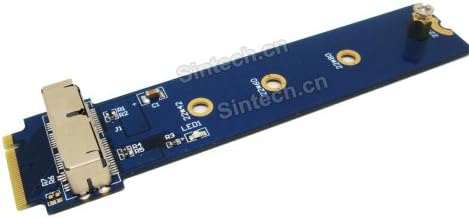
M-Key Card for 2013-2015 macbook SSD
Product ID: 21458017
Details
- BrandSintech
- ColorBlue Board
- Compatible DevicesDesktop
- Connector TypeM.2 NGFF PCI-e
- Finish TypePci-e
💻Fits M-Key slot desktops only
📏Compact 10mm height
🔧28Pin NGFF interface
Buy anything from 5,000+ international stores. One checkout price. No surprise fees. Join 2M+ shoppers on Desertcart.
Desertcart purchases this item on your behalf and handles shipping, customs, and support to Brazil.
💡 Upgrade your vintage Mac SSD game—desktop style, no compromises!
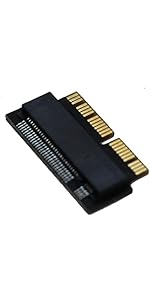
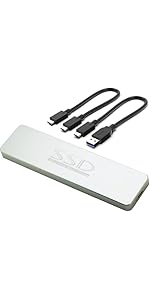
The Sintech M.2 NGFF 28Pin SSD Adapter enables reading and writing of 2013-2015 MacBook SATA SSDs via an M-Key slot on desktops. It supports specific Apple SSD models, features a compact 10mm height, and is designed exclusively for desktop use—not compatible with laptops or external USB enclosures. Perfect for tech-savvy users seeking to repurpose or test legacy Mac SSDs with reliable SATA speeds.






| ASIN | B0173ODBCE |
| Best Sellers Rank | #250 in Computer Memory Card Adapters |
| Customer Reviews | 4.0 4.0 out of 5 stars (132) |
| Date First Available | October 24, 2015 |
| Is Discontinued By Manufacturer | No |
| Item Weight | 0.352 ounces |
| Item model number | 2013AM2 |
| Manufacturer | Sintech Electronic |
| Package Dimensions | 5.63 x 2.36 x 0.39 inches |
B**.
Good to have aroun for testing SSD
Works fine for testing SSD at my bench.
C**E
A+ reclaimed my 256 extra Apple pie SATA drive. Now dual boots linux
Easy to install IF you're a techie which I am but I can see some people not getting it right the first time because you would think that you put the drive in the mount first and then attach it to the computer but doing it that way blocks the whole you need to screw the mount into the motherboard to hold it steady so you actually screw in this first and then hand tighten in one of the carrier nuts, then insert the drive, and then insert the last screw to hold it all in. once you realize that it's literally a 30 second install and reboot and then format the hard drive from Mac if you don't want to use it as HFS and you have an additional hard drive for your machine. It will not, I repeat not run at nvme m. 2 speeds this is a satta adapter that will run at roughly 500 megabits per second, not the 3500 like most nvme drives wood in a native m. 2 slot so just know that before buying it, the Apple drives that this is made for are not nvme drives they are m. To pcie SATA drives which are much slower than nvme
M**N
Works, but not bootable
I was wanting to use the SSD from my dead MBP as a boot drive on my PC, but this device does not make the SSD bootable. It does however work just fine from within the OS. It only fit in my motherboard because I have two M.2 slots. The first slot had components too close to the adapter. Luckily, it just barely squeezed into the second slot. This isn't really the device's fault, though, and I can't see how it could be made much narrower. Just be sure you have enough room around your M.2 slot. All in all, I'm mostly satisfied, but very disappointed I couldn't boot to the SSD.
C**N
Great product!
Awesome and super useful. A little big and can be difficult to install in tight places.
J**S
Doesn’t work
Easy to set up, and physical quality seems decent. Simply doesn’t work. Can’t get any sort of read on the ssd. Tried a whole bunch of different tools on the bad ssd, then tried a working ssd, and same issue.
A**A
Five Stars
Very difficult to find product, so it saved my life.Thanks.
A**R
Five Stars
Item received exactly as described. Fast delivery.
K**D
Works as advertised!
Installation was a breeze except for the support post for the Apple NVMe drive, that posed a bit of a "catch-22". I couldn't screw the adapter to the motherboard while the NVMe drive was attached, and I couldn't attach the NVMe drive with the board screwed onto the motherboard. In the end I just didn't screw the adapter to the MB since it felt secure. So far it works great! I haven't had any errors and the speed doesn't seem diminished by using the adapter. I am very satisfied, and happy that my 2TB drive isn't going to waste.
J**O
Workerd straight away attached to the spare M2 fitting on my motherboard which was used to back the content of the hard drive of a damaged Macbook.
G**A
Non funziona con i dischi Nvme AHCI della Apple, quindi occhio al modello che ci volete installare. Nella descrizione non era riportato (motivo per cui metto 3 stelle), ho dovuto restituirlo.
A**M
Geht nicht
B**L
Wanted an external enclosure but can't find any for old imac pcie SSD'S. This works fine using a docking station.
J**K
Does not work with Samsung MZ-JPV2560/0A3. I tried using an nmve to USB3 adapter and plugging it into my old Macbook Pro (A1502). It didn't appear on neither Disk Utility nor "diskutil list" in Terminal. I thought maybe it's because I'm using two adapters so I plugged it into a M.2 slot in a Ryzen 3900X Asus TUF x570 Gaming-plus WiFi running Debian 11. The device appeared but I could get no information off it. No smart status nor sector count. I tried Windows 10 on the same system and it showed up as a uninitialized disk without any information on it capacity or manufacturer.
Trustpilot
2 months ago
2 weeks ago