Buy anything from 5,000+ international stores. One checkout price. No surprise fees. Join 2M+ shoppers on Desertcart.
Desertcart purchases this item on your behalf and handles shipping, customs, and support to Brazil.
🎛️ Elevate your home studio game with the ultimate all-in-one mixing powerhouse!
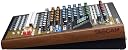
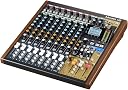
The Tascam Model 12 is a versatile 12-track digital mixer, multitrack recorder, USB audio interface, and DAW controller all in one compact unit. Featuring 12 inputs with onboard 1-knob compressors and 3-band EQs, dual headphone outputs, and full MIDI sync capabilities, it’s designed for seamless integration with electronic instruments and DAWs. Ideal for professional millennial creators seeking tactile control, flexible recording options, and synchronized multi-device workflows in a single, robust studio centerpiece.


| ASIN | B0842YDQ3Q |
| Audio Input | USB |
| Best Sellers Rank | #9,244 in Musical Instruments ( See Top 100 in Musical Instruments ) #10 in Digital Multitrack Recorders |
| Brand | Tascam |
| Brand Name | Tascam |
| Connectivity Technology | USB |
| Customer Reviews | 4.4 out of 5 stars 357 Reviews |
| Global Trade Identification Number | 00043774034499 |
| Item Dimensions D x W x H | 18"D x 16"W x 6"H |
| Item Type Name | Digital Multitrack Recorder |
| Item Weight | 13.3 Pounds |
| Manufacturer | Tascam |
| Manufacturer Part Number | MODEL 12 |
| Model Number | MODEL 12 |
| Number of Channels | 12 |
| Output Connector Type | Auxiliary |
| Power Source | Corded Electric |
| Product Dimensions | 18"D x 16"W x 6"H |
| UPC | 043774034499 |
| Unit Count | 1.0 Count |
| Warranty Description | 1 year warranty. |
J**L
An excellent multi-use mixer with MIDI sync capability and multi-channel USB audio
This is not only a solid mixer with physical EQ controls on every channel and nice sliders, but a digital multi-track recorder, a multi-channel USB audio interface, a remote DAW controller to keep the physical mixing feel if/when audio moves into the computer, and it has MIDI in/out. The MIDI ports can act as a USB to MIDI interface from the computer, but they can also be used to send clock and transport signals to MIDI gear. I work a lot with groove boxes and other sequencer-heavy units, from Volcas to Elektron boxes. Many of the smaller / less expensive groove boxes only have stereo output. Using the MIDI feature on the Model 12 (which is not present on the slightly older/larger Model 16 and 24), I can have my device(s) start playing immediately when I hit the record button. This makes it easy, using track-muting features on the groove boxes, to separately record synth, drums, and kick sequences into separate tracks on the Model 12. I don't have to try to manually hit 'play' at just the right time, or try to fix the timing later in a DAW. The MIDI sync alone was a deciding factor in choosing the Model 12 over the similarly spec'd Zoom Livetrak 12. I also chose this over the Zoom for the larger presence of dedicated EQ buttons on each channel, which comes at the cost of size - the Model 12 takes up some valuable real-estate in my home studio. Much bigger than the Behringer 1202 very-basic mixer I was replacing. The size is also worth it for the ability to use the Model 12 as a remote DAW controller for Logic. Although I must admit - I often find myself doing my mixing right within the Model 12's multi-track recorder itself. I still feel more comfortable recording to tape or to simple stereo programs on my computer, to later integrate into Logic X. The Model 12 suits me nicely here with that built-in multi-track recorder. It makes it easy to capture multi-track recordings of my electronic gear without having to set things up in Logic on my aging Mac mini. I can just record, and pull it together later. The Model 12 provides many options for that 'later'. It is easy to produce stereo mixes inside the Model 12 and just load those files on the computer, and the separate track recordings are there too. There are multiple options for how to record onto those tracks. The default being to record the raw post-gain / pre-compressor sound, allowing you to shape sound later. But there are options to record post-compressor and even post-eq on individual tracks if desired. You can do in-mixer bounces and move audio between tracks. Overall, really solid. I've been using it for about a month now. The build quality is really solid. I like that it's a mixer first - it's probably the best mixer I've had in 20 years. After years of low-cost Behringers (which were fine, they just suited a different need for me than what I need now), it feels good to have a really solid mixer again with good EQs, etc, all immediately usable. It has two mono AUX busses and a submix bus, with separate outputs. The fact that this mixer can also pull duties for multi-track recording, multi-channel USB audio, DAW control, and MIDI clock/transport master, just make it a very very solid add to a small home studio - especially as those latter two options are not available on the larger Model-16 and 24. For downsides - for me, I don't really need 8 channels of XLR inputs with phantom power. I would prefer maybe only two such inputs/channels, and have the rest be stereo-pair capable inputs. In the same space, that would turn this box into a 14 channel mixer and would be perfect for my collection of instruments. I am surprised that with the popularity of electronic music hardware over the past decade that there aren't more mixers geared to this market. The MIDI ports on the Model 12 are a nice feature for such users - I love that synchronized 'hit record, and all the machines start running' feature. But more stereo tracks and less XLR/mono tracks would be even better.
H**E
Versatile MTR and Mixer, does Bluetooth, USB etc., will work with DAWs.
Needs reading the manual, a few times. If you want to make multi-track recordings then this will do it. If you want an interface for a DAW, it does that too, and if you prefer Bluetooth, it does that also. An excellent machine, the 12 channel is the little brother of the 16, and 24 channel. Common sense applied to manual directions is all that is necessary to operate what appears to be quite complex at first. There are some complaints about USB hookup. Well they tell us not to use a long cable! In fact in the box there is a short one, 1 meter long, in fact. If that is not a hint, I do not know what is. Whichever, in my case hooking up directly to the Motherboard USB 2.0 sockets worked as the manual describes. However I will add, I tried to connect to a USB 3.0 upgrade card. That did not work. So yes! read the manual. The clean sound, silence if you prefer, of the powered device over headphone, or monitor, deserves the most marks. Well done Tascam. The Midi In and Out, a great asset! The Sub Out, alternative route to hookup monitors with 1/4 inch TRS cables, very handy, and useful for a host of other configurations. Love the dual inputs 1 - 10, either XLR, or 1/4 inch TRS. All in all, it leaves my old device, Fostex - X26 in the dust! Super value added with the PC hookup options, even if, at this time, I have no need of it. Only thing I would change is the Phantom Power option, currently global on this model, it might work better if managed by S/W to each channel. IOW turn it off for regular hookups. Before you power a new unit make sure the Phantom Power, top rhs of the board, is off! Else you may fry an expensive Mic which does not need the 48 Volts. Tips, gotten from the Tascam Forum, 1. on each channel the Sub Button arms the Headphones bus, IOW you can barely hear stuff without doing that, and do turn the volume, gain, down before tweaking their controls, middle rhs. 2 you do not need to press the Play button as well as the Record button when making a track. Yes in the old days of Tape it was necessary to, but on the Digital unit, it is not! To make a new track, create a song - RTM for more. Hookup your input - Mic or whatever. Use the Meter to set the level/s. Punch both record buttons, first the track one, then the main. When done punch the stop button. To hear what you did, move the Mode from Live to MTR, and press Play. To dub another track alongside, simply arm the next channel with an input, Mode live, set its levels. Then press it's record button, and when ready press the main record button. It is NOT necessary to press the record on the previous channel! Because if you do with no input it will erase track 1. Just leave it on play, make sure the volume slider is up so you can hear the Mode MTR replay as you dub the new track alongside. Effects work ONLY if you disarm all the Solo buttons, and the wee red light LHS of the screen is off. If it is on the Effects do not work. Need increasing the Aux 2 orange button on your chosen channel. Needs pressing the Select button in the control panel - mid rhs . This brings up the FX menu on the main screen. In it be sure to turn on the effect by rotating the Jog wheel to on - Manual Pages 33 / 34. Now press the Main buttons. I found it was necessary to do that both on my channels and on the FX slider. Too, that simply controls how much effect is sent to your Main bus, i.e. the one we chose to carry it. IOW the volume of the effect is still controlled by the Main slider, so maxing up the FX one does not increase the output. A bit sloppy but will save some searching. My headphone first click-less encounter with the Model 12 is now remedied with a full clicking replacement. Thanks Amazon!
B**N
Awesome mixer/interface - when properly set up.
This pup is a thing of beauty and a joy forever -- once properly set up. I had the same problems with DAW connectivity that several other folks had. Barely able to record small snippets with ASIO, unable to playback at all. Audacity played back using WDM but didn't recognize the Mic at all. The board simply froze several times. Frustrated, I did some research, and realized the problem wasn't the Tascam, it was the USB. It turns out that USB is quite finicky about connectivity. I moved the workstation closer to the computer to shorten the cable length and bought the heaviest 9 ft shielded USB 3.1 rated cable I could find. Also made sure it was the only USB source connected to that device in Win-doze setup. Bam! Everything started working flawlessly. Buffer setting of 128 yields extremely low latency with no dropouts. Preamps are lovely. My only complaint is that the 48V power is not selectable for individual channels. There is a learning curve: You've got to set up the WDM correctly: Win-doze doesn't speak multitrack, so you've got to set up the Tascam to output your stereo mix as the Windows Microphone and balance the volume in Windows. I LOVE being able to record to the DAW using ASIO and simultaneously stream to Source Connect or Zoom with WDM. I am not aware of any other interface that will do that. All in all, this is a terrific little board for the money. It sounds wonderful and will do a lot of seriously cool things if you take the time to learn how. Addendum: The default USB mode is Multitrack, where the PRE-FADER input from each channel is sent to the USB for mixdown in the computers' DAW. For Podcasting and other two channel applications, you must select 2-Channel mode, where the unit functions as a conventional mixer, sending the Master out signal to the USB for podcasting, Source Connect, or whatever.
D**M
Compact beast
Bought this device because I wanted a little DAW alternative for recording music and it really hits the spot for me. It's nice to have tactile EQ, a simple one knob compressor, and effects that actually sound good right out of the gate. The 100 Hz low cut button was a great idea too. The preamps sound great, but I'd still recommend using an external mic preamp if you're going to use dynamic mics that require more juice (sm58, sm7b, etc). Recording is great, but the write speeds of SD cards are obviously not on the level of SSDs so you will see the "spinning wheel" after hitting stop. Not the end of the world, but it would be cool to have the ability to write to an external SSD in the future. I do still have to use a DAW to do some final "mastering" stuff (fades, mix bus compression, minor EQ stuff, limiting), but that was anticipated before I purchased and not a big deal. Also, the ability to run an aux cable to your phone and record video and audio in one shot is amazing! It does work as a DAW controller (Logic), but there was a little wonkiness to it. The Tascam automatically mapped the outputs depending on the track you have selected. In other words, you have to be mindful of the track you have selected in the DAW before making any fader/knob moves on the Tascam. I'm not interested in using this as a DAW controller, but just wanted to mention that here.
J**D
nice sounding preamps, multi-track overdubs
I've only had it a few hours. The preamps are very nice. I'm testing with a Wunder Audio CM7 Fet mic. You can record multi-track onto sdxc cards that go up to 512GB. I used SanDisk 128GB Extreme PRO SDXC UHS-I Card - C10, U3, V30, 4K UHD, SD Card - SDSDXXY-128G-GN4IN from amazon... no problems. The recorder is silent. No fan that I can detect. I recorded on each track individually while playing back previous tracks in overdub mode. Recording on 11/12 is master mix. You can swap the master mix recording, for example with 9/10 and use that as a mix bounce down. I connected to my windows 10 laptop with a cable, UGREEN USB-C to USB A Cable USB C Charger Type C, from amazon. Then installed the Windows drivers from their website link, then updated the firmware to latest version from their site. Tascam is good about keeping manuals and firmware updates on their site. I have used their x48 recorders for years. model 12 supports auto punch-in and punch-out with rehearsal, which I haven't tried. it supports hearing both the live and playback mtr track during the pre-roll of the punch-in, which is nice. it supports in-place solo. Track swapping is very fast. You could move the current recorded data instead of moving the mic to another channel. You can use the windows software via the usb cable to upload or download tracks. The manual and videos show using the model 12 as a control surface. It has midi. Manual has instructions for several emulations, compatible with DAWs. I haven't tried it. There is a click track generator that can route to a back panel connection, as well as to the two headphone outputs. There are built-in effects that I didn't try. Not really interested. There is only a single switch for phantom power 48v.
A**Z
Perfect interface for Ableton Live
I got this to use as an interface for Ableton Live, and it works fantastically in that capacity. I wanted to be able to route my hardware drum machines and synths into the DAW separately, and this works right out of the box with very little setup. The only thing that concerns me a little are the slider switches for the Live/PC/MTR control on the channel strips. I have known these kinds of switches to wear and fail over time, and I find myself sliding them between Live/PC quite often. They work fine, and maybe the component quality will prove this to be a non-issue. Otherwise, this thing is better than expected. It is high quality and easy to setup. Love it!
D**D
Good Digital Mixer
Great compact mixer. It really does a lot for the price. If you upgrade it to the new firmware, it fixes a lot of the problems it initially had. I almost gave it 4 stars is the mic preamps are as little weak. They sound fine but there's just not enough gain for most mics. They added digital gain in the latest firmware which makes it a little better but really, you'll need to invest in a Cloudlifter or I recommend the Fethead. It's way cheaper and works just as good. That brings me to the other problem. Phantom power is switched for all channels at the same time. This is normal for a mixer in this price range. If you use phantom power make sure to use the 1/4” TRS jacks for devices that don’t need it.
N**R
Returning after 5 days of battling with it and no response from company
NOTE: Purchased for husband. This is his review on the item. I had such high hopes when I ordered the newly released Tascam Model 12. It’s not like I’m a newbie to the music business. I’ve been around for 22 years owning other boards like the Roland VS-1680 and VS-2000, the Avid Digi002, the PreSonus 16.0.2, and I’ve owned and used a host of audio interfaces and DAW’s. I purchased the Model 12 primarily for podcasting and to do songwriting and some new music tracking in my tiny 9’x10’ bedroom studio. I chose the Model 12 over the Zoom Livetrak L-8 and the Rode Podcaster Pro because I thought its feature set fit my needs the best. The Model 12 was released in early 2020, immediately before the coronavirus hit and impacted everyone. Maybe that has attributed to the fact that there’s hardly anyone posting real-world videos on the unit and its quirks. As a stand-alone mixer, recording to an SD card, this unit shines. It’s intuitive and easy to use… BUT it’s also advertised to be an audio interface and DAW controller. My experience with the unit for these uses absolutely sucked. For four days I tried to figure it out and just couldn’t make it work. I read the manual, I called engineer friends, I researched youtube and pressed every series of buttons and turned every knob trying to make it work. I called Tascam, but like most major companies under quarantine, I was unable to talk to a human, so I left a message with two names from their company list (by the way Tascam, it would be very helpful if your people also mentioned their department) and asked that they get my message to someone who could help me. For those of you who are wondering, I did my due diligence once the mixer was in my possession. I immediately upgraded the firmware to the new updated version. I have a current iMac with the latest OS and 16MB of ram. I downloaded and installed the Tascam ModelMixer software. I watched the YouTube video by TascamUSA instructing me on how to set up my Logic Pro X to recognize the unit. I plugged in a new USB-C to USB-A cable from the unit to my iMac. The Model 12 was able to control my faders, and the transport. My particular Model 12 may be defective because I had intermittent results with getting sound back to the board. ANY sound. I had multiple freezes where NO inputs to the buttons and knobs would register, and the onboard screen was just frozen… so I would have to do a complete restart of the unit. Through all of this I was unable to record any form of sound onto a track on my DAW. I have finally given up and am returning the unit. Ultimately, I feel like it was defective, but I couldn’t get the slightest bit of outside help to verify it. As a stand alone recorder I give it a grade of A. As a DAW controller and audio interface, it gets an “I” for incomplete… because I cannot fathom Tascam releasing anything not ready for primetime. Alas, in my case, another manufacturer gets my business.
R**Z
Todo
Excelente
N**S
A great quality product
A fantastic product, take your time to learn its features and it will reward you well, arrived on time and well packaged
S**N
Excelente
Excelente
C**A
Hoyo en uno!
Justo lo que necesitaba. Llegó en corto.
G**.
Calidad a través de los años
He tenido este artículo por años y la única falla que tuvo fue que dejó de encender, y descubrí que es común después de unos años que comience a fallar el botón de encendido pero fue extremadamente facil reemplazarlo, y la máquina sigue funcionando perfectamente, la calidad del sonido es buena y sus múltiples funcionalidades la hacen un excelente artículo a buen precio, Recomendable.
Trustpilot
1 month ago
1 month ago