Buy anything from 5,000+ international stores. One checkout price. No surprise fees. Join 2M+ shoppers on Desertcart.
Desertcart purchases this item on your behalf and handles shipping, customs, and support to Brazil.
๐ Elevate your DIY projects with vibrant visuals in a pocket-sized powerhouse!
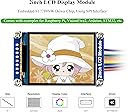
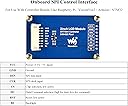
The Waveshare 2inch Mini LCD Screen is a high-contrast IPS display module featuring a sharp 240ร320 resolution and 262K RGB colors. Designed for Raspberry Pi, Arduino, and STM32 platforms, it uses a fast SPI interface that conserves GPIO pins and supports 3.3V/5V operation. Embedded with the ST7789VW driver, this compact 2-inch screen offers OLED-like color fidelity and wide viewing angles, backed by extensive development resources for rapid prototyping.
| Best Sellers Rank | #21,977 in Industrial & Scientific ( See Top 100 in Industrial & Scientific ) #2 in LCD Graphic Displays |
| Customer Reviews | 4.2 out of 5 stars 125 Reviews |
M**Y
Excellent
Great little screen. Works very easily on my RPi Zero 2 projects.
W**S
like OLED
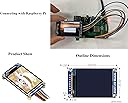
In the past, the main drawback of TFT technology has been the low contrast. Using In-Plane-Switching (IPS), the color is induced in the same plane as the backlight (The term would be wrong in this case, as the light plane is no longer behind the color plane), resulting in very high contrast. This display looks like an OLED display, without the drawbacks of color-fading over time, and price. Driver software is widely available - in the picture I'm using the sample from circuitpython for this chip. So far I have only driven the SPI at 24 Mhz, which the driver chip handles without hiccup. With the high contrast, this 2 inch display is as readable as bigger displays. The resolution of 240x320 gives fine detail, but obviously requires longer for screen refresh, so it's a trade off. For me, IPS displays will be the choice if available, and this display does not disappoint. The board allows for through-hole soldering of your own wires, and the supplied connector with breadboard friendly wires makes prototyping a snap, no soldering required. I will probably use this display for my final result, but will take the connector off, as it requires too much space below the display board. I tested several displays of different sizes and technologies. So far this is my favorite. What I haven't done yet is a power consumption comparison. When only few pixels are "active", OLED would usually consume less power, but I will see how it pans out.
A**.
Great value if you're willing to tinker a bit
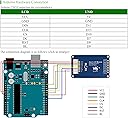
Very good after some tinkering. I wanted to use it with Arduino to create a device for measuring how fresh the coffee pots at the office were. The provide code on the website was only for Arduino Uno. I had to tinker a bit to get it to work on Arduino Nano. I ended up removing the Chinese fonts from the drivers to save on space so it would upload successfully. The display was very slow to update though. I wanted to update specific sections of the screen, which required me to clear that section before updating the text. I ended up just writing new text with a black background to cover the old text, which worked ok. I also ended up moving to an ESP board to improve the speed a bit. The code would not compile for the ESP board. I ended up using ChatGPT to help remove the code related to the CN fonts, which is where the compile error was. I also had to explicitly set SPI.setFrequency(10000000); and change the default CS and DC pin since they seem to interfere with the ESP's bootup. Overall, it's a good value for what I paid. I was able to use it for the project that I wanted.
L**R
Lamar
Works great
J**.
Waveshare might be selling you a paper weight, be careful.
I just wanted to share my experience with this item. I truly wanted to add this Waveshare 2inch LCD Display to my Raspberry Pi Zero 2 W. After, following the pin out diagram provided by Waveshare, I began the code part of the project and thatโs where my problems began. First, I am running Raspberry Pi OS Bookworm, Iโm using a 64GB micro SD card. And just incase anyone needs to know the Raspberry Pi Zero 2 W only has 512 MB of RAM. Therefore, just trying to load any website using either of the browsers provided on the Pi Zero has a major problem and freezes up. The suggestion to add the Waveshare display to the Pi Zero that Waveshare provides Iโm finding are either very outdated, or you must change your Operating System to a Lite version or obtain (Somehow) a non graphical web browser that will be a bit easier for the RPi OS Bookworm to load. Or, Iโm reading on multiple different forums that you can do a swap space command in the terminal that will help your current browser load a website. I think that as nice as the Waveshare products seem, and not bad costโs as far as Amazon pricing is concerned, if you cannot find suitable alternatives for getting the display to work with your device for your project then what good does it do. I just think thereโs cheaper alternatives for Paperweights. Just be certain that you know for certain that your system is compatible with the display you are purchasing, or you know all of the programming tasks that will be required for you to add the Waveshare display to your project. Itโs one thing to have to go through the back door to make devices compatible with each other, thatโs just part of the way things have to be done sometimes. Itโs a complete other to have to cut a hole in the roof of the building next door to get in where you need to be.
B**G
Its an LCD
Displays things. Works great.
K**.
Working fully
Updating my previous comment. Items is working well. Needed the right library and connections
C**N
Smoker Screen
This screen worked good for my Treager Pi Fire smoker controller. These screens are not water proof. I had one go out when it got wet.
M**S
Works very well, useful Python library and demo code
Works well. The driver library and demo code are good.
A**X
Works Great on Pico 2 w
Trustpilot
1 month ago
2 weeks ago