We remain fully operational. Our teams are working around the clock to ensure your deliveries continue safely.

DOWNLOAD THE APP


Customer Services
Copyright © 2025 Desertcart Holdings Limited
DOWNLOAD THE APP


✍️ Power your creativity with precision and freedom—because your ideas deserve the best.
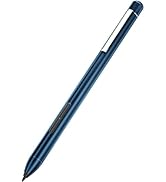
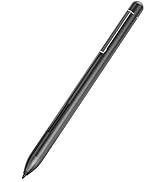
This Stylus Pen is engineered for HP touchscreen laptops including Envy x360, Pavilion x360, and Spectre x360 models. Featuring 1024 levels of pressure sensitivity and smart palm rejection technology, it offers a natural writing and drawing experience. With a long-lasting 300-day battery life powered by a single AAAA battery, two shortcut buttons for enhanced productivity, and plug-and-play compatibility requiring no software setup, this stylus is designed for professionals and students seeking seamless, precise digital interaction.





| ASIN | B07YTGX96J |
| Are Batteries Included | Yes |
| Are Batteries Required | Yes |
| Battery Average Life Standby | 300 days |
| Battery Description | Alkaline |
| Best Sellers Rank | #8,389 in Cell Phones & Accessories ( See Top 100 in Cell Phones & Accessories ) #196 in Styluses |
| Brand | hacey |
| Color | Black |
| Compatible Devices | (Available only for select HP models, please confirm your laptop is on the compatible list before purchasing.), ASUS Vivobook 13 Slate ASUS Vivobook S 14 Flip Zenbook 14 OLED, Zenbook Pro Duo 15 OLED Zenbook Pro 14 Duo OLED, Surface pen, ROG ZFlow 13 (2023) GZ301VU-DS94 ROG Zephyrus Duo 16 (2023) GX650PZ-XS96, ASUS Vivobook S 16 Flip OLED, ROG Flow X16 (2023) GV601VI-CS94, HP ENVY Laptop 17-aexxx … |
| Customer Reviews | 4.3 4.3 out of 5 stars (4,674) |
| EU Spare Part Availability Duration | 1 Years |
| Enclosure Material | Aluminum |
| Item Dimensions | 5.7 x 0.2 x 0.2 inches |
| Item Weight | 21 Grams |
| Manufacturer | hacey |
| Mfr Part Number | B07YTGX96J |
| Minimum Required Operating System Version | Windows 10 |
| Model Number | K2-C-HP PEN |
| Number of Batteries | 1 A batteries required. (included) |
| Pressure Sensitivity | 1024 Levels |
| UPC | 727040693367 |
| Unit Count | 1 Count |
K**R
Very functional and helpful when you dony have an Ipad
I reall like this pen and it works very well with my HP computer, 14-ek1511sa. I like how you don't need to continuously charge it everyday and for me it lasted about 3 months before the battery died and I used it alot as a college student to write notes in class so thats saying something. It writes immediatey you touch the screen and doesn't lag at all. Overall this is a great design and the only con might be that you'll have to constantly buy a battery every 3 months if you dont mind.
J**8
Essential
Works just as described
J**E
Works well for a basic pen
Overall, it does a pretty good job. I mainly use it for OneNote for school, and after playing around with it for a few minutes, I figured it out. There are two buttons on the side of the pen...the one closer to the nib becomes an eraser when you hold the button down. The one farther away becomes a lasso tool when held down; for this, hold it down and circle whatever you wanna manipulate. The pressure sensitivity is "okay" but not the greatest. To overcome this, on OneNote, just go to "DRAW" and you can manually change the thickness and thinness so it is an easy fix in that sense. Even with the battery, the pen is pretty light and nice to hold. Depending on your computer, you may or may not have a magentic strip in which a stylus is suppose to connect to when not in use...this will be located on the right side of the computer. Once the battery is in the stylus, it will actually connect to it and much better than I predicted; though it does hang down a little so I wouldn't slap my pen to it and just swing my laptop around unless you're okay with it maybe falling off.
L**B
Great item!
Works great! Item as described!!!!
L**V
very excited to use this!
Got this pen today after wanting to switch to writing notes on my laptop like my classmates. I was VERY scared that it wouldn't work for my laptop, a HP ENVY x360 14-es0033dx, but I was wrong! This is my first time using a stylus that isn't for a phone, so I'm not sure how sleek it's supposed to be, but it definitely looks and feels great when writing. It doesn't connect to Bluetooth, so it was much simpler to use than I anticipated. The writing itself is smooth, the pressure points seem to work to an extent (I don't see this mattering to me, but thought it was important to test out), and it felt exactly like writing on paper. I'm going to edit my review later on in the semester to let y'all know how it's holding up after rigorous use, but I'm very optimistic. Definitely worth it for the price, glad I got it.
P**T
Very Unresponsive Pen
This pen was incredibly underwhelming. With a price point of $30, I was expecting some functionality. I have an HP Pavilion x360 15-cr0xx, which it claims to have functionality for on the box. While the pen worked straight away after assembly, there were many glaring issues with it. Firstly, there is no pressure sensitivity. At all. Even though on the box it says it has 1024 levels of pressure, it does not. I tried both writing and drawing with this pen and there was no line weight to it at all. It was disappointing since I really wanted to primarily use this for drawing. Secondly, the lines are not smooth. The lines skip if you have the cap on the pen. There was no way to mitigate this either, as the pen has minimal functionality button wise/support wise online. The lines would skip frequently, and even with the cap off, the lines were very jagged when I tried to draw straight. Overall, this product is very disappointing. I am returning it and just going with the official HP pen instead.
K**S
Works well with older HP Envy 360
Works pretty well with a legacy hp 360.
A**N
Decent use for the price.
it looks pretty good. Easy to sync with notebook. Once in awhile you have to re sync. It works well for my kids but not for professional use.
C**I
not working i get it as gifts i travel and not working
K**R
Having used a digitizer before without battery, and then many years of touch less screens, it is amazing to get tactile feedback in this pen that works as if the screen was paper. Lovely to get my thoughts on to the digital notes... Look mom, no ink stains... 😉
V**O
Non funziona per niente. Molto deluso.
T**K
Works perfectly! Buttons on the side are easy to press whilst using it with the HP Envy 360.
A**Y
Works Excellently for my lenovo computer
Trustpilot
2 days ago
5 days ago