Buy anything from 5,000+ international stores. One checkout price. No surprise fees. Join 2M+ shoppers on Desertcart.
Desertcart purchases this item on your behalf and handles shipping, customs, and support to Brazil.
💡 Elevate Your Storage Game!
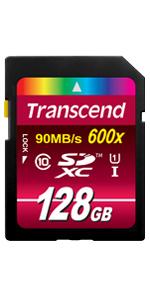
The Transcend 128GB SDXC Class 10 UHS-1 Flash Memory Card offers high-speed data transfer with read speeds up to 90MB/s and write speeds of 95MB/s. It features built-in error correction for data integrity and is compatible with a variety of devices, making it an essential tool for professionals who demand reliability and performance.


| ASIN | B00EH5US4W |
| Additional Features | Lightweight |
| Best Sellers Rank | #493 in SecureDigital Memory Cards |
| Brand | Transcend |
| Color | Blue |
| Compatible Devices | Camera |
| Customer Reviews | 4.5 out of 5 stars 3,943 Reviews |
| Flash Memory Type | SDXC |
| Flash Memory Video Speed Class | V10 |
| Global Trade Identification Number | 00021112442021, 00760557826507, 00780746969686, 00803983008861 |
| Hardware Connectivity | SDXC |
| Item Part Number | TS128GSDXC10U1 |
| Item Weight | 2 Grams |
| Manufacturer | Transcend |
| Media Speed | 95 |
| Mfr Part Number | TS128GSDXC10U1 |
| Model Name | 600X SDXC Class 10 UHS-I U1 |
| Model Number | TS128GSDXC10U1 |
| Secure Digital Association Speed Class | Class 10 |
| Special Feature | Lightweight |
| UPC | 617407490480 807320391852 881952498097 760557826507 069060200591 021112442021 012303268735 012300214049 780746969686 803983008861 617407587593 |
| Warranty Description | Limited lifetime warranty |
| Warranty Type | 3 year |
P**N
Excellent, Affordable SD card. My application: used as a boot drive for a MacBook Pro Retina 15
Works as expected. My application as a boot volume for a MacBook Pro Retina 15. In addition to camera applications, these cards are an affordable way to maintain a boot drive. Although my application is a little esoteric, I'll explain it in case it is useful. In the Mac OS X, it is very simple to create a two volume work environment versus the normal single volume work environment that Apple supplies. After backing up your computer, using Disktools, you make two partitions: an OsApps partition and a Users partition. I sized my OsApps partition at 100GB and my Users partition at "everything else." On a 500GB drive, that is 400 GB. Using your backup, copy all of your OS and Applications into the OsApps partition and the User data into the Users partition. In Disktools, you can use the Get Info command to find the UUID code of the Users partition and copy that value. Create a file in /etc/fstab that contains a single line: UUID=<36 character value you found in the uuid field> /Users hfs rw 1 2 At boot up, your Mac will mount the Users partition into the /Users directory. This makes it extremely simple to maintain a separation between your user data and your os and applications. This is extremely valuable with magnetic hard drives where "disk fragmentation" is a concern. With SSD's it's less important. However, keeping your OS Apps and User data separate makes it much simpler to update to a new OS and roll back if that update isn't successful. The only caveat is that on occasion, Apple changes the data model of iTunes/iPhoto/Mail which may complicate a roll-back. Also, if something goes wrong and you need to reload the OS or restore from a backup, keeping this separation makes it 100% certain that you have no issues in restoring the OS without affecting your User data. Finally, it makes it very easy to always have extra "bootable" disks stored on an inexpensive card such as this one in case your OS does have a problem. For many users this additional step isn't worth the complexity, but if you are familiar with unix, you might want to consider it on the Mac. In my application I use Carbon Copy Cloner to make a copy of everything but my /Users directory which is also regularly backed up.
T**Y
works great in macbook air
I bought this card to use in my new macbook air's sdxc slot. The basic macbook air comes with 128 gigs of storage, and it costs $200 to upgrade to 256 gigs. Instead, I bought this little 128 gig chip for $65, hoping to achieve the same end. It works beautifully. The card arrived very quickly, unlike the macbook. It was easily installed, immediately recognized, and very soon I was dragging and dropping media files onto it, and erasing them from the laptop's hard drive. Now I am able to keep all my large media files (so far) on the removable chip, freeing up the machine's hard drive for apps and speed. It takes less than 30 seconds to offload a large movie file of around 1.6 gigs, as fast or faster than my sony vaio would do just moving them from "downloads" to "videos." And forget about wirelessly archiving files, it takes forever. This puppy is like having another large flash drive internally installed. I am able to faultlessly stream HD video from the chip to my LG big screen tv via the macbook. As this is all I intend to require from this chip, I am very happy with it. I use it all the time. Highly recommended to anyone wishing to use the chip to offload and access media files from their laptop using the sdxc card slot. The card could also be used on a computer without an sdxc slot, via a cheap dongle card reader, and will no doubt be equally fast if using a usb 3.0 port. The card also serves to archive, store and easily share your large files. This seems better to me than cluttering up a hard drive with large, rarely-used files, as I usually do. A cheaper card might do as well, if you want to risk it. This card will fit in any sd card slot or reader, I was careful about that.
J**Y
Very pleasantly surprised. A top notch product.
I bought this product because I needed to increase the capacity of an ultrabook that I recently bought that came with only a 128gb SSD. This card effectively doubles the storage space I have available on my computer, easing the potential problem of running out of usable disk space. I was surprised that the card seems almost as fast as the SSD drive. Both are flash storage, but I had expected the SSD to be much faster than the card. However that does not appear to be so. I am using this card in a Haswell class machine, and I think that might make a difference, because the card did not work well in an older ultrabook, even though it fit into the SD slot of the older machine. Once I transferred the card to the newer machine, it just sings. I'm basing the five rating because I use it in the Haswell ultrabook. if I had to rate it for use in an older model, I would have to rate it a three. But, where it now resides, it gets a five with not reservations. Expensive, but worth it, in my opinion.
T**.
Quality memory card that's easy to open
What can I say? It's a SD card that reads and writes quickly. I have previously used Sandisk SD and CF cards exclusively, however with my new Canon G15, I needed a larger SD card with faster write speed than anything I had already. I wouldn't have considered the Transcend except the Sandisk wasn't in stock. I received the Transcend SD card and the packaging was considerably easy to open. A cardboard envelope containing the SD card, some literature, that opened with just the pull of a zip strip. The price was about half that of the competition and seems to work quite well.
D**O
Handled GH4 4K quality without a hicupp
I've used transcend for several years now. I had been using CF cards for cameras such as the 5D MK II and the 7D MK II. I shot an estimated amount of 72 events sucha as Weddings or Sweet 15's in the last couple years, not even including side jobs. I usually fill 2 32GB CF cards per event per camera. All Transcend brand. I recently changed my camera setup to Panasonic GH4's and they use this kind of cards. So far I've only shot 2 events with this cards and GH4's at 4K UHD quality. All I've got to say is that they take it in like nothing. Prior to shooting the events I ran a test to see if they would hold long shooting times in 4K. I needed at least 1hr for the camera to continuously record. It shoot 1hr 15min until I stopped it, the card was almost full anyways. After my tests I was confident to use them in real world scenario and they didn't let me down. For the price I wasn't really expecting them to hold up to 4K, but they handled the GH4 4K UHD quality at 100mbs which is around 12.5MB. The card claims it can handle up to 40MB writing and upward with compatible devices, so I guess I shouldn't be surprised they handled the GH4 4K as it is a compressed 4K. All I can say is that you can be confident that this card will handle your 1080p HD and can certainly be up to the task if you decided to record 4K with it, as long as the compression rate of the type of 4K you are filming is below the 40MB writing speed.
M**N
Nice chunk of memory
I'm using this in a brand new Nokia D3200 dSLR camera, and have the settings on LARGE images, which tend to be 6-7 MB per image. That being said, I'm able to take snapshots every second, with only minimal delay (the delay is due to charging capacitor to shoot the flash bulb, not the memory). I can also record 1080P video with no choppiness or other issues. Transcend is an excellent manufacturer of memory, and has a large number of industrial and commercial customers, such as hospital equipment manufacturers and electric utility customers. The reason industrial and large commercial customers use Transcend is due to the high quality and reliability found in their memory products, when critical components can't fail (think of life support systems or systems that reside at subzero temperatures (ice monitors in arctic areas, for instance)). I'd highly recommend Transcend memory for all use, not just 'critical use'.
P**A
Very good value SDHC card
I was a little apprehensive about buying this card because it was stated that this is a Class 10 as well as a UHS-1 card. In the fine print on the packaging, it actually says the maximum speed requires UHS-1 compatible device. This is important to note. The maximum official speed is stated to be 85MB/s. And Class 10 speed is 10MB/s. While I'm using this on a Panasonic GH2, I'm getting performance that is significantly faster than my previous Transcend Class 10 SD card. However, the GH2's camera limit for writing is around 45MB/s. So I wasn't getting the full advantage of the Transcend card on that camera. I also tried it on other cameras. From the performance I'm seeing, this card is quite fast. Performance difference compared to the SanDisk 95MB/s card which I also have is not huge. However, the price of the SanDisk is much higher. So overall, the Transcend SDHC card is a good deal for the money.
K**Z
For card errors on Nikon D7000 Upgrade your Firmware
I have been very happy with Transcend cards in the past, so I was really disappointed when I couldn't use this faster card in my Nikon D7000 because of card errors. Because research I had done prior to buying the card indicated it would work in my camera I tried formatting the card in the camera, which made it work great for about 20 shots. Then I started getting intermittent card errors again and would have to power off the camera, remove the card, reinsert it and turn the camera back on to be able to take more shots. I had already contacted Amazon to return the card when I found and installed a firmware update for my camera taking "A" to version 1.02 and "B" to version 1.03. Since updating the firmware I have taken over 800 pictures with this card with no card errors, and the card does seem much faster than my previous Transcend Class 10 card.
B**E
Bonnes cartes mémoires achetées par deux
Bonjour, Je cherchais des cartes mémoires un peu plus performantes que mes anciennes, et je suis satisfait. L'étoile en moins est juste pour attendre et voir si les commentaires négatifs au sujet des "pannes subites" de cet article seront justifiés dans le temps ou pas. Je me suis servi de mes deux cartes mémoires pour flasher les deux bios de mes cartes mères MSI à l'aide d'un support adéquat "clé USB" et ça a été une réussite. Ceci fait, j'ai ensuite utilisé l'une des deux cartes SD pour mon appareil photo Pentax K5 et effectivement, l'enregistrement des images est légèrement plus rapide qu'avant avec mon ancienne carte que vous pourrez découvrir en lisant mes évaluations (même marque mais étiquettes bleues 300x) et l'autre carte pour télécharger une version Windows 10 Pro installable achetée en "dématérialisée" pour installation sur le PC d'une amie. Mes deux cartes ont jusqu'à présent, rempli leur contrat, à voir la longévité dans le temps, et si c'est concluant, la cinquième étoile sera méritée. Le rapport qualité prix contenance est bon. Cordialement, Bons achats sur Amazon Édit du 03/09/17 donc cinq mois plus tard, à deux semaines près, du jour de mon achat, je reviens rajouter la cinquième étoile, car j'utilise et formate souvent mes deux cartes, que ce soit avec mon Pentax, ou mes PC, pour transférer images, vidéos, et fichiers, et même installer des O.S. sur de nouveaux PC construits, sans avoir rencontré aucun problème. Donc, je dis que c'est fiable et je recommande.
N**R
Good product, value for money
Good and awasom product,
S**7
Bonne marque
Si vous ne voulez pas vous ruiner dans une carte équivalente Sandisk, achetez cette Transcend. Classe 10 indispensable pour les appareils photo de dernière génération, qui demandent non seulement une capacité accrue mais des vitesses lecture/écriture de plus en plus rapides. Pour ma part, je préfère 2 cartes 8 Go qu'une carte de 16 Go (mais c'est un choix...). Quant aux performances, celles de cette petite carte rose sont assez remarquables. Après avoir testé plusieurs types de cartes sur des années, je n'ai jamais été déçue par la marque Transcend.
L**O
Ottimo!
ORDINE EFFETTUATO IL: 07 marzo 2015 Previsione di consegna: lunedì 16 marzo 2015 - mercoledì 25 marzo 2015 entro le 20:00 (Deutsche Post) CONSEGNATO IL: 12 marzo 2015 (Poste Italiana) nel sud Italia. Servizio eccellente, migliore dei corrieri privati. Contento su ogni fronte, prezzo qualità, servizio, fornitore. Consiglio l'acquisto, stelle 5 *****
M**N
大容量かつ高速なSDCXカード
持ち出して使用するノートPCのデータ用ストレージとして使用中。 セキュリティーの面も考え、BitLockerをonにして使用しているのですが、この状態でのレポートはあまりないようですのでベンチの結果をレポートさせて頂きます。 ゲタとしてはPLANEXのPL-CR55S3U3-Bを使用しました。 数週間使用し、残容量65%程の状態での結果です。 Windows7 Ultimate 64bit SP1 MB: ASUSTek MAXIMUS IV EXTREME REV3.0 CPU: Intel Core i7 2600 (3.40GHz) Crystal Disk Mark Ver. 3.0.1c 1,000MB exFAT (BitLocker "On") Read -Seq 83.62MB/s -512k 65.33MB/s -4k 2.493MB/s -4KQD32 2.817MB/s Write -Seq 56.04MB/s -512k 14.00MB/s -4k 0.570MB/s -4KQD32 0.662MB/s 最速クラスのSDHCカードに近い数字が出せています。 お勧めできる一品ではないかと思います。
Trustpilot
3 weeks ago
2 weeks ago