
Desertcart purchases this item on your behalf and handles shipping, customs, and support to Brazil.
🚀 Unlock your innovation potential with the ultimate Raspberry Pi 4 PRO Kit!
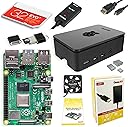
The CanaKit Raspberry Pi 4 4GB Starter PRO Kit combines a powerful 1.5GHz 64-bit quad-core CPU with 4GB LPDDR4 RAM and a pre-loaded 32GB Samsung EVO+ MicroSD card. It features a premium high-gloss case with an integrated low-noise fan for optimal cooling, a 3.5A USB-C power supply with noise filter, and a handy on/off PiSwitch. The included 6-foot micro HDMI cable supports up to 4K60p resolution, making it perfect for professional-grade projects and multimedia applications. This all-in-one kit is designed for makers, developers, and tech enthusiasts ready to elevate their Raspberry Pi experience.

| ASIN | B07V5JTMV9 |
| Best Sellers Rank | #5 in Single Board Computers (Computers & Accessories) |
| Brand | CanaKit |
| Built-In Media | Raspberry Pi 4 4GB Model B, 32GB Samsung EVO+ Micro SD Card, CanaKit Premium High-Gloss Raspberry Pi 4 Case with Integrated Fan Mount, CanaKit Low Noise Bearing System Fan, 3.5A USB-C Raspberry Pi 4 Power Supply, Set of Heat Sinks, Micro HDMI to HDMI Cable, USB MicroSD Card Reader, CanaKit Quick-Start Guide, CanaKit GPIO Reference Card |
| CPU Model | Tegra |
| CPU Speed | 1.5 GHz |
| Compatible Devices | Displays with HDMI input, USB-C power banks/chargers, USB-enabled devices with MicroSD card slots, Raspberry Pi models, Arduino, keyboards, mice, speakers, cameras, printers, and other general-purpose devices with compatible ports and protocols. |
| Connectivity Technology | GPIO |
| Customer Reviews | 4.8 out of 5 stars 6,569 Reviews |
| Item Dimensions L x W x H | 8.27"L x 6.61"W x 1.81"H |
| Item Weight | 1.1 pounds |
| Manufacturer | CanaKit |
| Memory Storage Capacity | 32 GB |
| Mfr Part Number | 99295 |
| Model Name | CanaKit Raspberry Pi 4 Starter Kit |
| Model Number | 99295 |
| Number of Items | 1 |
| Number of Packs | 1 |
| Operating System | Raspbian (or a similar lightweight Linux distribution) |
| Processor Brand | Broadcom |
| Processor Count | 4 |
| Processor Speed | 1.5 GHz |
| RAM Memory Installed | 4 GB |
| RAM Memory Technology | LPDDR4 |
| Ram Memory Installed Size | 4 GB |
| Total Usb Ports | 4 |
| UPC | 682710992952 |
| Unit Count | 1 Count |
| Wireless Compability | Bluetooth |
A**R
Good @$$ kit!
This 4gb has more than enough ram to run any number of dockers and containers the 4b is a great model, this kit is also everything you actually need so i reccomend it over the standalone. The case cools perfectly fine no issues, microsd is good quality and so are the cables and switch I have had 0 issues and considering that and the overall quality has been very good its a reasonable deal.
L**Z
GREAT starter kit for dev and non dev
Been using this bad boy for six months now to automatically shut down my server when it's not in use, and let me tell you, my electricity bill is thanking me. If you're looking for a smart way to save some cash and automate stuff, this is it. What's killer about this kit is that it literally comes with everything you need. No hunting around for extra bits and bobs. And the power adapter? Huge win. Trust me, you don't wanna be stuck trying to find the right one. The parts themselves feel solid, not like some cheap plastic junk. You can tell they put some thought into this. Whether you're a hardcore developer or just someone who likes to tinker (like me!), this kit is super easy to get up and running. The assembly was a breeze, no complicated steps or anything. Honestly, if you're even thinking about getting a Raspberry Pi, just grab this kit.
M**D
Update & Upgrade from Bridger General (1 Star) to General of the Army (5 Star)!
An update and upgrade from Bridger General (1 Star) to General of the Army (5 Star): Shortly after posting my review I was contacted by CanaKit. I went over the product review with them in addition to the only two options I can think of that I didn’t do were changing out the micro HDMI to standard HDMI cable that came with it, and a different make/model TV/monitor. At that point I thought maybe there wasn’t enough power coming out of the micro HDMI connector to the stand HDMI connector from the Pi 4 B to display an image blaming fault on the power supply as state in my review. After going through all the troubleshooting steps described in my Amazon review, and in addition to the ones just explained I felt that there wasn’t anything a technical support technician could do that I didn’t already do but willing to make another “go of it” because there has been a lot of exciting projects on YouTube about the Raspberry Pi 4 4GB. They sent me a new Raspberry Pi 4 4GB Starter Kit - 4GB RAM for me to try out. I received the kit Monday morning on the 4th. Again I followed the instructions to the letter supplied in the kit, putting the Pi together and setting it up correctly and taking my time. The basic same problem as before! No activity and nothing was displayed on the screen (monitor/TV)! I didn’t brother going through the standard troubleshooting steps again because I felt it had to be something entirely different. I decided to try using an old VIZO monitor/TV I had laying around the house instead of my newer Seiki 24-inch TV/monitor I had been using before contacting CanaKit. This time it worked flawlessly! As it turned I did a careful examination on both connectors on each monitor and notice that when I connected the HDMI cable to the newer Seiki 24-inch TV/monitor it wouldn’t fully seat like all the other HDMI cables would, including the one that came with my old Pi 3 B+. I would suggest to anyone having similar issues to first check your connectors on the TV/monitor you will be using before returning the device for a refund. Thanks CanaKit, very thoughtful and kind of you to go out of your way to do this, and much appreciated in helping me getting this amazing device up and running! I will be looking forward to the next upgrade soon! Very Disappointed, My Heart is Broken! Was looking forward to using this amazing device as a second desktop PC. Problem: the red power light illuminated on the board, but there is was no other activity and nothing was displayed on my screen (monitor/TV). I checked to ensure that the Micro-SD card was fully seated all the way in the Micro-SD card slot of the Raspberry Pi 4 B board itself, ensured that the Micro-SD card is properly formatted with compatible software, Raspbian Buster the official operating system (OS) for all models of the Raspberry Pi by downloading it and installing it on a Micro-SD card or use the NOOBS Micro-SD card that came with the kit which is the easy installer for the Raspbian OS. I tried booting first from the Micro-SD card with NOOBS installed on it and then using a 32GB Micro-SD card with the the new Raspbian Buster OS for the Raspberry Pi 4 B the new standard version of Raspbian OS, and for all earlier Raspberry Pi models too. Both with no success but both of these Micro-SD cards will work on my old Raspberry Pi 3 B+ that I purchased from Amazon April 1, 2018 and is working great so far! Finally, I checked to see if the device’s EEPROM had become corrupted (rare but possible) by following the recovery instructions on the Raspberry Pi 4 B’s website by removing the Micro-SD card, disconnecting the device from power, then reconnect it. If the green LED does not flash then the EEPROM will need to be reprogramed but the green LED was flashing. Returned the item for full refund. Maybe i'll purchased another one again but not sure when. Might wait until they come out with a Raspberry Pi 4+ next year. I suspect it might be the power supply that comes with the kit and is not enough to power the device. What else could it be?
Y**A
Awesome little linux box...
I finally got my hands on a Canakit after waiting nearly two years for one due to the pandemic supply-line shortages. I had to return the first one back to Amazon due to a defective WiFi. The replacement one is working great without any noticeable issues. I'm using it to run pi-hole and as a server for the UniFi controller. I access it via SSH & XRDT, using putty &/or windows 10 remote desktop. Once resbian is installed & configured, mouse, keyboard, and monitor are not necessary. My next purchase will just be the board, a cheap case & power supply to save money because in my humble opinion the kit is a waste of money because some of those extras <cables > are unnecessary after the initial installation. Thus, the kit is an overkill. Recently, I experienced a corrupted microSD card & wasted time formatting & preparing the new microSD for a new image. I didn't know you could just insert the blank microSD & use network installation option instead. This method is so much easier vs manually downloading & creating a new resbian image, which is time consuming. Installing the UniFi controller on Raspberry Pi 4 was lengthy & a tedious process... it was so frustrating 😤. There are so many old & useless information on the web when you use Google on how to install the UniFi controller on Raspberry Pi 4. Some of those websites sent me to that proverbial rabbit hole. To avoid going to that rabbit hole like me... First, you must use the 64 bit version of the Rasbian OS because Ubiquity no longer supports the 32 bit version. Second, you'll see many useless websites still pushing obsolete info if you use Google for help, the website with the current info is..."PiMylife", hopefully Amazon will not block me for listing it. I'm new to linux. I'm learning useful new linux commands to efficiently operate this amazing little machine 😍. It runs quietly even with the fan running, somewhat a little warm & relatively nimble. This credit card sized PC is highly recommended!
J**N
Great product overall, power supply leaves something to be desired
This is a great kit, it's got just about everything you could need for your Raspberry Pi to function to its best ability. And it's got everything you need (apart from keyboard, mouse, monitor obviously) to get going. My main gripe is that the power supply has the shape of plug that makes it hog multiple slots in a vertical alignment of plugs so that it won't fit neatly into a power supply. The previous model I had from CanaKit for the 3+ had a plug with the sideways alignment so it wouldn't hog multiple slots, so this is a step down in that regard. This is kind of a big deal in today's world, and it's mystifying why they would've taken a step backward with this design. However, the fact that Amazon's version of this kit has the toggle-able power switch and the manufacturer's site doesn't, for the same price, makes this a better value. I suppose you could use a different power supply than what comes with the kit, but it's unfortunate that they provide one that's got this weakness.
R**K
Amazing product
Amazing what this little thing can do. Capable of executing lot of DIY projects
E**C
Easy Assembly
CanaKit Raspberry Pi 4 4GB Starter Kit - 4GB RAM Mine shipped in the original packaging, so it was visible what it was. I don’t remember a notice from Amazon that it would ship this way. I don’t like it when they do that, but it was sealed with a sticker so at least I know it hadn’t been tampered with. Assembly was a breeze, no tools required, everything just snaps into place and the fan connects to the pins on the board with no soldering required. The hardest part was figuring out how to insert the SD card. I did not use the pre-loaded Raspberry Pi image, so I can’t speak to that. I am using this with HomeBridge for home automation, so I just flashed the SD card with their image. It works great with HomeBridge to control accessories with an Apple TV. The hardest part of the setup was figuring out its IP address, because I didn’t connect a monitor and keyboard/mouse. I just used my Router’s homepage to find it, then assign it a static IP Address. For this purpose, it works great. I wanted to control my Garage Door with Siri, but the Chamberlain MyQ garage controller requires a $100 hub to work. I got this instead, since it is the same price and works fine as a MyQ hub with the HomeBridge plugin for it running, and I can control other things too. I connected the fan so that it runs at 3.5v (low setting), and I can only hear the fan if I put my face right near the unit. I have it on my desk next to my computer, and do not hear it at all when sitting at the desk. I haven’t used it for anything else at this point, but for this purpose, it has been working great.
D**E
Great little sandbox to get started with Raspberry Pi or jumping off point for another project
This Cana kit came with just about everything I needed to get started with my first raspberry pi project. Used this and the ThinLinx OS deployment to setup a dedicated thinclient to use at home to connect to Citrix for work without going downstairs to my main computer setup. Works wonderfully as the raspberry pi hardware is the basis for the official Citrix Workspace Hub hardware (please do understand this is not the same software setup as the workspace hub and Citrix hdx support is based on Citrix example code so your mileage may vary for this purpose, but at half the cost and if you're a tinkerer well worth it - just don't try to get your IT department [or me for that matter] to help you out with this if you try it based on my experience) My only disappointment here was that there was only one micro-hdmi to HDMI cable included, but that isn't a fault of the product just one of the distinguishing factors between this and the next kit up) I am looking forward to buying more Raspberry Pi's for other projects and now that I've gotten my first project out of the way I likely won't go with a kit and will specialize for the project now that I have a feel for it. Though the kit does make for a great initial sandbox and who knows for random tinkering I may do another kit order or two.
Trustpilot
1 week ago
3 days ago