Buy anything from 5,000+ international stores. One checkout price. No surprise fees. Join 2M+ shoppers on Desertcart.
Desertcart purchases this item on your behalf and handles shipping, customs, and support to Brazil.
⚡ Elevate your game with the Apex Pro — where speed meets precision.
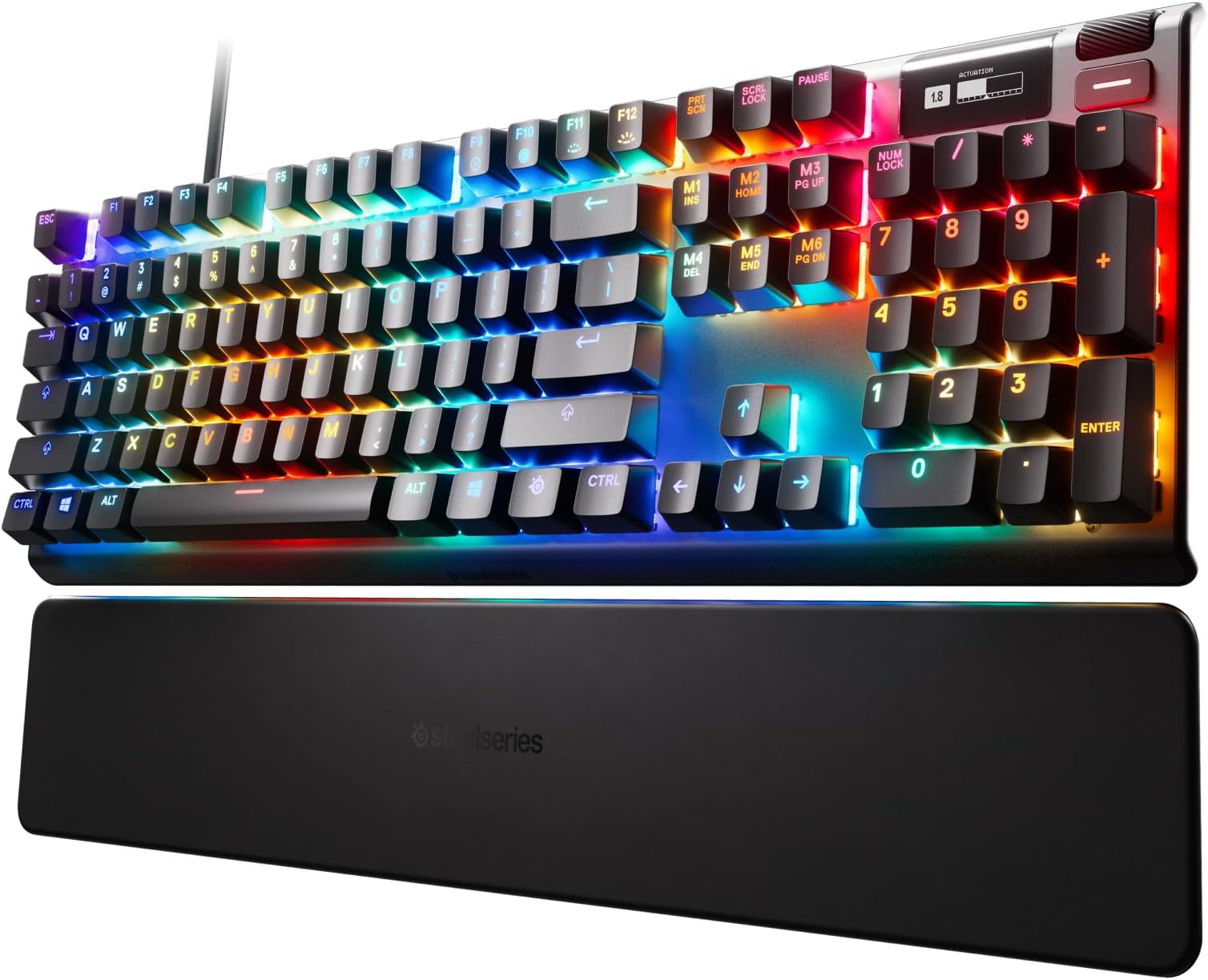
The SteelSeries Apex Pro HyperMagnetic Gaming Keyboard redefines mechanical keyboards with its OmniPoint 2.0 adjustable magnetic switches, offering 40 levels of per-key actuation for unparalleled customization. Featuring rapid trigger technology for 20x faster actuation and an 11x faster response time, it delivers elite performance. The keyboard includes a sleek OLED smart display, vibrant RGB lighting, and USB passthrough, all housed in a durable aluminum frame designed for serious gamers and professionals seeking precision and style.


| ASIN | B07SVJJCP3 |
| Additional Features | Backlit, Ergonomic, Integrated Stand, Spill Proof |
| Antenna Location | Gaming |
| Best Sellers Rank | #5,380 in Video Games ( See Top 100 in Video Games ) #441 in PC Gaming Keyboards |
| Brand | SteelSeries |
| Built-In Media | Apex Pro Gaming Keyboard|Download Arctis Pro Product Information Guide|Magnetic Wrist Rest|Product Information Guide |
| Button Quantity | 104 |
| Color | Pro Gen 2 |
| Compatible Devices | Gaming Console |
| Connectivity Technology | Wired |
| Customer Reviews | 4.7 4.7 out of 5 stars (4,086) |
| Enclosure Material | Aluminum |
| Hand Orientation | Ambidextrous |
| Is Electric | Yes |
| Item Dimensions L x W x H | 5.5"L x 20"W x 1.6"H |
| Item Type Name | Keyboard |
| Item Weight | 2.14 Pounds |
| Keyboard Backlighting Color Support | RGB |
| Keyboard Description | Gaming |
| Keyboard Layout | QWERTZ |
| Language | English |
| Manufacturer | SteelSeries |
| Mechanical Keyboard Switch Model | steelseries_omnipoint |
| Model Name | Apex |
| Model Number | 64622 |
| Number of Keys | 104 |
| Power Source | Wired (USB) |
| Series Number | 64622 |
| Style Name | Gen 2 Wired |
| Switch Type | Magnetic |
| UPC | 813682029432 |
| Unit Count | 1.0 Count |
| Warranty Description | 1 year |
P**R
Pricey and awesome mechanical keyboard
When a rogue Win 10 update took out my Gskill KM780 RGB unexpectedly, I had to pull the trigger fast on a new KB instead of having to endure using my spare membrane board. After a solid day of research, I took a chance on the Apex Pro. Coming from Cherry MX Browns, I had some reservations about OmniPoint. The Browns have a tactile point which I liked. I had tried MX Reds, and wasn't a fan of the linear feel. With these Omni switches being linear, I was unsure but somehow compelled to pass on the Apex 7 with MX Browns and go Pro. TBH, I was half expecting to return it. Needless to say.... I was surprised when I hooked this up! First off... dat switch. Wow. SUPER smooth. The inherent scratchiness of linear MX switches is GONE. It feels like the keycaps are just sort of floating over the brushed aluminum base. The adjustment ability is unique compared to most mechanical boards, bringing a true Hall Effect switch to people. (Look up Hall Effect... gets a little complex for explanation here, but very cool) Actuation can be adjusted from a light brush on the keys (probably overkill) to making the switch bottom out completely. This can also be done on a per key basis. Lot of range to play with! Another key strength... the RGB lighting. Its nothing short of fantastic. The raised caps let the bright and vibrant lighting spill over the board itself, creating a very cool and clean lighting effect. Even for those who don't much care about RGB lighting, it's very tastefully done here. Typing is unreal. I spent 15 mins just typing random weirdness on a word doc just for them feels when I first hooked it up. And for some reason, I find myself with a lot less errors compared to old board with the Browns. I'd commonly get keypress duplication (as if I held the key down) with that switch, and with these Omni switches, it doesn't happen anymore. Of course, these Omni switches are much quieter than the tactile Browns given their linear nature. Not much bad to say here. Some minor gripes would be somewhat "meh" software from Steelseries and the keycaps being ABS instead of something like double-shot PBT caps. The latter feel much sturdier and more premium, and I suppose one could buy some PBT caps if it was a huge issue. Not sure how that would affect the lighting though. The small B&W OLED screen in the upper right doesn't add much in reality, but its kind of a geeky fun thing that you can customize with whatever you want. It does have some functionality with brightness and other features, which is nice to have versus having to use the software. Also, only the primary keys have Omni switches. All the F keys, num pad, and extra function keys are on a generic linear switch that feels good enough. Would be nice to have all keys on omni switches, but it makes sense from a cost perspective and isn't a big deal to me. All in all, fantastic keyboard that towers over my old Gskill in every respect. I really wish MS terrible updates hadn't bricked old board, but I guess things happen for a reason. If you have the cash and want a great analog-based mechanical keyboard with adjustable hall effect switches.... this is the one for you. Very hard to fault this board. Steelseries done good here.
R**M
Nice keyboard, nice features, amazing RGB!
This keyboard is great. It's good for typing or gaming. The whole board feels well made and solid, I think it'll last a while. The dual USB (one connector for keyboard and one for USB passthrough) is a bit thick and stiff, but not unmanageable by any means. The programmable keys make a HUGE difference when going between typing and gaming, and with the Steelseries software it's extremely easy to set up. I went into it assuming the programmable keys were more of a marketing gimmick and never actually intended on adjusting them...but that changed when I realized that they're definitely a feature I'll use. The RGB is nice and bright and very customizable with the software. Lots of options for colors. Something to note, they board turns on/off keys white when active (caps lock, num lock, etc stay white when on). This confused me at first, I thought the LEDs in my NumLock key were broken because it stayed white. Definitely not an issue, but not a feature that's pointed out anywhere either. The OLED screen is the one part of the keyboard that I'll admit, while cool, is a bit gimmicky. It does have it's use for sure, like changing saved profiles without the software, but it's not necessary. It's a neat little addition that allows another level of customization, but I feel Steelseries could have left it off and made they keyboard $10 less or something. It gives the "pro" keyboard a premium feel, but seems wholly unnecessary once the "neatness" wears off. Overall it's a great keyboard, definitely a purchase I'm glad I made. If the board holds up, which I think it will, I'll definitely look into other Steelseries products in the future.
B**S
The Absolute Pinnacle of Customization and Performance
This is easily the most impressive keyboard I've ever had on my desk. While it skips the over-the-top, flashy lighting animations in favor of some solid, high-quality standard themes, it more than makes up for it with sheer engineering brilliance. The level of configuration is staggering—it's not just about RGB; it's about how the keys actually behave. For instance, I've set mine up so a full press acts as rapid-fire for gaming, but a slight lift and lower triggers a reload at the half-up position. The dual-actuation and rapid trigger features are game-changers, allowing for a level of control that feels almost like cheating. Your imagination is truly the only limit to what you can do with this hardware. It's a powerhouse for anyone who takes their setup seriously.
K**R
I am writing this after my kid dumped a large mug of chocolate milk on his SteelSeries Apex Pro. He didn't clean it up immediately so it had time to spread. When he tried it, about the only thing that worked was the tilde key. I've been in IT for years so I figured I'd try to clean it up before trashing it. It was already totaled so why not try, eh? Liability statement: If you try to clean a keyboard this way, it is at your own risk. Don't blame me if something doesn't work. So, I decided to take this apart and literally wash it. I was impressed with how sturdy the keyboard is. They have tons of screws that create a strong attachment from the circuit board to the casing. The USB/power cable is anchored really well inside the case. The casing was also very solidly screwed together. There are good protectors keeping the cable from shorting the main board and also good guides for the smaller wires. Some engineers put some time into the design of this and did a good job imho. Taking off all the keycaps was easy. But I found the switches couldn't be removed without dealing with desoldering, etc. which I've never tried before. So they stayed in. After I got the main circuit board removed, I literally washed it - twice. I could see areas where the chocolate milk was dried on the board and it was a bit goopy. I put the board in a large sink with a bit of dishwasher soap and some vinegar and shook it around. There were some areas the milk needed to be scrubbed off with a gentle brush. It was a testament to being a good product since none of the board solders came loose or seemed impacted by the scrubbing. Then I rinsed it well under cold water. I did this twice. I also did this with the top portion of the case which included the led display in the upper right corner. Then I let both dry outside in the heat but not in direct sun for 2 days. I hand scrubbed the bottom part of the case since it had tape that was working as vents or something I didn't want to ruin. I put it back together with very low hopes. Son of a .... if the thing didn't work perfectly. Even the LED screen worked and had retained the memory with my kid's macros and custom mini led screen drawing. So, this review doesn't address all the advertised features. There are many video reviews that can tell you more. My kid thinks it is great and leaves the thing on all night so he can see the leds flashing. His macros work well. The keycaps washed off well. The switches literally were soaked goopy liquid that dried and then in water and worked just fine after proper drying. My kid got pissed off once and banged the space bar hard enough to break it in two but even that didn't hurt the switch or the risers. (Some superglue fixed the space keycap). I'm not an expert in keyboards like this but I can say this thing is a beast, solidly built. For us, this was a great choice. I hope this helps you make a decision on your keyboard. Good luck.
A**A
The Apex Pro.. Right away with the cons.. •price is too high! Unfortunately the Magnetic Switches not across all the switches just the main side which is the Numbers above the letters and the letters and SpaceBar..etc the Functions key are Red Switches. Even the Arrow are red switches. •the Keycaps aren’t Doubleshot and they feel cheap. •I don’t call this a con, but I don’t like the placement of the LED. I prefer the hidden one PCB Mount. The Pro.. •The Magnificent Switches (Magnetic) is Amazing! •The Quality of the keyboard. •the Included Rubber WristRest is Amazing! ••• 3 points for the Key Switches and stabilizers! They feel lubed and the stabilizers I barely can hear Rattling!! I no longer enjoy using my Corsair K70 feels so cheap! I modded the K70 But even with the mods, doesn’t have a chance against the apex Pro. •Plug and play no need for software! I just feel bad i paid this price and it is near perfect! Glad I own a Doubleshot keycaps! feels much better and sounds a lot better!
M**O
Ótimo produto, resistente, teclas confortáveis e macias, porém, o ponto fraco é o software que é extremamente bugado e não salva muitas vezes a configuração do teclado, minha recomendação é alterar e fechar o software, não deixa-lo iniciar com o windows e apenas abri-lo quando necessário. O teclado apresenta erros com teclas piscando, é bom dar uma lida na internet de como lidar com eles, tive problemas com o software (teclas piscam azul) e com o hardware (teclas piscam vermelho) e solucionei facilmente, o suporte da Steelseries já é inexistente lá fora, aqui no Brasil então, desiste.
D**L
Este teclado mecánico la verdad vale la pena a su precio ya que tendrás una exelente experiencia solo que si es un precio elevado a si que opta por el mismo teclado pero que sea 60% tendrás la misma experiencia. Primero empecemos por sus SWITCHES OMNIPOINT tienen una increíble respuesta casi inmediata de 0.7 ms con una actuación de 0.4 mm de hecho si no te acomodas tiene su software tanto en el teclado como en la computadora solo que el de la computadora tendrás que descargarlo en su página que te permitirá poder cambiar su respuesta ya que este teclado si necesitas escribir y sientes que es muy rápido o muy sensible podrás cambiar su respuesta para hacerlo más cómodo y aparte promete ser más duradero ya que soportará 100 millones de pulsaciones otro punto es que tiene su pantalla oled que te permitirá cambiar su sensibilidad de las teclas podrás ver su respuesta con una barra de sensibilidad, cambiar perfiles predeterminados de su iluminacion que puedes personalizar efectos dobles que se ilumine de un solo color combinar colores incluso si tienes su software en la computadora podrás cambiar tecla por tecla efectos independientes y crear tu propia mezcla También tiene incluído el macros y perfiles preterminafos para sensibilidad y personalización de tus combinaciones de rgb y además cambiar el logo de Steelseries que está en la pantalla oled podrás personalizar con animaciones o imágenes pero debes de ajustar su tamaño si no no se podrá visualizar en la pantalla, solo que al momento de conectar a la computadora su conección son de dos cables en uno pero el teclado tiene una conección extra de USB para poder conectar algo más.
L**A
very nice product, i’ve had it for months now and it’s still perfect, the finish makes dirt stand out but looks nice when clean
Trustpilot
3 weeks ago
1 month ago