⌨️ Edit smarter, not harder — your Lightroom game changer!
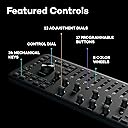
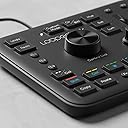
The Loupedeck+ is a sleek, battery-powered photo and video editing console designed specifically for Adobe Lightroom users. Weighing only 670 grams and measuring 39.5 x 15 x 39.5 cm, it offers customizable tactile controls that enhance editing speed and precision. Built for durability and portability, it empowers creative professionals to elevate their workflow anywhere.

| ASIN | B07C2X4R9M |
| Antenna Location | photo and video editing |
| Box Contents | USB 2.0 A cable |
| Brand | Loupedeck |
| Brand Name | Loupedeck |
| Button Quantity | 17 |
| Colour | Black |
| Compatible Devices | Laptop |
| Connectivity Technology | USB |
| Customer Reviews | 4.1 out of 5 stars 1,603 Reviews |
| Enclosure Material | Plastic |
| Generation | 2nd Generation |
| Hand Orientation | Ambidextrous |
| Importer Contact Information | Green Terrace Building, Lane Number 5, South Koregaon Park, Pune 411001, MH, India., Email ID:- [email protected]., Number:18002668571 |
| Item Dimensions L x W x H | 39.5L x 15W x 39.5H Centimeters |
| Item Type Name | Editing Console |
| Item Weight Unit of Measure | 670 Grams |
| Keyboard Backlighting Color Support | Single Color |
| Keyboard Description | Multimedia |
| Keyboard Layout | QWERTY |
| Manufacturer | LOUPEDECK, Loupedeck |
| Manufacturer Contact Information | Loupedeck |
| Manufacturer Part Number | LDD-1801 |
| Minimum Required Operating System Version | Windows 10 |
| Model Name | Loupedeck Plus |
| Model Number | LD+ |
| Number of Items | 1 |
| Number of Keys | 24 |
| Number of Sections | 3 |
| Packer Contact Information | Green Terrace Building, Lane Number 5, South Koregaon Park, Pune 411001, MH, India., Email ID:- [email protected]., Number:18002668571 |
| Power Source | Battery Powered |
| Product Features | Ergonomic |
| Recommended Uses For Product | photo and video editing |
| Series Number | 1 |
| Special Feature | Ergonomic |
| Style Name | Modern |
| Switch Type | Membrane |
| Theme | Photo and video editing |
| Unit Count | 1 Count |
| Warranty Description | 2 year manufacturer |
| Water Resistance Level | Not Water Resistant |
R**N
Awesome 👌
As a Photographer and Editor, this editing console is such a helpful and timesaving device for me. I spend hours together on lightroom editing everyday. This speeds up the work time by 50% . As it is mainly made for Adobe Lightroom, all the controls and shortcuts you need are there in the console and you can even edit every single knob/button to your liking. It even works on other editing softwares as well (Premier Pro, After Effects, Photoshop , etc..,) You just need to do some tweaking in the provided loupedeck software. I didn't face any issues with it and it is working just fine. Yes, it is a little expensive, but, if you're an editor/Photographer and u spend hours on lightroom, then definitely it's worth the price.
C**N
It's amazing for Lightroom editing, I believe it can be a bit more reasonably priced.
Awesome product meant for quick editing. I wish there were tutorials on YouTube or on the companys website on how to configure it.
D**R
Lovely equipment
Am using for Lightroom Classic. Very useful. Am also using it for FCPx. Can tailor make it to be used for often repeated commands. Help in quick Colour grading.
J**L
Awesome and makes editing so easy
Found this product on Google and was very confused bcoz of the price but after making courage to by it and finally I can say it is just awesome incredible The person behind the innovation understood the requirements properly
P**E
Nice product
Good for video editors for improving speed and accuracy
S**A
worst product ever purchased
dont buy this product. it invented with a good intension. but the moment i install the software, it crashes adobe lightroom. even if you uninstall the software, it still closes down lightroom. you will not be able to open lightroom, once you install it. i regret buying this product.
R**O
Good product. But auto WB key is Missing
We are going to use this product for our light room corrections work. Hope it ll be useful for us
C**A
Very low time in work best.
It's best for using for lightroom and premiere pro..very fast color collection and very esy.
N**A
現像がはかどります
質感は他のレビューの通りかなり安っぽいです、3COINSとかの激安キーボードレベルですね。水平の机に置いても少しガタツキ感じたりもします。ですが、使い勝手は非常に良いです、現像スピードが劇的に上がるのと、細かい設定がしやすいので現像の楽しさがアップしました。物理的なツマミがあるとこんなに快適になるのかと感動しました。結構な大きさなのでそれなりの広さのデスクが必要になります。総じて満足です
D**O
SOOOO COOL - I spent a lot of time in a Dark Room
Coming from a traditional darkroom where you turn knobs to make actual adjustments, this is SOOO cool and not just in a novelty way... The price is pretty hard to take, but if you are in a stuation going though a lot (hundreds/thousands) of photos at a time its well worth it just for sorting ease. I can also see how overtime it will allow you to become a better editor I am already finding myself using adjustments i would have never used without the ease of the loupedeck. Only complaint is the cord but I think speed would drop if it was cordless ask a gamer... lol Overall I am happy I splurged on myself I think the quality is good, and its not that much more than a MAC/Corsair/other high end mechanical keyboard. It would be cool if it was built like a Corsair keyboard... I don't need RGB but that cord... It would be better braided since this is going to get moved anytime its not in use, also at least backlight stuff PLEASE lol the color wheel dots are pretty small and who likes to have ambient light on to read a keyboard? Also since you insist needing a USB it would be cool if you had a passthrough USB on the deck somewhere, it's wide enough you could easily put one on the side (I am sure you are already developing the next version). Its mostly NICE plastic.... Titanium or something would be cool but then again I probably couldn't afford it if you did that lol. But don't think because it's plastic its 'cheap' its extremely well made. I think a lot of the bugs and stuff you read will be resolved with firmware updates, just make sure you are using the correct Lightroom version for your firmware it matters. ALSO INSTALL DIVERS BEFORE YOU PLUG IT IN!!!!
T**D
Videobearbeitung so günstig und effizient wie nie
Ich bin schon länger um das Loupedeck+ herumgeschlichen. Als Hobbyfotograf habe ich die Entwicklung von vornherein verfolgt, aber der Kauf hat sich für die eher sporadische Bildbearbeitung in meinem Fall (noch) nicht gelohnt. Interessant wurde es, als Loupedeck auch Adobe Premiere Pro CC integrierte. Damit sollte nun auch die Videobearbeitung möglich sein. Also landete das Gerät direkt in meinem Warenkorb. Als das Loupedeck+ bei mir eintraf, hatte ich große Erwartungen. Der erste Eindruck war gut. Das Gerät kommt in einer ansprechenden Verpackung, die das Essentielle und keinen unnötigen Schnickschnack enthält. Schnell wurde der Treiber installiert und ich konnte das Mischpult direkt mit Premiere verknüpfen. Die üblichen Tastenkürzel für die Arbeit mit Premiere hat Loupedeck direkt integriert, was die Arbeit zu Beginn enorm erleichtert. Die Belegung und Anordnung der einzelnen Tasten ist sehr intuitiv, so dass ich mich schnell an die neue Arbeitsweise gewöhnt habe. Das Blättern in den Aufnahmen, das Festlegen der In- und Outpoints sowie das Schneiden haben super funktioniert. Das wahre Highlight ist allerdings die Farbkorrektur, denn diese muss sich nicht im Lumetri-Farbfeld befinden. Ein einfaches Drehen an den Reglern für Belichtung, Sättigung und Kontrast etc. sorgt schon für die gewünschte Veränderung und dabei können sogar mehrere Regler gleichzeitig genutzt werden. Durch die präzisen Regler sind auch feine Farbkorrekturen möglich. Das Loupedeck+ hat meine Arbeit in Premiere Pro unheimlich effizient gemacht. Ich bin mit dem Preis-Leistungs-Verhältnis total zufrieden. Wenn man bedenkt, wie teuer andere Produkte zur Videobearbeitung sind, sind 230 € absolut gerechtfertigt. Zumal das Loupedeck+ eben auch noch die Bildbearbeitung mit anderen Programmen ermöglicht. Ich bin gespannt, was da in Zukunft noch von dem finnischen Hersteller kommt und möchte das Loupedeck+ schon jetzt nicht mehr missen.
A**K
Formidable et indispensable outil de retouche
Utilisation pour traitement photo et vidéo. En photo : j’en suis à plusieurs centaines de photos traitées depuis mon achat (j’ai justement un stock immense en attente) et je me rends compte que je me vois très mal reven8r en arrière et faire du traitement lightroom sans ce loupedeck plus. Il faut quelques heures pour le configurer (comprendre le logiciel, déterminer quelles sont ses fonctions utiles personnellement puis attribuer spécifiquement chaque fonction à chaque bouton). J’avais certes utilisé le profil de base mais j’ai fait de nombreuses modifications. Pour chaque photo, le gain en temps de déplacement de pointeur souris et de clics est incroyable. De plus on ne regarde quasiment plus les réglettes de réglages affichées sur écran, et on se concentre réellement sur l’image ! C’est d’une efficacité redoutable. Je le conseille vraiment pour toute personne qui doit traiter de nombreuses photos. A noter : en débutant j’ai eu peur de la résistance de certains boutons (surtout les boutons rectangulaires) mais en fait tout se passe bien, et les bruits ’suspects’ (un genre de grincement / grattement/ressort qui est trop léger) ne sont restés que sur 6 touches sans que cela pose le moindre problème, d’autant plus que j’utilise surtout les molettes silencieuses et les molettes crantées. En vidéo : pour l’instant j’ai eu moins le temps de m’y consacrer mais ai déjà tout configuré selon mes fonctions préférées, et en test simplifié ça a l’air tout aussi efficace qu’en photo. Évidemment, ici, il y a une différence, c’est qu’on utilise beaucoup plus la souris en parallèle qu’en traitement photo.Toujours est-il est que le Loupedeck plus est ici encore un gain de temps mais surtout une autre façon de gérer la post-production, de façon plus pratique, plus tactile.
T**H
Loupedeck +review
Excellent and fast service I highly recommend buying your products I hope in the coming days to buy from your company Forza Italy& Juventus😁
Trustpilot
1 month ago
2 weeks ago