We remain fully operational. Our teams are working around the clock to ensure your deliveries continue safely.

DOWNLOAD THE APP


Copyright © 2025 Desertcart Holdings Limited
DOWNLOAD THE APP
Buy anything from 5,000+ international stores. One checkout price. No surprise fees. Join 2M+ shoppers on Desertcart.
Desertcart purchases this item on your behalf and handles shipping, customs, and support to Brazil.
⚡ Upgrade your desktop’s brainpower — faster, cooler, smarter!
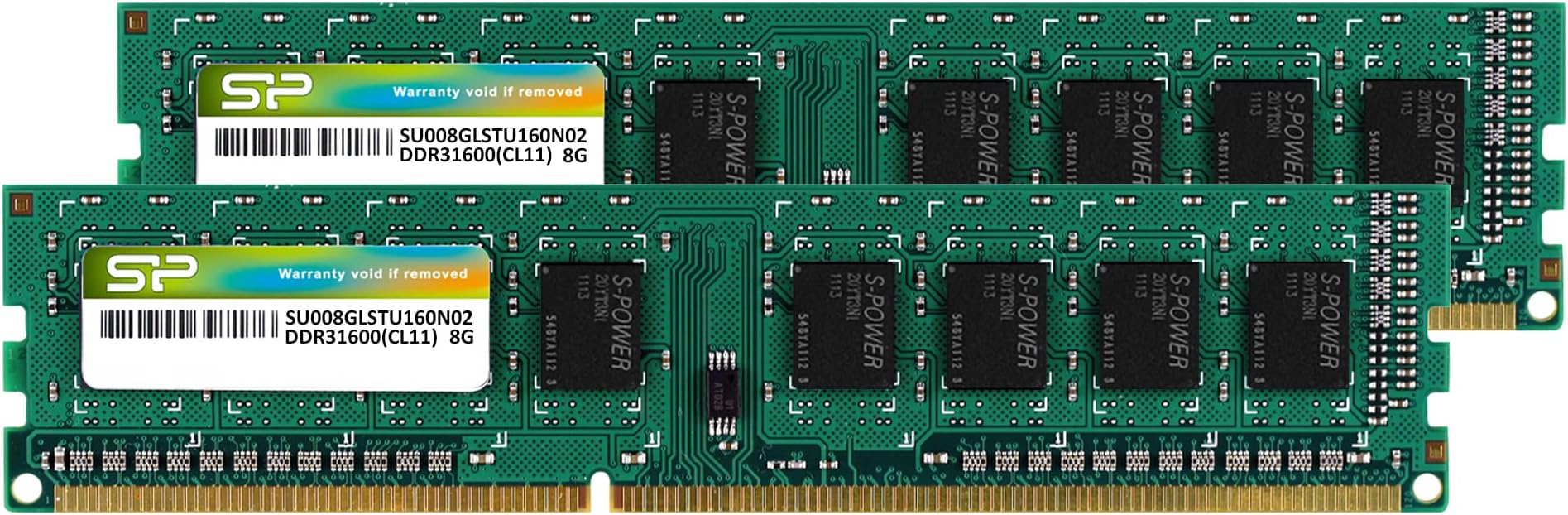
The Silicon Power DDR3 16GB (2x8GB) 1600MHz desktop memory kit delivers high-speed, low-voltage performance with 20% reduced power consumption. Engineered for stability and durability, it’s 100% factory-tested and compatible with most DDR3/DDR3L motherboards. Perfect for professionals seeking a reliable multitasking boost, it comes backed by a lifetime warranty ensuring long-term confidence.
| ASIN | B07RDKRRKM |
| Additional Features | Low power consumption and wide compatibility |
| Best Sellers Rank | #121 in Computer Memory |
| Brand | SP Silicon Power |
| Column Address Strobe Latency | CL11 |
| Compatible Devices | Desktop |
| Computer Memory Size | 16 GB |
| Customer Reviews | 4.7 out of 5 stars 3,868 Reviews |
| Data Transfer Rate | 1600 MHz |
| Form Factor | DIMM |
| Manufacturer | SP Silicon Power |
| Memory Form Factor | UDIMM |
| Memory Generation | DDR3L |
| Memory Speed | 1600 MHz |
| Mfr Part Number | SP016GLLTU160N22IP |
| Model Name | SP016GLLTU160N22IP |
| Model Number | SP016GLLTU160N22IP |
| Number of Pins | 240 |
| RAM Memory Technology | DDR3 |
| RAM Size | 16 GB |
| Special Feature | Low power consumption and wide compatibility |
| UPC | 886576045474 |
| Voltage | 1.35 Volts |
J**R
Fast and effective (yet relatively cheap) upgrade for older PCs
Purchased to upgrade an older PC (circa 2012) from 4GB to 32GB (purchase quantity: 2). Popped old DIMMs out, shoved these in. Watched the BIOS report the good news on first boot subsequent to upgrade. Haven't done a damn thing since, besides enjoying the vastly improved multitasking experience. It can't be emphasized enough, even though you have likely heard it before: interacting with Windows becomes exponentially more pleasant when running on a machine boasting a sufficiently healthy surplus of RAM, such that the OS is forced to rely upon swapping to disk approximately, uhm, never. No problems after 3 months and counting; bang for buck has been outstanding. I will note that the price seems to have increased somewhat during that time; if you're on the fence because of the cost factor, it might be worth checking the price history, and setting an alert for whenever the price comes back down (assuming it is still running above the historical average as you read this.) That said, so long as other brands were also charging comparably inflated amounts, I would be a satisfied customer even if I had needed to pay considerably more. (To anyone who remembers WAY BACK to the days when RAM was sold by unit(s) expressed in MB: from a long-term perspective, it is not at all difficult to appreciate the fact that this product and its peers objectively offer truly staggering quantities of exceptionally fast, reliable memory, constructed using unfathomably miniscule circuit fabrication technologies, all crammed into a sub-$100 package. Worth!)
S**B
Cheap 16GB DDR3 RAM with quality components. Runs fine
Silicon Power DDR3 16GB (2 x 8GB) 1600MHz (PC3 12800) 240-pin UDIMM Desktop Memory RAM came as a two pack (2x 8GB sticks) in a plastic pack. Made in Taiwan. CPU-Z identified the SDRAM Manufacturer as Samsung SEC K4B4G0446D-BYK0. Ram stick identifies as Dual Ranks. 16 chips total (8 per side) double sided. Module Density: 4096 Mbit (512 MB per) x 16 = 8192 MB per stick Runs fine in Dual Channel mode at the stated CL11 Timing (tCAS-tRCD-tRP-tRAS): 11-11-11-28 @ 800 MHz Memory Speed: 800.0 MHz (DDR3-1600 / PC3-12800) Nominal Voltage: 1.35 Volts Supports Module Timing: 333.3 MHz CL5, 400.0 MHz CL6, 533.3 MHz CL7, 666.7 MHz CL9 and 800.0 MHz CL11. Works fine in an Intel Core i5-3570K desktop. Recognizes the full 16 GBytes (16384 MB) and runs at low voltage 1.35V. Also works at regular 1.5V. Passes Memtest86+ with no errors, 6 passes, 5.66 hours. Lifetime warranty, hopefully never have to use. Good memory to max out older DDR3 system at a great price, runs well.
W**I
Responds very well!
Bumped my ancient desktop build, about 2011-12, from 8gb (4x2gb) to higher speed 16gb (2x8gb). VERY noticeable difference. Probably will add same for the other 2 slots eventually. There was conflicting information on the capacity. That's why I held back to just the 2 sticks. I believe it was the final Bios update that allowed the higher capacity 8gb sticks. Upon installation, it recognized on first launch. Very pleased. MSI mobo 880g-e45 w/Phenom X4-3.2ghz.. w/ added USB 3.0 cards, multiple SSD hard drives, twin DVD burners, 750watt power supply, win10pro, but getting ready to move to Linux. No gaming, just dual monitors for large spreadsheets. Next upgrade better graphics card.
U**R
Works as Expected
Installed this kit of memory into my Lenovo K330 to replace the two sticks of 4 GB each. No issues to report so far, and works as expected. The memory properly shows as 1600 MHz, and I'm seeing 1.35V listed in CPU-Z. No abnormal crashes to report. Memory is fairly easy to install, but it's recommended to do it with the computer(motherboard) laying horizontally. Noticed an improvement going from 8 GB to 16 GB. I was having issues with certain programs and games using up my memory capacity, and making heavy use of the pagefile (causing significant wear on my SSD). In recent years, this has become more of a problem. I also no longer get reloads of certain web tabs based on my activities. I recommend upgrading to 16 GB if you're still holding onto an older system like this, the cost is fairly low currently. I wouldn't maybe suggest it if it were higher though.
A**R
Worked with no noticeable problem in Windows and Linux
It works but could have been cheaper last year. Wish I had a time machine which would let me know of future needs and prices.
M**N
Works great at an ok price
It works great, but I wish Ram memory costed less
L**R
They work fine, but not so easy to install
Taking the old cards out is easy. There are little levers at the end of each memory card slot. Push down on the levers and the card pops up. Putting new cards in is no so easy. I had lots of wires in the way, but the real issue is the slot is tight and you have to push very hard to get them in. So, two tricks. First...leave the levers in the down position so you can tell when the new card is in all the way. The lever will pop up against the card when the card is properly in. Second, wear gloves so you can press hard. These cards are narrow and hurt my thumb and fingers to press that hard. Maybe if I had thick callouses it wouldn't matter. Or maybe my motherboard memory slots were just tighter than normal. The first time I tried installing these, my computer wouldn't boot. The cards seemed to be in there and weren't loose, but not in far enough. It just beeped at me...3 beeps and repeat...and repeat. So, open the case and pull them out and try again. Let the levers pop up and then it booted with the new memory.
D**C
Works perfectly in my Portwell/Sophos SG210 system. Good RAM, happy, A++
Title: Works perfectly in my Portwell/Sophos SG210 system I have a Portwell CAR-3040 (originally a Sophos SG210 firewall) that I’m now using for OpenWRT and OPNsense. It has a Haswell Xeon E3-1220 v3 CPU and a Q81 chipset — not your typical home PC. This RAM runs at the expected 1600 MHz @1.5v with CAS tcl of 11, as confirmed in the BIOS. No issues so far. I’m starting to really like Silicon Power — as long as their quality holds up, I’ll definitely use them again.
Trustpilot
2 weeks ago
2 weeks ago