


🚀 Elevate your home network—fast, secure, and effortlessly connected!
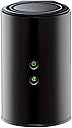
The D-Link DIR-850L is a dual-band AC1200 wireless router delivering up to 1200 Mbps speed with backward compatibility for older devices. Featuring four Gigabit Ethernet ports and a USB Share Port, it supports multiple wired and wireless connections. Easy setup via a mobile app and advanced WPA2 security make it ideal for HD streaming, gaming, and secure home networking.


| Wireless Type | 2.4 GHz Radio Frequency, 802.11a/b/g/n |
| Brand | D-Link |
| Series | DIR-850L |
| Item model number | DIR-850L |
| Operating System | Windows® 8, Windows® 7, Windows Vista®, Windows® XP SP2, or Mac OS® X (v10.4) |
| Item Weight | 9.9 ounces |
| Product Dimensions | 4.45 x 3.43 x 5.72 inches |
| Item Dimensions LxWxH | 4.45 x 3.43 x 5.72 inches |
| Color | Black |
| Voltage | 240 Volts |
| Manufacturer | D-Link Systems, Inc. |
| Language | English, French |
| ASIN | B00BYRPPAS |
| Is Discontinued By Manufacturer | No |
| Date First Available | March 21, 2013 |
M**E
C.R. or CNET recommended. I used it to replace a single band DLink. It's working great!
Awesome router. I have a D-Link model 650, single band router that I was using until yesterday, because the ASUS dual band router that I had failed after less than 6 months of use. The Asus (my 2nd and my last) would intermittently just disconnect from my devices from a wireless perspective. However, I love dual band functionality, because I could put guest on the 2.4ghz band (with a separate password), while putting streaming devices on the 5ghz frequency. So internet access downtime was minimal, I did this. I plugged in this D-Link AC 1200 router into the power, 'without' connecting it to the internet modem. Once it started broadcasting, I had my tablet ignore the normal network it connects to and connect to the SSID wi-fi signals of this router, using the default password provided by a sticker on the router.. Went into the settings of the router, set a new administrative i.d. password, changed the SSID's to a personal preference (giving each wifi signal its own SSID name), changed the default passwords on each of the bands, assigned specific channels (instead of the auto mode), enabled two firewall settings on it (that are by default disabled), then told the router to save the settings. Again, the router was not connected to the internet when I did this. So my tablet was only talking to the new router only via the IP address. In the meanwhile, other devices were still working with the single bank D-Link, so there was no interference. Shut off the cable modem, connected the D-Link Wireless AC 1200 to it, powered back on the cable modem. Within 5 minutes all devices were working flawlessly. I did a signal strength test with the wifi analysis app from the android store and noticed improvement in strength. I'm sticking with the D-Link brand and very pleased with this new dual band router. It was also recommended by either Consumer Reports or CNET. I can't remember which one.
M**O
So many issues
No problems installing this. Great range and all my electronics run smoothly. PS3 Laptops, smart TV and phones. The problem arises when I have to restart both the router and the modem every week sometimes 2 or 3 times a week. I have been on the phone with customer service countless times and they replaced my unit. Customer service is awesome, no question about it. But the router keeps getting disconnected. We have charter 60 gigabit service and if I bypass the router plugging the modem straight into the pc everything is fine. The customer service tech had me clone my pc mac address and it worked fine for 5 days, then it started doing the same thing. I will call them again today, buy at this point I feel I wasted 80 bucks...if anyone has any solutions please let me know.
S**Y
Ahead of the curve
I upgraded from an expensive Netgear running DD-WRT because my WAN to LAN throughput was being throttled. I recently upgraded to gigabit and wasn't getting close to that on my old Netgear. No offense to Netgear, it was partially a problem with DD-WRT that's been thoroughly documented. That firmware just does so much computation that the speed is throttled if the hardware can't keep up. This is understandable, and this D-Link worked to solve that problem. This D-Link is capable of some fairly amazing speeds. It was rated at about 900 Mbit speeds for WAN to LAN. As soon as I got it home I snapped in my ethernet ports and clicked that speedtest button. When I saw 830+ Mbit coming back across my screen I knew things were better. I configured the router to use a static external IP, it didn't have a problem with that. I set it up to do port forwarding as I run a number of services on my network that need to be externally accessible. It gave me a number that I could have. I was surprised it would limit it to ~25 or whatever it said. I don't run that many services, or I don't manually require that many ports to be open, but I was close. This could be a limiting factor for another user, so beware. I got the wireless setup, but knew I didn't have any AC devices yet. My N still looks good on there; I got enough speed on my phone and iPad to know it was an improvement, despite no external antenna on the device. Honestly, my coverage was spotty directly above the device, one floor up, so I laid the router on its side and tried again. I saw SIGNIFICANT improvements. I don't know if this is because of how it broadcasts, I didn't make the thing, I'm just saying I had success with it, maybe you can too! I had a friend with a newer MacBook Pro come over to see what the AC was actually capable of. Long story short he got mad at me because he got 200 Mbit faster on my wireless than he gets at his house using an ethernet cable. The interface reminded me of every D-Link I've had in the past 5-7 years, except faster. You could tell that the chip running this router is a bit nicer than what I'm used to. I tried to find a reason to only give this router 4 stars, and couldn't think of one. It works well for people using up to 25 services. It works well for the casual user. It works well with old hardware and wireless technologies. It's not ugly. It's not too loud. Five stars.
T**Y
Great AC / N Access Point - Dual Band.
If you are buying an AC (or other brand) "n" capable router / access point to increase your transmission speed or cut down on delays, think again. I was getting collision interference from wireless / streaming surveillance cameras competing for air time with streaming video to my internet enabled tv. Here's the considerations: Your device (e.g., tv) you want to hook up must be enabled for the ac/n mode to use the 5 ghz band. There are two wireless access points in one: 2.4 ghz and 5.0 ghz. The 2.4 will workd for n, g or b. The 5 ghz will work for ac, n and a. Either access point will run at the mode and rate of the SLOWEST device connected to that access point. You also need to carefully choose your channels so you don't compete for bandwidth with your neighbors. It has a very good built in firewall and even has provision for your guests to be able to get to the internet without your security password (can't see your network devices). The vertical shape is a little unstable when you plug all those wires in at the back -- would have been nice to have a place to screw it so the shelf for stability. That being said, this is a great device. Vendor sold it at a very good price. Shipped promptly and securely. As is usual for Dlink, the quality is excellent and the internal setup is easy.
K**H
Product WiFi died after three years.
Used for in home Lan/Wlan. Unit was protected from power spikes and surges through an APC 1500 UPS. Even so, the wifi radio died after three years. Not impressed with quality of hardware. Unit was easy to setup and worked for a while, before WiFi radio died completely, and I could not connect over WLAN/WiFi. Poor quality. Designed to last long enough to get through warranty period. I bought a different brand to replace it from TP-Link.
G**T
Good router, not good support, buy extended warranty.
So far, this has been a great router tho installing was quiet Difficult due to the very short length of the power cord. Shortest I've ever seen & was a total pain. I see they sell a longer cord separately which I think is tacky of DLink. I installed the same model router the week before mine for a friend & we had such difficulty also w the short power cord. But, the most frustrating part was working with Dlink support. The internet light in front wud never turn on so after 3 calls to DLink, they finally came to the conclusion that the Ethernet cord was no good. We had to have the router working that afternoon so had to go to a retailer & spend $26 on an Ethernet cord. DLink never said they wud send us one or reimburse for the one we bought nor did they ever say sorry that they shipped us a router w a bad Ethernet cord. They weren't rude, they simply didn't seem to be concerned. Bought a 2 year replacement warranty from Squaretrade as I was left feeling a bit shaky about the life of this router.
M**I
Nice entry level AC router
I live in a very crounded neighborhood and the 2.4Ghz band is getting pretty full. I have started moving my systems to 5G and that is helping, but the range is not so hot. I recently purchased a couple of PC's that came with AC cards, so I started looking at AC routers. Despite my poor experiences with D-Link in the past, based on the reviews and the price, I decided to give this on a try. I am glad I did. While the range is not much better than the 5G router is replaced, the speeds are incredible. TBO, I am getting close to hardwire LAN transfer speed. At this point, I think my bottleneck might by the machine itself. However, I cannot aford multiple TB in SSD. The router was easy to set up. I am not using it as my main router into the house. It is set up as an AP on the main level for maximum throughput. I have had a lot of problems with routers getting hot and needing to be reset (other than WRT routers), but so far, this has been running for a month with no problems. While I have not done extensive testing, like some reviewers have, I have been very pleased with the performance and reliability of the router.
J**.
Do NOT buy unless you enjoy rebooting the router twice a week!!!
I had bought this back in March of 2017 after researching for a decent gigabit router to replace an old router. Once I took this out of the box to plug it in and get it setup, it refused to connect to the internet. So I started the process over, I figured that I did something wrong. And once again it refused to connect to the internet. So I called customer service to walk me through the process of setup and even they couldn't get it to connect. After spending over an hour on the phone and talking with the tech and his senior tech, they finally got it to work. (This is where I would come to learn that the D-Link rep had just placed a bandaged over a problem instead of fixing it.) So one month passes with it working with no issues. Then partially into the second month, the router starts acting up again and refuses to connect to the internet, so I reboot the router and it works again (for a week) so I have to reboot it again. After three months and having to reboot it at least twice a week, I am fed up with this routers poor performance. It is usually warm to the touch on top but I didn't think I was working it to hard because I only have 2-3 devices connected to it. I don't know how I am going to get a refund because I have passed my warranty window and at this rate the router is bound to crash anytime soon.
Trustpilot
2 months ago
2 months ago