We remain fully operational. Our teams are working around the clock to ensure your deliveries continue safely.

DOWNLOAD THE APP


Copyright © 2025 Desertcart Holdings Limited
DOWNLOAD THE APP


Buy anything from 5,000+ international stores. One checkout price. No surprise fees. Join 2M+ shoppers on Desertcart.
Desertcart purchases this item on your behalf and handles shipping, customs, and support to Brazil.
⌨️ Elevate your typing game — where precision meets professional style.
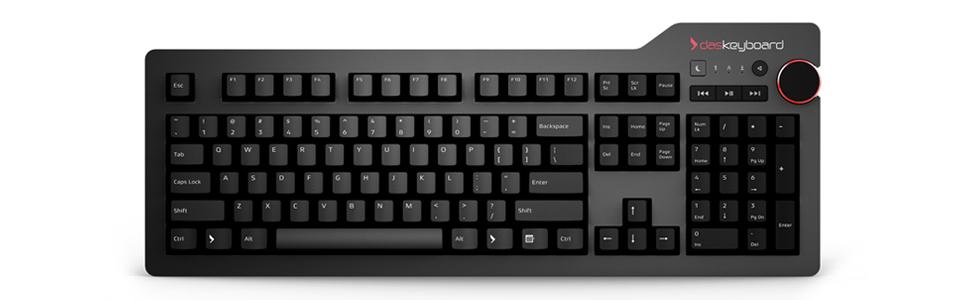
The Das Keyboard 4 Professional is a premium wired mechanical keyboard featuring 104 keys with Cherry MX Blue switches for tactile and audible feedback. It boasts a durable aluminum top, laser-etched keycaps rated for 50 million keystrokes, and a built-in 2-port USB 3.0 hub for fast data transfer and device charging. Designed for professionals seeking a high-performance, ergonomic typing experience with sleek aesthetics and advanced media controls.


| ASIN | B00JI2APZQ |
| Additional Features | Ergonomic |
| Antenna Location | Office |
| Best Sellers Rank | #749 in Computer Keyboards |
| Brand | Das Keyboard |
| Built-In Media | USB Cable |
| Color | Clicky Tactile - Cherry MX Blue Switches |
| Compatible Devices | Most computers with a USB port |
| Compatible Operating System Family | Linux, MacOS, Windows |
| Connectivity Technology | USB |
| Customer Reviews | 4.3 4.3 out of 5 stars (592) |
| Enclosure Material | Aluminum |
| External Testing Certification | Não aplicável |
| Global Trade Identification Number | 00855800001425 |
| Hand Orientation | Ambidextrous |
| Item Dimensions L x W x H | 18.11"L x 7.09"W x 0.83"H |
| Item Type Name | Professional Clicky MX Blue Mechanical Keyboard |
| Item Weight | 2.6 Pounds |
| Keyboard Backlighting Color Support | Single Color |
| Keyboard Description | QWERTY |
| Keyboard Layout | QWERTY |
| Manufacturer | Das Keyboard |
| Mechanical Keyboard Switch Model | Cherry MX Blue |
| Mfr Part Number | DASK4MKPROCLI |
| Model Name | 4 Professional Cherry MX Blue |
| Model Number | DASK4MKPROCLI |
| Number of Keys | 104 |
| Number of Sections | 4 |
| Power Source | Corded Electric |
| Style Name | Professional w/ USB 3 Hub |
| Switch Type | Clicky |
| Theme | Professional Productivity |
| Total USB 2.0 Ports | 2 |
| UPC | 855800001425 780746325017 |
| Unit Count | 1.0 Count |
| Warranty Description | 1 year limited manufacturer warranty |
J**E
Best Mechanical Keyboard I've Owned
The following review is regarding my experience with the Das Keyboard Professional (w/ Cherry MX Blue switches), which I’ve owned for several months now. I also own the Cherry MX Brown version of the same keyboard. SPECIFICATIONS Cord Length: 6.5’ Top Panel Thickness: ~ 1 mm Top Panel Material: Anodized aluminum (matte), though feels similar to powder-coated finish BUILD QUALITY The build quality of this keyboard is its strongest attribute. It’s extremely solid – there is no flexing of the keyboard at all. The keyboard is also perfectly stable on my desk as I type. After using it daily for several months now, the keyboard looks brand new. There hasn’t been any fading of the text on the key cap labels, and the black finish of the key caps hasn’t changed either. While the top panel of this keyboard is made of a solid piece of metal, the bottom is plastic (though a pretty solid feeling plastic). I suppose if the bottom of the keyboard was also made of metal that may be better, though it is possible that the plastic bottom is more effective in absorbing vibrations. DESIGN & FEATURES This keyboard is very well designed. The non-flashy approach looks great to me, particularly compared to so many of the mechanical keyboards that look maybe a bit over the top. The font of the key-cap labels is traditional looking, which I prefer to the extra-large stylized font found on many gaming keyboards. The media keys are, in my experience, useful and well-placed. The inclusion of a dedicated “sleep” button is also very useful to me, and many other mechanical keyboards I looked at didn’t have one. In the Windows power settings, I set the sleep key to put my display into standby rather than put my computer to sleep. The volume knob is also useful to me, and I think the way in which it is placed (where it hangs over the right edge of the backplate slightly) makes it easy to adjust. The knob appears to be made of plastic, with a rubberized finish along the side and a red (looks like anodized) ring accenting the top. While I’d prefer to have the volume knob be entirely black, the red accent doesn’t stand out too much and I imagine some people would actually like it. The das keyboard logo is, in my opinion, cool and it looks good on the top-right of the backplate. Just under the logo are the blue indicator lights for num lock, caps lock, and scroll lock. The indicator lights do the job and look great from a normal typing position, though they do put out quite a bit of light straight up – in a dark room my ceiling is illuminated in blue light just above the keyboard (I keep num lock on always). The magnetic stand / ruler of this keyboard actually seems to work pretty well. It provides a nice even support across the entire keyboard, and I never have an issue with the keyboard sliding on my glass desk. I admit that I haven’t yet had a need to take the stand off and use it as a ruler, but maybe to some it would be more useful. The USB 3.0 hub (two ports) along the top right of the keyboard is very useful to me. I have my wireless mouse adapter plugged into one of them. These USB ports are an actual hub as opposed to a pass-through, so the keyboard only requires one port on the computer. Regarding the keyboard’s cord – it does seem to be attached to the keyboard securely, though it is pretty darn thick. It attaches right in the back-center of the keyboard. It is nice having an extra long cord – though for my particular setup I still need to use a USB extension cable with it. I would definitely prefer to have a cord that isn’t operantly attached. Also this keyboard doesn’t have a backlight, which hasn’t been an issue for me as my monitor provides enough light to illuminate the keyboard, but for the price a plain white backlight would still be a nice option to have. Additional features include NKRO (which does work – supposedly it is disabled by pressing shift + mute), and Das Keyboard claims this keyboard’s firmware can be updated (though not sure what could really be changed). This keyboard requires no software or drivers, which I definitely prefer compared to keyboards from many of their competitors (like Corsair, Logitech, Razer – all of which want you to have their own software always running). CHERRY MX BLUE VERSION I purchased the cherry MX Blue version, and this is the version that I have been using most the time since I bought it several months ago. I personally like the “crisp” feel of the blue switches, though I will admit that I worry about them being too loud at times. This worry led me to also purchase the same version of this keyboard with the brown switches. CHERRY MX BROWN VERSION I purchased the cherry MX Brown version of this keyboard as well, and I tried it off and on over the last few months, as well as exclusively for a few weeks. Well I did like many aspects of the brown switches; overall I have concluded that I prefer the blues. The brown switches were quieter than the blue switches, but I never got over the way they felt more “mushy” compared to the blue switches. PRICE So, I like the keyboard - so far, it’s the best of any mechanical keyboard I’ve owned. The price is steep, and if it perhaps had backlit keys the price would seem more reasonable. That being said, a keyboard like this should last a very long time, and I would recommend it all things considered. I would give it a 4.5 star rating if I could, but I feel that a five star rating is more appropriate than a four star one.
P**S
Best Keyboard on the market today ... bar none.
Best keyboard I've ever used ... at least since the early keyboards of the 1980s. On the keyboard market today, there is a plethora of keyboards produced ... with profit margins driving their design. I just threw one of those away. Then there are keyboards in which the brand is keenly focused on quality construction, superior design, and UI. The Das product fits tightly into the latter category. The keyboard is weighty and solid. It doesn't slide around your desktop when you inadvertently smack it with a book or whatnot. The tactile feedback of the keys is superb ... eliminating uncertainty from off-tempo or incidental key strikes. The Media Control system is nothing short of brilliant. Volume control: it is such an obvious solution ... put a volume knob on the keyboard rather than those infernal (+) and (-) buttons. I've seen no volume solution on other products that is as elegant as on this keyboard. The knob is even side-exposed, for better ergonomics. The media control buttons on this keyboard are low profile, but provide similar feedback when pressed. Slick! I have yet to use the USB ports, but I will use them eagerly when opportunity presents. The keyboard incline bar on the back of the keyboard doubles as a ruler ... also great outside-the-box thinking, though in truth I'll likely never use it as a ruler. (Given my druthers, I'd probably incline the keyboard more ... and Das Keyboard might be well to offer a higher incline bar/ruler in the future.) Top marks.
D**E
Solid, clicky, responsive, and built like a tank.
I was a little bit worried when I made the decision to purchase a Cherry MX Blue keyboard because of the noise factor. However, after receiving this keyboard and typing on it for several hours, I must say that the Das Keyboard is no louder than my employee's who are using XArmor keyboards with Cherry MX Browns. Make no mistake, this keyboard has no frills, no blinking lights, no special software macros for gaming but that's ok. The keyboard has weight to it and typing on it just feels right. I like the added touch of the ruler as a stand - it may sound strange but oddly enough, I found it useful in less than a day. The two factors that made me choose the Das Keyboard over everything else was that this keyboard has two USB ports as well as great placement of a volume knob. It's more convenient to plug in to the keyboard than to reach under my desk to get to my computer's ports. The volume knob and media keys are also a nice touch. I have heard people say this keyboard slides on a smooth surface but my desk at home and at work is wood and this keyboard doesn't budge. Maybe on glass? I don't know. I do know the Das Keyboard 4 Pro has some significant weight to it. Nothing "cheap" about it. Overall, this keyboard feels like it will last several years which is why I bought it. It's a minor investment for a tool which I use on a daily basis and typing on it simply feels great. You never know what you are missing in a mechanical keyboard until you actually own and use one. So for those looking for a solid keyboard with zero gimmicks and a purist typing experience - I recommend the Das Keyboard Professional 4.
E**A
Tastiera che fa il suo dovere e con pochissimi fronzoli. La qualità costruttiva è ottima, tranne che per i tasti. Dopo poco più di due mesi di utilizzo si vedono già i segni delle dita e la stampa inizia a sbiadire. Ciò dà fastidio visto il prezzo pagato, per il resto la consiglio
J**.
I'll admit that I'm rather new to the mechanical keyboard world. So far, I've only tried about three mechanical keyboards, but I must say this is definitely "the one", right off the bat. Build quality is great, key caps feel good and have a nice texture. The Cherry MX Blue switches feel super responsive, although I don't think this keyboard would be suitable for an open office type setup given the amount of sound the key switches make. I only really mention this as the name "professional" might imply this product is suitable for office use, but I really don't see that being possible with any keyboard that sports Cherry MX Blue key switches unless you have your own office or work in an area secluded from others. If you're somewhat unsure about the sound these things make, I'd recommend passing by a Canada Computers or a Best Buy as there is a good chance that they have a floor model on display that you can try out. The volume knob is very responsive and ticks as the volume increases, which I personally prefer to that linear feel. The two USB 3.0 ports located on the side of the keyboard are well positioned and convenient -- they are no longer placed on the side like the old model, meaning that there is no possibility that the attachments will obstruct your mouse movements. One thing to note, unlike most of the other mechanical keyboards I've owned, the cable to plug the keyboard into the computer is not detachable. The wire itself is also very thick, probably due to the two USB 3.0 ports. I've included a picture in the review which showcases the wire's attachment to the keyboard (just ignore the key caps, I switched the defaults caps for my own.) This is not an issue at all for me though, as the wire seems sturdy and unlikely to break. To be honest, besides being able to route the wire to different sides of the keyboard, I never understood why the detachable cable is such a selling point. Overall, this is a fantastic keyboard, one looking for a quality build need look no further!
J**J
I was a bit scared that the keyboard will be too loud but fortunately it's not that bad (MX Blue), even my wife likes it. I'm using it with my rMBP 2012 and it works like a charm. I didn't have to install anything extra to get the media buttons and USB working. So if you are a programmer, you shouldn't get definitely one of these :)
T**G
I've typed around 150 wpm on this keyboard; its switches make all the difference. I believe there to be an ever stiffer and harder to press switch that exists but perhaps the easier Cherry MX Blues are all I need. They actuate and give great tactile feedback. I really like the one cord into USB 3.0 and it splits into two USB ports somehow, accessible for charging various peripherals, speakers and fans etc in the top right. That in itself makes it way better than anything I have ever owned, including Overwatch edition Razer BlackWidows, Corsair K70 RGB Mk 2 SE (although the volume roller on the Corsair is quite nice compared to the das keyboard but the cord is atrociously thick and annoying, double pronged), MadCatz STRIKE 7s, PS/2 various membrane keyboards etc etc etc. If you don't need RGB backlit keys, this keyboard is for you.
G**D
Great keyboard. It's has everything I need and nothing more. The mx blue keys are awesome, it feels weird to type on something else.
Trustpilot
2 months ago
5 days ago