We remain fully operational. Our teams are working around the clock to ensure your deliveries continue safely.

DOWNLOAD THE APP


Customer Services
Copyright © 2025 Desertcart Holdings Limited
DOWNLOAD THE APP


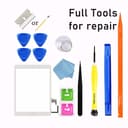
🔧 Repair, Revive, Rejoice! Your iPad Air deserves the best.
This iPad Air 1st Generation Screen Replacement Touch Glass Digitizer is specifically designed for models A1474, A1475, and A1476. It features a highly durable, scratch-resistant surface with 9H hardness and 99.9% transparency for an optimal viewing experience. The package includes a complete repair kit with a video guide for easy installation.
| ASIN | B07PKDQLW3 |
| Best Sellers Rank | #80,109 in Electronics ( See Top 100 in Electronics ) #319 in Tablet Replacement Parts |
| Brand Name | JPUNG |
| Clarity | 0.9999 |
| Color | White |
| Compatible Devices | for iPad Air 1st |
| Compatible Phone Models | iPad Air 1st Gen (A1474 A1475 A1476) |
| Customer Package Type | Standard Packaging |
| Customer Reviews | 4.3 4.3 out of 5 stars (1,227) |
| Finish Type | The watch is a real eye-catcher |
| Item Dimensions L x W | 11.81"L x 7.68"W |
| Item Hardness | 9H |
| Manufacturer | JPUNG |
| Material | Glass |
| Model Name | iPad Air 1st Generation Screen Protector |
| Model Number | for iPad Air 1 |
| Number of Items | 1 |
| Part Number | for iPad Air 1 |
| Screen Size | 9.7 Inches |
| Screen Surface Description | Glossy |
| Special Features | High Definition, Scratch Resistant |
| UPC | 745302427741 |
| Unit Count | 1.0 Count |
A**R
Win!
Excellent value for the money, easy to install and fit perfectly. Works just like the original.
Y**N
Happy with the replacement.
I replaced my iPad hours ago. The screen replacement works well with my old IPad Air gen 1 and no issues have been found.
T**1
Not as easy to install as I thought
Overall, the product is working very well. For the price, I decided to repair an old iPad, but it was not as easy as the video showed. There are no instructions included with the package so you will need to review the video a few times to understand the process. Make sure to wear eye protection, while removing the glass as the tiny shards will go everywhere. My screen fell apart as you can see in the picture. The included tools were helpful, but I also had to use one of my small flat head screwdriver’s to remove the old adhesive. Also be prepared to work with tiny screws. You will need to remove several of them and then replace them. You will also need to connect the ribbon cables within the iPad. It is a little tricky, but I figured it out. I took my time with this little project and it took me just a little over two hours. Everything seems to be working so I am happy. Good luck to all the DIY folks.
M**A
What you would expect
The screen is exactly what you would expect. The tools that come with the kit are wonderful and exactly what you need. The instructions are great for the first half of the process and then for the second half they get very rough and sporadic. It was hard to figure out the wires and how to install the new screen from the instructions, so I had to watch a YouTube video just to make sure that I was installing everything exactly where it was supposed to be (the wires broke when removing the old screen, so I couldn’t just plug and chug using the old wires to go off of). Unfortunately the new screen had a crack that wasn’t visible until I had it on the black of the iPad and didn’t see it until I was already in the process of replacing the new screen after removing the old screen. At that point I had no choice but to continue with replacing the screen since the old one was even more damaged in the removal process. I contacted the seller, who requested a video and order number in order to replace the screen. We are currently in the process of waiting to see if a replacement screen is sent. The seller has been gracious and easy to work with so far, so fingers crossed a new screen comes and is easy to replace the second time. *update: the seller did mail out a new replacement screen. Haven’t replaced it just yet, but all appears to be good!
K**P
Adhesive didn’t stay but they’re sending me a new one
The adhesive didn’t hold, I tried reheating it like the directions said, but it kept coming off, the screen then fell out and got a crack in it, it still works but I have to hold the screen in place with my hand or lay it flat. I contacted the seller and they will be sending me a new one to replace this one, so hopefully it stays on better this time! The seller responded quickly. Update, they sent me a new one free of charge to replace the broken one, this one is staying in place much better and feels more secure. I do wish this had a video or a link on how to do this with their product as the YouTube videos are of other screen replacements that are slightly different with regard to color and placement of adhesives, tools, etc. but even without it, it was easy to replace, just took longer.
S**Y
Easy to install but the button only lasted a week. 😞
I found a very thorough video. Followed it and everything ended up perfect. Use a heat gun or hair dryer to soften the adhesive. A few weeks later… Unfortunately after a week of regular use the button stopped working and is apparently broken. The screen has started to glitch and a small corner of it has no touch capability. I have used various screens on different Apple devices that I have had to replace and I’ve never had the disappointment that I have with this one. Maybe I got a lemon and it be great if they replaced it for me but I’m not sure. It was easy to install just like other screens that I’ve done but it just doesn’t quite work like it should.
X**A
Cheap tools but the digitizer works.
You will need to prepare yourself for a better tool such as suction cup and pry tools. I ended up just using the razor blade instead. Digitizer does work good and very clear screen. I love that the whole kit is complete with the adhesive tape, picks and cheap tools you'll probably get pissed about using. Still a 5 star because the screen did work and amazon shipped it over night.
S**R
Yes it’s working well , easy to install .. So far so good.
P**R
A redonné vie a mon iPad
B**R
The only thing I didn’t like that I didn’t find a tutorial specific to this product so I don’t even know what some of the tools were meant for. Make sure you own a blow dryer or heat gun. Broken glass makes a mess everywhere and tiny pieces will cut you! The double sided tape seems good quality and I’m glad this came with a home button. One less step to do that way. I spent about 3 hours on it, mostly making sure I got all the glass and adhesive off. Make sure you have extra isopropyl alcohol on hand, also a goop remover would have been handy to have. A micro fiber cloth and windex was the only way I could get the lcd screen spotless and streakless. Sadly!! I cracked the screen at the very last second when I was pressing it down but trying to shove that little tag thing by where all the parts connect. I pushed a little too hard. Don’t do what I did!
C**C
EDIT : j'ai contacté le service client, et ai été remboursé d'une partie de la somme dépensée pour acheter l'écran. Ils ont proposé un remplacement gratuit si besoin à la place. --- L'écran tactile semble bien fonctionnel. En revanche, le bouton home ne fonctionne pas. J'ai été obligé de récupérer celui de l'ancien écran, et en démontant le nouveau, j'ai vus que le circuit imprimé du bouton n'avait aucun composant de soudé dessus (comparé à l'ancien qui lui, a bien des petites résistances de soudées dessus)... Bref, pas entièrement fonctionnel, et je regrette d'avoir payé plus pour avoir un bouton non fonctionnel
D**O
Se me rompió el antiguo cristal de mi iPad y con este nuevo lo he recuperado de vuelta. Al tacto se siente algo diferente que el original, quizá el material no es el más premium, pero cumple su función. El botón de Home también se siente algo diferente y el sonido al hacer clic es un poco más seco que el original. Es cuestión de acostumbrarse.
Trustpilot
2 months ago
1 week ago