Buy anything from 5,000+ international stores. One checkout price. No surprise fees. Join 2M+ shoppers on Desertcart.
Desertcart purchases this item on your behalf and handles shipping, customs, and support to Brazil.
โก Unlock your maker potential with precision and power!
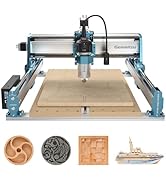
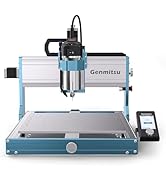
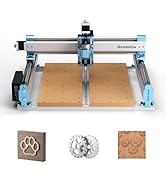
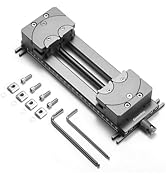
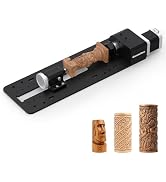
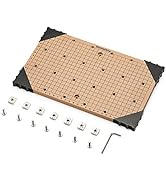
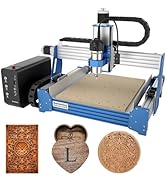
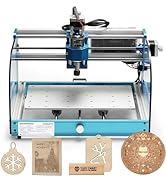
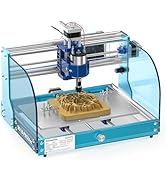
The Genmitsu CNC 3018-PRO is a robust 3-axis desktop router kit featuring a 300x180x45mm working area, UL-approved 24V power supply, and a high-speed spindle supporting up to 20,000 RPM. Designed for hobbyists and professionals alike, it offers easy assembly with upgraded components, versatile material compatibility including plastics, soft aluminum, and wood, and runs on the reliable open-source GRBL firmware. With optional expansion kits and comprehensive software support, itโs the perfect gateway into CNC milling and engraving.


| ASIN | B07P6K9BL3 |
| Amperage | 1.3 Amps |
| Base Type | Fixed |
| Best Sellers Rank | #82,868 in Tools & Home Improvement ( See Top 100 in Tools & Home Improvement ) #2 in Power Milling Machines |
| Brand | Genmitsu |
| Brand Name | Genmitsu |
| Customer Reviews | 4.0 out of 5 stars 1,912 Reviews |
| Global Trade Identification Number | 00816550021620 |
| Horsepower | 120 |
| Included Components | Wood Carving Milling Engraving Machine |
| Item Dimensions W x H | 7.09"W x 11.81"H |
| Item Type Name | CNC 3018-PRO Router Kit GRBL Control 3 Axis Plastic Acrylic PCB PVC Wood Carving Milling Engraving Machine, XYZ Working Area 300x180x45mm |
| Item Weight | 15.3 Pounds |
| Manufacturer | SainSmart |
| Manufacturer Part Number | B07P6K9BL3 |
| Maximum Rotational Speed | 1000 RPM |
| Model Number | 3018-PRO |
| Power Source | Corded Electric |
| Product Dimensions | 7.09"W x 11.81"H |
| UPC | 816550021620 |
| Unit Count | 1.0 Count |
| Voltage | 24 Volts |
C**D
Trust yourself and get this
I was just like you, reading reviews and contemplating if I should meander in to the world of CNC machines, a world that I know nothing about. If you're searching for these machines, you're already interested - so the only thing I can tell you is - get it. I have basic knowledge when it comes to electronics/hardware/software, if you're completely new to these things, the setup and usage may be slightly intimidating, but it IS easy enough that anyone can do it by following basic instructions. Like most mention - instruction manuals aren't the easiest to understand (for anything) but there are a ton of user videos all across the interwebs showing you how to set up/run the 3018. (seriously, if you need to learn anything, ever, about anything, ever, just YouTube or TikTok that ish) Out of box - I was a bit anxious. Any time you're opening a package that has hundreds of tiny parts it can seem like an uphill battle. If you dedicate a half hour or so of watching a set up video (all the way through), then setting it up while watching it again, it makes this set up a breeze. I had mine completed in about an hour, and after a minor issue was up and running. The V Bits that come with the machine are what I use most for cutting out designs. I also purchased some straight bits to use which, to me, are necessary if you're cutting out large pockets of material. As far as while this machine is running, people have mentioned noise quite often in reviews. I did not find the noise to be overwhelming. I have the 3018 set up in a room inside my house, and with the door shut, it doesn't disturb us at all. I use a Mac currently. I hate it, I was born and raised on a PC. So far I have found that Easel (it's a free application from inventables) is the easiest and most user friendly application to send G-Code, or your designs, to the machine. It's also incredibly user friendly for creating new designs for your 3018 if you're less than a novice and don't use any number of graphic suites (inkscape, illustrator, photoshop) along with Fusion 360 to create toolpaths for your designs. Windows users have a ton of more options to utilize your machine while connected to a computer, or you can upload your codes to the controller that comes with the machine to create your projects. I have used the 3018 quite often in the month I have had it. As always, there is trial and error involved. There is a learning curve when it comes to types materials to cut/carve at what speeds, and what types of bits to use. As you try a few projects here and there, you'll get much more comfortable about what to cut, and how to cut it. You can research and read about spindle speeds/materials/bits as much as you want, but you'll inevitably learn more from trial and error after having that basic knowledge from your prior research. So far I have mainly used MDF for my projects, though when attempting to use it on acrylic and copper, I can see the vast potential this machine has. CUSTOMER SERVICE for this product awesome. I had an minor issue during set up, and I was sent a replacement part incredibly quick. I was up and running the same week I received the machine. I have seen reviews complaining, but my experience reflects all of the glowing reviews about the help I received. This isn't a plug and play machine. You have to set it up. You have to learn it. At the price point, and with the capabilities this machine has - it is the PERFECT starter machine to get into the world of CNCs. All I can say is that you won't regret this if you try it. I'll upgrade the bed of the machine for larger projects, and eventually invest in the laser module to play with that as well. I would definitely recommend this machine and I would buy it again.
S**N
Insane value for the money.
The 3018 router is neither a production machine nor a toy. It is a solid hobbyist tool that is capable of producing excellent results. Assembly is straight forward with an excellent pictorial guide. Expect to put it together in an hour to a few hours depending on your experience. The unit is well designed and constructed. Tolerances are tight and there is no flex in the frame. The travel along the x and y axes measured precisely to spec out of the box. The kit comes with everything you need to get started including some bits and a disk with software. A word on software: Some reviews criticize the machine based on "software". The fact is that the firmware (the code that lives inside the controller board) is a recent version of GRBL, an open source program that is behind the vast majority of desktop routers. Every CAM program you are likely to use supports GRBL, so you will have access to a plethora of design tools to create your projects. Keep in mind that CNC is a 3 step process: 1) design the piece in CAD and export to DXF 2D format; 2) use CAM software to prepare G code by providing information on the bit, depth and order of cuts, and travel and rotation speed of the bit; 3) send the G code to the router with G code sender software. Don't be confused by the fact that some applications can combine 2 or even 3 of these steps. Like with 3D printing, it is very gratifying to start with an idea and develop it into a physical object. If you have the maker mentality this machine will provide great enjoyment and utility. UPDATE: My controller board stopped working--a very common occurrence for desktop routers due to the heat the motor drivers generate. I sent an email to Sainsmart describing the problem and within a few days they had a new board in the mail to me. After I received the board, their representative even followed up with me to make sure everything was working. This is the kind of customer service you love to have, and so rarely get. Even if you pay a few dollars more to buy from Sainsmart, it's well worth it. They will stand by their products.
J**N
Great for what it is!
I have spent over 10 years in the CNC router world (building, servicing, installing, training, and running) so this little Sainsmart router kit was not my first rodeo. Here are my impressions: Packaging: Very nice, everything custom fit in foam and a nice box. For the price I was expecting everything thrown in a bag, so this was a good touch. Build quality: I was honestly pleasantly surprised by the quality of the components in this kit. The aluminum extrusions were cut cleanly and tapped properly, though be prepared to do a bit of cleaning; my extrusions were covered in cutting oil and metal shavings and I had to blow them out after wiping them down. I expected the plastic components to be cheap 3d printed parts but they are actually some sort of fairly tough cast resin. The uprights and the sides of the machine are made out of phenolic resin sheets (the instructions call it bakelite) and were cut well. The only thing that seemed to be poor quality were the fasteners and the included hex keys (more on that later). Assembly: Overall, the instruction booklet makes the assembly pretty clear and with a kit this simple there just isn't a whole lot that can go wrong. However, there are a few issues. The first is the aforementioned hex keys: throw them out and grab some decent ones, at least for the small screws. Mine were slightly undersized and I could not tighten down the set screws for the motor couplings at all. Luckily, I have piles of hex keys all over the house so I found a set that worked a little better. The next part is more important, so I'm giving it a couple carriage returns so it stands out: BUILD IT ON SOMETHING FLAT! There is enough play in the machine that you could easily get everything bound up or just have poor accuracy due to the machine being out of square. I used a granite surface block, but not everyone has one of those lying around so at least make sure you're using a flat table. Make sure everything is as flat and square as you can make it. Also, leave the screws for the guide rods slightly loose as you move the machine around, then tighten them incrementally so they don't bind. I did run into a couple assembly issues with my spindle, the first being that it really wasn't a good fit in the actual block. The spindle was too big for the hole and some prying ensued before it would fit. Once I had it mounted, I noticed that the motor didn't have a marking for which side should have the red wire. With a DC motor like this, it isn't a huge issue; if it's spinning the correct way, it's wired right. If it's spinning the other way, you have it backwards. "Correct" in this case means the bit spins clockwise when looking down from the top. Easy way to visualize this is to make a "thumbs up" with your left hand. See the way your fingers are curved? That's the way the bit should spin. Electronics & Software: Everything was plug and play on the electronics part. I liked that cable ties were included so I could keep the wires tidy. I would have appreciated having different size motor cables for each stepper but at least none of them were too short. The circuit board seems well built and was pre-flashed with the correct firmware. All you have to do is install the driver and then open up the software (the Candle GRBL controller software) and set it to the same serial port you see in your device manager. Once that's set up, it's easy to control and send files to. The visualization is a nice touch. All in all, I'd recommend this for anybody looking to get started in CNC routing and doesn't mind the small build volume and anemic spindle. You have to go low and slow with it but it will cut and the machine has good bones if you wanted to start upgrading it down the line. Well worth the ~$200.
K**S
My first year learning and using CNC Router Machine
Iโve never used a CNC Machine before purchasing the Genmitsu 3020-PRO MAX, and to be honest I didnโt know if I could figure it out. I have to say that I sure had a lot to learn. Granted I did watch a whole lot of YouTube and seen the different types of machines. The one thing that hooked me was the wood cravings that could be created that as a wood craftsman I could never accomplish with the limited experience I have. I chose this machine over others was first the price, ease of assembly (it comes mostly assembled already) and simplicity of the operation. I purchased my unit in July of 2022 but since I was not ready to start I didnโt open the box till June. Getting the 3020 was pretty easy. Learning the difference softwares and programs was the default part. The box it came in had all the parts and manuals to put it together but was missing a USB stick with the software! At first I was a bit taken back by this and sent an email to the customer service department. This is when I first realized I had made the right choice. A service member (Hong or Mr. Hong) was right on spot with sending me a link to download software. I used a Laptop with Windows 10 and was able to setup the comport and install Candle. A software that uses files called gcode (*.nc file) to tell the machine what to do. Also one of the files was a test file that craved a small 2.5D image. I know this now but didnโt know then that a machine with three axles will only crave 2.5D as the other 0.5 is the flat surface on the bottom. From this one file I was able to figure out the files needed to take a object (2.5D) and turn it into a work of art. To my surprise it actually takes three steps to complete first. 1st was finding the object files. Too my delight in found 1000โs of free files in a *.stl format online. As Iโm not going to use these files or creations to sell I downloaded and modified using a software already available in Windows called 3D Build. I then downloaded a trial version of MeshCam. As my CNC machine is located in a spare room, I used another Laptop to modify the files, open these files with MeshCam to create the tool paths and convert the files from an STL file into a NC file that the Genmitsu 3020-PRO MAX uses. I only was able to convert 15 files using MeshCam before the trial version ran out. I have tried other softwares but after using MeshCam I will pay for the license ($250.00 one time payment) as other programs where not as easy to learn and the results as positive. I would have purchased the software already but ran into issues with the stepper motors. I started getting what I first thought was banding with the X and Y axis that increased very quickly, projects halfway completed were being ruined. I emailed Hong and told him my troubles and he sent 2 new stepper motors to me free of charge. I installed the new motors and itโs back to creating beautiful works of art. While the machine was down I was able to give the machine a good cleaning. My only drawback with the machine is that the manufacturer does not at this time offer a explanation kit for this model. Iโm hoping one will come out in the near future. Overall I give this one an 4 1/2 Stars. Itโs built strong, service is excellent and itโs a very good investment for anyone looking to get into using a CNC Machine.
D**R
I struggled with the rating (see details). Conditionally recommended
The Genmitsu CNC 3018-PRO is one of the more polarizing products I've purchased in recent memory. In case you suffer from TLDR; syndrome, I will tell you this: the 3018-PRO is an incredible value... especially if you get it on sale. It's also a bit of DIY PITA. So, now you know the summary... time for the details. The Genmitsu CNC 3018-PRO arrives in a very compact box. That's made possible since the unit is COMPLETELY disassembled. This shouldn't be a huge surprise, considering the price point, but I'm telling you just in case. An important thing to know is that the mill's pieces appear to have come straight off of whatever machines were used to fabricate them. The aluminum extrusions are covered in metal shavings. All of the parts, including the bakelite pieces, have some machine oil on them. For best results, blow everything off with air (or brush it), and wipe down everything. If you are the DIY type (and I am), then a fully disassembled machine isn't really an issue... unless the assembly instructions aren't any good. On the plus side, the manual is pretty extensive (24 pages) considering the other types of vendors and devices in this market space. The english is clear, the diagrams are well drawn and easy to see, and the instructions of what to do with the software are clear. So what's wrong? Well, the diagrams don't explain what you're doing on any particular step. That's not necessarily a big deal, but I did miss using a spring as a brass fitting. It only took a few minutes to get it right, but it was still inconvenient. From unboxing to flipping the machine on took me about 40 minutes. TIP #1: It's not super obvious how some of the locking nuts are supposed to work, but they drop into the guide channel and spin onto locking position when almost fully screwed in. TIP #2: There are no instructions on how your working material is supposed to be secured to the table in the documentation provided. I did figure it out what to do with the hardware provided, but you should just look at the product page photos, and you'll see how the bolt + plate + screw arrangement works. Once everything was assembled and ready to go, I went to SainSmart's page to download the driver, firmware, and secondary software. No dice... I couldn't find it, so I had to copy it from the included mini-CD (but seriously... what about all of the people that don't have an optical drive?) on to a flash drive. Everything installed in a few minutes, and the mill was controlled properly from the GRBL software. The mill works, but it good to have realistic expectations. How well it works is heavily influenced by the spindle speed, the motor positioning rate, plunge depth, and the cutting tool quality. I used the mill with acrylic and wood, which are pretty much the softest materials you can use. Even with those I had to use really low step values to make sure that the side loads didn't cause too much bit deflection. I'd imagine better bits would help here. I think you'd want a more substantial machine if you want to mill some of the softer metals (aluminum, copper, and the like). As an introduction to CNCs, the 3018-PRO is a nice starting point. The polarizing thing for me is the price... I'd been looking at this item for a while, but never pulled the trigger at its normal price. A week or two ago the price dropped in a lightning deal by $50. If you can get that deal, I think it's a no-brainer. Value is a very subjective thing, though, so you may like it at the current price, too (YMMV). Conditionally recommended.
A**T
Don't do it
This will be a lengthy review .. 1. Assembly was easy. There is a very nice instructional booklet and plenty of videos on YouTube on how to do it. Took me about 40min to 1 hr. 2. The item came well packaged and gives a bit of a WOW moment when you open it. I mean you pay under $200 and everything is nicely placed inside and no parts missing :) 3. The frame is sturdy, everything pretty much self levels and squares as you put it together. Assemble slightly loose and tighten up all bolts fully at the end. Honestly, by the time I was done with assembly and played with the software, I was surprised that there were any negative reviews lol 4. The USB stick was a nice touch but you still need a service/program to convert data to gcode. There is a learning curve with getting this to work but YouTube is your best friend again. I am very tech-savvy and had no issues at all. Others might have a different experience but give yourself time and you will get it; it's easy, I promise :) 5. The problem/s- The connection created by the Coupling&Set screws!!! This is a nightmare! The issue is that they can't hold tight enough to handle the tension created by the spindle w/bits against the surface your are milling/carving. They simply come loose and the job goes to trash. 6. Also, once assembled, there is no good access to keep tightening both ends (motor and rod) on all 3 axes. For X and Y, you need to detach the motors and reattach again. For the Z axes, you need to work on the one end at an angle. When one of those coupling screws gives in, the machine can't follow the code and move in the failed direction so your project is ruined. One would say hit the Stop button, adjust/fix/tighten and continue.. hm, it doesn't work like that. By the time you hit Stop, you either get a scratch or a hole dug into the material by the bit, depending on which axes fails. 7. I only used mdf and plywood, both 1/4 inch thick. Out of maybe 20 jobs, I had only 3 successfully completed. Can't imagine if I had to do work on a walnut piece. 8. Each successful attempt came after I fully unscrewed, disassembled, reassembled and freshly tightened the coupling screws. And this to me, is totally unacceptable. At least give me 3 good cuts before I need to go through the nonsense lol 9. The machine is noisy when in operation but I didn't expect it to be quiet, its a power tool after all. it's pretty much on par with my Vacmaster. So, is this machine usable? - yes, if you are willing to tighten all coupling&ser screws and bolts between each use. This deserves 1 star only because if you are determined to make it work, you POSSIBLY can. When I was watching tips/tricks/troubleshooting on YouTube, I came across a guy who suggested that one should put a drop of superglue when tightening the screws. Perhaps that would work to a degree, it might've actually given me the 3 good cuts i want lol But let's face it, how long would the superglue metal to metal bond hold when the machine is in constant vibration during operation?!? Yep, 3 good cuts then back to point 8 above :) Save your money, time, frustration and materials, and buy something better. I can't afford the $2k price tag so decided to give Foxalien Masuter a shot next. I'm truly hoping my experience is better with it because I have so many ideas and want to open a hobby shop on etsy. I am forever grateful for Amazon and their return policy. I've disassembled the cnc and sending it back.
C**L
Great for small parts, very accurate, very well built, and reasonably priced
I have been looking for a desktop CNC router to make small parts for rc model aircraft and quadcopters. The materials which I use most often are 1/16" to 1/4" thick balsa, basswood, light-ply, aircraft grade plywood, spruce, cherry, maple, and occasionally, 3mm carbon fiber plate. I was skeptical that this machine could handle these materials, but after doing some reading on the internet, I decided to give it a try. What I like about it is this: (1) is is very well built, just use blue thread locker on the screws and grub screws holding the parts together because all machines like this are subject to vibration, not matter how well built or expensive they are. (2) Use the depth gauge on a vernier caliper to square the aluminum xy-table to the frame since this thing will, like all machines, be only as good as you put it together. Do this by measuring the distance between the xy-table and the frame on the diagonals from opposite corners of the xy-table. (3) The motor is relatively quite. Quieter than my Dremel 4000. (4) It includes an ER11 collet, and an off-line controller which is easy to use. (5) It has a variety of upgradable parts and spare parts are available. (6) It works particularly well with Easel and FreeCAD, and of course Candle. What I don't care for are the bakelite components, but they are more than strong enough for the machine and the makers had to economize somewhere. Some people complain that there is some flex in the rods supporting the motor carriage. I have not found this to be a noticable problem. In the bags of parts you will find an blue extra shaft coupling adapter. I finally realized that this is used to hold 1/8" bits to the motor's spindle if you don't use the ER11 collet. The ER11 collet is much easier to use.
J**7
Great little CNC, fantastic value for the price
I was looking at small routers with tables about 1000 mm x 1000 mm and couldn't justify the price. I had this one in my wishlist so I could look into it further, but my wife saw it and bought it for me. (Yes she is a GREAT wife.) This is a terrific small CNC router table. I have had the table for about 2 months and have made a lot of wood projects. It does a really good job of routing with a great level of detail. I have been impressed with the level of detail that can be done. I made lots of small decorations for Christmas, as well as other projects. For those that are beginners and don't know, there is a web site where you can create your programs for free. The program is Easel; web site is inventables com and is really easy to learn/use. You have to have an account, but it is free also. It allows you to export the G-code and that code can be directly imported to Candle to run on the table. (Also it has recommended speeds and feeds, that is a big deal if you are a beginner.) I have ordered lots of end mills to use, I bought some packs that had various sizes, but have used the 20ยฐ V-bits, 1/8" end mill and 1 mm end mills the most. Most of what I have bought are 10 bits for less than $15. There is no need to buy the expensive ones unless you are really good (and then you would probably be getting a more expensive table!) Also I didn't like the way the backlash nut chattered when the axis' were moving, so I use pneumatic tool oil on the threads and the table moves VERY smoothly now. No backlash, no chatter! (Just move all the way to one side. drip a couple drops of oil on the threads and then move all the way to the other side.) You can get the oil on amazon or any big box home improvement store. Get a small bottle, 4 oz will last a LONG time. I have access to a 4 foot by 8 foot table for big projects, and the principles of this table vs. the large one are almost exactly the same. Cons: Does not have any safety switches so it is possible to drive the motors too far and run into the sides. When working with thin wood (1/4" or 5mm) the spindle won't go as low as I would like. Does not have a way to set the depth. I use the paper method but just purchased an add-on to fix this. It wasn't hard to assemble the table, however there are numerous revisions so the videos online are not quite like my model. Take your time, go slow, don't tighten down any of the bolts until you have to, because you will probably have to take it apart a couple times to fix mistakes. (especially with the directions of the bearings holding the table.) I spent a lot of time looking ahead at next few steps to make sure everything was oriented correctly. ************************************** Overall impression: Very happy to have it. Very capable in the 6"x 8" size range. Would definitely buy it again. No regrets.
D**S
CNC 3020 pro Max Great
This mini Cnc 3020 pro max arrived well packaged. This machine is well thought out because it is extremely easy to assemble because all the different parts are pre-assembled, the holes drilled and tapped. It is a comfort for any person (beginner, intermediate or confirmed). I followed the installation manual in English without difficulty. Everything is referenced and imaged. It took me nearly 45 minutes (unpacking + assembly) to get the final machine. This Cnc 3020 pro max has all the possible options. Nothing is to be purchased additionally. It has: a rigid aluminum plate of 30x20 cm, limit sensors, reinforced axis guides, a depth sensor, an external screen. There's even the micro SD card adapter included with the screen. The parts of the frame are massive and neat, it is a guarantee of quality. Safety is also an asset with its emergency stop and its box which hides the electronic part. All these options make this machine a reliable and efficient means of production. To improve the life of the top, it is advisable to install a martyr plate of the MDF wood type. Ideally, it allows rapid prototyping at home, in school to learn about engraving or machining easily. I carried out some tests using the Grbl software and the files present on the USB key supplied with the machine. Just connect the machine to the "Com port" with the USB cable. Grbl software icons are very intuitive. All you have to do is make the machine origin in x, y and z, then open the file and start machining. Whether engraving or machining, with tests on plastic or wood, the CNC is up to my expectations. I highly recommend her.
A**R
Great service!
Shipment was quick and building the machine was easy. After a few runs the spindle motor stopped working. After contacting Tech Maker they shipped a new motor from China to the Netherlands in a few dates. Great product and great service!
G**S
Supera las expectativas
Excelente precio Muy buenos resultados
N**S
A perfect machine to start with
Really nice machine to start with.
B**N
This is a great desktop CNC machine
This is a first class CNC milling machine. I am a professional library maker. I've taken on a commission to make a model of 11c abbey. I am used to CAD design and solid modelling. when it came to this model I made the decision to machine these small parts on CNC. I looked at a lots of machines but was taken by this one and kept coming back to it due to the solid construction and the good reviews. I ordered it in the late afternoon and it arrived the next day. With a forwarded code that I needed to give the driver. This I found reassuring on a high valued item. I watched some You Tube clip on construction. however the Genmitsu handbook is excellent well illustrated in colour with detailed cad models and pictures. I had it constructed and working by the evening, great fun. I then needed to get down to the serious work of learning how these machines work. If your new to this then you need to be patient during the learning. There are lots of good You Tube vids on this. I don't usually write reviews on Amazon I just do not have the time. I had a small issue and contacted the seller. As we all no doubt feel some trepidation that your not going to get anywhere. I could not be more wrong. I was emailed right back the next day by Jamie. He resolved the issue and followed up to make sure that everything was working. He gave me complete reassurance. That to me means a great deal in today world. I am cutting 36 windows in ebony with .8mm cutters for the glazing bars and trifoil window frames in cedar of Lebanon representing sandstone. I am delighted, Getting my head around gcode is not easy but once to you have a grasp then you can build from there. My work is a little specialised and complex. but for lettering and stock carving there are many programmes and images you can learn by. I will post some pictures of this work when I have it completed. Most of all I wanted to thank Jamie for his first class service and following through to make sure all was running well. I have not received anything for this review. This is a genuine reflection of my experience with this CNC machine and the seller. Bernard Allen
Trustpilot
1 month ago
3 weeks ago